
Увод
Хвала вам на куповиниasing the WIITHINK WCD-9949 Portable CD Player Boombox. This device offers versatile audio playback options including CD, FM radio, Bluetooth, USB, and AUX input. Designed for ease of use and portability, it provides a rich audio experience for various settings. Please read this manual carefully to ensure proper operation and maintenance of your new boombox.
Безбедносне информације
- Не излажите јединицу киши или влази да бисте спречили опасност од пожара или удара.
- Не блокирајте вентилационе отворе. Обезбедите довољно простора око уређаја за правилан проток ваздуха.
- Користите само додатке/прибор које је навео произвођач.
- Искључите јединицу из струје током олуја са грмљавином или када се не користи дуже време.
- Do not open the unit casinг. Сва сервисирања препустите квалификованом сервисном особљу.
- Dispose of batteries properly. Do not expose batteries to excessive heat.
Садржај пакета
Проверите да ли су све ставке присутне у пакету:
- 1 x WIITHINK WTB791 Portable CD Radio Boombox (Batteries Not Included)
- 1 x Remote Control (Batteries Not Included)
- 1 к кабл за напајање
- 1 к АУКС линија
- 1 к Упутство за употребу
- 1 к кутија за паковање
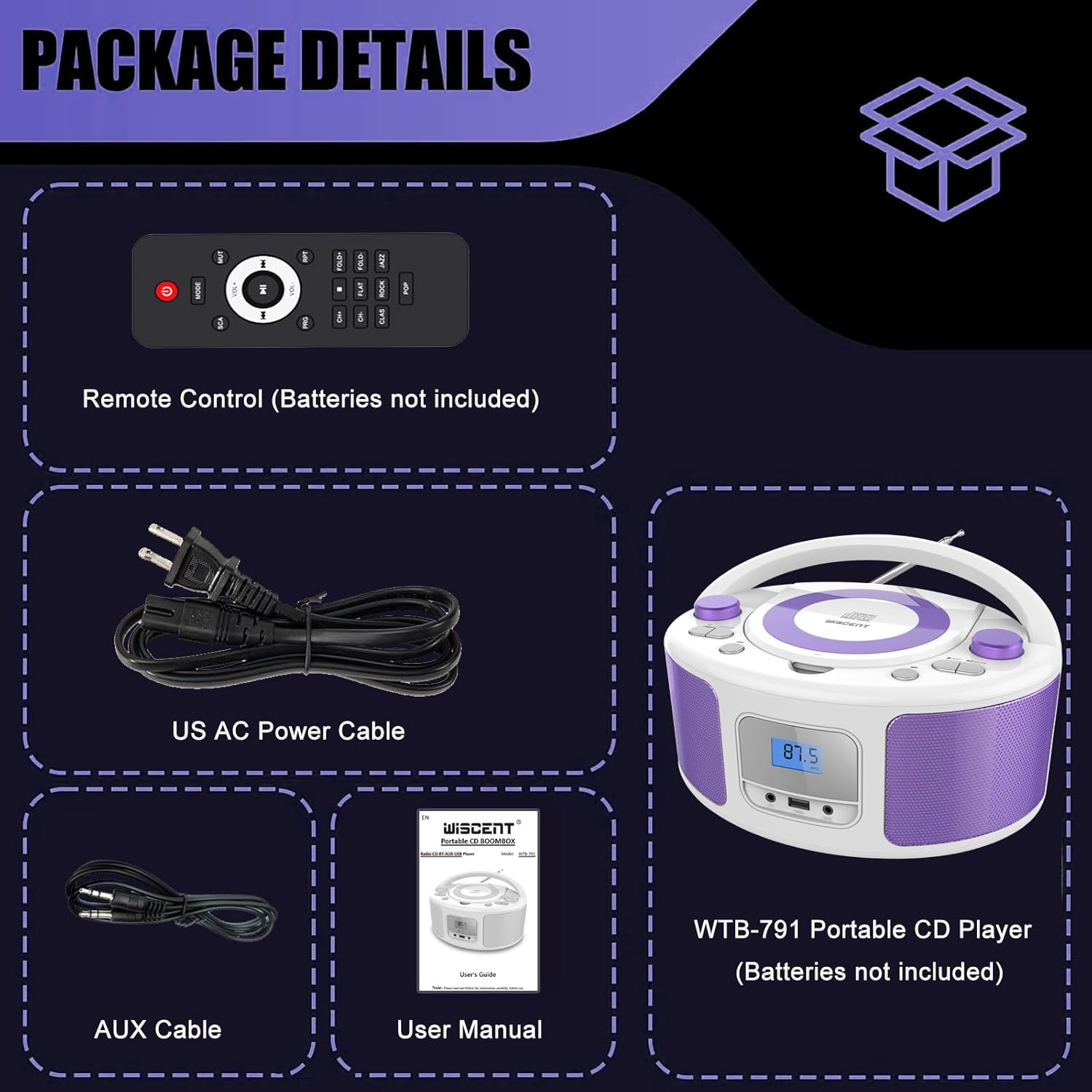
Image: Contents of the WIITHINK WCD-9949 Boombox package, showing the boombox, remote control, power cable, AUX cable, and user manual.
Производ је завршенview
Familiarize yourself with the main components of your boombox.

Слика: Фронт view of the WIITHINK WCD-9949 Boombox, highlighting key features such as CD player, Bluetooth, USB port, AUX input, headphone jack, LCD display, FM radio, and power options.
- Top-Loading CD Player: For playing CDs, CD-R/RW, MP3 CDs, and audiobook CDs.
- ФМ радио тјунер: За слушање ФМ радио станица.
- Блуетоотх: За бежични аудио стриминг са компатибилних уређаја.
- УСБ улаз: For playing MP3/WMA music files from USB flash drives (FAT32 format, up to 128GB).
- AUX улаз (3.5 мм): За повезивање спољних аудио уређаја.
- Утичница за слушалице (3.5 мм): За приватно слушање.
- ЛЦД екран: Shows current mode, track number, and radio frequency.
- Контролна дугмад: Power, Mode, Play/Pause, Skip/Search, Repeat, Scan, EQ/Function.
- Дугмад за јачину звука: Подесите ниво аудио излаза.
- Дугме за подешавање: Adjusts FM radio frequency.
- Телескопска антена: За побољшани пријем ФМ радија.
- Дршка за ношење: За лаку преносивост.
Сетуп
Напајање бумбокса
Your boombox can be powered by AC power or batteries.
AC Power (Wall Outlet)
- Ensure the boombox is turned off.
- Insert one end of the provided AC power cable into the AC IN jack on the back of the boombox.
- Укључите други крај кабла за напајање наизменичном струјом у стандардну зидну утичницу.
Слика: Позади view of the boombox, indicating the AC IN jack for power connection and the battery compartment.
Battery Power (Portable Use)
- Ensure the boombox is turned off and disconnected from AC power.
- Пронађите одељак за батерију на дну уређаја.
- Отворите поклопац одељка за батерије.
- Insert 4 x UM2-C 1.5V batteries (not included), ensuring correct polarity (+/-).
- Добро затворите поклопац одељка за батерије.
Напомена: Извадите батерије ако уређај неће бити коришћен дуже време како бисте спречили цурење и оштећење.
Упутство за употребу
Општа операција
- Укључивање/искључивање: Притисните тастер ПОВЕР дугме за укључивање или искључивање јединице.
- Изаберите режим: Притисните тастер МОДЕ button repeatedly to cycle through available modes: CD, FM, Bluetooth (BT), USB, AUX. The selected mode will be displayed on the LCD screen.
- Подесите јачину звука: Ротирајте ВОЛУМЕ Окрените дугме у смеру казаљке на сату да бисте повећали јачину звука и у смеру супротном од казаљке на сату да бисте смањили јачину звука.
- ЕК режими: Притисните тастер ЕКВИЛАЈЗАЦИЈА/ЗАБАВА button to select different equalizer presets: ROCK / POP / FLAT / CLASS / JAZZ.

Слика: Прекоview of the boombox's multiple playback modes and features.
ЦД репродукција
- Притисните тастер МОДЕ button to select CD mode. "CD" will appear on the display.
- Open the CD compartment cover by gently lifting it.
- Place a CD (CD, CD-R/RW, MP3 CD, audiobook CD) onto the spindle with the label side facing up.
- Close the CD compartment cover. The CD will begin playing automatically.
- Пусти/паузирај: Притисните тастер ПЛАИ/ПАУСЕ дугме за паузирање или наставак репродукције.
- Прескочи песме: Притисните тастер НАПРАВИТЕ НАПРЕД or ПРЕСКОЧИ НАЗАД дугмад за прелазак на следећу или претходну нумеру.
- Поновите: Притисните тастер РПТ button to repeat the current track (Repeat 1) or all tracks (Repeat All).
- Програм репродукције: Refer to the detailed user manual for programming specific track orders.

Image: Close-up of the top-loading CD player with a disc inside, ready for playback.
Операција ФМ радија
- Притисните тастер МОДЕ button to select FM radio mode. The FM frequency will appear on the display.
- Извуците телескопску антену за оптималан пријем.
- Аутоматско скенирање: Притисните и држите СЦАН дугме за аутоматско скенирање и чување доступних ФМ станица (до 30 предефинисаних станица).
- Ручно подешавање: Ротирајте ТУНИНГ knob to manually adjust the frequency.
- Изаберите унапред подешено: Користите УНАПРЕД ПОДЕСОВАНО +/- buttons on the remote control to navigate through saved stations.

Image: Visual representation of the FM radio feature, showing the frequency range and preset capabilities.
Блуетоотх упаривање
- Притисните тастер МОДЕ button to select Bluetooth mode. "BT" will flash on the display, indicating it's ready for pairing.
- На уређају који подржава Bluetooth (паметни телефон, таблет итд.) омогућите Bluetooth и потражите доступне уређаје.
- Select "WTB-791" from the list of devices.
- Once paired, "BT" will stop flashing and remain solid. You can now stream audio wirelessly.
- Control playback (Play/Pause, Skip) using the boombox buttons or your connected device.

Image: The boombox displaying "BT" for Bluetooth mode, connected to a smartphone for wireless music streaming.
УСБ репродукција
- Insert a USB flash drive (FAT32 format, up to 128GB) containing MP3/WMA audio files into the USB port on the front of the boombox.
- Притисните тастер МОДЕ button to select USB mode. "USB" will appear on the display.
- Playback will start automatically. Use the Play/Pause and Skip buttons to control playback.
АУКС улаз
- Connect an external audio device (e.g., MP3 player, laptop) to the AUX IN jack on the front of the boombox using the provided 3.5mm AUX cable.
- Притисните тастер МОДЕ button to select AUX mode. "AUX" will appear on the display.
- Control playback from your external device. Adjust volume using the boombox's volume knob.

Image: The boombox connected to multiple external devices via AUX input, demonstrating its versatility.
Употреба слушалица
For private listening, plug 3.5mm headphones (not included) into the HEADPHONE jack on the front of the boombox. The speakers will automatically mute.
Ремоте Цонтрол
The included remote control allows you to operate the boombox from a distance. Ensure batteries are inserted correctly (2 x AAA, not included). Functions include Power, Mode selection, Volume, Mute, Play/Pause, Skip/Search, Repeat, Scan, and EQ modes.

Image: The boombox and its remote control, highlighting the convenience of remote operation.
Одржавање
- Очистите уређај меком, сувом крпом. Не користите абразивна средства за чишћење или раствараче.
- Keep the CD compartment clean and free of dust. Use a CD lens cleaner if necessary.
- Чувајте уређај на хладном и сувом месту, даље од директне сунчеве светлости и екстремних температура.
Решавање проблема
| Проблем | Решење |
|---|---|
| Нема струје | Check if the AC power cable is securely connected. If using batteries, ensure they are inserted correctly and not depleted. |
| CD се не репродукује | Ensure the CD is clean and free of scratches. Verify the CD is inserted correctly with the label side up. Close the CD compartment completely. Ensure CD mode is selected. |
| Лош ФМ радио пријем | Extend and adjust the telescopic antenna. Try repositioning the unit. |
| Блуетоотх се не упарује | Ensure the boombox is in Bluetooth mode and "BT" is flashing. Make sure your device's Bluetooth is enabled and within range. Forget previous pairings on your device and try again. |
| Проблеми са репродукцијом са USB-а | Ensure the USB drive is formatted to FAT32 and contains compatible MP3/WMA files. The maximum capacity supported is 128GB. |
Спецификације
| Феатуре | Детаљ |
|---|---|
| Број модела | ВЦД-9949 |
| Димензије производа (Д к Ш к В) | 7 к 10 к 5 инча |
| Тежина артикла | 3.91 фунти |
| Технологија повезивања | Помоћни, Блутут, УСБ |
| Спеакер Типе | Уграђени |
| Излазна снага | 2к2В РМС |
| ФМ радио фреквенција | 87.5-108 МХз |
| Извор напајања | AC 100-240V~ / 4 x C batteries (not included) |
| УСБ капацитет | Up to 128GB (FAT32 format only) |
Гаранција и подршка
WIITHINK is committed to customer satisfaction. Your product comes with:
- Замена на 18 месеци: For missing parts or defective products.
- Доживотна техничка подршка: Assistance with any product inquiries.
- Поруке између купаца и продаваца на Амазону: Available 7/24 for support.
For any inquiries, please go to Your Orders, find your order in the list, and click on "WIITHINK" to contact us.

Image: Details on WIITHINK's customer support, including replacement policy and technical assistance.
Званични видео снимци производа
WIITHINK Direct - CD Radio Portable CD Player Boombox with Bluetooth
Video: An official product video from WIITHINK Direct showcasing the features and functionality of the CD Radio Portable CD Player Boombox with Bluetooth.