
LEAUDIO D50 III
Topping D50 III Desktop HiFi DAC User Manual
Model: D50 III
1. Увод
Thank you for choosing the Topping D50 III Desktop HiFi DAC. This device is designed to provide high-fidelity audio conversion, featuring dual ES9039Q2M DAC chips for superior sound quality, LDAC wireless connectivity, and flexible output options. This manual will guide you through the setup, operation, and maintenance of your D50 III.
The D50 III is engineered for audiophiles and enthusiasts seeking pristine audio reproduction from various digital sources. Its robust design and advanced circuitry ensure a premium listening experience.
2. Шта је у кутији
Молимо вас да проверите садржај вашег пакета како бисте били сигурни да су сви предмети присутни:
- Topping D50 III DAC Unit
- Ремоте Цонтрол
- УСБ АЦ кабл
- УСБ ЦЦ кабл
- Блуетоотх антена
- Картица са информацијама о производу
- Guide for Bluetooth Remote

Image: Diagram showing the Topping D50 III unit, remote control, USB A-C cable, USB C-C cable, Bluetooth antenna, product information card, and Bluetooth remote guide.
3. Производ је готовview
The Topping D50 III features a sleek, compact design with intuitive controls and comprehensive connectivity options.
Предња плоча

Слика: Фронт view of the Topping D50 III, showing the power button, display screen, and navigation/volume buttons.
- Дугме за напајање: Press to turn on/off, short press to cycle through inputs.
- Екран: Приказује тренутни улаз, sampбрзина звука и ниво јачине звука.
- Navigation/Volume Buttons: Used for menu navigation and volume adjustment.
Реар Панел

Слика: Позади view of the Topping D50 III, displaying various input and output ports including RCA, Optical, Coaxial, USB-C, Bluetooth antenna connector, 12V Trigger, and Power input.
- RCA Outputs (L/R): Unbalanced analog audio output.
- TRS Outputs (L/R): Balanced analog audio output.
- Коаксијални улаз: Дигитални аудио улаз.
- Оптички улаз: Дигитални аудио улаз.
- УСБ-Ц улаз: Digital audio input for PC, Mac, Linux, iOS/Android devices.
- BT (Bluetooth) Antenna Connector: За бежични аудио пријем.
- 12В окидач: Allows synchronous power on/off with compatible devices.
- Улазна снага: ДЦ улаз за напајање.
Кључне карактеристике
- Dual ES9039Q2M DACs: Utilizes two ES9039Q2M chips for improved SNR, dynamic range, and lower distortion.
- New I/V Conversion Circuit: Designed for enhanced audio reproduction with lower distortion and noise.
- LDAC Wireless: Equipped with QCC5125 and Bluetooth 5.1, supporting LDAC/aptX-Adaptive/aptX-HD/AAC/SBC up to 96kHz/24bit.
- Plug and Play USB: Compatible with Windows 10/11, MAC, Linux, iOS/Android. Supports PCM768kHz/32bit and DSD512.
- Свестрани излазни режими: Features RCA and TRS balanced outputs with selectable 4V/2V or 5V/2.5V modes.
- ПреampЛифиер Функција: Can operate in DAC mode or Preamp mode, allowing volume control for active speakers or power ampлифиерс.
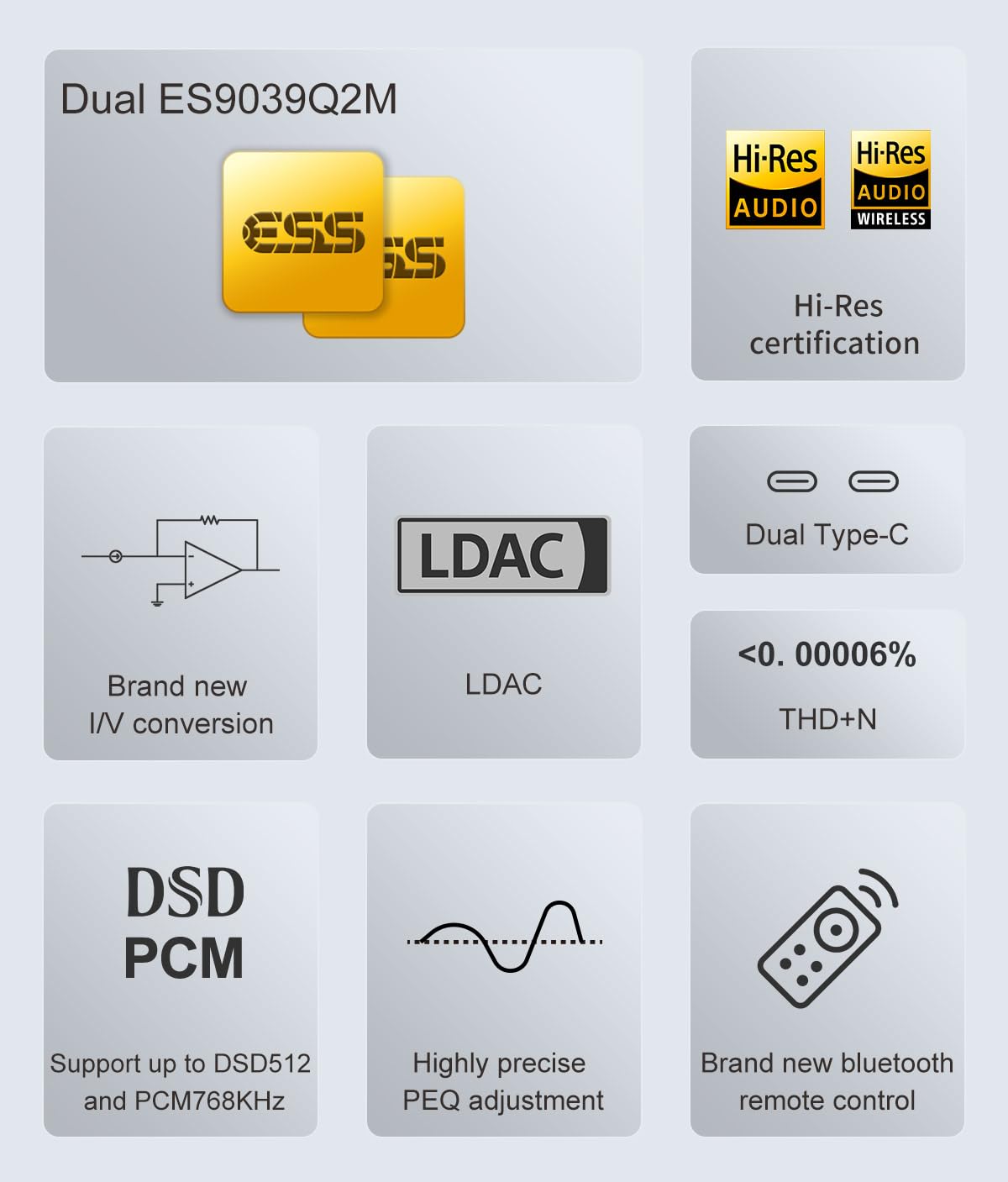
Image: Infographic highlighting key features such as Dual ES9039Q2M, Hi-Res Audio certification, LDAC support, new I/V conversion, Dual Type-C, low THD+N, DSD/PCM support, precise PEQ adjustment, and a new Bluetooth remote control.

Image: Detailed diagram illustrating the dual ES9039Q2M DAC chip architecture within the D50 III, emphasizing the separate chips for left and right channels.
4. Подешавање
Follow these steps to set up your Topping D50 III DAC:
- Прикључите напајање: Connect the provided power adapter to the D50 III's power input and then to a wall outlet.
- Повежите аудио излаз: Choose your preferred output method:
- РЦА: Connect RCA cables from the D50 III's RCA outputs to your ampлифиер или активни звучници.
- TRS (Balanced): Connect TRS cables from the D50 III's TRS outputs to your balanced ampлифиер или активни звучници.
- Повежите аудио улаз: Choose your desired digital audio input:
- УСБ: Connect a USB cable (A-C or C-C) from your computer, smartphone, or tablet to the D50 III's USB-C input. For Windows, you may need to install the Thesycon driver from the Topping webсајту.
- Оптички/коаксијални: Connect an optical or coaxial cable from your digital audio source (e.g., CD player, TV) to the corresponding input on the D50 III.
- Блуетоотх: Screw the Bluetooth antenna onto the BT connector on the rear panel.
- Укључено: Press the power button on the front panel or the remote control to turn on the D50 III.
- 12V Trigger (Optional): If you have a compatible device (like the Topping A50 III) that supports 12V Trigger, connect a 12V trigger cable between the D50 III and the other device for synchronized power control.
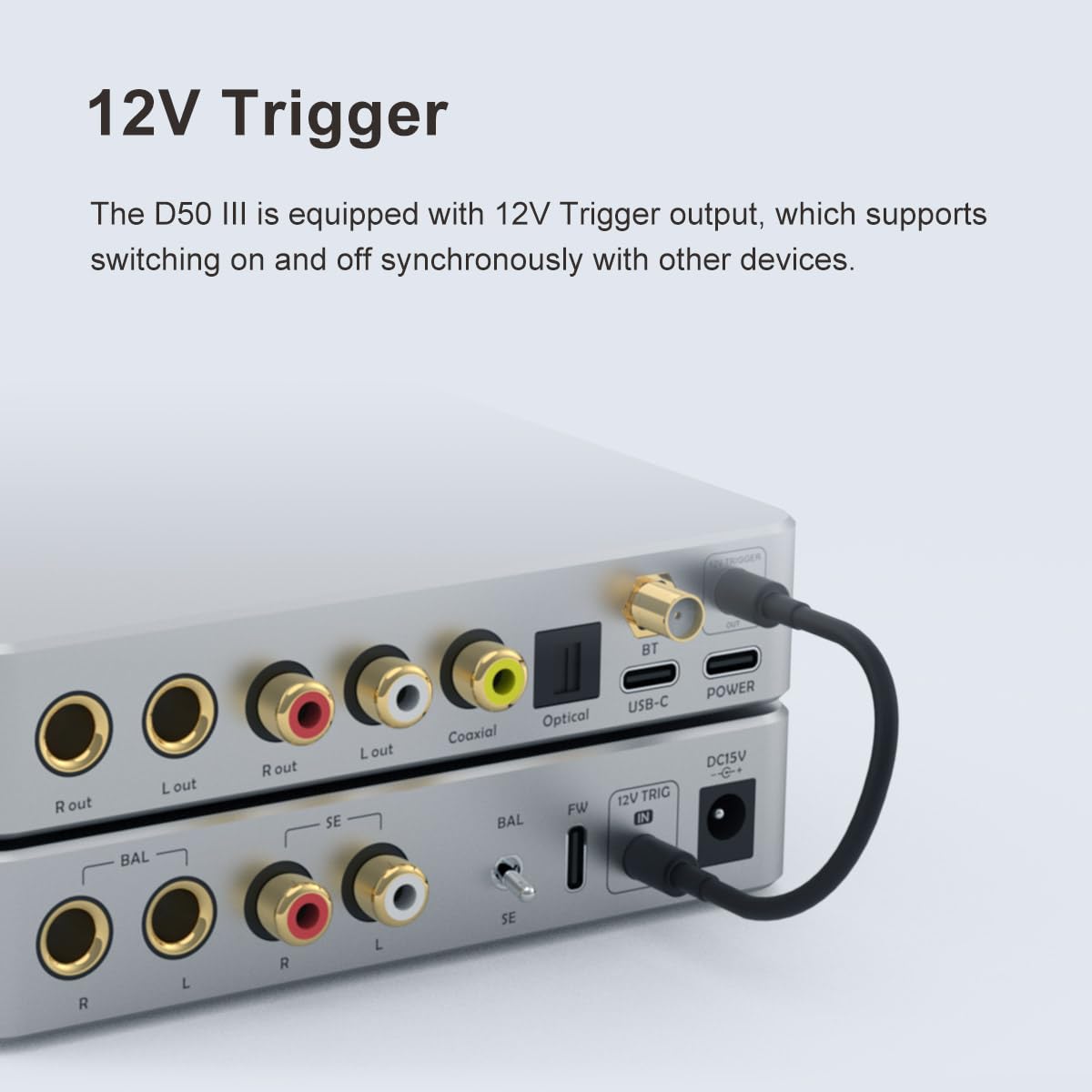
Слика: Крупни план view of the rear panel of the D50 III, showing the 12V Trigger port with a cable connected, illustrating its use for synchronized power control with other devices.
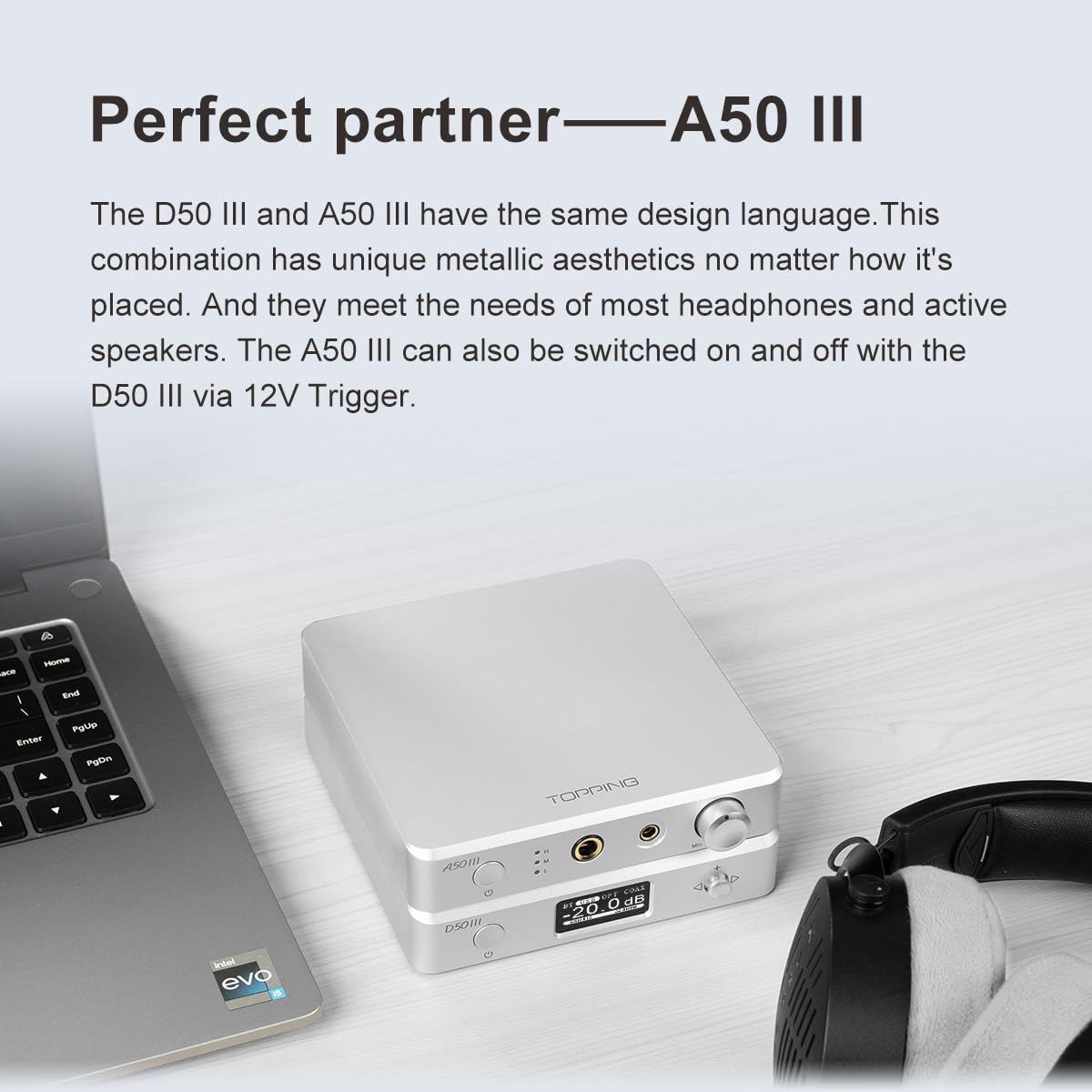
Image: The Topping D50 III stacked with a Topping A50 III amplifier on a desk next to a laptop and headphones, demonstrating a typical setup where both devices are used together.
5. Упутство за употребу
Основна операција
- Укључивање/искључивање: Press the power button on the front panel or the remote.
- Избор улаза: Short press the power button on the front panel to cycle through USB, Optical, Coaxial, and Bluetooth inputs. Alternatively, use the input selection buttons on the remote.
- Контрола јачине звука: Use the '+' and '-' buttons on the front panel or the remote to adjust the volume.
- Искључи звук: Press the mute button on the remote control to mute/unmute the audio output.
Подешавања менија
The D50 III offers various settings accessible via the menu. Use the navigation buttons on the front panel or remote to enter and navigate the menu.
- Режим излаза: Select between 4V/2V (standard) and 5V/2.5V (high output) modes for RCA and TRS outputs.
- DAC/Preamp Режим: Choose between pure DAC mode (fixed output) or Preamp mode (variable output with volume control).
- Блуетоотх упаривање: Enter the Bluetooth menu to pair with new devices.
- Осветљеност екрана: Adjust the brightness of the display screen.
- Подешавања филтера: Select different digital filter modes (if available) to fine-tune the sound.
6. Спецификације
The following table details the technical specifications of the Topping D50 III DAC:
| Параметар | РЦА | ТРС |
|---|---|---|
| ТХД+Н @1кХз (А-вт) | <0.00008% @1кХз | <0.00006% @1кХз |
| ТХД @ 20-20 кХз (90 кБВ) | <0.0004 % @20-20kHz | <0.0002% @ 20-20 кХз |
| СНР @МАКС ОУТ 1кХз (А-вт) | 127 дБ на 1 кХз | 132 дБ на 1 кХз |
| Динамички опсег @1кХз (А-вт) | 127 дБ на 1 кХз | 132 дБ на 1 кХз |
| Фреквенцијски одзив | 20Hz-20kHz (0.1dB), 20Hz-40kHz (0.3dB) | 20Hz-20kHz (0.1dB), 20Hz-40kHz (0.3dB) |
| Оутпут Левел | 2.0Vrms @0dBFS (4V Mode), 2.5Vrms @0dBFS (5V Mode) | 4.0Vrms @0dBFS (4V Mode), 5.0Vrms @0dBFS (5V Mode) |
| бука (А-вт) | <1.1уВрмс | <1.3уВрмс |
| Преслушавање канала | -136дБ@1кХз | -147дБ @1кХз |
| Цханнел Баланце | 0.3дБ | 0.3 дБ |
| Излазна импеданса | 50Ω | 100Ω |
Напомена: Горе наведени подаци су резултат добијен лабораторијским тестом TOPPING под AC220V 50Hz и D50 III подешеним на излазни режим од 5V.
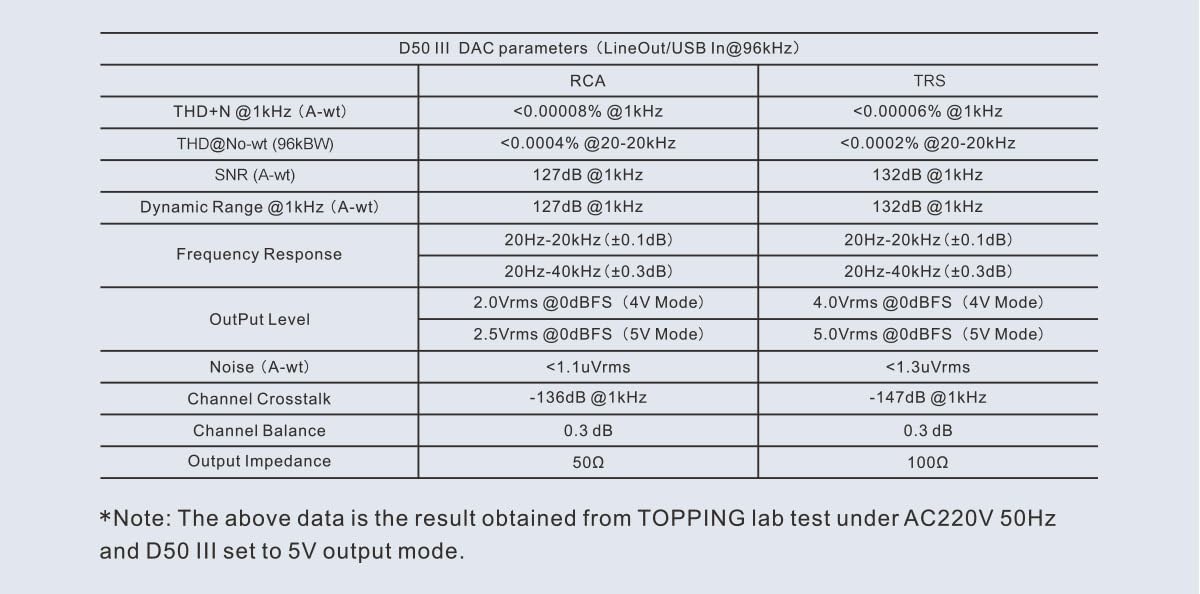
Image: A table displaying detailed technical specifications for the Topping D50 III DAC, including THD+N, SNR, Dynamic Range, Frequency Response, Output Level, Noise, Channel Crosstalk, Channel Balance, and Output Impedance for both RCA and TRS outputs.
Опште спецификације
- Димензије производа: 4.92 к 3.94 к 0.1 инча
- Тежина: 2.05 фунти
- Тип монтаже: Деск Моунт
- Макимум Суппли Волtage: 5 Волтс
- Минимум Суппли Волtage: 5 Волтс
- Земља порекла: Кина
7. Одржавање
To ensure the longevity and optimal performance of your Topping D50 III, please follow these maintenance guidelines:
- Чишћење: Use a soft, dry cloth to wipe the exterior of the unit. Avoid using abrasive cleaners, solvents, or chemical sprays, as they may damage the finish or internal components.
- Пласман: Поставите D50 III на стабилну, равну површину, даље од директне сунчеве светлости, извора топлоте и прекомерне влаге. Обезбедите одговарајућу вентилацију око уређаја.
- Везе: Periodically check all cable connections to ensure they are secure and free from dust or corrosion.
- Складиштење: Ако складиштите уређај дуже време, искључите га из струје и чувајте га на хладном и сувом месту.
КСНУМКС. Решавање проблема
If you encounter issues with your D50 III, refer to the following common problems and solutions:
- Нема излаза звука:
- Ensure the D50 III is powered on.
- Verify that the correct input source is selected on the D50 III.
- Check all audio cable connections between the D50 III and your ampлифиер/звучници.
- Осигурајте своје ampзвучници су укључени и подешени на исправан улаз.
- Check the volume level on the D50 III and your amplifier/speakers; ensure it is not muted.
- If using USB, ensure the correct audio output device is selected in your computer's sound settings and that the necessary drivers are installed for Windows.
- Изобличен звук:
- Check if the input source's volume is too high, causing clipping.
- Уверите се да су каблови безбедно повезани и да нису оштећени.
- Proverite da li je sample rate and bit depth settings on your source device are compatible with the D50 III.
- Пробајте други аудио file or source to rule out source-related issues.
- Проблеми са Блуетоотх везом:
- Уверите се да је Блутут антена безбедно причвршћена.
- Make sure the D50 III is in Bluetooth input mode.
- Unpair and re-pair the D50 III with your Bluetooth device.
- Уверите се да други уређаји не ометају Блутут сигнал.
- Try moving your Bluetooth device closer to the D50 III.
- Даљински управљач не ради:
- Проверите батерију у даљинском управљачу и замените је ако је потребно.
- Ensure there are no obstructions between the remote and the D50 III.
- Point the remote directly at the D50 III's front panel.
Ако проблем и даље постоји након што сте испробали ова решења, обратите се корисничкој подршци.
9. Гаранција и подршка
For information regarding the product warranty, please refer to the warranty card included in your product packaging or visit the official LEAUDIO/Topping webсајт. Услови гаранције могу се разликовати у зависности од региона и продавца.
For technical support, troubleshooting assistance beyond this manual, or service inquiries, please contact the retailer where you purchased the product or visit the official LEAUDIO/Topping support webсајт. Молимо вас да имате при руци модел производа и серијски број када контактирате подршку.
Произвођач: LEAUDIO
Повезани документи - Д50 ИИИ
 |
Topping D90LE: High-Fidelity Balanced HiFi DAC with Bluetooth 5.0 Explore the Topping D90LE, a fully balanced HiFi DAC featuring ES9038PRO, Bluetooth 5.0 LDAC, DSD512/PCM768kHz support, and versatile connectivity for superior audio performance. |
 |
TOPPING DX5 II Упутство за употребу: Hi-Fidelity DAC и слушалице Ampлифиер Гуиде Откријте TOPPING DX5 II, премиум десктоп DAC и слушалице ampживотник. Ово корисничко упутство детаљно описује његове напредне функције, могућности звука високе резолуције, опције повезивања и упутство за употребу за оптимално искуство слушања. |
 |
ТОППИНГ Д90СЕ Десктоп Фулл Баланцед ДАЦ Упутство за употребу Упутство за употребу за TOPPING D90SE десктоп потпуно балансирани DAC, са детаљним описом његових карактеристика, спецификација, рада и подешавања. Садржи информације о MQA технологији и усклађености са FCC прописима. |
 |
Упутство за употребу Topping D90LE HiFi DAC-а Свеобухватно корисничко упутство за Topping D90LE HiFi DAC, које детаљно описује његове карактеристике, спецификације, рад и опције повезивања за висококвалитетни звук. |
 |
Westbrass Cable Drive Bath Waste and Overflow Installation Guide Comprehensive installation, cleaning, and troubleshooting guide for Westbrass Cable Drive Bath Waste and Overflow systems, including model numbers and part identification for plumbing fixtures. |
 |
ТОППИНГ Е50 ИИ 快速入门指南 ТОППИНГ Е50 ИИ 快速入门指南。本指南提供 ТОППИНГ Е50 ИИ 音频ДАЦ/前置放大器的设置和使用说明,涵盖设备概览、输入/输出连接、操作接、操作接、操作 |
Ask a question about this manual
Ask about setup, troubleshooting, compatibility, parts, safety, or missing instructions. Manuals+ will review the question and use this page’s manual context to help answer it.