
1. Увод
This manual provides detailed instructions for the installation, operation, and maintenance of your DB Drive SPRO2500.4 4-Channel Class AB Amplifier. Please read this manual thoroughly before attempting installation or operation to ensure proper use and to prevent damage to the unit or your vehicle's audio system. Keep this manual for future reference.
2. Безбедносне информације
Увек се придржавајте следећих мера безбедности током инсталације и рада:
- Искључите негативни терминал акумулатора возила пре почетка било каквих електричних радова.
- Ensure all wiring is properly routed and secured to prevent pinching, cutting, or short-circuiting.
- Use appropriate gauge wiring for power and ground connections as specified in this manual.
- Инсталирајте ampУређај држите на месту које омогућава одговарајућу вентилацију како би се спречило прегревање.
- Избегавајте монтирање ampу подручјима изложеним директној сунчевој светлости, прекомерној топлоти, влази или прашини.
- Не покушавајте да отворите или модификујете ampспасилац. Сва сервисирања препустите квалификованом особљу.
- Wear eye protection when working with tools and electrical components.
3. Подешавање и инсталација
3.1 Распакивање
Пажљиво уклоните amplifier from its packaging. Inspect the unit for any signs of damage. If damage is found, contact your dealer immediately.
3.2 Место монтирања
Choose a mounting location that is dry, well-ventilated, and protected from physical damage. Ensure sufficient space around the ampвентилатор за циркулацију ваздуха. Обезбедите amplifier firmly to a solid surface using appropriate hardware.
3.3 Ожичење
Proper wiring is crucial for optimal performance and safety. Refer to the diagram below for terminal identification.

слика: Rear panel of the DB Drive SPRO2500.4 amplifier showing power, ground, remote, fuse, and speaker output terminals.
- Снага (BATT+): Connect a 4-gauge power cable directly from the positive (+) terminal of the vehicle's battery. Install an in-line fuse holder (not supplied) within 18 inches (45 cm) of the battery.
- Уземљење (ГНД): Connect a 4-gauge ground cable from the amplifier's GND terminal to a clean, unpainted metal surface of the vehicle's chassis. Ensure a solid electrical connection.
- Даљински управљач (REM): Connect a 18-gauge remote turn-on wire from your head unit's remote output to the ampREM терминал пуњача. Ова жица окреће ampукључивање и искључивање горионика помоћу ваше главне јединице.
- Speaker Outputs (CH1-CH4): Connect your speakers to the appropriate output terminals. The SPRO2500.4 supports 4-channel stereo operation or 2-channel bridged operation. Refer to the specifications for minimum impedance requirements.
- Осигурачи: Тхе amplifier is equipped with internal fuses. Do not attempt to replace them.
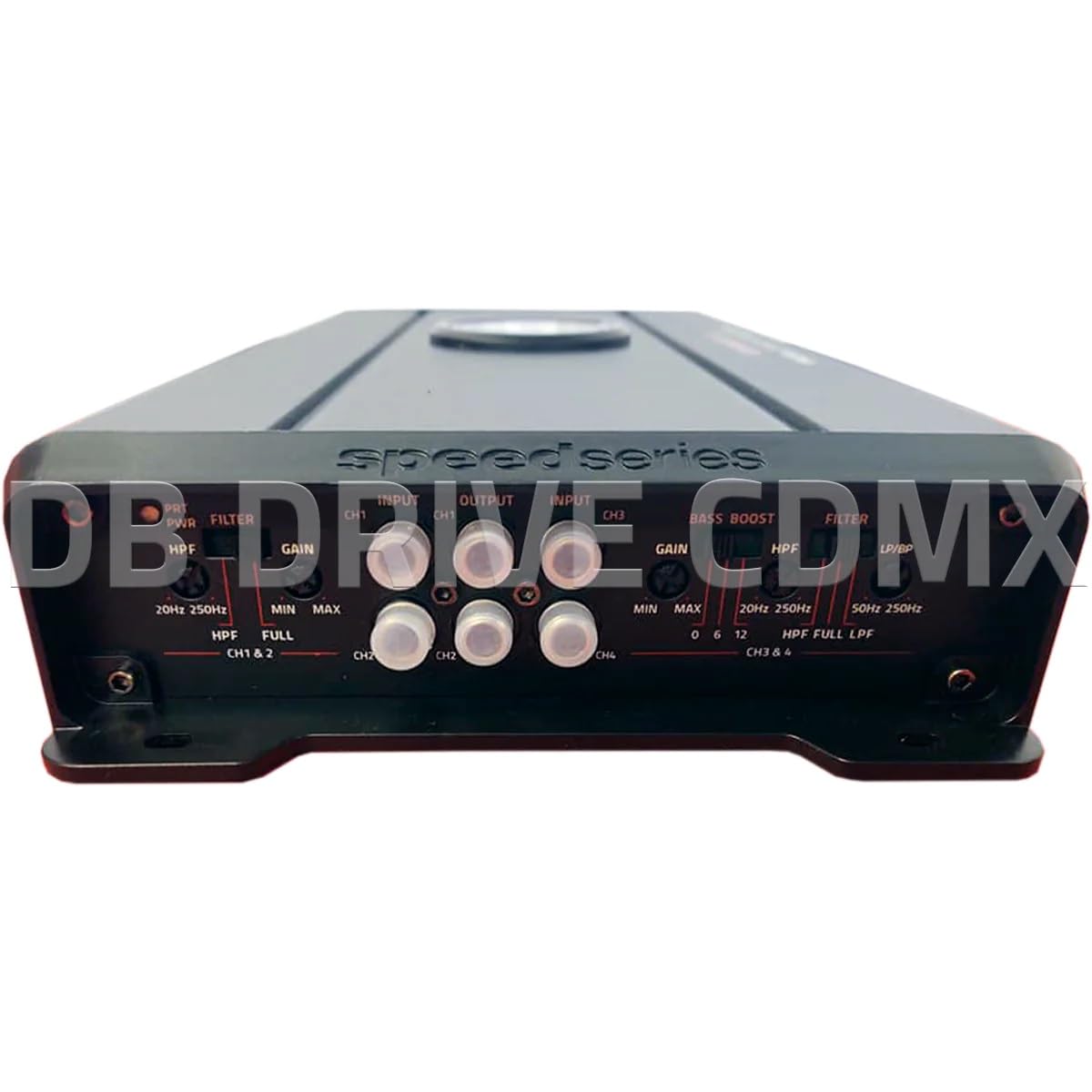
слика: Front panel of the DB Drive SPRO2500.4 amplifier showing input, gain, filter, and bass boost controls.
3.4 Control Panel Settings
The front panel features controls for fine-tuning the amplifier's audio output:
- Input (CH1/CH2, CH3/CH4): Повежите RCA каблове са предње стране ваше главне јединице.amp outputs to these inputs.
- Gain (CH1&2, CH3&4): Подешава улазну осетљивост amplifier to match the output level of your head unit. Start with the gain at minimum and slowly increase until desired volume is achieved without distortion.
- Filter (HPF/FULL/LPF): Selects the crossover mode for the respective channels.
- ХПФ (Хигх Пасс Филтер): Allows frequencies above the set point to pass, blocking lower frequencies. Useful for full-range speakers.
- ЛПФ (нископропусни филтер): Allows frequencies below the set point to pass, blocking higher frequencies. Useful for subwoofers.
- ПУНО: Allows all frequencies to pass without filtering.
- HPF/LPF Frequency Controls: Adjusts the cutoff frequency for the selected HPF or LPF.
- Басс Боост: Provides an adjustable bass enhancement at a specific frequency. Use sparingly to avoid distortion.
4. Упутство за употребу
Once all connections are made and verified, you can power on your audio system. The amplifier will turn on automatically with your head unit via the remote wire.
- Прво појачање: Укључите главну јединицу. ampИндикатор напајања на уређају за пуњење треба да светли.
- Аудио подешавање: Start with the head unit volume low. Gradually increase the volume and adjust the amplifier's gain controls until the desired sound level is reached without audible distortion.
- Crossover Tuning: Adjust the HPF and LPF settings according to your speaker types and desired sound characteristics. For full-range speakers, use HPF to remove low bass. For subwoofers, use LPF.
- Басс Боост: If desired, slowly increase the bass boost control to enhance low frequencies. Overuse can lead to distortion and potential speaker damage.
5. Одржавање
The DB Drive SPRO2500.4 ampУређај за спасавање захтева минимално одржавање како би се осигурао дуготрајан рад.
- Чишћење: Периодично обришите ampОбришите спољашњост уређаја меком, сувом крпом. Не користите јаке хемикалије или абразивна средства за чишћење.
- вентилација: Уверите се да је amplifier's cooling fins are free from dust and debris to maintain proper heat dissipation.
- Провера везе: Occasionally check all wiring connections for tightness and corrosion. Loose connections can cause performance issues or damage.
КСНУМКС. Решавање проблема
Ако имате проблема са својим amplifier, refer to the following common issues and solutions:
| Проблем | Могући узрок | Решење |
|---|---|---|
| Нема струје / AmpЛајфајер се не укључује | Blown fuse, loose power/ground/remote wire, faulty remote turn-on signal. | Check in-line fuse near battery. Verify all power, ground, and remote connections are secure. Test remote wire for 12V when head unit is on. |
| Нема излаза звука | RCA cables disconnected, speaker wires disconnected or shorted, gain set too low, head unit volume too low. | Check RCA input connections. Verify speaker wiring for proper polarity and no shorts. Increase gain and head unit volume. |
| Дистортед Соунд | Gain set too high, improper crossover settings, damaged speakers, poor ground connection. | Reduce gain. Adjust HPF/LPF settings. Inspect speakers for damage. Ensure ground connection is solid. |
| AmpПрегревање усисивача | Insufficient ventilation, impedance too low, prolonged high output. | Обезбедите адекватан проток ваздуха око amplifier. Verify speaker impedance meets specifications. Reduce volume or allow ampлифиер да се охлади. |
If these steps do not resolve the issue, contact DB Drive customer support or a qualified car audio technician.
7. Спецификације
The following table details the technical specifications for the DB Drive SPRO2500.4 ampдизалица:

слика: Detailed specifications sheet for the DB Drive SPRO2500.4 ampлифиер.
| Феатуре | Спецификација |
|---|---|
| Ampлифиер Цласс | Класа А/Б |
| Канали | 4-канал |
| Output Power (RMS @ 14.4VDC, 2Ω) | 4 к 500В |
| Output Power (RMS @ 14.4VDC, 4Ω) | 4 к 250В |
| Output Power (RMS @ 14.4VDC Bridged) | 2 к 1000В |
| Улаз напајања Волtage | 12.0ВДЦ до 14.8ВДЦ |
| THD (100Hz @ 1Ω) | 0.04% |
| Frequency Response (3dB) | 20Хз - 250Хз |
| Damping Factor (1KHz @ 4Ω) | 100 |
| S/N Ratio (as weighted @ 1 Volt) | 99дБ |
| Инпут Сенситивити | .20mV - 5.0V RMS |
| Минимална импеданса оптерећења | 2Ω |
| Инпут | Пре у РЦА |
| Нагиб филтера скретнице | 12дБ |
| Crossover Filter Range in Mono | 24дБ |
| Channel 1-2 HPF Range | 20Хз - 250Хз |
| Channel 3-4 HPF Range | 20Хз - 250Хз |
| Channel 3-4 LPF/BPF Range | 50Хз - 250Хз |
| Selectable Bass Boost CH 1-2 or 3-4 | 0 - 6dB - 12dB |
8. Гаранција и подршка
DB Drive products are designed and manufactured to the highest quality standards. For specific warranty information, please refer to the warranty card included with your product or contact your authorized DB Drive dealer.
Корисничка подршка:
For technical assistance or support, please contact:
DB Research L.L.P
302 Ханморе Индустриал Паркваи
Harlingen, TX 78550 USA
Телефон: 877-787-0101
Local: 956-421-4513