
Увод
This manual provides detailed instructions for the installation, operation, and maintenance of your DELLA 6000 BTU Window Air Conditioner. Please read this manual thoroughly before using the appliance and retain it for future reference.
Безбедносне информације
Увек се придржавајте основних мера предострожности када користите електричне уређаје како бисте смањили ризик од пожара, струјног удара и повреда особа.
- Уверите се да је јединица правилно уземљена.
- Немојте користити уређај са оштећеним каблом или утикачем.
- Не убацујте прсте или стране предмете у отвор за улаз/излаз ваздуха.
- Искључите уређај из струје пре чишћења или било каквог одржавања.
- Држите запаљиве материјале даље од јединице.
Производ је завршенview
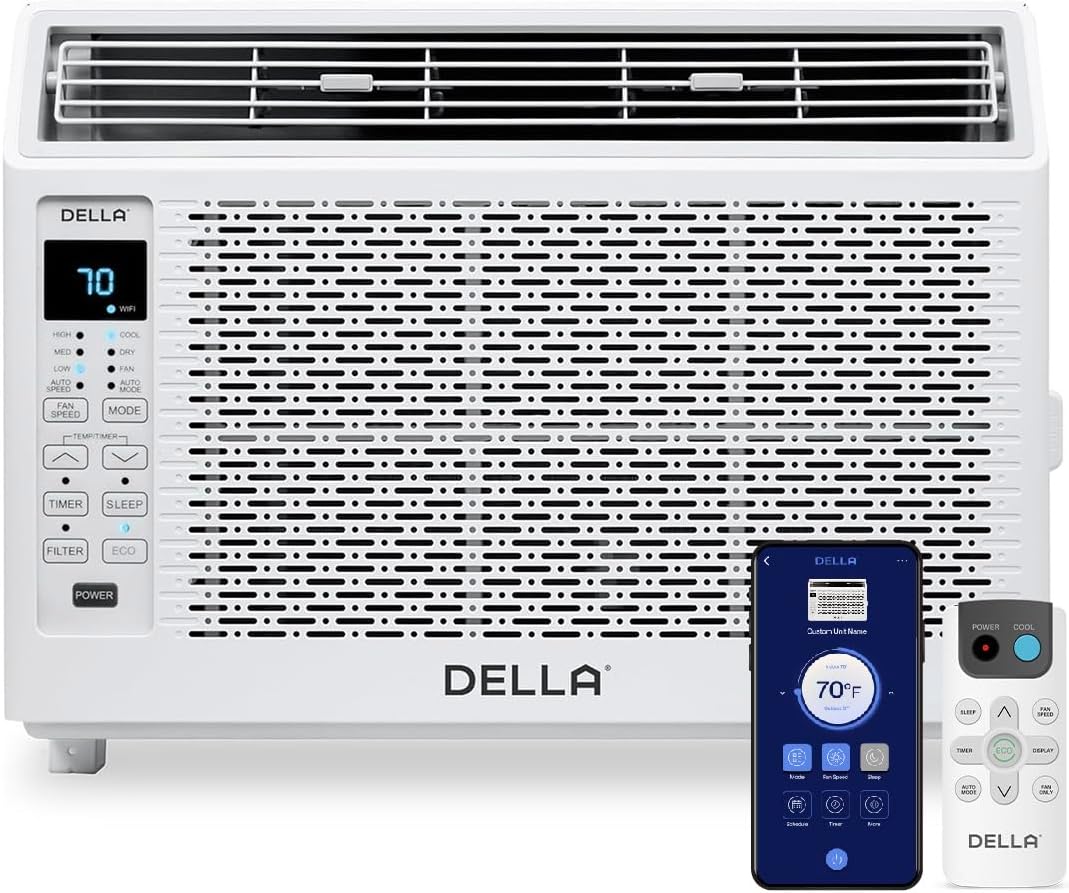
Figure 1: DELLA 6000 BTU Window Air Conditioner Unit, Remote Control, and Smartphone App Interface.
Цонтрол Панел
The unit features an intuitive control panel with various buttons and indicator lights for easy operation.
- Дугме за напајање: Укључује или искључује јединицу.
- Дугме за режим: Cycles through Cool, Dry (Dehumidifier), Fan, Auto Mode, and ECO Mode.
- Дугме за брзину вентилатора: Adjusts fan speed (High, Med, Low, Auto Speed).
- Temp/Timer Buttons: Adjusts temperature settings or sets timer.
- Дугме за спавање: Активира режим спавања за тихи, енергетски ефикасан рад преко ноћи.
- Дугме за филтрирање: Indicates when the filter needs cleaning.
- ВиФи индикатор: Shows Wi-Fi connectivity status.
Ремоте Цонтрол

Figure 2: Remote Control for the DELLA Air Conditioner.
The remote control allows for convenient operation of all unit functions from a distance. Ensure batteries are correctly installed.
Инсталација
The DELLA 6000 BTU Window Air Conditioner features a T-design for simplified installation.
Кораци инсталације

Figure 3: T-design installation allows for flexible window opening.

Figure 4: Simplified 3-step installation process.
- Step 1: Secure into window frame. Place the unit into the window opening, ensuring it is securely seated.
- Step 2: Mount with four screws. Fasten the unit to the window frame using the provided screws for stability.
- Step 3: Extend side panels into wall. Extend the accordion side panels to fill the gap between the unit and the window frame, providing insulation and reducing air leaks.
Компоненте инсталационог комплета

Figure 5: Included installation kit components.
The installation kit includes filler panels, insulation strips, lock frame & sash lock, screws, window sash seal, and a top mounting rail to ensure a secure and efficient installation.
Димензије производа

Figure 6: Unit dimensions and recommended window opening.
The unit dimensions are approximately 15.94"D x 16.02"W x 12.05"H. It is designed for window widths between 23"-34" and requires at least 14.5" vertical clearance.
Упутство за употребу
Modes and Fan Speeds

Figure 7: Available operating modes and fan speeds.
The unit offers 5 operating modes (Cool, Auto, Dehumidify, Fan Only, ECO Mode) and 4 fan speeds (Auto, Low, Mid, High) to suit various comfort needs. Use the 'Mode' and 'Fan Speed' buttons on the control panel or remote to select your desired settings.
Контрола температуре
Use the up and down arrow buttons on the control panel or remote to set your desired temperature. The digital display will show the current setting.
Smart Features (Wi-Fi Control)

Figure 8: Control your unit wirelessly with the Della+ APP.

Figure 9: Della+ app supports Google Assistant and Alexa for voice control.
Download the free Della+ app to control your unit from anywhere. The app allows for remote control, scheduling, and integration with smart home systems like Google Assistant and Alexa.
Geo Location Function

Figure 10: Smart Geo Location feature for automatic operation.
The Geo Location feature allows the unit to automatically turn on or off based on your proximity to your home. This feature can be configured via the Della+ app.
Video 1: Demonstration of the Geo Location Function setup and customization within the Della+ app.
Слееп Моде

Figure 11: Intelligent sleep mode adjusts temperature for optimal comfort.
Intelligent sleep mode automatically adjusts the temperature overnight to maintain comfort and save energy. Activate it using the 'Sleep' button.
Функција тајмера
The 24-hour auto on/off timer allows you to program the unit to turn on or off at specific times, enhancing convenience and energy efficiency.
Одржавање
Чишћење филтера за вишекратну употребу

Figure 12: The unit features a washable and reusable filter.
The unit is equipped with a washable and reusable filter. A clean filter helps maintain optimal cooling performance and air quality. When the 'Filter' indicator light illuminates, it's time to clean the filter.
- Искључите и искључите клима уређај.
- Скините предњу плочу и извуците ваздушни филтер.
- Оперите филтер топлом водом са сапуном. Добро исперите.
- Оставите филтер да се потпуно осуши пре него што га поново уметнете.
- Замените предњу плочу.
Општа нега
- Очистите спољашњост јединице меком, дamp тканина.
- Не користите јаке хемикалије или абразивна средства за чишћење.
- Уверите се да је подручје одводњавања без препрека.
Решавање проблема
If you experience issues with your air conditioner, refer to the following common problems and solutions:
| Проблем | Могући узрок | Решење |
|---|---|---|
| Јединица се не укључује | Нема струје; осигурач се активирао; уређај је искључен из струје. | Check power supply; reset circuit breaker; ensure plug is fully inserted. |
| Уређај се не хлади ефикасно | Прљав филтер за ваздух; блокиран усисни/издувни отвор за ваздух; превелика просторија; отворени прозори/врата. | Clean air filter; clear obstructions; ensure unit is sized correctly for room; close windows/doors. |
| Бучан рад | Лабави делови; јединица није нивелисана; зачепљење вентилатора. | Check for loose components; ensure unit is level; remove any fan obstructions. |
| Вода капље напољу | Нормалан рад (кондензација). | This is normal during cooling. Ensure proper drainage. |
Спецификације
| Феатуре | Детаљ |
|---|---|
| Бранд Наме | Делла |
| Информације о моделу | 048-ТЛ-В6КВД |
| Димензије производа | 15.94 к 16.02 к 12.05 инча |
| Број модела артикла | 048-ТЛ-В6КВД |
| Ефикасност | Енергетски ефикасан |
| Капацитет | 0.5 тоне |
| Бука | 51 дБ |
| Врста инсталације | Прозор |
| Парт Нумбер | 048-TL-W6KW_2 |
| Форм Фацтор | Прозорски клима уређај |
| Посебне карактеристике | Даљински управљач |
| Волtage | 115 волти (АЦ) |
| Ватtage | 517.5 вати |
| Батерије укључене? | бр |
| Флоор Ареа | 250 квадратних стопа |
| Цоолинг Повер | 6000 британских термалних јединица |
| Оцена звездицама BEE | Да |
| Сезонски коефицијент енергетске ефикасности (SEER) | 11 |
| Извор напајања | Цордед Елецтриц |
Гаранција и подршка
Your DELLA 6000 BTU Window Air Conditioner comes with a 1 година гаранције. For any inquiries or technical assistance, Della provides 24/7 корисничка подршка.
Молимо посетите Дела продавница на Амазону за више информација или да контактирате подршку.