
1. Увод
The iKiKin V600 OBD2 Diagnostic Scanner is a versatile tool designed to assist in diagnosing vehicle issues. It provides comprehensive OBD2 functions, allowing users to read and clear fault codes, view live data, perform battery tests, and access various vehicle information. This manual will guide you through the proper use and maintenance of your device.
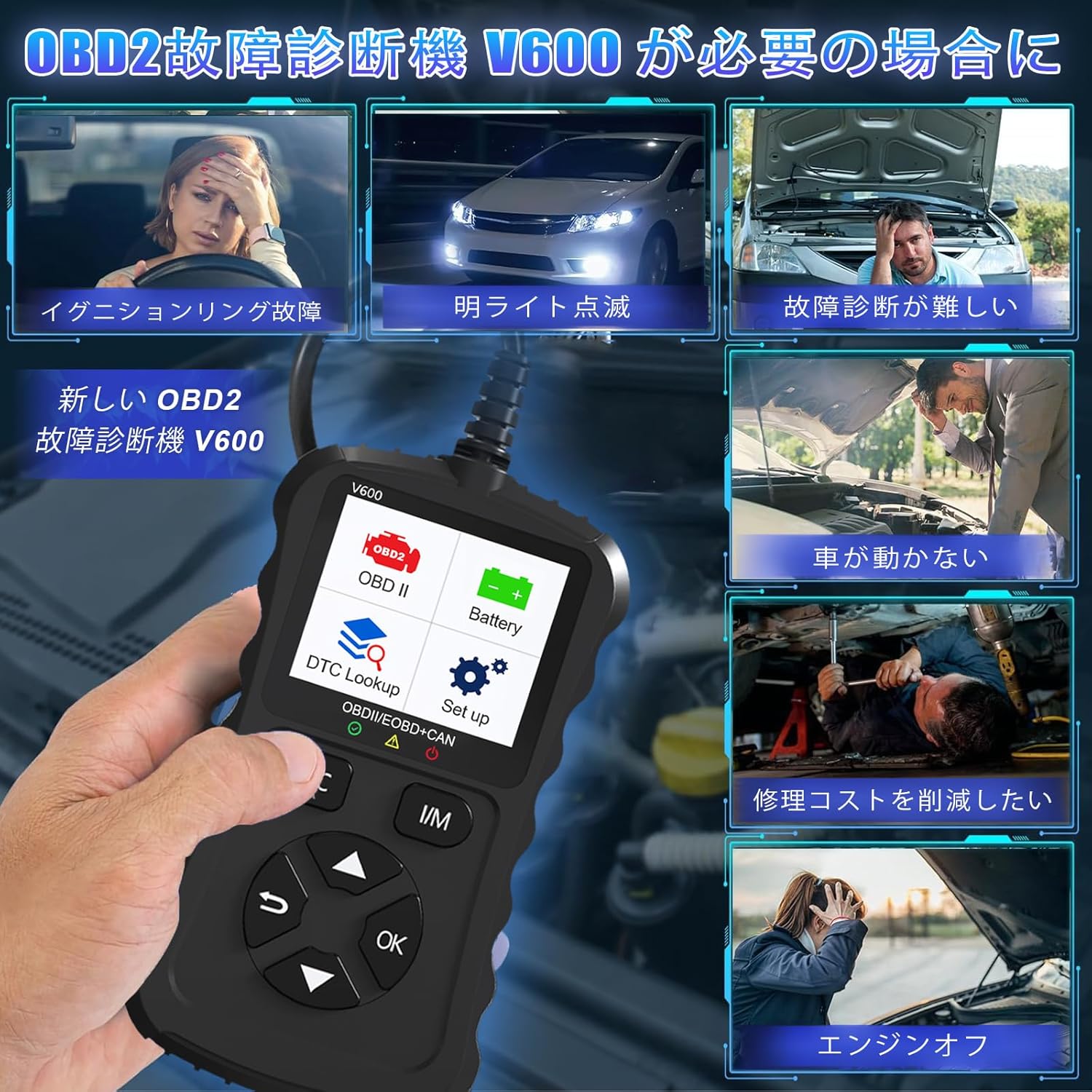
Figure 1.1: Common scenarios where the V600 diagnostic tool can be utilized.
2. Производ је готовview
The iKiKin V600 is a handheld diagnostic scanner featuring a clear TFT color screen and intuitive button controls. It is designed for ease of use and portability.
2.1 Кључне карактеристике
- Подршка за више језика: Supports 13 languages, including English and Japanese.
- Comprehensive OBD2 Functions: Reads and clears Diagnostic Trouble Codes (DTCs), displays live data stream, freeze frame data, I/M readiness status, O2 sensor test, EVAP system test, and vehicle information.
- ДТЦ претрага: Built-in database with over 35,000 DTC definitions for quick reference.
- Функција теста батерије: Вол. батерије у реалном временуtage monitoring to assess battery health.
- Плуг анд Плаи: Simple connection to the vehicle's OBD2 port.
- Ручни дизајн: Compact and portable for convenient use.

Слика 2.1: Предња страна view of the iKiKin V600 OBD2 Diagnostic Scanner.
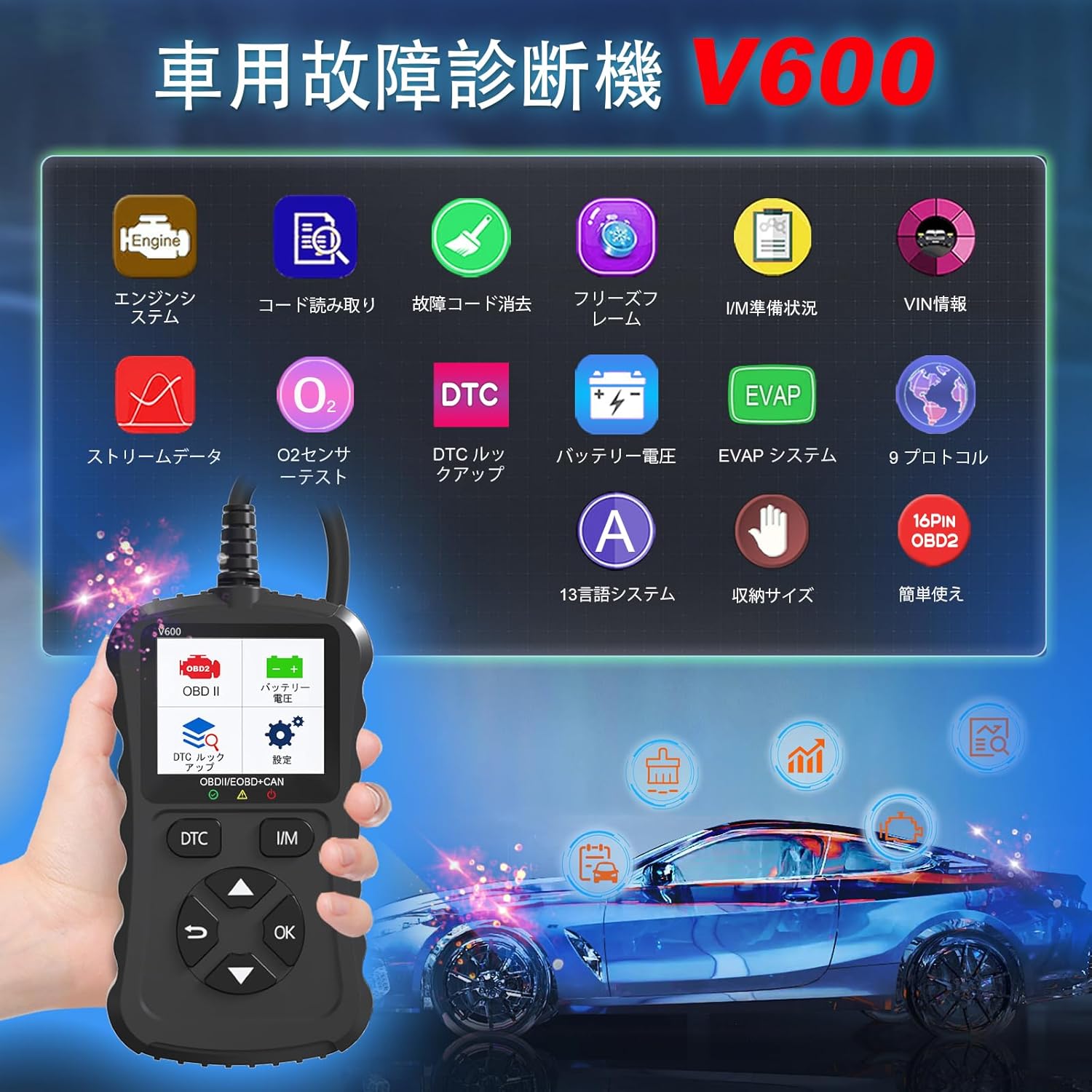
Figure 2.2: The V600 scanner displaying its main menu with various diagnostic options.
3. Подешавање
3.1 Повезивање уређаја
- Уверите се да је паљење вашег возила у положају OFF (искључено).
- Locate the 16-pin OBD2 diagnostic port in your vehicle. This port is typically found under the dashboard on the driver's side.
- Plug the V600 scanner's connector firmly into the vehicle's OBD2 port.
- Turn the vehicle's ignition to the ON position (do not start the engine). The scanner will power on automatically.

Figure 3.1: Connecting the V600 to the vehicle's OBD2 port.
3.2 Подешавања језика
The default language of the diagnostic tool is English. To change the language:
- From the main menu, navigate to "Settings".
- Select "Language".
- Choose your desired language (e.g., Japanese) from the list.
- The device may require an update after changing the language. Follow on-screen prompts or refer to the support section if you encounter issues.
4. Упутство за употребу
4.1 Reading and Clearing Fault Codes
This function allows you to identify and clear Diagnostic Trouble Codes (DTCs) that trigger the Check Engine Light.
- Connect the scanner to your vehicle and turn the ignition ON.
- Select "Read Codes" from the main menu to display current, pending, and permanent DTCs.
- To clear codes, select "Erase Codes" from the menu. Confirm the action when prompted.
- Напомена: Clearing codes will turn off the Check Engine Light. However, if the underlying issue is not resolved, the light may reappear.
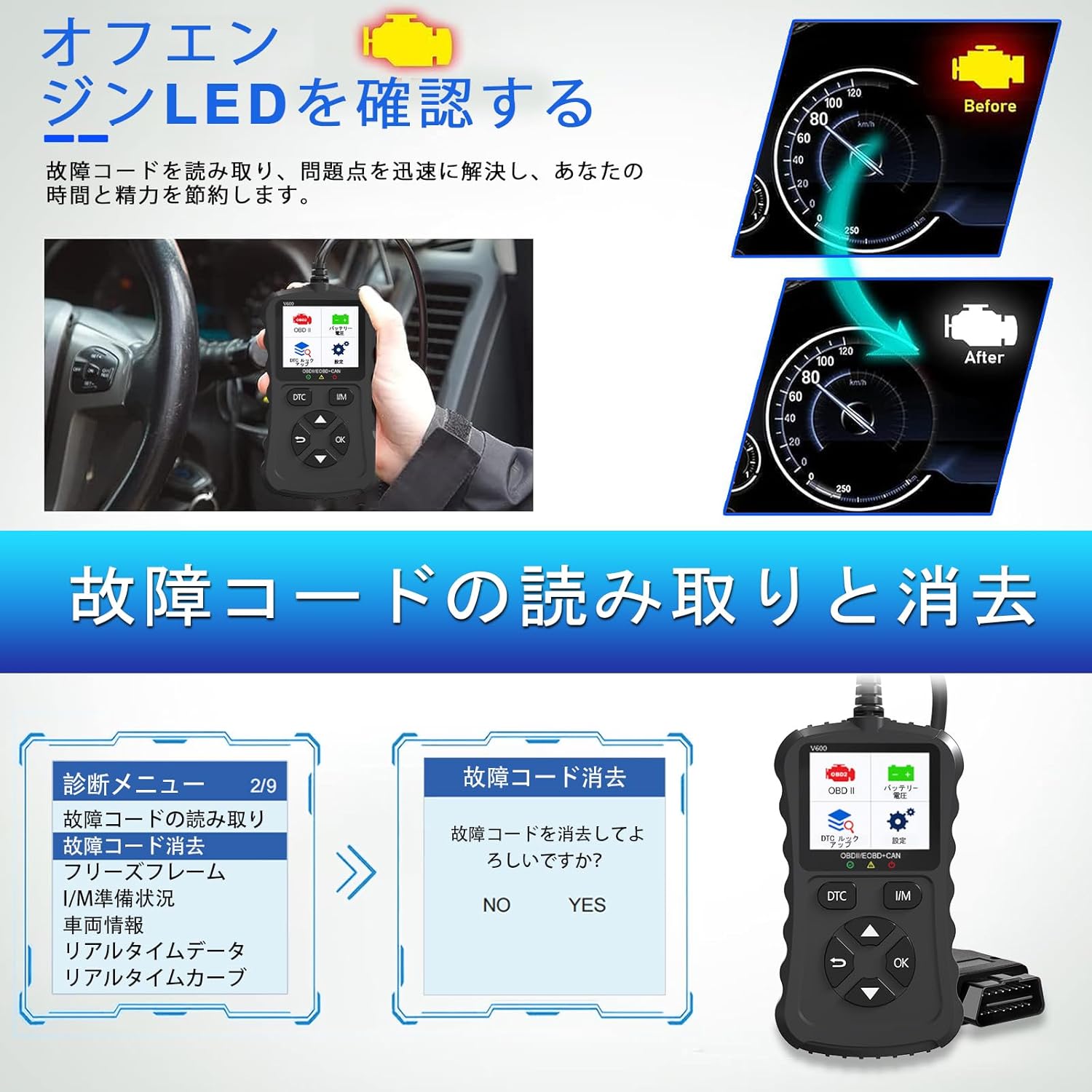
Figure 4.1: Clearing fault codes and turning off the engine warning light.
4.2 Пренос података уживо
View real-time operational parameters from the vehicle's sensors and modules.
- Select "Live Data" from the menu.
- Choose the parameters you wish to monitor.
- Подаци ће бити приказани нумерички или графички.
4.3 Замрзнути подаци
When an emission-related fault occurs, the ECU stores a snapshot of operating conditions at that moment. This is called Freeze Frame Data.
- Select "Freeze Frame" from the menu to view this stored data.
4.4 Статус спремности за управљање/управљање
This function checks the operation of the emission system on OBD2 compliant vehicles. It indicates if the various emission-related systems are ready for inspection and maintenance testing.
- Select "I/M Readiness" to view the status of monitors.
- A dedicated I/M hotkey allows for a quick one-click check.
4.5 Тест О2 сензора
Retrieves O2 sensor monitoring test results for the most recently completed tests from the vehicle's on-board computer.
- Select "O2 Sensor Test" to view резултате.
4.6 Тест ЕВАП система
Initiates a leak test for the vehicle's Evaporative Emission System (EVAP).
- Select "EVAP System Test" to perform this diagnostic.
4.7 Батерија Волtagе Тест
Monitors the vehicle's battery voltage in real-time, providing insights into its health and estimated lifespan.
- Select "Battery Voltage" from the menu.
- The screen will display the current voltage.

Слика 4.2: Напуњеност батеријеtage test and DTC lookup display.
4.8 ДТЦ тражење
Access a built-in database of over 35,000 Diagnostic Trouble Code definitions.
- Select "DTC Lookup" from the menu.
- Enter the DTC code to view its definition and potential causes.
4.9 Информације о возилу
Retrieves the Vehicle Identification Number (VIN), Calibration ID, and Calibration Verification Number (CVN) of the vehicle.
- Select "Vehicle Info" to display this data.
5. Компатибилност
The iKiKin V600 OBD2 Diagnostic Scanner is compatible with OBD2 protocol vehicles equipped with a 16-pin DLC (Data Link Connector).
- American Vehicles: Compatible with vehicles manufactured from 1996 onwards.
- European Vehicles: Compatible with vehicles manufactured from 2000 onwards.
- Japanese Domestic Vehicles: Compatible with OBD2 vehicles manufactured from 2008 onwards.
Важна напомена: This device is not compatible with vehicles that do not have a 16-pin OBD2 connector or vehicles that are not OBD2 compliant (e.g., some hybrid vehicles may have specific diagnostic requirements outside standard OBD2 protocols). If the fault cause is outside the standard OBD2 definition range, the scanner may not be able to read the fault codes. In such cases, a full system diagnostic tool may be required.
6. Одржавање
To ensure the longevity and optimal performance of your iKiKin V600 OBD2 Diagnostic Scanner, follow these maintenance guidelines:
- Одржавајте уређај чистим и без прашине и влаге. За чишћење користите меку, суву крпу.
- Избегавајте испуштање уређаја или излагање јаким ударима.
- Чувајте уређај на хладном и сувом месту када се не користи.
- Не покушавајте сами да растављате или поправљате уређај. То ће поништити гаранцију.
- Regularly check for software updates to ensure the latest vehicle compatibility and features.
КСНУМКС. Решавање проблема
7.1 Уређај се не укључује
- Ensure the scanner is correctly plugged into the vehicle's 16-pin OBD2 port.
- Проверите да ли је паљење возила у положају УКЉУЧЕНО.
- Check the vehicle's battery. If the battery is too low, the scanner may not receive sufficient power.
7.2 Cannot Read Fault Codes
- Confirm the vehicle is OBD2 compliant and has a 16-pin connector.
- Ensure a stable connection between the scanner and the vehicle.
- If the fault cause is outside the standard OBD2 definition range, the scanner may not be able to read the codes. In such cases, consult a professional or use a full system diagnostic tool.
7.3 Check Engine Light Reappears After Clearing Codes
- Clearing codes only resets the warning light. If the underlying mechanical or electrical issue is not resolved, the fault code will be detected again, and the light will illuminate.
- Address the root cause of the fault code by performing necessary repairs.
8. Спецификације
| Феатуре | Спецификација |
|---|---|
| Бранд | иКиКин |
| Назив модела | В600 |
| Тежина артикла | 200 г |
| Димензије пакета | 18.3 к 11.9 к 3.7 цм |
| Извор напајања | Battery Powered (via OBD2 port) |
| Тип услуге возила | Universal Fit (OBD2 compliant vehicles) |
| Подржани протоколи | 9 OBD2 protocols |
| DTC Database | 35,000+ definitions |
| УПЦ | 724873544378 |
9. Гаранција и подршка
The iKiKin V600 OBD2 Diagnostic Scanner comes with a half-year manufacturer's warranty.
For any questions regarding product operation, software updates, or language changes, please contact iKiKin customer support. Refer to the product packaging or the seller's webсајт за контакт информације.