
TOPTECH AL-212-BK
AL-212 Wireless Bluetooth Speaker User Manual
Model: AL-212-BK | Brand: TOPTECH
1. Увод
The TOPTECH AL-212 is a powerful and versatile wireless Bluetooth speaker designed to deliver high-fidelity sound with dynamic LED lighting. Featuring dual 12-inch woofers, it provides robust audio for various occasions, from home entertainment to outdoor parties. This manual provides detailed instructions for setting up, operating, and maintaining your speaker to ensure optimal performance.

Слика: Фронт view of the AL-212 speaker, showcasing its dual 12-inch woofers and vibrant LED lighting.
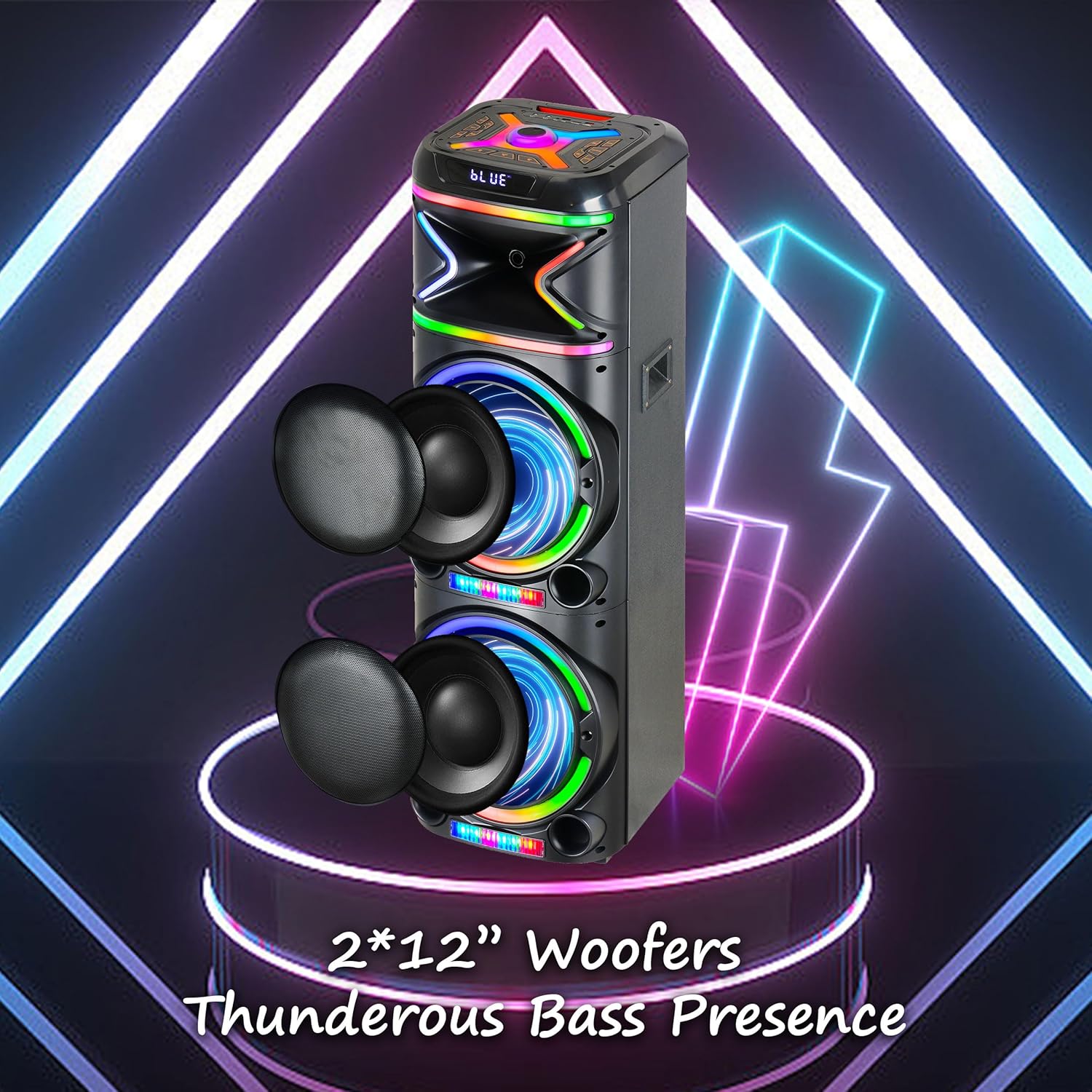
Слика: Крупни план view emphasizing the two 12-inch woofers, responsible for the speaker's powerful bass and clear audio output.
2. Шта је укључено
Молимо вас да проверите садржај пакета како бисте били сигурни да су сви предмети присутни:
- AL-212 Wireless Bluetooth Speaker
- Ремоте Цонтрол
- Жични микрофон
- Повер Адаптер
- Кориснички приручник (овај документ)
- Гарантни лист

Image: Visual representation of the speaker's dimensions and the accessories included in the package: wireless microphone, remote control, and portable wheels.
3. Контроле и портови
Familiarize yourself with the control panel and various input/output ports located on the top and rear of the speaker.
Контроле на горњем панелу:

Слика: Детаљна view of the speaker's top control panel, showing buttons for various functions and input ports.

Image: A simplified diagram highlighting the key control buttons and their functions on the speaker's interface.
- Дугме за напајање: Укључује или искључује звучник.
- Дугме за режим: Switches between Bluetooth, FM Radio, AUX, USB, and TF Card modes.
- Дугме за јачину звука: Подешава главну јачину звука.
- Дугме за јачину звука микрофона: Подешава јачину звука микрофона.
- Ехо дугме: Adjusts the microphone echo effect.
- Дугме за ЛЕД режим: Changes the LED light patterns.
- Дугме за репродукцију/паузу: Репродукује или паузира репродукцију звука.
- Дугмад за претходну/следећу нумеру: Прескаче на претходну или следећу нумеру.
- Дугме за снимање: Records microphone input to USB/TF card.
- ТВС дугме: Покреће упаривање са правим бежичним стерео уређајем.
Улазно / излазни портови:
- УСБ порт: For USB drive playback and charging external devices.
- Слот за ТФ картицу: За репродукцију са TF (MicroSD) картица.
- AUX улаз (3.5 мм): Connect external audio devices via an audio cable.
- Microphone Input (6.35mm): Повежите жичани микрофон.
- Guitar Input (6.35mm): Connect a guitar or other instrument.

Image: The AL-212 speaker displayed with icons representing its versatile connectivity options, including Bluetooth, USB, TF card, AUX, microphone, and remote control.
4. Подешавање
4.1 Пуњење звучника
The AL-212 speaker is battery-powered. Before first use, fully charge the speaker using the provided power adapter. The charging indicator light will show the charging status and turn off when fully charged.
4.2 Почетно укључивање
Press and hold the Power button on the top panel to turn on the speaker. You will hear a power-on prompt, and the LED lights will illuminate.
5. Упутство за употребу
5.1 Блуетоотх упаривање
- Turn on the speaker. It will automatically enter Bluetooth pairing mode, indicated by a flashing 'BLUE' on the display and an audible prompt.
- Омогућите Блутут на свом паметном телефону, таблету или другом уређају који подржава Блутут.
- Тражи "AL-212" in the list of available devices and select it to connect.
- Once connected, you will hear a confirmation sound, and the 'BLUE' indicator will stop flashing.

Image: A smartphone screen showing the Bluetooth pairing menu, with the AL-212 speaker and a Bluetooth icon, illustrating the connection process.
5.2 Упаривање са правим бежичним стерео (TWS) системом
To achieve a stereo sound experience, you can pair two AL-212 speakers together using the TWS function.
- Ensure both AL-212 speakers are powered on and not connected to any Bluetooth device.
- Press the 'TWS' button on one of the speakers. It will emit a sound indicating it's searching for another speaker.
- Два звучника ће се аутоматски повезати један са другим. Када се повежу, чућете звук потврде.
- Now, connect your Bluetooth device to one of the paired speakers (the master speaker) as described in Section 5.1. Audio will play in stereo through both speakers.

Image: Two AL-212 speakers positioned outdoors, demonstrating the True Wireless Stereo (TWS) feature with a dotted line indicating the wireless connection between them.

Image: A simplified diagram showing two AL-212 speakers with a dotted line and 'TWS' label, illustrating the True Wireless Stereo connection.
5.3 Репродукција са USB/TF картице
Insert a USB flash drive or TF (MicroSD) card into the respective port. The speaker will automatically switch to USB/TF mode and begin playing audio files. Use the Play/Pause and Previous/Next Track buttons to control playback.
5.4 АУКС улаз
Connect an external audio device (e.g., MP3 player, laptop) to the AUX input port using a 3.5mm audio cable. The speaker will automatically switch to AUX mode. Control playback from your connected device.
5.5 Употреба микрофона
Connect the provided wired microphone to the Microphone Input port. Adjust the microphone volume using the 'Mic Vol' knob and add echo effects with the 'Echo' knob. You can sing along with music playing from any source.
5.6 ФМ Радио
Press the 'Mode' button until you hear the FM radio prompt. Press the 'Play/Pause' button to auto-scan and save available FM stations. Use the Previous/Next Track buttons to switch between saved stations.
5.7 ЛЕД светлосних режима
Press the 'LED Mode' button to cycle through different LED light patterns and effects. Press it repeatedly to find your preferred lighting display.

Image: The AL-212 speaker illuminated with its vibrant, multi-color LED lights, showcasing the dynamic light show feature.
5.8 Функције даљинског управљача
The included remote control provides convenient access to all speaker functions from a distance. Refer to the remote control diagram in the package for specific button layouts and functions.
6. Одржавање
- Чишћење: Користите меку, суву крпу за чишћење спољашњости звучника. Не користите абразивна средства за чишћење, воскове или раствараче.
- Складиштење: Када се звучник не користи дуже време, чувајте га на хладном и сувом месту, даље од директне сунчеве светлости и екстремних температура.
- Одржавање батерије: Да бисте продужили век трајања батерије, избегавајте често потпуно пражњење звучника. Редовно га пуните, чак и ако га не користите.
- Изложеност води: Овај звучник није водоотпоран. Избегавајте излагање води или прекомерној влази.
КСНУМКС. Решавање проблема
If you encounter issues with your AL-212 speaker, please refer to the following common problems and solutions:
| Проблем | Могући узрок | Решење |
|---|---|---|
| Звучник се не укључује. | Батерија је празна или је истрошена. | Connect the speaker to the power adapter and charge it fully. |
| Нема излаза звука. | Volume is too low; Incorrect mode selected; Device not connected properly. | Increase the speaker volume. Ensure the correct input mode (Bluetooth, AUX, USB/TF) is selected. Reconnect your device. |
| Блуетоотх веза не успева. | Звучник није у режиму упаривања; Уређај је предалеко; Сметње. | Ensure the speaker is in Bluetooth pairing mode. Move your device closer to the speaker. Avoid obstacles and other wireless devices. |
| Микрофон не ради. | Microphone not plugged in correctly; Mic volume is low. | Ensure the microphone is securely plugged into the correct input. Increase the 'Mic Vol' knob. |
| Упаривање TWS-а не успева. | Speakers are already connected to another device; Speakers are too far apart. | Disconnect both speakers from any Bluetooth devices. Ensure they are within close proximity (within 10 meters) during pairing. |
8. Спецификације
| Феатуре | Детаљ |
|---|---|
| Назив модела | AL-212-BK |
| Спеакер Типе | Воофер |
| Величина звучника | Двоструки 12 инча |
| Технологија повезивања | Блуетоотх, помоћни, УСБ |
| Бежична комуникациона технологија | Блуетоотх |
| Блуетоотх домет | 33 стопа (10 метара) |
| Режим аудио излаза | Стерео (конфигурација канала за 2.0 сурроунд звук) |
| Посебне карактеристике | LED Light, Built-In Microphone, USB Port, Display, FM Radio, Remote Control |
| Извор напајања | Баттери Поверед |
| Димензије производа | 14.96"Д к 7.48"Ш к 14.96"В |
| Боја | Црно |
| Тип монтаже | Самостојећи, утикач |
| Произвођач | Top Tech Audio |
| УПЦ | 755824425927 |
9. Гаранција и подршка
The TOPTECH AL-212 speaker comes with a Limited Warranty. Please refer to the included Warranty Card for detailed terms and conditions, including coverage period and claim procedures.
For technical support, troubleshooting assistance beyond this manual, or warranty inquiries, please contact TOPTECH customer service. Contact information can typically be found on the warranty card or the official TOPTECH webсајту.
Note: No official product videos from the seller were found to be embedded based on the provided criteria.