
1. Увод
This manual provides detailed instructions for the installation, operation, and maintenance of your ZSUS X99 P4 Motherboard Kit. This kit includes the ZSUS X99 P4 motherboard, an Intel Xeon E5-2650 V4 CPU, and 16GB of DDR4 RAM. Please read this manual thoroughly before beginning the installation process to ensure proper setup and optimal performance.
2. Садржај пакета
Carefully unpack the contents of your ZSUS X99 P4 Motherboard Kit. Verify that all items listed below are present and undamaged. If any items are missing or damaged, please contact your retailer.
- ZSUS X99 P4 Motherboard
- Intel Xeon E5-2650 V4 CPU (pre-installed or separate)
- 1 x 16GB DDR4 RAM Module
- И / О штит
- SATA кабл(ови)

Image: Contents of the ZSUS X99 P4 Motherboard Kit, including the motherboard, CPU, RAM, and accessories.

Image: The ZSUS X99 P4 Motherboard and its I/O shield, securely packaged in anti-static bags.
3. Производ је готовview
The ZSUS X99 P4 motherboard is designed to support Intel LGA2011-3 processors, offering robust performance for various computing needs. Below is an overview of the key components and ports on the motherboard.

Слика: Детаљна view of the ZSUS X99 P4 Motherboard with labels indicating various ports and connectors, including PS/2, USB 2.0, USB 3.0, Gigabit Ethernet, Audio, PCIe x16, PCIe x1, SATA, 4-pin CPU fan, 8-pin DC, 24-pin DC, DDR4 slots, and M.2 port.
Кључне компоненте:
- ЦПУ Соцкет: LGA2011-3, compatible with Intel Xeon E5 V3/V4 series processors.
- Чипсет: X99 or B85 (versions may vary).
- Мемори Слотс: 4 x DDR4 DIMM slots, supporting dual-channel memory up to 128GB at 2133MHz/2400MHz.
- ПЦИе слотови: Two PCIe x16 slots for graphics cards and one PCIe x1 slot for expansion cards.
- Складиштење: One M.2 port (supports PCIe M.2 or SATA M.2) and multiple SATA ports (one SATA 3.0, two SATA 2.0).
- УСБ портови: Four USB 2.0 interfaces and two USB 3.0 interfaces on the rear I/O, plus internal headers for additional USB 2.0 ports.
- умрежавање: Integrated Realtek Gigabit Ethernet.
- аудио: Integrated audio interface with LINE OUT and LINE IN.

Image: The ZSUS X99 P4 Motherboard with the Intel Xeon E5 2650 V4 CPU installed in the LGA2011-3 socket and DDR4 RAM modules in the memory slots.
4. Спецификације
Detailed technical specifications for the ZSUS X99 P4 Motherboard Kit:
| Компонента | Спецификација |
|---|---|
| Модел матичне плоче | ZSUS X99 P4 |
| ЦПУ Соцкет | Интел ЛГА2011-3 |
| Компатибилни процесори | Intel Xeon E5 V3/V4 Series |
| Чипсет | X99 or B85 (randomly shipped) |
| Тип меморије | DDR4 (Dual Channel) |
| меморијска слота | 4 x DDR4 DIMM |
| Максимални капацитет меморије | 128ГБ |
| Брзина меморије | 2133 MHz (up to 2400 MHz) |
| ПЦИе Слотс | 2 к ПЦИе к16, 1 к ПЦИе к1 |
| M.2 Port | 1 (supports PCIe M.2 or SATA M.2) |
| САТА портови | 1 x SATA 3.0, 2 x SATA 2.0 |
| USB портови (задњи I/O) | 4 к УСБ 2.0, 2 к УСБ 3.0 |
| Етхернет | Realtek Gigabit Ethernet |
| Аудио | Integrated Audio (LINE OUT, LINE IN) |
| Повер Цоннецторс | 1 x 8-pin ATX, 1 x 24-pin ATX |
| Димензије | 216 к 190 мм |
| Included CPU | Intel Xeon E5-2650 V4 (12 Cores/24 Threads) |
| CPU Base Frequency | 2.2 GHz (до 2.9 GHz Turbo) |
| ЦПУ Цацхе | 30 MB L3 Cache |
| CPU Lithography | 14 нм |
| Included RAM | 1 x 16GB DDR4 2133 MHz |

Image: The ZSUS X99 P4 Motherboard displaying its physical dimensions: 215mm width and 190mm length.
5. Водич за подешавање
Follow these steps to properly install the components and set up your motherboard kit.
5.1. Инсталација процесора
- Ensure the CPU socket lever is open.
- Carefully align the CPU (Intel Xeon E5-2650 V4) with the socket, matching the golden triangle on the CPU to the triangle on the socket. Do not force the CPU into place.
- Gently lower the CPU into the socket.
- Затворите полугу утичнице да бисте осигурали процесор.
- Нанесите танак, равномерни слој термалне пасте на врх процесора.
- Инсталирајте хладњак процесора према упутствима произвођача.

Image: The Intel Xeon E5-2650 V4 CPU, which is part of the kit.

Слика: Крупни план врха view of the Intel Xeon E5-2650 V4 CPU, showing its integrated heat spreader.
5.2. Инсталација РАМ-а
- Locate the DDR4 memory slots on the motherboard.
- Отворите копче на оба краја слота за меморију.
- Align the notch on the DDR4 RAM module with the key in the memory slot.
- Чврсто притисните оба краја РАМ модула док се копче не закаче на своје место, причвршћујући модул.
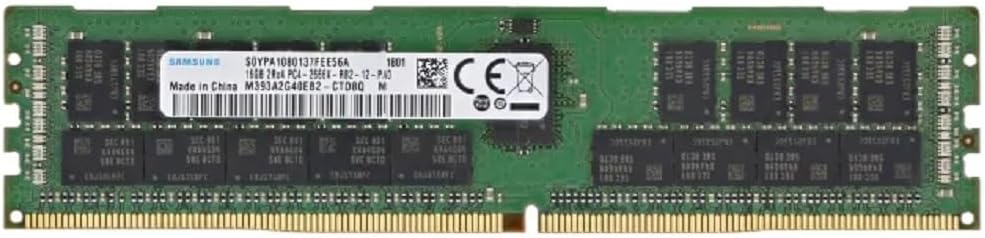
Image: A 16GB DDR4 RAM module, included in the kit, ready for installation.
5.3. Storage Device Installation (M.2 / SATA)
- For M.2 SSD: Locate the M.2 slot. Insert the M.2 SSD at an angle into the slot, then gently push it down and secure it with the provided screw.
- For SATA Drives: Connect one end of the SATA data cable to a SATA port on the motherboard and the other end to your SATA hard drive or SSD. Connect a SATA power cable from your power supply to the drive.
5.4. Прикључци за напајање
- Connect the 24-pin ATX power connector from your power supply to the 24-pin power socket on the motherboard.
- Connect the 8-pin ATX 12V power connector from your power supply to the 8-pin power socket near the CPU.
5.5. Периферне везе
- графичка картица: Insert your graphics card into one of the PCIe x16 slots and secure it. Connect any necessary PCIe power cables from your power supply to the graphics card.
- Конектори предње плоче: Connect the power button, reset button, HDD LED, power LED, and front panel USB/audio headers to their respective pins on the motherboard. Refer to the motherboard diagram for correct pin assignments.
- УСБ уређаји: Connect your keyboard, mouse, and other USB devices to the USB ports on the rear I/O panel.
- Етхернет: Connect an Ethernet cable to the Gigabit Ethernet port for network access.
- аудио: Connect your speakers or headphones to the audio output port.
6. Упутство за употребу
6.1. Почетно покретање
- After all components are installed and connected, ensure your power supply is switched on.
- Притисните дугме за напајање на кућишту рачунара.
- Систем би требало да се укључи и прикаже почетни екран BIOS/UEFI.
6.2. Подешавање BIOS-а/UEFI-ја
Upon initial boot, you may need to enter the BIOS/UEFI setup to configure settings such as boot order, date/time, and enable specific features (e.g., NVMe support). Typically, you can enter the BIOS by pressing the ДЕЛ or F2 key during the boot process.
- Navigate through the menus using arrow keys.
- Направите неопходна подешавања.
- Save changes and exit the BIOS. The system will then restart.
6.3. Инсталација оперативног система
Once the BIOS is configured, you can proceed with installing your preferred operating system (e.g., Windows, Linux) from a bootable USB drive or DVD.
7. Одржавање
Regular maintenance helps ensure the longevity and stable operation of your motherboard kit.
- Уклањање прашине: Периодично чистите прашину са матичне плоче и компоненти помоћу компримованог ваздуха. Уверите се да је систем искључен из струје пре чишћења.
- Управљање кабловима: Уверите се да су сви каблови уредно постављени и да не ометају проток ваздуха.
- Ажурирања BIOS-а: Проверите произвођача website for BIOS updates. Only update the BIOS if necessary and follow the instructions carefully.
- Ажурирања драјвера: Keep your operating system and component drivers (chipset, graphics, audio, network) updated for optimal performance and stability.
КСНУМКС. Решавање проблема
If you encounter issues with your ZSUS X99 P4 Motherboard Kit, refer to the following common troubleshooting steps:
- Нема напајања:
- Проверите све прикључке за напајање (24-пински ATX, 8-пински CPU, GPU напајање).
- Ensure the power supply switch is on.
- Тестирајте напајање помоћу другог система или тестера напајања.
- Без приказа:
- Ensure the monitor is connected to the graphics card (not the motherboard, as this CPU/motherboard combo does not have integrated graphics).
- Поново инсталирајте графичку картицу и РАМ модуле.
- Покушајте да покренете систем само са једном РАМ меморијом.
- Нестабилност/падови система:
- Проверите температуру процесора и графичке картице. Обезбедите адекватно хлађење.
- Покрените алате за дијагностику меморије да бисте проверили да ли постоје грешке у РАМ меморији.
- Уверите се да су сви драјвери ажурирани.
- Уређај за покретање није пронађен:
- Проверите везе SATA/M.2 каблова.
- Проверите редослед покретања у BIOS-у/UEFI-ју.
- Ensure the operating system is properly installed on the drive.
For more complex issues, consider consulting online forums or professional technical support.
9. Гаранција и подршка
Information regarding specific warranty terms and conditions for the ZSUS X99 P4 Motherboard Kit is not available in this manual. Please refer to the product packaging or contact your retailer for warranty details.
For technical support, please contact the vendor or retailer from whom you purchased this product. Keep your proof of purchase for any warranty claims or support inquiries.