
Производ је завршенview
The MONODEAL MD08 Air Conduction Headphones are designed for comfort and clear communication, featuring an open-ear design, Bluetooth 5.1 connectivity, and a noise-canceling microphone with a mute function. These headphones transmit sound through air conduction, providing an alternative to traditional in-ear or bone conduction devices, aiming to reduce pressure and discomfort during extended use.

Image: MONODEAL MD08 Air Conduction Headphones, showcasing the open-ear design and boom microphone.
Шта је у кутији
- Air Conduction Headphones (1 unit)
- USB-C кабл за пуњење (1 комад)
- Упутство за употребу (1 јединица)
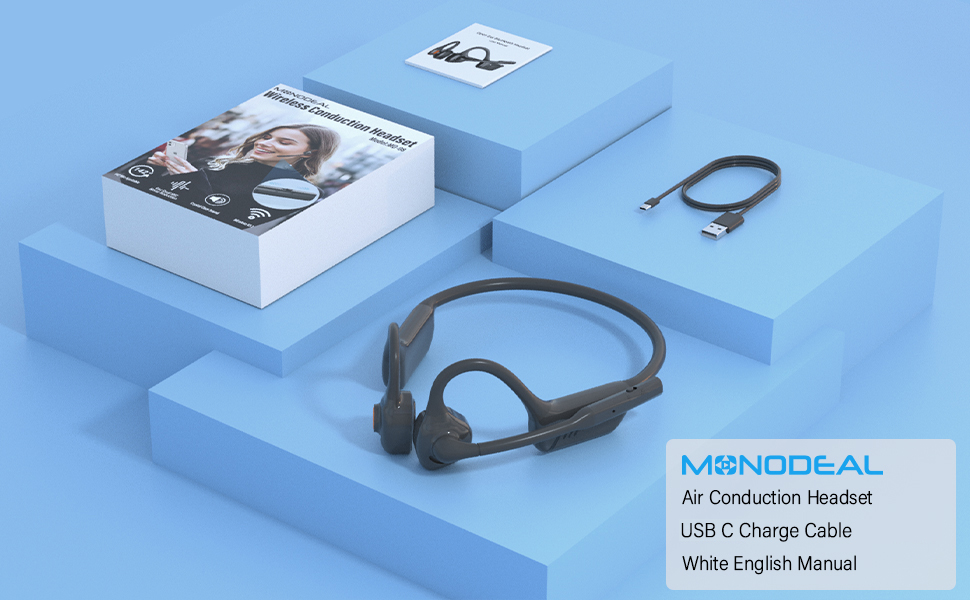
Image: The MONODEAL MD08 headphones, USB-C charging cable, and user manual laid out, representing the package contents.
Сетуп
1. Пуњење слушалица
Before initial use, fully charge the headphones. Connect the provided USB-C charging cable to the charging port on the headphones and plug the other end into a compatible USB power source. A full charge typically takes approximately 2 hours.

Image: Diagram illustrating the charging process and battery life indicators: 8 hours usage, 36 hours standby, 2 hours charging time.
2. Блуетоотх упаривање
To connect your MONODEAL MD08 headphones to a device:
- Уверите се да су слушалице искључене.
- Press and hold the multi-function button until the indicator light flashes red and blue, indicating pairing mode.
- На свом уређају (паметном телефону, таблету, рачунару) омогућите Блутут и потражите доступне уређаје.
- Select "MD08" from the list of found devices to connect. A voice prompt will confirm successful pairing.
3. Multi-Point Connection (Connecting to Two Devices Simultaneously)
The MD08 headphones support connecting to two Bluetooth devices at the same time. This allows you to seamlessly switch between audio sources, for example, listening to music on your tablet and answering calls on your phone.
- 1. корак: Pair the headphones with the first device (e.g., your phone) as described in the Bluetooth Pairing section.
- 2. корак: Once connected to the first device, turn off Bluetooth on the first device. This will put the headphones back into pairing mode.
- 3. корак: Pair the headphones with the second device (e.g., your tablet).
- 4. корак: Turn Bluetooth back on for the first device. The headphones should automatically reconnect to both devices.
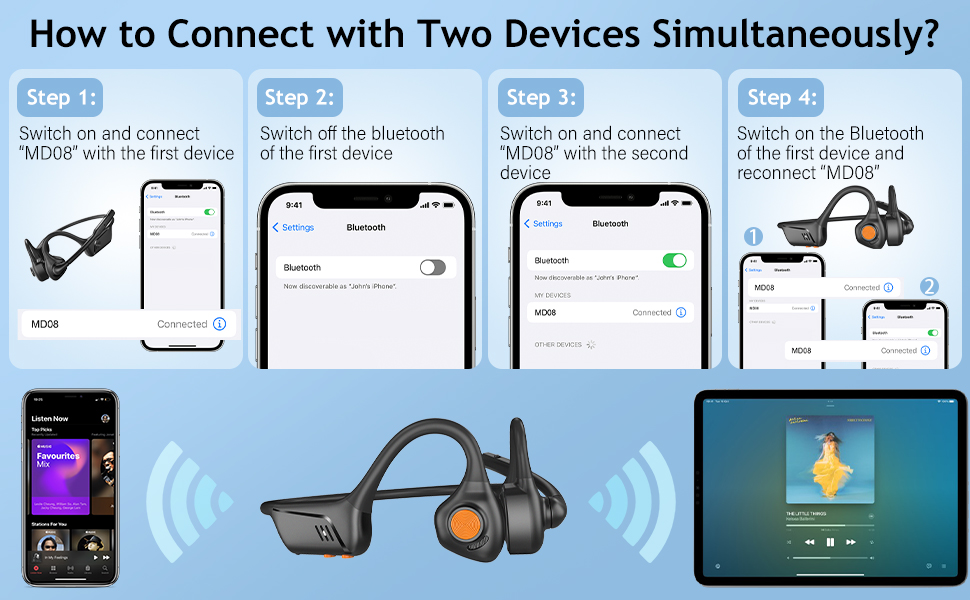
Image: Visual guide demonstrating the four steps to connect the MD08 headphones to two devices simultaneously, showing a phone and a tablet.
Упутство за употребу
1. Ношење слушалица
Position the headphones with the speakers resting gently in front of your ears, allowing the sound to be transmitted through air conduction. The flexible band should rest comfortably around the back of your head. The open-ear design ensures you remain aware of your surroundings.

Image: A man wearing the MD08 headphones, illustrating the open-ear design and comfortable fit, emphasizing its lightweight nature (40g) and stable design.
2. Основне контроле
The headphones feature a multi-functional button and volume controls for easy operation:
- Укључивање/искључивање: Притисните и држите вишефункционално дугме.
- Пусти/паузирај: Једном притисните вишефункционално дугме.
- Одговори/заврши позив: Једном притисните вишефункционално дугме током долазног позива или активног позива.
- Одбиј позив: Притисните и држите вишефункционално дугме током долазног позива.
- Појачавање/утишавање: Користите посебна дугмад за јачину звука.
- Следећа нумера: Двапут притисните вишефункционално дугме.
- Претходни запис: Трипут притисните вишефункционално дугме.
- Активирајте гласовног асистента (Siri/Google Assistant): Притисните и држите вишенаменско дугме 2 секунде.

Image: A user demonstrating the controls of the MD08 headphones, with icons indicating functions like Play/Pause, Skip Track, Control Calls, Volume+/-, and Voice Assistant.
3. Функција искључивања звука микрофона
The MD08 headphones feature a dedicated mute button on the microphone boom. During a call, you can easily touch this button to mute or unmute your microphone, providing privacy when needed.

Image: A woman using the MD08 headphones, highlighting the microphone mute function and environmental noise reduction technology, showing 96% noise filtered during calls.
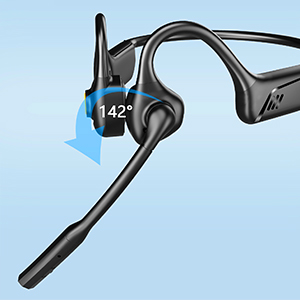
Image: Close-up of the MD08 microphone, showing its 142-degree rotation capability for optimal positioning.
Одржавање
- Чишћење: Користите меку, суву крпу за чишћење слушалица. Избегавајте употребу јаких хемикалија или абразивних материјала.
- Складиштење: Слушалице чувајте на хладном и сувом месту, даље од директне сунчеве светлости и екстремних температура.
- Пуњење: Да бисте продужили век трајања батерије, избегавајте често потпуно пражњење батерије. Редовно пуните слушалице, чак и ако их не користите дуже време.
- Отпорност на воду: While designed for active use, avoid submerging the headphones in water.
Решавање проблема
| Проблем | Решење |
|---|---|
| Слушалице се не укључују. | Уверите се да су слушалице потпуно напуњене. Прикључите их на извор напајања и покушајте поново. |
| Упаривање са уређајем није могуће. |
|
| Нема звука или је јачина звука ниска. |
|
| Микрофон не ради. |
|
| Повремена веза. |
|
Спецификације
| Феатуре | Детаљ |
|---|---|
| Назив модела | МД08 |
| Технологија повезивања | бежични (Блуетоотх) |
| Блуетоотх верзија | 5.1 |
| Блуетоотх домет | До 10 метара (33 стопе) |
| Тип аудио драјвера | Драјвер за ваздушну проводљивост |
| Battery Life (Music/Talk Time) | До 8 сати |
| Време приправности | До 36 сати |
| Време пуњења | Отприлике 2 сата |
| Порт за пуњење | УСБ-Ц |
| Тежина | 1.41 унци (приближно 40 г) |
| Постављање уха | Отворено ухо |
| Контрола буке | Active Noise Cancellation (for microphone) |
| Посебне карактеристике | Microphone Included, Multipoint Pairing, Rechargeable Battery, Volume Control, Mute Function |
Гаранција и подршка
MONODEAL products are designed and manufactured to high-quality standards. For warranty information, technical support, or customer service inquiries, please refer to the contact information provided with your purchase or visit the official MONODEAL webсајту.
Manufacturer: MONODEAL