
Rfiver MT200
Rfiver Mobile TV Stand MT200 User Manual
Model: MT200 | For 32-70 Inch TVs
1. Увод
This manual provides essential information for the safe and correct assembly, operation, and maintenance of your Rfiver Mobile TV Stand MT200. Please read all instructions carefully before beginning assembly and retain this manual for future reference.
Безбедносне информације
- Пре склапања се уверите да су сви делови присутни и неоштећени. Не користите ако неки делови недостају или су неисправни.
- Do not exceed the maximum load capacity of 40 kg (88 lbs) for the TV and 10 kg (22 lbs) for the media shelf.
- This stand is designed for TVs between 32 and 70 inches.
- Always ensure the casters are locked when the stand is in a stationary position to prevent accidental movement.
- Assembly should be performed by at least two people for safety.

Слика 1.1: Готовоview of the Rfiver Mobile TV Stand MT200 with a TV and laptop.
2. Садржај пакета
Проверите да ли су све компоненте наведене у наставку укључене у ваше паковање. Ако неки делови недостају или су оштећени, обратите се корисничкој подршци.
- Base (X-shaped)
- Vertical Support Pillars (2)
- Носач за монтажу телевизора
- Полица за медије
- Casters (4, with locking mechanism)
- Hardware Kit (various screws, washers, spacers, Allen wrench)
- Клипови за управљање кабловима

Image 2.1: Key features and components of the TV stand.
3. Упутства за подешавање
Follow these steps carefully to assemble your Rfiver Mobile TV Stand.
3.1 VESA Compatibility and TV Requirements
Before assembly, ensure your TV meets the following criteria:
- Величина екрана: 32 до 70 инча
- Капацитет тежине: Максимално 40 кг (88 лбс)
- ВЕСА узорак: Compatible with VESA patterns from 100x100 mm to 400x400 mm. (e.g., 100x100, 200x100, 200x200, 300x200, 400x200, 300x300, 400x300, 400x400 mm).
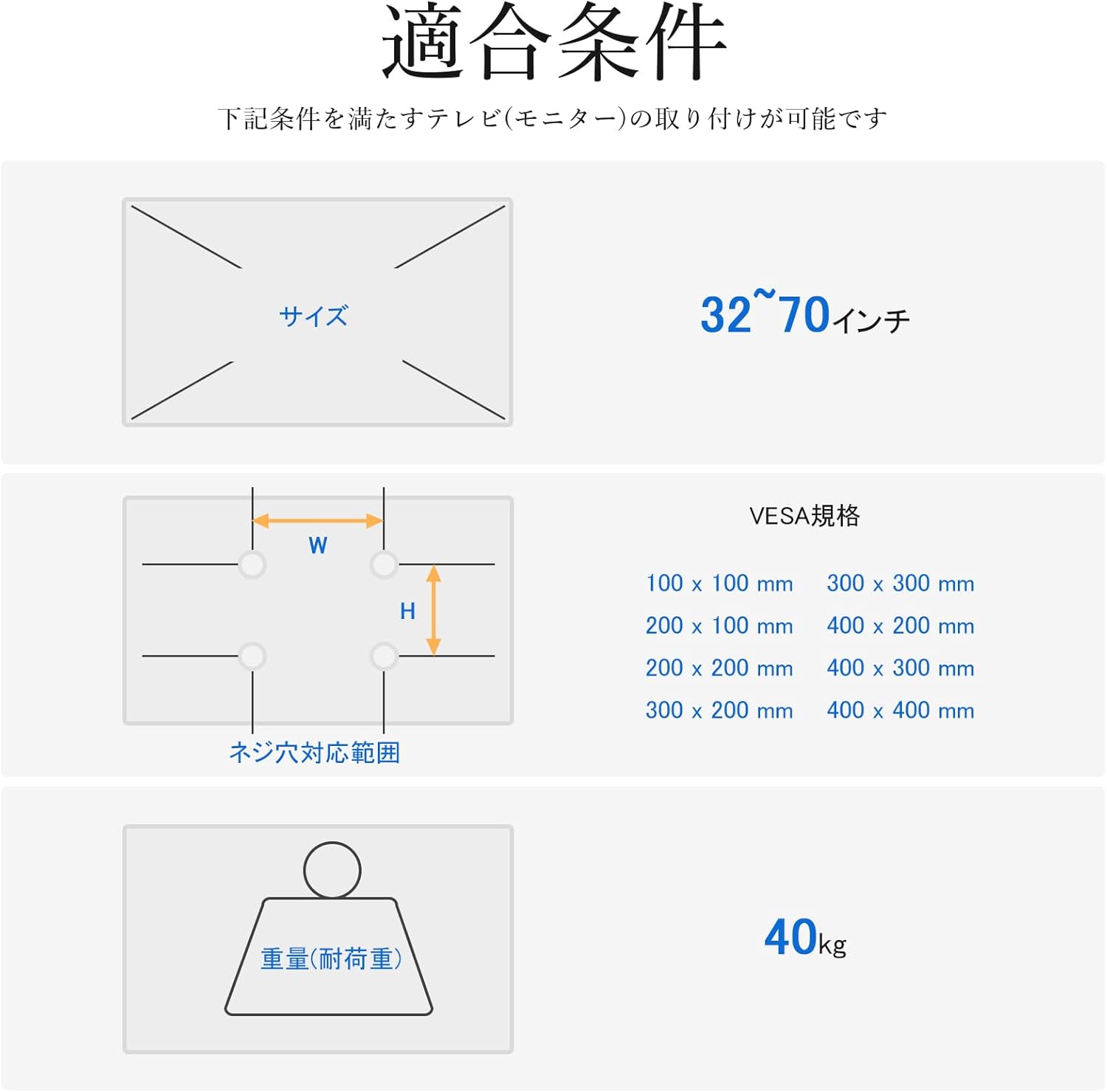
Image 3.1: VESA mounting hole patterns, compatible TV sizes, and maximum load capacity.
3.2 Кораци монтаже
- Саставите базу: Attach the four casters to the X-shaped base using the provided screws. Ensure they are securely tightened.
- Attach Vertical Pillars: Secure the two vertical support pillars to the assembled base using the designated hardware.
- Install TV Mounting Bracket: Attach the TV mounting bracket to the top of the vertical pillars. Ensure it is oriented correctly and securely fastened.
- Монтирајте телевизор: Carefully attach the TV to the mounting bracket. Use the appropriate screws and spacers from the hardware kit that match your TV's VESA pattern. Ensure the TV is centered and level.
- Инсталирајте медијску полицу: Attach the media shelf to the vertical pillars at your desired height. The shelf is adjustable and can hold devices up to 10 kg.
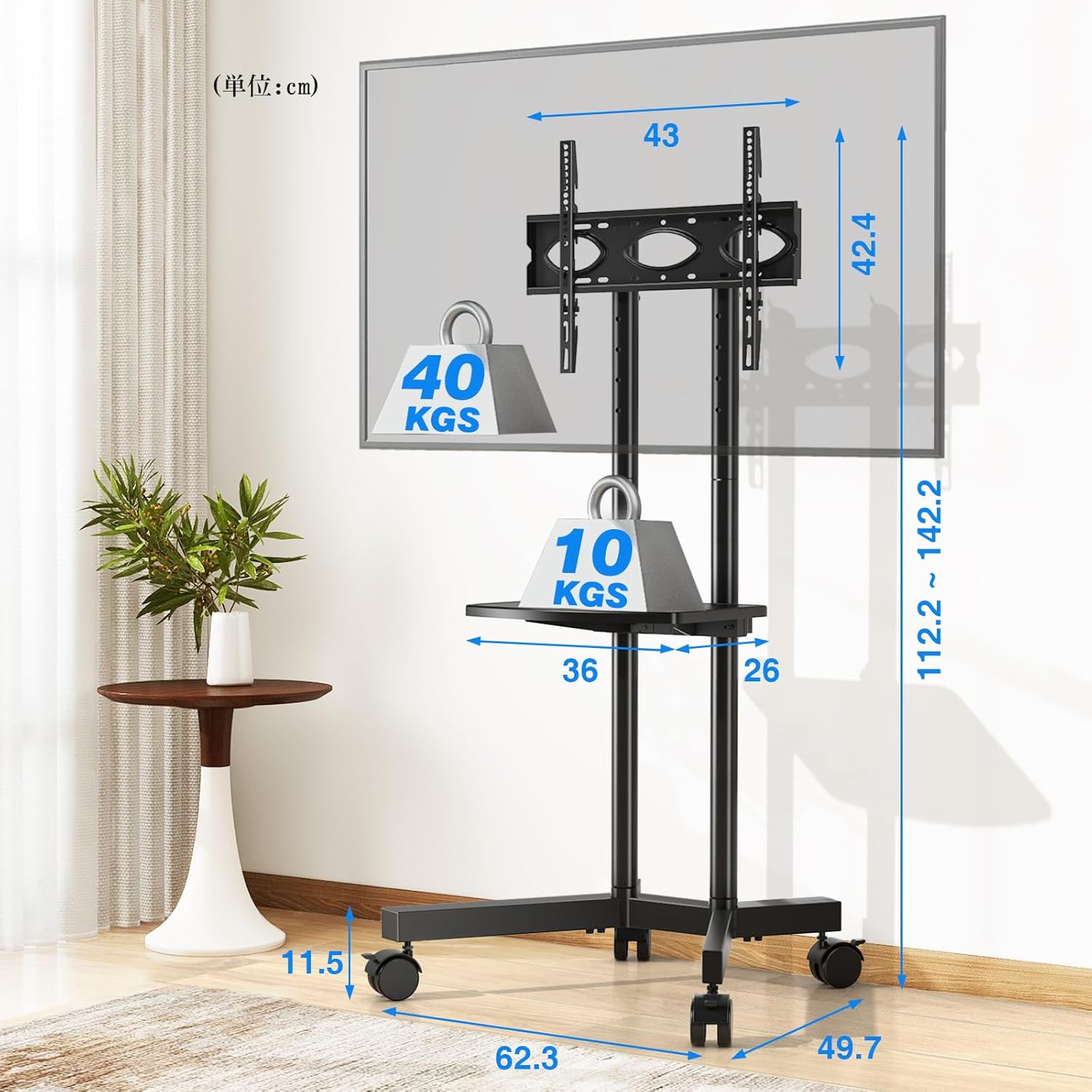
Image 3.2: Detailed dimensions and load capacities of the stand and shelf.
4. Упутство за употребу
4.1 Подешавање висине
The Rfiver Mobile TV Stand offers flexible height adjustment for optimal viewинг.
- Укупна висина: The stand's total height can be adjusted from 112.2 cm to 142.2 cm.
- TV Plate Adjustment: The TV plate has 5 adjustable height levels.
- Подешавање носача: The TV mounting brackets have 3 adjustable height levels.
To adjust the height, loosen the securing bolts on the vertical pillars and TV plate/brackets, slide to the desired height, and re-tighten all bolts securely.

Image 4.1: Height adjustment options for the TV plate and mounting brackets.
4.2 Мобилност и стабилност
The stand is equipped with four 360° rotating casters for easy movement. Each caster includes a stopper for stability.
- Померање постоља: Unlock all four casters by flipping their stoppers upwards. Gently push the stand to its new location.
- Осигуравање постоља: Once in the desired position, lock all four casters by pressing their stoppers downwards to prevent unintended movement.

Image 4.2: Detail of the 360° rotating casters with locking function.
4.3 Управљање кабловима
Integrated cable management clips help keep your cables organized and out of sight, contributing to a tidy setup.
- Route TV and device cables along the vertical pillars.
- Use the provided cable management clips to secure the cables neatly to the pillars.
5. Одржавање
Редовно одржавање осигурава дуготрајност и безбедан рад вашег ТВ сталака.
- Чишћење: Обришите постоље меком, сувом крпом. За тврдокорне мрље користите благо суву крпу.amp крпом и благим детерџентом, а затим добро осушите. Избегавајте абразивна средства за чишћење.
- Проверите везе: Периодично проверавајте све завртње и вијке да бисте били сигурни да су чврсто затегнути. По потреби поново затегните.
- Функционалност точкова: Keep casters free of debris to ensure smooth movement. Lubricate if needed.
КСНУМКС. Решавање проблема
Ако наиђете на било какве проблеме, погледајте следеће уобичајене проблеме и решења:
- Сталак је нестабилан:
- Ensure all screws and bolts are securely tightened.
- Verify the TV weight does not exceed 40 kg and is centered on the bracket.
- Ensure the stand is on a flat, level surface. - Difficulty moving the stand:
- Check that all casters are unlocked.
- Clean any debris from the caster wheels.
- If casters are stiff, apply a small amount of lubricant. - TV does not fit the bracket:
- Re-check your TV's VESA pattern against the stand's compatibility (100x100mm to 400x400mm).
- Ensure you are using the correct screws and spacers from the hardware kit. - Делови који недостају:
- Double-check the package contents against Section 2. If parts are genuinely missing, contact customer support.
7. Спецификације
| Феатуре | Спецификација |
|---|---|
| Број модела | МТ200 |
| Компатибилне величине телевизора | 32-70 инча |
| Maximum TV Load Capacity | 40 кг (88 лбс) |
| Максимални капацитет оптерећења полице | 10 кг (22 лбс) |
| ВЕСА компатибилност | 100x100 мм до 400x400 мм |
| Опсег подешавања висине | 112.2 цм - 142.2 цм |
| Media Shelf Dimensions | 36 цм к 26 цм |
| Димензије производа (Д к Ш к В) | 62.3 к 49.7 к 137.2 цм |
| Тежина производа | 7.2 кг |
| Материјал | легирани челик |
| Боја | Црно |
| Мовемент Типе | Swivel (Casters) |
| Начин склапања | Флоор Моунт |
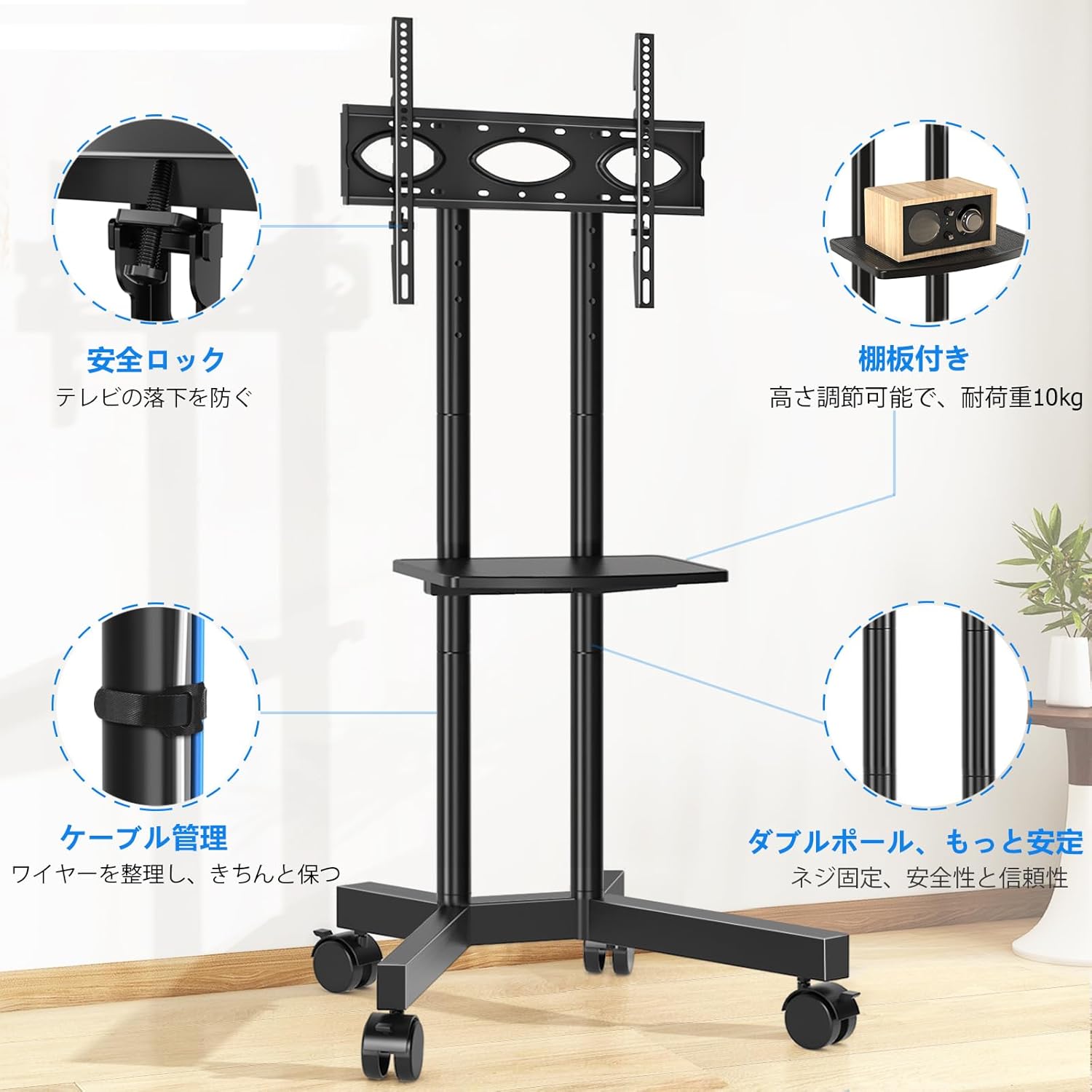
Image 7.1: The Rfiver Mobile TV Stand in a living room environment.
8. Гаранција и подршка
Rfiver products are manufactured with quality and durability in mind. For warranty information, technical support, or to report missing/damaged parts, please contact your retailer or the manufacturer directly. Please have your model number (MT200) and purchase date available when contacting support.
Ask a question about this manual
Ask about setup, troubleshooting, compatibility, parts, safety, or missing instructions. Manuals+ will review the question and use this page’s manual context to help answer it.