
1. Увод
This manual provides essential information for setting up, operating, maintaining, and troubleshooting your TRIGKEY Mini PC S7 Pro AMD Ryzen 7 7840HS. Please read this manual thoroughly before using the device to ensure optimal performance and longevity.
2. Садржај пакета
Проверите да ли су све ставке присутне у пакету:
- 1 x TRIGKEY Mini PC S7 Pro
- 1 x Power Adapter (EU plug)
- 1 к Упутство за употребу
- 1 x VESA носач
- 2 x HDMI Cables (100 cm and 25 cm)
3. Производ је готовview
Familiarize yourself with the ports and features of your Mini PC.

Слика 3.1: Предњи панел изнадview
This image displays the front panel of the TRIGKEY Mini PC S7 Pro, highlighting the power button, audio jack, and USB ports for easy access.
Слика 3.2: Задњи панел изнадview
This image illustrates the rear panel of the TRIGKEY Mini PC S7 Pro, detailing the power input, HDMI, DisplayPort, USB, and Ethernet connections.
3.1. Front Panel Ports
- Дугме за напајање: Притисните да бисте укључили/искључили уређај.
- 3.5 мм аудио прикључак: За слушалице или микрофоне.
- Type-C (10Gbps): High-speed data transfer and display output.
- USB 3.2 (10Gbps) x2: Брзи пренос података за периферне уређаје.
- CLR CMOS: Button to clear CMOS settings (use with caution).
3.2. Портови на задњој плочи
- ДЦ Јацк: Повежите адаптер за напајање овде.
- HDMI 2.0 (4K 60Hz): Повежите се са екраном.
- DP 1.4 (Max 4K 144Hz): Повежите се са екраном.
- USB 2.0 (480Mbps): For standard peripherals.
- USB4 (40Gbps/DP1.4): High-speed data, display output, and power delivery.
- RJ45 2.5G: За жичану мрежну везу.
4. Упутства за подешавање
4.1. Повезивање периферних уређаја
- Connect your monitor(s) to the HDMI, DisplayPort, or USB4 ports using the provided HDMI cables or compatible cables.
- Connect your keyboard and mouse to any available USB ports.
- For wired internet, connect an Ethernet cable to the RJ45 port.
4.2. Укључивање
- Connect the power adapter to the DC Jack on the Mini PC.
- Укључите адаптер за напајање у утичницу.
- Press the Power Button on the front panel. The power LED will illuminate.
4.3. Initial Operating System Setup
The Mini PC comes with an activated OS Pro system. Upon first boot, follow the on-screen instructions to complete the initial setup, including language, region, and user account creation. The device also supports other operating systems like WOS and Ubuntu, which can be installed by the user if desired.
5. Упутство за употребу
5.1. Multi-Display Configuration
The TRIGKEY Mini PC S7 Pro supports up to three displays simultaneously, with resolutions up to 4K at 120Hz/160Hz, utilizing the HDMI, DisplayPort, and USB4 outputs. This allows for enhanced productivity and immersive visual experiences.

Figure 5.1: Triple Display Support
This image demonstrates the capability of the Mini PC to connect to and drive three independent displays, enhancing multitasking and visual workspace.
5.2. Мрежна повезаност
- Ви-Фи 6: Connect to wireless networks for high-speed internet access.
- Блуетоотх КСНУМКС: Pair with wireless peripherals such as keyboards, mice, and audio devices.
- 2.5G Ethernet: For stable and high-bandwidth wired network connections.
5.3. Напредне функције
- Network Wake-up (Wake-on-LAN): Allows the Mini PC to be powered on remotely via the network.
- Power Wake-up: Configurable to automatically power on the device at a scheduled time or after a power loss.
6. Одржавање и надоградње
6.1. Чишћење
Regularly clean the exterior of the Mini PC with a soft, dry cloth. Use compressed air to clear dust from ventilation openings to maintain optimal airflow and cooling efficiency. Ensure the device is powered off and unplugged before cleaning.

Figure 6.1: CPU Silent Fan and Heat Sink
This diagram illustrates the internal cooling components, including the silent fan, heat pipe, and heat fins, designed for efficient heat dissipation.
6.2. RAM Upgrade
The Mini PC supports DDR5 5600MHz RAM and has two SO-DIMM slots, allowing for a maximum of 64GB RAM (32GB per slot). To upgrade, carefully open the chassis, locate the RAM slots, and install compatible DDR5 SO-DIMM modules.

Figure 6.2: DDR5 5600MHz RAM Upgrade
This image highlights the DDR5 5600MHz RAM modules, indicating the upgrade potential for system memory.
6.3. Storage Upgrade
The device features dual PCIe 4.0 NVMe SSD slots for high-speed storage. You can upgrade or add additional M.2 2280 NVMe SSDs to expand storage capacity or improve performance. Ensure new SSDs are compatible with the PCIe 4.0 standard.

Figure 6.3: Dual PCIe 4.0 NVMe SSDs
This image illustrates the dual PCIe 4.0 NVMe SSD slots, emphasizing the high-speed and low-latency storage capabilities.
КСНУМКС. Решавање проблема
If you encounter issues with your Mini PC, refer to the following common troubleshooting steps:
- Нема напајања: Ensure the power adapter is securely connected to both the Mini PC and a working power outlet. Try a different outlet.
- Без приказа: Check all display cable connections (HDMI, DP, USB4) to the monitor and the Mini PC. Ensure the monitor is set to the correct input source. Try connecting to a different display or using a different cable.
- Нема интернет везе: For wired connections, check the Ethernet cable and router status. For Wi-Fi, ensure Wi-Fi is enabled in the operating system and you are connected to the correct network with the correct password.
- Периферни уређај није откривен: Try connecting the peripheral to a different USB port. Ensure drivers are installed if required by the peripheral.
- Успоравање система: Check for background applications consuming resources. Ensure sufficient free storage space. Consider upgrading RAM or SSD if performance issues persist.
- прегревање: Ensure the Mini PC has adequate ventilation and is not placed in an enclosed space. Clean dust from the vents.
- BIOS/CMOS Reset: If experiencing boot issues, use the CLR CMOS button on the front panel (refer to section 3.1) to reset BIOS settings to default. Power off and unplug the device before performing this action.
8. Спецификације
Detailed technical specifications for the TRIGKEY Mini PC S7 Pro AMD Ryzen 7 7840HS.

Figure 8.1: Gaming Performance Overview
This image presents benchmark results for various games, demonstrating the Mini PC's graphical capabilities and expected frame rates.
| Феатуре | Спецификација |
|---|---|
| Назив модела | S7 Pro 7840HS |
| Број модела ставке | S6 6600H |
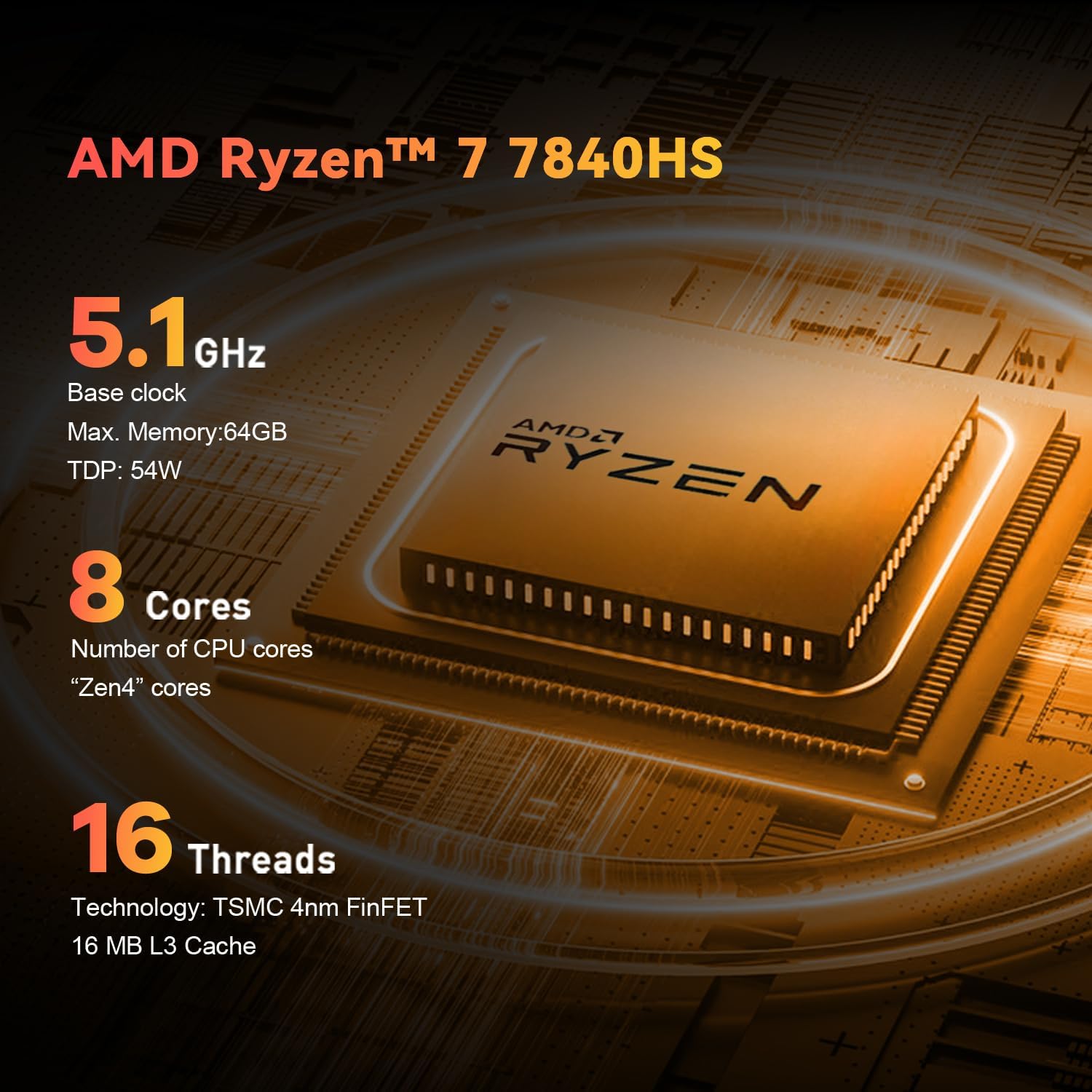
| Процесор | AMD Ryzen 7 7840HS (8 језгара, 16 нити, до 5.1 GHz) |
| Графика | Integrated AMD Radeon 780M (12 CUs, 2700 MHz) |
| РАМ | 32GB DDR5 (5600MHz), 2 SO-DIMM slots, Max 64GB |
| Складиштење | 500GB PCIe 4.0 NVMe SSD, Dual M.2 2280 slots |
| Оперативни систем | OS Pro (activated), supports WOS, Ubuntu |
| Бежично повезивање | Wi-Fi 6 (802.11ax), Bluetooth 5.2 |
| Жичано повезивање | RJ45 2.5G Ethernet |
| Видео Оутпут | HDMI 2.0 (4K 60Hz), DisplayPort 1.4 (Max 4K 144Hz), USB4 (DP1.4) |
| УСБ портови | 2 x USB 3.2 Gen2 (10Gbps), 1 x USB 2.0 (480Mbps), 1 x USB4 (40Gbps) |
| Аудио портови | 1 x 3.5mm Audio Jack (HP&MIC) |
| Димензије | 16 к 13.9 к 10.2 цм |
| Тежина | 1.13 кг |
| Метод хлађења | Ваздушно хлађење |
9. Гаранција и подршка
TRIGKEY provides comprehensive support for your Mini PC:
- гаранција: Једногодишња ограничена гаранција од датума куповине.
- Служба за кориснике: 24/7 personalized customer service.
- техничка подршка: Lifetime technical support is available for all TRIGKEY products.
For technical assistance or warranty claims, please refer to the contact information provided on the TRIGKEY official webсајт или вашу документацију о куповини.