Увод
The Tilta Khronos Lightweight Kit is a mobile filmmaking solution designed for the iPhone 15 Pro. This kit enhances your phone's capabilities for professional-grade video capture by providing a secure case and adjustable handles, forming the foundation of an expandable ecosystem for various filmmaking accessories.
Кључне карактеристике укључују:
- Custom Designed: Lightweight mobile filmmaking solution compatible with iPhone 15 Pro.
- Прошириво: Part of the Khronos Ecosystem, supporting focus side handles, cooling modules, filters, on-board lights, and USB-C hubs (available separately).
- Закључавање Цлamp Дизајн: Features a secure way to connect accessories and mount the system to tripods and other support systems.
- Passthrough Power: Integrated electronic contact points in the Khronos Case expand options for powering accessories within the ecosystem.
- Rotatable Side Handles: Supports comfortable operating in horizontal and vertical filming configurations.
Шта је у кутији
The Tilta Khronos Lightweight Kit for iPhone 15 Pro includes the following components:
- 1x Tilta Khronos Case Compatible with iPhone 15 Pro (Titanium White)
- 2x Khronos Adjustable Handle (Titanium White)

Image: All components included in the Tilta Khronos Lightweight Kit, laid out on a surface.
Setup Guide & Overview
This video provides a comprehensive guide to setting up and using the Tilta Khronos Ecosystem, including the case, handles, and various accessories.
Video: Tilta Khronos Ecosystem for iPhone Setup Guide & Overview. This video demonstrates the assembly and functionality of the Khronos system components.
1. Installing the iPhone 15 Pro into the Khronos Case
- Carefully place your iPhone 15 Pro into the Khronos Case.
- Secure the phone by tightening the four screws located in each corner of the case.
2. Attaching Adjustable Handles
The Khronos case features multiple mounting points with electronic contacts for accessories.
- Identify the desired mounting points on the side of the case. Note that the bottom two points on each side form one mounting point, and the top two form another.
- Align the adjustable handle with the chosen mounting point, ensuring the lever on the handle faces outwards.
- Press the handle firmly into the mounting point until the internal pins engage.
- Push down the lever on the handle to securely lock it in place.

Image: The Tilta Khronos Lightweight Kit with adjustable handles extended, showing the iPhone 15 Pro mounted horizontally.
3. Connecting the Focus PD Handle (if applicable)
The Focus PD Handle provides power to the case and phone, along with focus and zoom control in the Blackmagic Camera app.
- Connect the USB-C cable from the Focus PD Handle to the iPhone's USB-C port.
- Align the handle with a side mounting point on the case and press firmly to engage the pins. Secure with the lever.
- To power on the handle, hold down the record button. An LED indicator will show battery life.
- To pair with the Blackmagic Camera app: Ensure Bluetooth is enabled on your iPhone. In the app's settings, navigate to 'Accessories' and select the handle's name under 'Nucleus Wireless Lens Control'.
- To use with the native Camera app: Double-tap the function button on the handle until the LED is green. Pair the handle via your iPhone's Bluetooth settings. The record button will act as a shutter for photos and start/stop for video.
4. Utilizing the Quick Release USB-C Hub (if applicable)
The USB-C Hub expands connectivity options for external devices and power.
- Attach the USB-C Hub to the bottom of the case via the mounting points. It can also be mounted to a tripod using its Arca-Swiss plate or 1/4"-20 thread.
- Connect the short USB-C cable from the iPhone's USB-C port to the corresponding port on the hub.
- The hub provides a PD USB-C port for external power, two additional USB-C ports for accessories or data transfer, an HDMI port for video output, and a 3.5mm microphone jack for external audio.

Image: The Tilta Khronos Quick Release USB-C Hub, showing its various ports for expanded connectivity.
Прибор
The Khronos Ecosystem offers a range of accessories to enhance your mobile filmmaking experience:
Khronos Cooling Module
The cooling module attaches magnetically (MagSafe) to the back of the case. It can draw power from the case's electronic contacts to activate its fans, providing additional cooling for extended shooting sessions.

Image: The Tilta Khronos Cooling Module attached to the back of the iPhone 15 Pro case.
Khronos Mini LED Panel
This daylight-balanced LED light connects to any mounting point with electronic contacts. It does not have an internal battery and requires power from the case (e.g., via the Focus PD Handle or USB-C Hub). Hold the power button to turn it on, and single-tap to adjust intensity.
Khronos SSD Holder
The SSD holder connects to any mounting point on the case, allowing you to attach various SSDs for external recording directly from your iPhone.
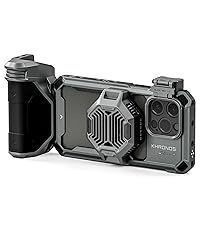
Image: The Tilta Khronos SSD Holder mounted on the side of the iPhone 15 Pro case.
Khronos Cold Shoe Receiver
This accessory provides a cold shoe mount for attaching external monitors, microphones, or other cold shoe compatible devices to your rig.

Image: The Tilta Khronos Cold Shoe Receiver, providing a standard cold shoe mount.
Khronos NATO Rail with 1/4"-20 Thread
This versatile mount allows you to attach NATO rail compatible accessories or use the 1/4"-20 thread for articulating arms or custom rigging solutions.

Image: The Tilta Khronos NATO Rail with a 1/4"-20 thread, offering versatile mounting options.
Khronos Filter Tray Holder & Lens Mounts
The filter tray holder snaps over the iPhone's lenses, allowing for quick attachment and removal of various filters (e.g., ND filters) via magnets. Additionally, lens mounts are available for T-series by Photo Gear and 17mm threaded lenses, expanding your focal length options beyond the iPhone's native lenses.
Спецификације
- Боја: Титанијум бела
- Бренд: Тилта
- Компатибилни уређаји: Tilta Khronos Ecosystem Accessories, iPhone 15 Pro
- Тежина артикла: 3.5 фунти
- УПЦ: 810153170532
- Произвођач: Тилта
- Препорука за максималну тежину: 5 фунти
- Ниво водоотпорности: Није водоотпоран
Гаранција и подршка
This product comes with a 2-year mechanical warranty and a 1-year electronic warranty from the manufacturer. For technical support or warranty claims, please contact Tilta customer service.
Решавање проблема
- Accessory Not Securing: Ensure the accessory is correctly aligned with the mounting point and the release pins are fully engaged. For handles, ensure the lever is pushed down to lock.
- Power Issue with Accessories: Verify that the case itself is receiving power (e.g., from a Focus PD Handle or USB-C Hub). Ensure all electronic contact points are clean and properly aligned.
- Focus PD Handle Pairing Issues: Confirm Bluetooth is enabled on your iPhone. For Blackmagic Camera app, check 'Accessories' settings. For native Camera app, ensure the handle's LED is green and it's paired in iPhone's Bluetooth settings. If issues persist, clear the paired list on the handle by triple-pressing the function button.
Одржавање
To ensure the longevity and optimal performance of your Tilta Khronos Lightweight Kit, follow these maintenance guidelines:
- Чишћење: Use a soft, dry cloth to wipe down the case and accessories. Avoid abrasive cleaners or solvents.
- Складиштење: Комплет се чува на хладном и сувом месту, заштићено од директне сунчеве светлости и екстремних температура.
- инспекција: Periodically check all screws and connection points for tightness. Tighten as necessary to maintain security.