
1. Увод
The Brilagi VELVET SMART LED Ceiling Light is a high-efficiency, dimmable LED lighting solution designed for indoor use. With 24 watts of power and 230 volts, it offers significant energy savings. Its modern black and gold design complements various interior styles. Featuring Wi-Fi Tuya technology, this ceiling light allows remote control of brightness and color temperature (2700-6500K) via an application, and also includes a remote control for convenience. The light has a 45 cm diameter and comes with mounting hardware.
2. Важна безбедносна упутства
- Пажљиво прочитајте сва упутства пре инсталације и употребе.
- Ensure the power supply is disconnected at the main circuit breaker before installation or maintenance.
- Инсталацију треба да обави квалификовани електричар ако нисте сигурни.
- Не модификујте производ ни на који начин.
- Овај производ је намењен само за употребу у затвореном простору. Не излагати влази или екстремним температурама.
- Држите материјале за паковање ван домашаја деце.
3. Садржај пакета
Проверите да ли су све компоненте присутне пре почетка инсталације.
- Brilagi VELVET SMART LED Ceiling Light (1 unit)
- Даљински управљач (1 јединица)
- Монтажни прибор (вијци, анкери)
- Кориснички приручник (овај документ)
4. Подешавање и инсталација
The Brilagi VELVET SMART LED Ceiling Light is designed for flush ceiling mounting and does not require assembly.
4.1. Mounting the Ceiling Light
- Искључите напајање: Before starting, ensure the power supply to the installation area is completely off at the main circuit breaker.
- Припремите површину за монтажу: Mark the drilling points on the ceiling using the light fixture's mounting bracket as a template.
- Избушите рупе: Drill holes at the marked points and insert appropriate wall anchors if necessary.
- Повежите ожичење: Connect the household electrical wires to the light fixture's wires according to local electrical codes (Live to Live, Neutral to Neutral, Ground to Ground). Ensure connections are secure.
- Сигурно причвршћивање: Attach the light fixture to the ceiling using the provided mounting hardware. Ensure it is securely fastened.
- Врати струју: Када је инсталација завршена, вратите напајање на главном прекидачу.

Image: The Brilagi VELVET SMART LED Ceiling Light seamlessly integrated into a modern living room setting, showcasing its aesthetic appeal when installed.
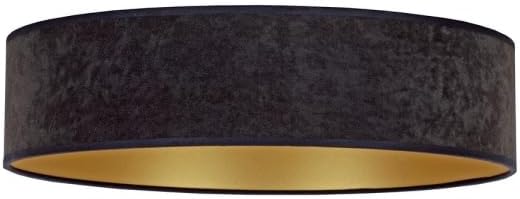
Слика: Детаљна view of the Brilagi VELVET SMART LED Ceiling Light, highlighting its black exterior finish and the contrasting gold interior, which enhances light reflection.
4.2. Упаривање даљинског управљача
The remote control is typically pre-paired. If not, or if you need to re-pair:
- Уверите се да је светло укључено.
- Within 5 seconds of turning on the light, press and hold the "ON/OFF" button on the remote control until the light flashes, indicating successful pairing.

Image: The included white remote control, featuring buttons for power, brightness adjustment, color temperature control, and preset scene selections for convenient operation.
4.3. Wi-Fi (Tuya App) Setup
- Преузмите апликацију Туиа Смарт: Download and install the "Tuya Smart" app from your smartphone's app store (iOS or Android).
- Регистрација/Пријава: Отворите апликацију и региструјте се за нови налог или се пријавите ако га већ имате.
- Додај уређај: Додирните икону „+“ у горњем десном углу апликације да бисте додали нови уређај.
- Изаберите осветљење: Choose "Lighting" or "Light Source (Wi-Fi)" from the device categories.
- Enter Wi-Fi details: Ensure your phone is connected to a 2.4GHz Wi-Fi network. Enter your Wi-Fi password in the app.
- Reset Light for Pairing Mode: Turn the light ON-OFF-ON-OFF-ON (with 2-second intervals) until the light starts blinking rapidly. This indicates it's in pairing mode.
- Потврдите трептање: У апликацији потврдите да индикаторска лампица брзо трепери.
- Повежите се: The app will search for and connect to the light. Once connected, you can rename the device.
5. Упутство за употребу
5.1. Коришћење даљинског управљача
The remote control provides convenient access to the light's primary functions:
- УКЉУЧЕНО/ИСКЉУЧЕНО: Press the central button to turn the light on or off.
- Подешавање осветљености: Use the "+" and "-" buttons to increase or decrease the light intensity.
- Температура боје: Adjust the color temperature from warm white (2700K) to cool white (6500K) using the dedicated buttons.
- Унапред подешене сцене: Select from various pre-programmed lighting scenes (e.g., night mode, reading mode) using the scene buttons.
Image: The remote control layout, illustrating the functions of each button for controlling the ceiling light's features.
5.2. Коришћење апликације Туиа Смарт
The Tuya Smart app offers advanced control and customization options:
- Даљинско укључивање/искључивање: Control the light from anywhere with an internet connection.
- Безстепено затамњење: Precisely adjust brightness levels.
- Контрола температуре боје: Fine-tune the color temperature across the 2700K-6500K range.
- Прилагођавање сцене: Create and save your own custom lighting scenes.
- Заказивање: Подесите тајмере и распореде за паљење/гашење светла или аутоматску промену подешавања.
- Контрола гласом: Integrate with voice assistants like Amazon Alexa or Google Assistant (requires compatible device and setup within the Tuya app).
6. Одржавање
- Чишћење: Ensure the power is off before cleaning. Wipe the light fixture with a soft, dry cloth. Do not use abrasive cleaners or solvents.
- ЛЕД: Интегрисани ЛЕД извор светлости је дизајниран за дуготрајну употребу и корисник га не може заменити.
- даљински управљач: Replace batteries (type not specified, assume standard AAA or button cell) when the remote's range decreases or it stops responding.
КСНУМКС. Решавање проблема
| Проблем | Могући узрок | Решење |
|---|---|---|
| Светлост се не пали. | Нема напајања; лабаво ожичење; неисправан прекидач. | Check circuit breaker. Verify wiring connections. Test with another switch if possible. |
| Даљински управљач не ради. | Batteries depleted; remote not paired. | Replace remote control batteries. Re-pair the remote control (see Section 4.2). |
| Cannot connect to Wi-Fi (Tuya app). | Incorrect Wi-Fi password; 5GHz Wi-Fi network; light not in pairing mode; network interference. | Ensure correct 2.4GHz Wi-Fi network and password. Reset light to pairing mode (Section 4.3). Move closer to router. |
| Светло неочекивано трепери или се гаси. | Unstable power supply; loose connection; incompatible dimmer (if external). | Check power supply stability. Verify wiring. This light is internally dimmable; do not use with external dimmers. |
8. Спецификације производа
| Феатуре | Детаљ |
|---|---|
| Бранд | Брилаги |
| Назив модела | ВЕЛВЕТ |
| Број модела | БГ0436 |
| Димензије | 45Д к 45Ш к 10В цм |
| Боја | Црна, златна |
| Материјал | Стакло (абала) |
| Тип извора светлости | ЛЕД |
| Ватtage | 24 вати |
| Волtage | 230 Волтс |
| Температура боје | 2700K - 6500K (подесиво) |
| Повезивање | Wi-Fi (Tuya Smart App), Remote Control |
| Тип монтаже | Flush Mount, Ceiling Mount |
| Ознака енергетске ефикасности | High / Excellent (EU Label) |
| Обавезна монтажа | бр |
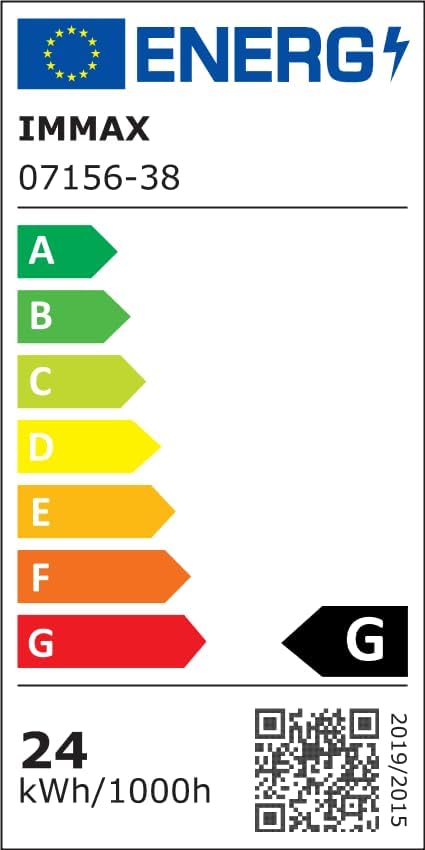
Image: The EU Energy Efficiency Label, indicating the product's energy consumption and efficiency class. For more details, refer to the official EPREL database via the QR code or link.
Official EPREL Database Link: https://eprel.ec.europa.eu/qr/1294167
9. Гаранција и подршка
For warranty information and customer support, please refer to the documentation provided with your purchase or contact Brilagi customer service. Keep your proof of purchase for warranty claims.