
1. Увод
Хвала вам на куповиниasing the Soundmaster MCD5600 Stereo System. This versatile audio system combines classic and modern audio technologies, including a record player, DAB+ and FM radio, double cassette deck, CD player, USB playback, and Bluetooth connectivity. It also features a digitization function to convert your analog media to MP3 files on a USB drive. This manual provides essential information for safe operation, setup, and maintenance of your device. Please read it thoroughly before use and retain it for future reference.
2. Безбедносна упутства
- Извор напајања: Уверите се да напајање одговара запреминиtage specified on the unit. Disconnect from the power outlet during lightning storms or when unused for long periods.
- вентилација: Не блокирајте вентилационе отворе. Оставите довољно простора око уређаја за правилан проток ваздуха како бисте спречили прегревање.
- Вода и влага: Не излажите уређај киши, влази, капању или прскању. Не стављајте предмете напуњене течношћу, као што су вазе, на уређај.
- топлота: Држите уређај даље од извора топлоте као што су радијатори, грејни уређаји, шпорети или други уређаји (укључујући ampлифиерс) који производе топлоту.
- Чишћење: Чистите само сувом крпом. Немојте користити течна средства за чишћење или средства за чишћење у облику аеросола.
- Сервисирање: Не покушавајте сами да сервисирате овај производ. Све сервисирање препустите квалификованом сервисном особљу.
- Пласман: Поставите уређај на стабилну, равну површину како бисте спречили његов пад.
3. Садржај пакета
Молимо вас да проверите да ли су сви предмети присутни приликом распакивања:
- Soundmaster MCD5600 Main Unit
- 2 x спољна звучника
- Ремоте Цонтрол
- Упутство за употребу (овај документ)
- FM/DAB+ антена
- Повер Цабле
4. Производ је готовview
Familiarize yourself with the main components and controls of your stereo system.
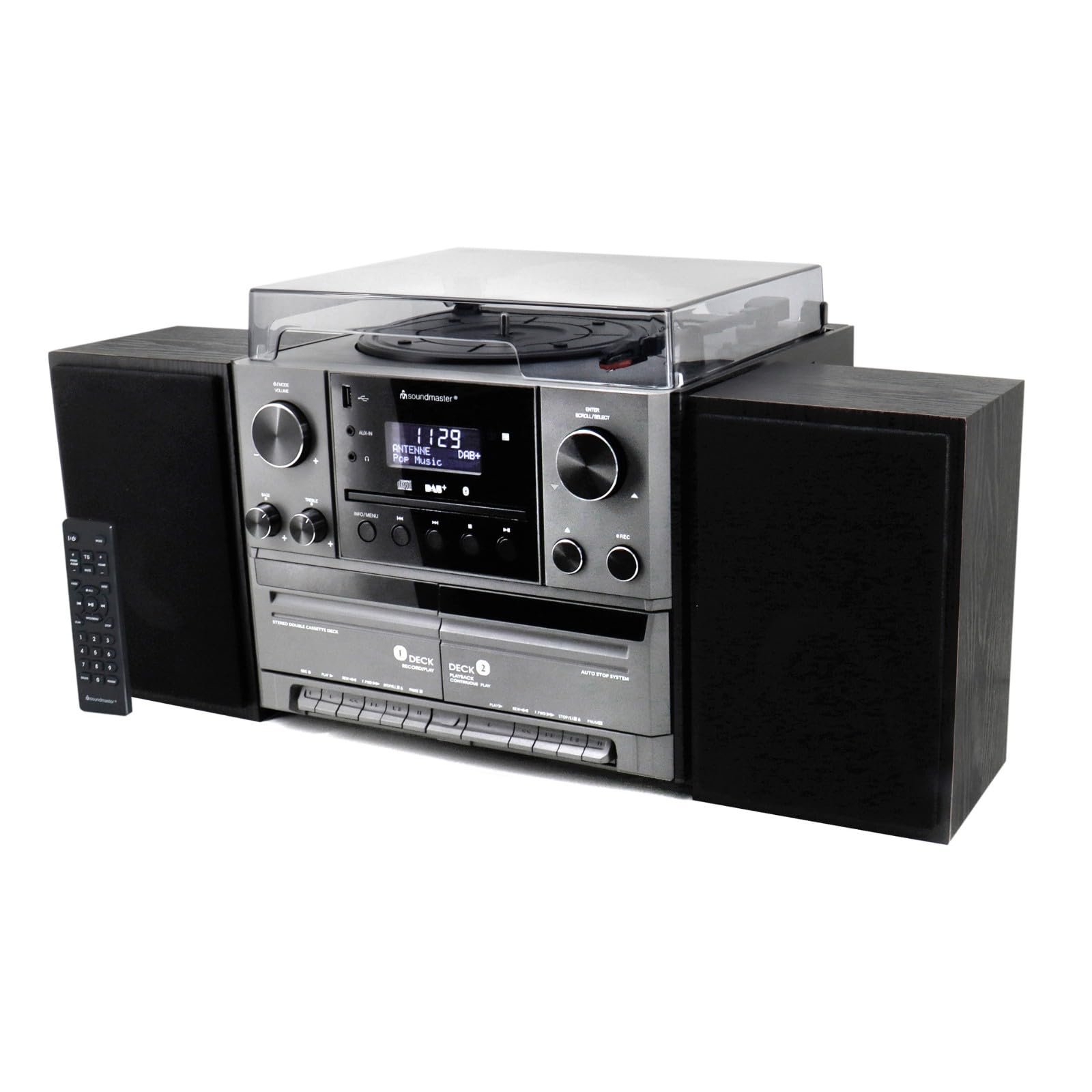
Слика 4.1: Фронт view of the Soundmaster MCD5600 stereo system, showing the main unit flanked by two speakers, with the remote control positioned to the left. The display, control knobs, and various media inputs are visible.

Слика 4.2: Фронт view of the Soundmaster MCD5600 stereo system with the CD tray open and a cassette tape inserted into one of the two cassette decks. This image highlights the multi-media capabilities of the unit.
5. Подешавање
5.1 Повезивање звучника
Connect the included speakers to the speaker terminals on the rear of the main unit. Ensure correct polarity (red to red, black to black) for optimal sound quality. Place speakers equidistant from the listening position for the best stereo effect.
5.2 Повезивање антене
Connect the supplied 75 Ohm antenna to the FM/DAB+ antenna input on the rear panel. Extend the antenna fully and position it for the best possible radio reception.
5.3 Прикључак за напајање
Plug the power cable into the AC inlet on the rear of the unit, then connect the other end to a standard wall outlet.
6. Упутство за употребу
6.1 Опште контроле
- Дугме за напајање: Притисните да укључите или искључите јединицу.
- Дугме за јачину звука: Rotate to adjust the overall sound volume.
- Дугме Извор/Функција: Press repeatedly to cycle through available audio sources (CD, Phono, Tape, FM, DAB+, Bluetooth, USB).
- Приказ: Shows current mode, track information, radio frequency, and time.
6.2 Рад CD плејера
- Притисните тастер CD source button.
- Притисните тастер ОПЕН/ЦЛОСЕ дугме да бисте отворили лежиште за ЦД.
- Place a CD (CD/CD-MP3/CD-R/CD-RW/WMA compatible) with the label side up into the tray.
- Притисните ОПЕН/ЦЛОСЕ again to close the tray. The unit will read the disc.
- Притисните ПЛАИ/ПАУСЕ да бисте покренули или паузирали репродукцију.
- Користите SKIP FORWARD/BACKWARD дугмад за навигацију по стазама.
- Тхе ПРОГРАМ и РЕПЕАТ functions allow for customized playback sequences and continuous repetition.
6.3 Record Player Operation
- Притисните тастер ПХОНО source button.
- Select the appropriate speed (33, 45, or 78 RPM) using the speed selector switch based on your record type.
- Place a record on the turntable platter. For 45 RPM singles, use the included adapter.
- Carefully lift the tonearm using the cueing lever and position it over the desired track on the record.
- Lower the tonearm gently onto the record. Playback will begin automatically.
- На крају плоче, подигните ручицу грамофона и вратите је у положај за одмор.
6.4 Управљање касетофоном
The unit features two cassette decks: Deck 1 (Record/Play) and Deck 2 (Continuous Play).
- Притисните тастер ТАПЕ source button.
- Притисните тастер СТОП/ЕЈЕЦТ button on the desired deck to open the cassette door.
- Insert a cassette tape with the open edge facing upwards. Close the door.
- Притисните ПЛАИ да бисте започели репродукцију.
- Користите БРЗО ПРЕМОТЕ и РЕВИНД дугмад за навигацију по траци.
- To record, ensure Deck 1 is selected, insert a blank tape, select your desired input source (e.g., Phono, CD, Radio), and press the РЕЦОРД дугме.
6.5 Radio (FM/DAB+) Operation
- Притисните тастер FM or ДАБ+ source button.
- For FM radio, use the ТУНИНГ knob or buttons to manually tune or auto-scan for stations.
- For DAB+ radio, the unit will automatically scan for available digital stations. Use the СЦРОЛЛ/СЕЛЕЦТ knob to browse and select stations.
- To save a station as a preset, refer to the specific instructions in the full manual for your model.
6.6 Блуетоотх рад
- Притисните тастер Блуетоотх source button. The display will show "PAIRING" or similar.
- Омогућите Блутут на екстерном уређају (паметном телефону, таблету итд.).
- Тражи "MCD5600" (or similar device name) in your device's Bluetooth settings and select it to pair.
- Once paired, you can play audio from your device through the stereo system.
6.7 Репродукција са УСБ-а
- Уметните УСБ флеш диск у УСБ порт на предњој плочи.
- Притисните тастер УСБ source button.
- The unit will read the contents of the USB drive. Use the navigation buttons to browse folders and select MP3 fileс за репродукцију.
6.8 Digitization (Encoding)
The MCD5600 allows you to convert audio from vinyl records, cassette tapes, or radio broadcasts directly to MP3 fileс на повезаном УСБ диску.
- Уметните УСБ флеш диск у УСБ порт.
- Select the desired audio source (Phono, Tape, FM, DAB+).
- Start playback of your chosen source (e.g., start a record, play a cassette, tune to a radio station).
- Притисните тастер РЕЦОРД button on the main unit. The display will indicate recording is in progress.
- Притисните СТОП when you wish to end the recording. The audio will be saved as an MP3 file on your USB drive.
7. Одржавање
- Чишћење јединице: Wipe the exterior surfaces with a soft, dry, lint-free cloth. Do not use abrasive cleaners or solvents.
- Record Player Stylus: Periodically check the stylus for dust and debris. Clean gently with a soft brush designed for styli, brushing from back to front. Replace the stylus if sound quality deteriorates significantly.
- Cassette Heads: After extended use, clean the cassette heads, pinch rollers, and capstans with a cotton swab lightly dampнапуњен изопропил алкохолом.
- CD сочиво: Avoid touching the CD lens. If cleaning is necessary, use a specialized CD lens cleaner disc.
КСНУМКС. Решавање проблема
| Проблем | Могући узрок | Решење |
|---|---|---|
| Нема струје | Кабл за напајање није повезан; утичница је неисправна | Проверите везу кабла за напајање; покушајте са другом утичницом |
| Нема звука | Јачина звука је прениска; изабран је погрешан извор; звучници нису повезани | Increase volume; Select correct source; Check speaker connections |
| CD skips or doesn't play | CD dirty or scratched; CD inserted incorrectly | Clean CD; Insert CD label-side up |
| Лош радио пријем | Antenna not extended or positioned correctly | Extend and reposition antenna; Try auto-scan for DAB+ |
| Блуетоотх упаривање није успело | Device too far; Bluetooth not enabled on external device | Move device closer; Ensure Bluetooth is enabled and in pairing mode |
9. Спецификације
- Број модела: МЦД5600СВ
- Бренд: Соундмастер
- Боја: Црно
- ЦД плејер: CD, CD-MP3, CD-R, CD-RW, WMA compatible; Program/Repeat functions
- Record Player: 33/45/78 RPM speeds
- касетофон: Double cassette (Deck 1: Record/Play, Deck 2: Continuous Play)
- Радио: FM-PLL with preset stations, DAB+ Digital Radio (75 Ohm antenna connection)
- Повезивање: USB порт, Bluetooth
- Посебне карактеристике: Digitization (CD, cassette, radio to USB-MP3 encoding)
10. Информације о гаранцији
This Soundmaster MCD5600 Stereo System comes with a manufacturer's warranty. Spare parts availability is guaranteed for 1 year from the date of purchase. For detailed warranty terms and conditions, please refer to the warranty card included with your product or contact your retailer. Keep your proof of purchase for any warranty claims.
11. Подршка
If you encounter any issues not covered in the troubleshooting section or require further assistance, please contact your retailer or the Soundmaster customer support. Contact details can typically be found on the manufacturer's webсајту или у паковању вашег производа.