
Elektron Digitakt II
Elektron Digitakt II User Manual
Model: Digitakt II
Производ је завршенview
The Elektron Digitakt II is a powerful 16-track drum computer and sampler designed for music production and live performance. It offers extensive sound manipulation capabilities, a robust sequencer, and a compact, durable design, making it suitable for both studio and on-the-go creative work.

Слика 1: Предња страна view of the Elektron Digitakt II, showing the display, knobs, and performance pads.
Садржај пакета
Уверите се да су све ставке присутне у кутији:
- Elektron Digitakt II Unit
- Повер Адаптер
- УСБ кабл
Почетно подешавање
Follow these steps to set up your Digitakt II for the first time:
- Прикључите напајање: Plug the included power adapter into the 12V DC IN port on the rear of the unit and then into a wall outlet.
- Повежи аудио: Connect your audio output cables from the L/R OUT ports to your mixer, audio interface, or headphones. If using external audio sources, connect them to the L/R IN ports.
- Повежите УСБ (опционо): For computer integration and use with Elektron's Overbridge software, connect a USB cable from the Digitakt II's USB port to your computer.
- Укључено: Press the Power button on the rear of the unit to turn on the Digitakt II.
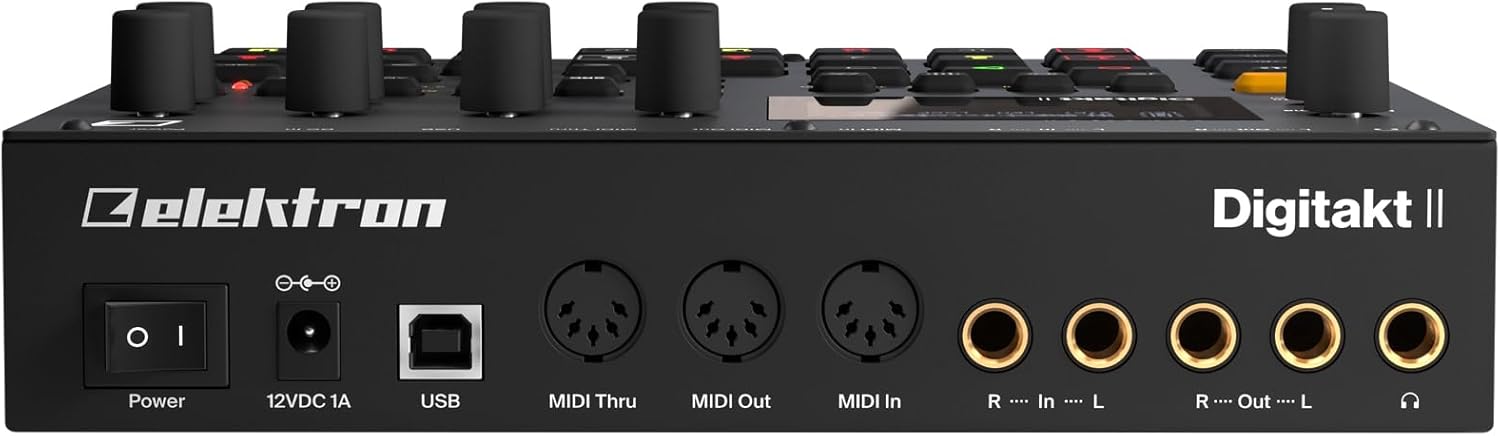
Слика 2: Задња страна view of the Elektron Digitakt II, showing power, USB, MIDI, and audio connections.
Operating Your Digitakt II
The Digitakt II features an intuitive interface with dedicated buttons and encoders for efficient workflow. Familiarize yourself with the main display and control layout.
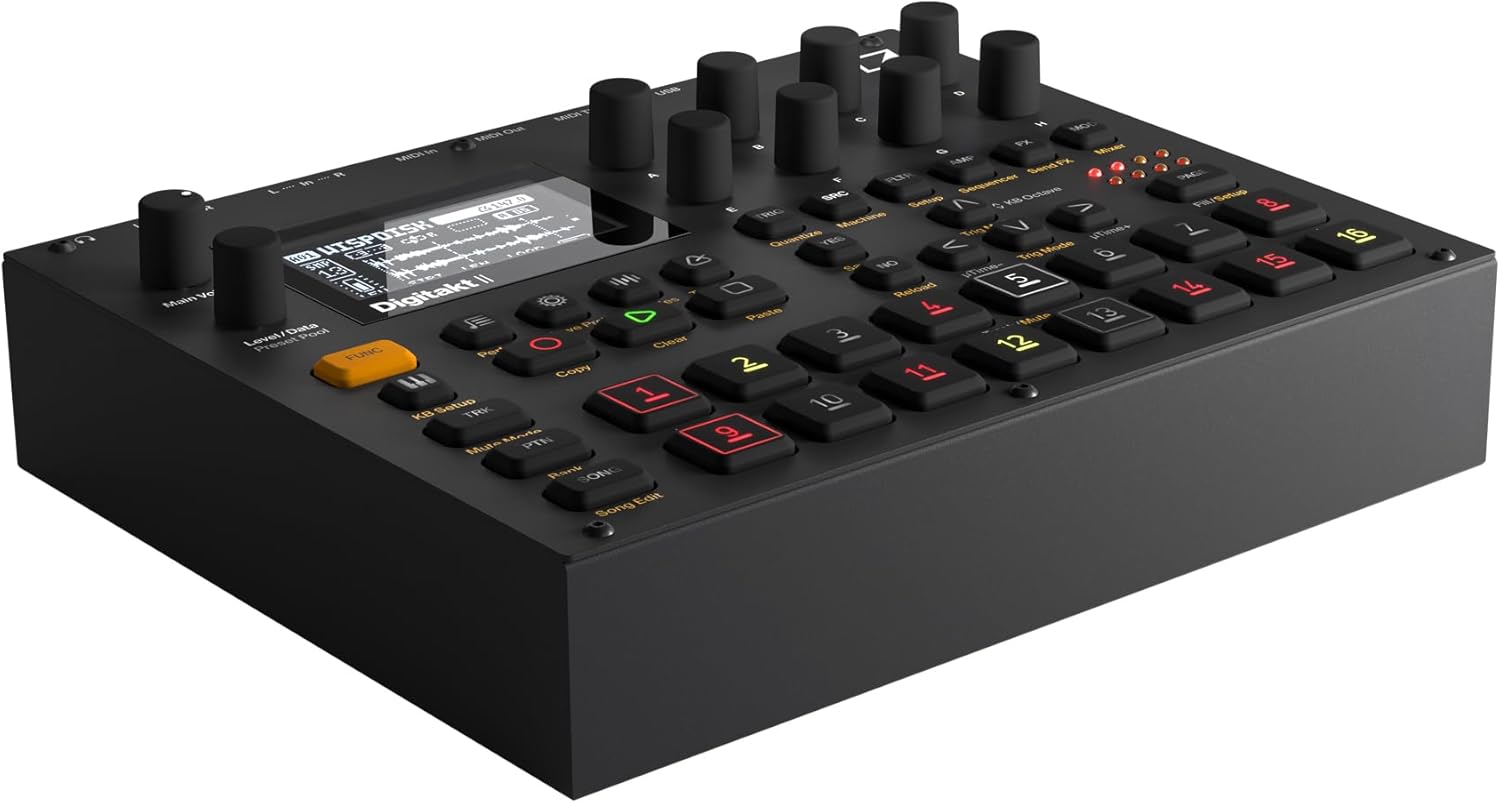
Слика 3: Под углом view of the Elektron Digitakt II, highlighting the control surface and display.
Кључне карактеристике
- 16 Audio Tracks: Each track supports stereo or mono samples, or MIDI data.
- 128-Step Elektron Sequencer: Program intricate patterns with precise control.
- 3 Assignable LFOs per Track: Modulate various parameters for dynamic sound design.
- Per-Track Effects: Apply Delay, Reverb, Chorus, Bit Reduction, Sample Reduction, and Overdrive to individual tracks.
- Euclidean Sequence Generator: Explore complex rhythmic possibilities.
- Swappable Filters: Utilize a Base-width filter and choose from Multi-mode, Low Pass 4, Comb, EQ, or Legacy LP/HP filters.
- 4 Trig Modes: Enhance sequencing with various trigger behaviors.
- Режим песме: Create, edit, and play full compositions with ease.
Основна операција
Учитавање Сampлес: Use the 'Samples' button and the data encoders to browse and load samples into your project. Samples can be imported via USB using Elektron's software.
Редослед: Select a track using the numbered pads. Enter notes and parameter locks by holding a trig button and adjusting parameters. The 128-step sequencer allows for detailed pattern creation.
Ефекти: Access the FX section to apply and adjust the built-in effects for each track. Experiment with different effect types and parameters to shape your sound.
Saving Projects: Regularly save your work by pressing the 'Save Proj' button to prevent data loss.
Нега и одржавање
To ensure the longevity and optimal performance of your Digitakt II, follow these guidelines:
- Чишћење: Користите меку, суву крпу за чишћење уређаја. Избегавајте абразивна средства за чишћење или раствараче.
- Складиштење: Чувајте уређај на хладном и сувом месту, даље од директне сунчеве светлости и екстремних температура.
- Руковање: Avoid dropping the unit or exposing it to excessive force.
- вентилација: Осигурајте одговарајућу вентилацију око јединице како бисте спречили прегревање.
Решавање проблема
If you encounter issues with your Digitakt II, refer to the table below for common problems and solutions:
| Проблем | Могући узрок | Решење |
|---|---|---|
| Нема излаза звука | Incorrect audio connections, volume too low, muted tracks. | Check audio cables, increase Main Volume, ensure tracks are not muted in Mute Mode. |
| Jedinica se ne uključuje | Power adapter not connected or faulty, power outlet issue. | Verify power adapter connection, try a different power outlet, ensure power button is pressed. |
| Проблеми са УСБ повезивањем | Incorrect USB cable, driver not installed, Overbridge not running. | Use the provided USB cable, install the latest Elektron drivers and Overbridge software from the official webсајту. |
| Pads unresponsive | Unit frozen, calibration issue. | Restart the unit. If the problem persists, consult the full manual for calibration procedures. |
Техничке спецификације
| Феатуре | Детаљ |
|---|---|
| Назив модела | Digitakt II |
| Тежина артикла | 3.3 фунти (1.5 кг) |
| Димензије производа (Д к Ш к В) | 8.4 к 6.9 к 2.5 инча (21.3 к 17.5 к 6.4 цм) |
| Материјал тела | Ливени алуминијум |
| Боја | Црно |
| Тип конектора | USB, Proprietary Power, MIDI In/Out/Thru, Audio In L/R, Audio Out L/R, Headphones |
| Укључене компоненте | Повер Адаптер |
Гаранција и подршка
Elektron products are manufactured to high standards and come with a limited warranty. For detailed warranty information, product registration, and technical support, please visit the official Elektron webсајт или контактирајте њихову корисничку службу. Сачувајте доказ о куповини за потребе гаранције.
Онлине ресурси: For the most up-to-date information, firmware updates, and additional resources, please refer to the official Elektron support page.