
1. Увод
The Machenike K500W is a versatile mechanical gaming keyboard designed for performance and flexibility. It features a compact 94-key layout, tri-mode connectivity (Bluetooth, 2.4G wireless, and wired USB), hot-swappable switches, and customizable RGB backlighting. This manual provides essential information for setting up, operating, maintaining, and troubleshooting your K500W keyboard.
Кључне карактеристике:
- Tri-Mode Connectivity: Bluetooth 5.0, 2.4G Wireless, and Wired USB.
- 94-Key Compact Layout.
- 100% Anti-Ghosting & N-Key Rollover.
- Hot-Swappable Switches (compatible with 3/5-pin switches).
- PBT Doubleshot Keycaps.
- Customizable RGB Backlighting (20 effects, 16.8 million colors).
- Programmable Driver Software.
- Built-in 2500mAh Lithium Battery.
- Звук Дamping Silicone Pad for improved acoustics.
2. Подешавање
2.1 Почетно пуњење
Before first use, ensure the keyboard is fully charged. Connect the keyboard to a USB power source using the provided USB-C cable. The charging indicator will show the charging status.
2.2 Повезивање тастатуре
The Machenike K500W supports three connection modes:
2.2.1 Жични режим
- Connect the USB-C cable to the keyboard and the other end to your computer's USB port.
- Тастатура ће бити аутоматски препозната и спремна за употребу.
2.2.2 2.4G бежични режим
- Locate the 2.4G USB receiver, typically stored in a dedicated slot on the keyboard.
- Прикључите 2.4G USB пријемник у слободан USB порт на рачунару.
- Switch the keyboard's mode selector to 2.4G wireless mode. The keyboard should connect automatically.
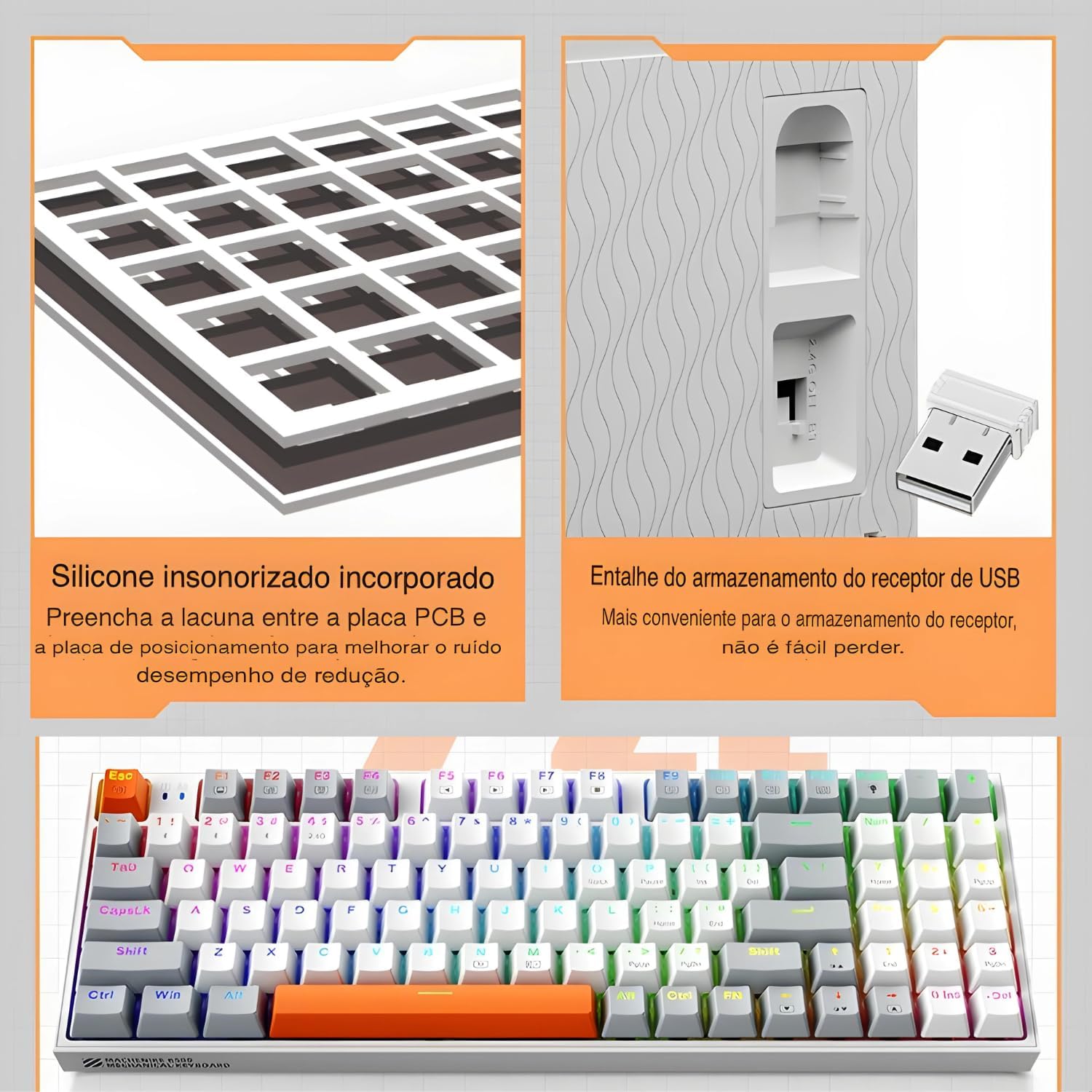
The keyboard features a silicone sound damping pad and a convenient storage slot for the 2.4G USB receiver.
2.2.3 Блуетоотх режим
- Пребаците селектор режима на тастатури на Bluetooth режим.
- На рачунару или уређају омогућите Bluetooth и потражите нове уређаје.
- Select "Machenike K500W" from the list of available devices to pair.
- Ако се то од вас затражи, унесите код за упаривање приказан на екрану.

The Machenike K500W supports tri-mode connectivity, allowing connection to multiple devices like PCs, laptops, and smartphones.
3. Упутство за употребу
3.1 Распоред и функције тастера
The K500W features a compact 94-key layout, providing essential keys while saving desk space. Familiarize yourself with the key positions, especially the function (Fn) key combinations for multimedia and lighting controls.
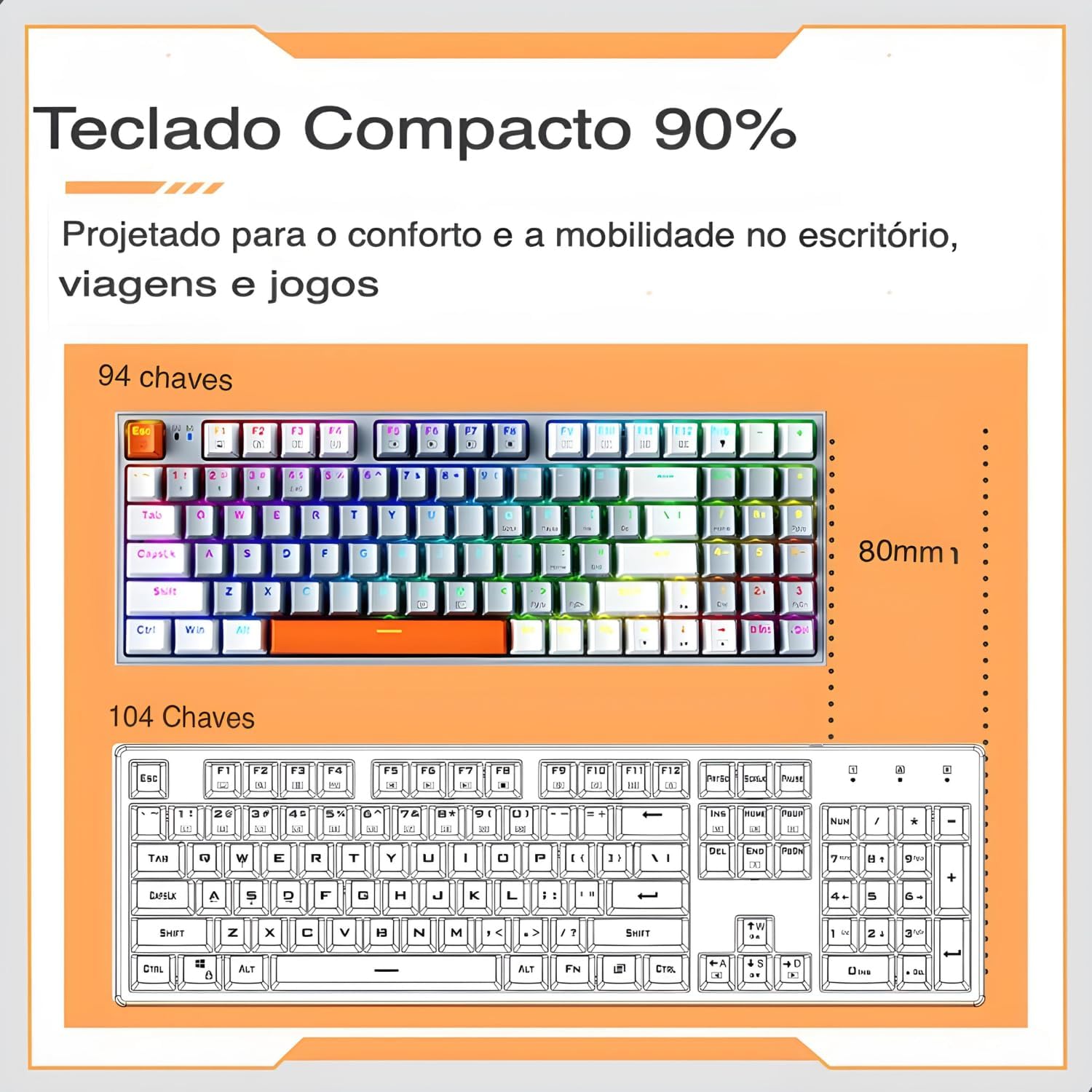
The 94-key compact layout offers more space for mouse movement compared to a 104-key keyboard.
3.2 РГБ позадинско осветљење
The keyboard features dynamic RGB backlighting with 20 lighting effects and approximately 16.8 million programmable colors. Use the dedicated function keys (often combined with the Fn key) to cycle through lighting modes, adjust brightness, and change speed.
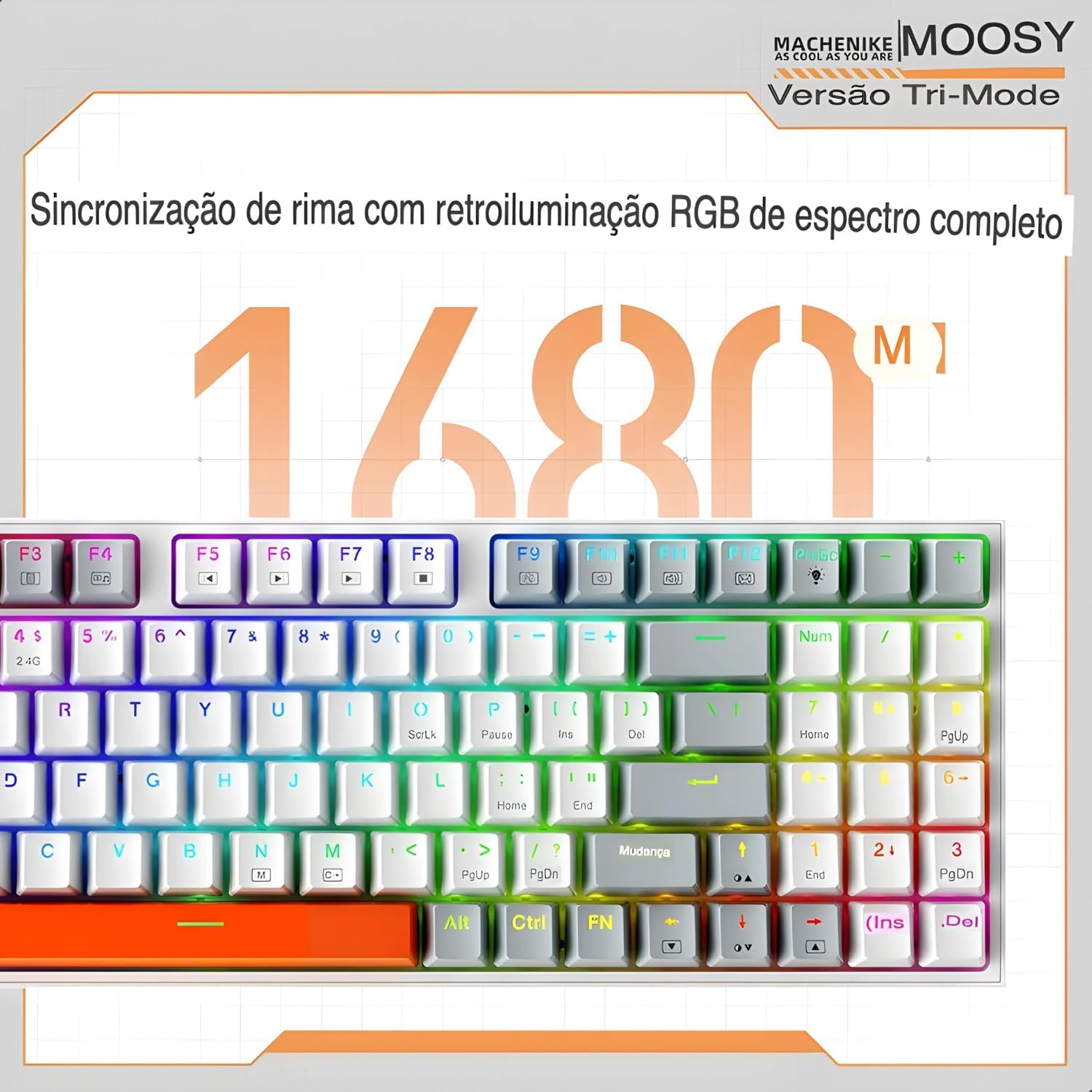
Experience full-spectrum RGB backlighting with 16.8 million colors and various dynamic effects.
3.3 Прекидачи са могућношћу замене током рада
The K500W allows you to easily change mechanical switches without soldering. This feature enables customization of your typing experience. Use the included switch puller to remove existing switches and insert new 3-pin or 5-pin compatible switches.

The hot-swap feature allows for easy installation and replacement of mechanical switches.
3.4 Programmable Driver Software
For advanced customization, download and install the Machenike K500W programmable driver software. This software allows you to remap keys, create macros, and fine-tune RGB lighting effects to your preference.
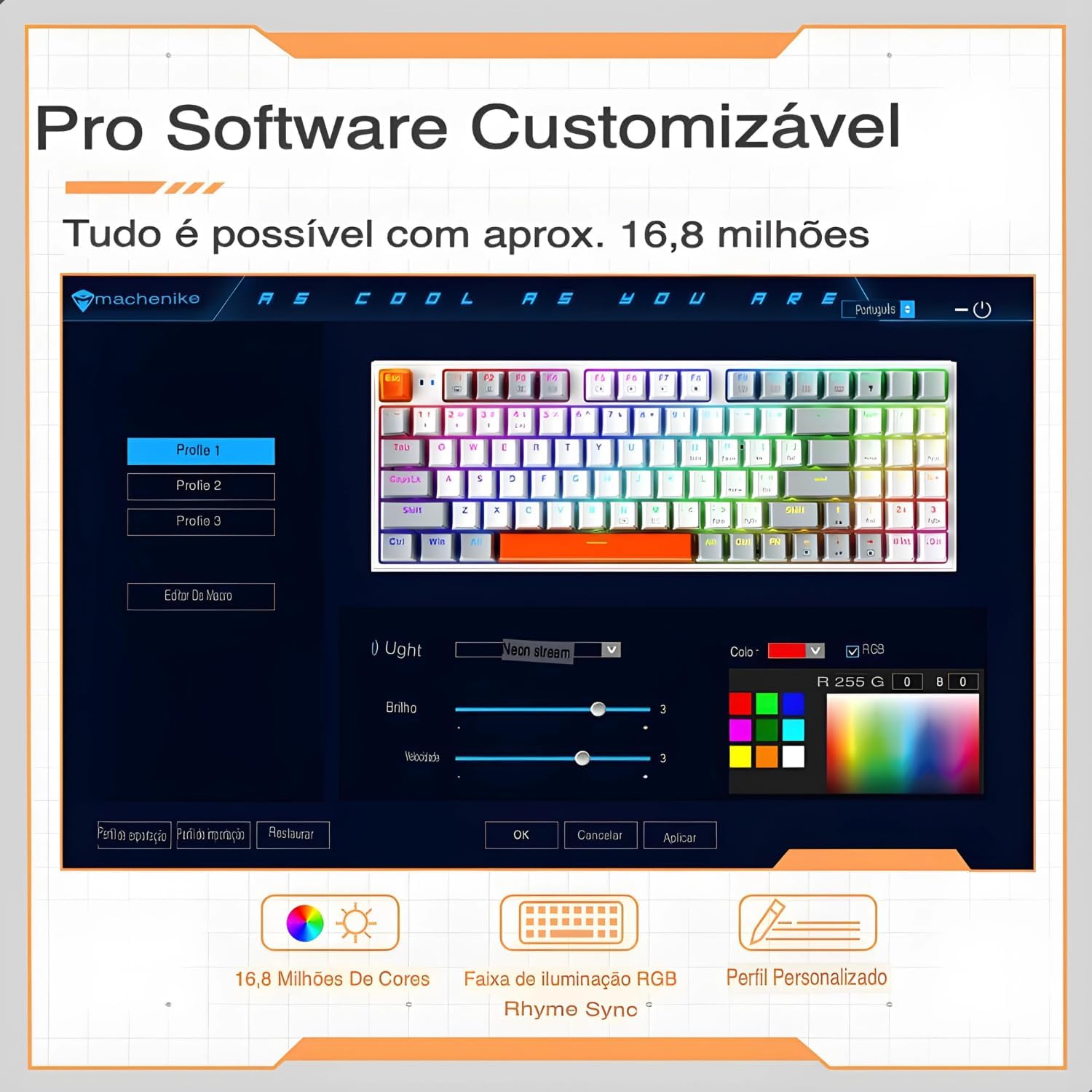
The professional software allows for customizable RGB lighting, macro creation, and personalized profiles.
4. Одржавање
Правилно одржавање осигурава дуготрајност и оптималне перформансе ваше тастатуре.
- Избегавајте изливање: Keep liquids away from your mechanical keyboard, as spills can damage the internal circuits.
- Gentle Disconnection: When disconnecting the cable, always pull the plug, not the cable itself, to prevent damage.
- Редовно чишћење: Dust and debris can accumulate and affect performance. Regularly clean your keyboard using compressed air and a soft cloth. For keycaps, you can remove them for a deeper clean.
- Заштитите УСБ конектор: When not in use, disconnect and store the keyboard properly to protect the USB connector from damage.
- Ажурирања софтвера: Keep the keyboard's software and drivers updated to ensure optimal performance and access to new features.
- Избегавајте капи: While mechanical keyboards are durable, severe impacts can still cause damage. Handle with care.
КСНУМКС. Решавање проблема
If you encounter issues with your Machenike K500W keyboard, refer to the following troubleshooting steps:
5.1 Connectivity Issues (Bluetooth or 2.4G Wireless)
- Блуетоотх адаптер: Use a reputable brand Bluetooth adapter. Other adapters may cause compatibility issues. Refer to your adapter's instructions for installation details.
- Блуетоотх активација: Before connecting, ensure your computer's Bluetooth adapter is correctly installed and Bluetooth is enabled.
- Поновно упаривање: If you cannot connect, disable or delete the existing keyboard connection from your device's Bluetooth settings, then re-pair according to the setup instructions.
- Device Change: If your computer's Bluetooth device has changed, you must re-pair the keyboard.
- сметње: If your computer's Bluetooth is connected to other devices, check if the Bluetooth speed is adequate or if there's interference.
- 2.4G Anomaly: For 2.4G mode issues, re-pair the keyboard and device by removing the 2.4G receiver and inserting it into another valid USB port.
- Радни опсег: Ensure the keyboard is used within a 10-meter working range from the receiver/device.
5.2 Индикатор празне батерије
If the keyboard shows a low battery indication, connect it to a USB power source using the provided cable to charge it. Refer to section 2.1 for initial charging instructions.
6. Спецификације
| Феатуре | Детаљ |
|---|---|
| Бранд | Мацхенике |
| Број модела | К500В |
| Технологија повезивања | Bluetooth 5.0, 2.4G Wireless, Wired (USB-C) |
| Опис тастатуре | Механички |
| Кључна количина | 94 Кеис |
| Тип прекидача | Hot-swappable (3/5-pin compatible) |
| Кеицап Материал | PBT Doubleshot Plastic |
| Подршка за позадинско осветљење | RGB (20 режима, 16.8 милиона боја) |
| Капацитет батерије | 2500мАх литијумска батерија |
| Компатибилни уређаји | ПЦ, Лаптоп, Таблет |
| Димензије | 36 x 13 x 5 цм (приближно) |
| Посебне карактеристике | Anti-ghosting, N-key rollover, Programmable, Sound Dampинг Пад |

Готовоview of the Machenike K500W's main features and specifications.
7. Гаранција и подршка
7.1 Информације о гаранцији
Овај производ долази са а 90-дневна гаранција from the date of purchase. The warranty covers manufacturing defects and malfunctions under normal use. It does not cover damage caused by misuse, accidents, unauthorized modifications, or normal wear and tear.
7.2 Корисничка подршка
For technical assistance, warranty claims, or any questions regarding your Machenike K500W keyboard, please contact the seller or manufacturer's customer support. Refer to your purchase documentation for contact details.