
YanLan G7
YanLan G7 Wired Gaming Mouse User Manual
Model: G7 | Brand: YanLan
Увод
Thank you for choosing the YanLan G7 Wired Gaming Mouse. This high-performance mouse is designed for precision and comfort, featuring 7 programmable buttons, adjustable DPI settings, and vibrant RGB LED lighting. This manual will guide you through the setup, operation, and maintenance of your new gaming mouse.

Image: The YanLan G7 Wired Gaming Mouse, showcasing its ergonomic design and colorful RGB lighting from a top-down perspective.
1. Подешавање
The YanLan G7 Wired Gaming Mouse is a plug-and-play device, requiring no additional drivers for basic functionality. Follow these simple steps to get started:
- Повежите УСБ кабл: Пронађите слободан УСБ порт на рачунару (десктопу или лаптопу).
- Plug in the Mouse: Insert the USB connector of the G7 mouse into the USB port.
- Препознавање система: Your operating system (Windows, Mac OS) will automatically detect and install the necessary generic drivers. This process usually takes a few seconds.
- Спреман за употребу: Once recognized, the mouse's LED lighting will illuminate, and it will be ready for immediate use.

Image: The YanLan G7 Wired Gaming Mouse connected to a laptop, illustrating its design with a metal panel and galvanized wings.
2. Упутство за употребу
2.1 Функције дугмета
The G7 mouse features 7 buttons for enhanced control and customization:
- Леви клик: Стандардна функција примарног клика.
- Десни клик: Стандардна функција секундарног клика.
- Scroll Wheel (Middle Click): За скроловање и клик средњим тастером миша.
- Дугме за подешавање DPI-ја: Cycles through DPI settings (see section 2.2).
- Дугме за напред: Обично се користи за навигацију напред у web претраживачи или file истраживачи.
- Дугме за назад: Обично се користи за навигацију уназад web претраживачи или file истраживачи.
- Seventh Button: This button's specific function may vary or be programmable depending on software, if available. Default is often a double-click or macro key.
2.2 ДПИ подешавање
The G7 mouse allows you to adjust its sensitivity (DPI - Dots Per Inch) on the fly. This is useful for different tasks, such as precise aiming in games or fast navigation across multiple monitors.
- Нивои ДПИ: The mouse supports four adjustable DPI levels: 1200, 1800, 2400, and 3600 DPI.
- Како прилагодити: Притисните посвећено Дугме за подешавање ДПИ (usually located behind the scroll wheel) to cycle through the available DPI settings. Each press will switch to the next DPI level.
- Визуелни индикатор: The RGB lighting may change color or pattern to indicate the current DPI setting, though this is not explicitly stated, it is a common feature.
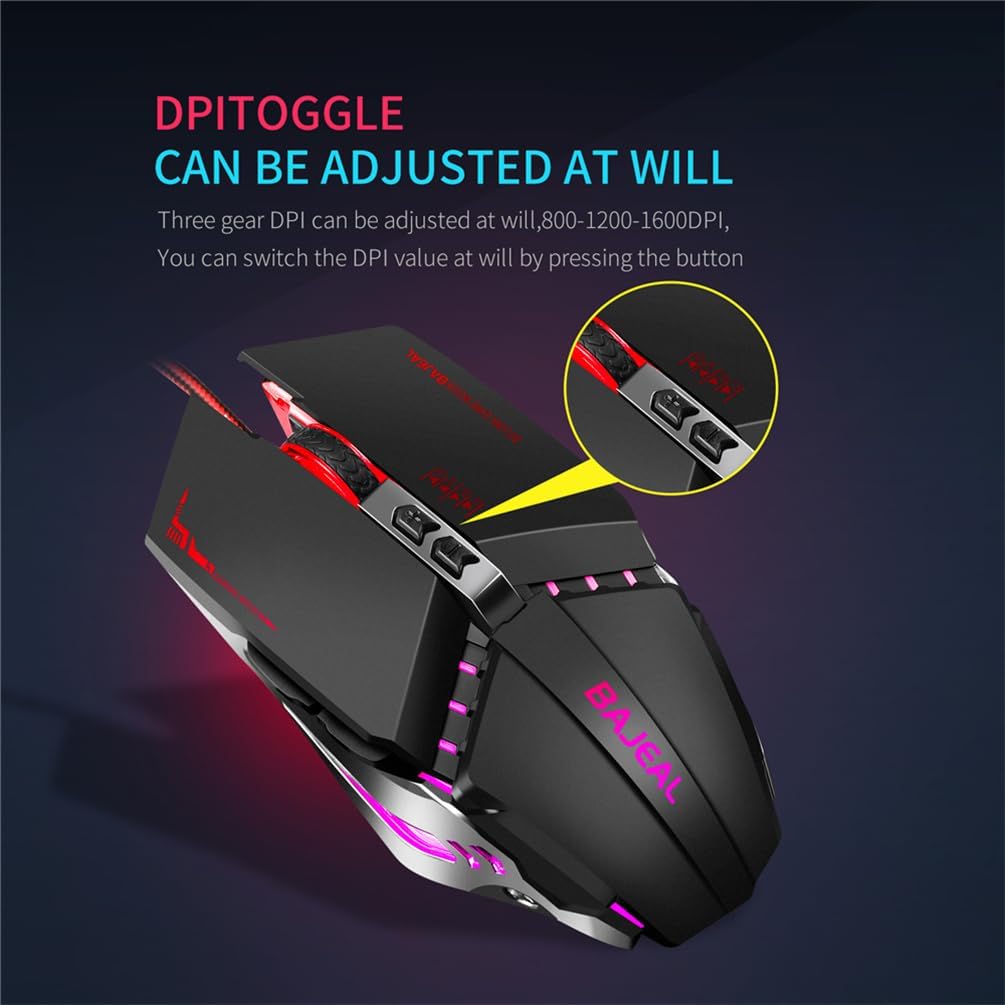
Слика: Крупни план view of the YanLan G7 Wired Gaming Mouse highlighting the DPI toggle button. Note: The image text indicates 800-1200-1600 DPI, while the product description specifies 1200-1800-2400-3600 DPI.
2.3 RGB LED осветљење
The G7 mouse features dynamic RGB LED lighting, enhancing its aesthetic appeal. The lighting effects are typically pre-programmed and cycle automatically. There are no user-adjustable settings for the RGB lighting directly on the mouse.
3. Одржавање
To ensure the longevity and optimal performance of your YanLan G7 mouse, follow these simple maintenance guidelines:
- Чишћење површине: Користите меку, суву крпу која не оставља влакна да обришете спољашњост миша. За тврдокорну прљавштину, благо обришитеampИсперите крпу водом. Избегавајте јаке хемикалије или абразивна средства за чишћење.
- Cleaning the Optical Sensor: Periodically inspect the optical sensor on the underside of the mouse for dust or debris. Use a cotton swab or compressed air to gently clean the sensor area.
- Нега каблова: Избегавајте оштро савијање или увијање USB кабла. Чувајте миш на начин који спречава савијање или оштећење кабла.
- Избегавајте течности: Do not expose the mouse to liquids. If liquid spills on the mouse, immediately disconnect it from your computer and allow it to dry completely before reconnecting.
КСНУМКС. Решавање проблема
If you encounter any issues with your YanLan G7 mouse, refer to the following common problems and solutions:
| Проблем | Могуће решење |
|---|---|
| Миш не реагује. |
|
| Кретање курсора је неправилно или скачкасто. |
|
| Дугмад не функционишу исправно. |
|
| RGB осветљење не ради. |
|
5. Спецификације
| Модел | G7 |
| Бранд | YanLan |
| ДПИ подешавања | 1200 / 1800 / 2400 / 3600 ДПИ |
| Број дугмади | 7 |
| Врста везе | Жичани УСБ |
| Цабле Ленгтх | 1.5 метара |
| Тежина производа | 140 грама |
| Боја | Црно |
| Димензије (Д к Ш к В) | 130 мм к 76 мм к 42 мм |
| Компатибилни системи | Windows XP, Vista, 7, 8, 10, ME, 2000, Mac OS (or latest versions) |
| Посебне карактеристике | RGB LED Lighting, Ergonomic Design, Durable Micro-switch, Optical Tracking |
6. Гаранција и подршка
Information regarding product warranty and customer support is not provided in the available product details. Please refer to your purchase documentation or contact the retailer for specific warranty terms and support options.
Ask a question about this manual
Ask about setup, troubleshooting, compatibility, parts, safety, or missing instructions. Manuals+ will review the question and use this page’s manual context to help answer it.