
1. Увод
The MeLE Overclock 4C Mini PC N100 is a compact and powerful micro desktop computer designed for business, education, and multimedia use. Featuring an Intel N100 processor, 32GB DDR4 RAM, and a 512GB SSD, it supports 4K triple display output and runs Windows 11 Pro, with compatibility for Linux and Ubuntu.

Фронт view of the MeLE Overclock 4C Mini PC N100.
2. Подешавање
2.1 Шта је у кутији
- 1*Overclock 4C Mini PC
- 1*12V/3A Power Adapter
- 1*Vesa Mount
- 1*Упутство за употребу
2.2 Почетно повезивање
Connect the power adapter, display cables (HDMI or USB-C), and any peripherals such as a keyboard and mouse to the appropriate ports on the mini PC. Once all connections are secure, press the power button to start the device.
Ан оверview video demonstrating the unboxing, port connections, and basic usage scenarios like light gaming and triple display multitasking of the MeLE Overclock 4C Mini PC N100.

Цлосе-уп view of the MeLE Overclock 4C Mini PC N100's ports, including Kensington Lock Slot, USB 3.2 Gen2, USB 2.0, USB Type-C (PD3.0, DP1.4, Data), Micro-SD slot, Audio Jack, HDMI 2.0, Reset Button, and Gigabit Ethernet port.
2.3 VESA Mount Installation
The included VESA mount allows for convenient installation of the mini PC on the back of a compatible TV or monitor, helping to save desk space.
3. Упутство за употребу
3.1 Укључивање/искључивање
Press the power button located on the front of the device to turn it on. To shut down, use the operating system's power options. A brief press of the power button can also initiate sleep mode.
3.2 Конфигурација екрана
The mini PC supports triple display output via two HDMI 2.0 ports and one USB-C port, enabling 4K UHD video playback (4096x2160@60Hz) and HDR. Configure display settings through your operating system.
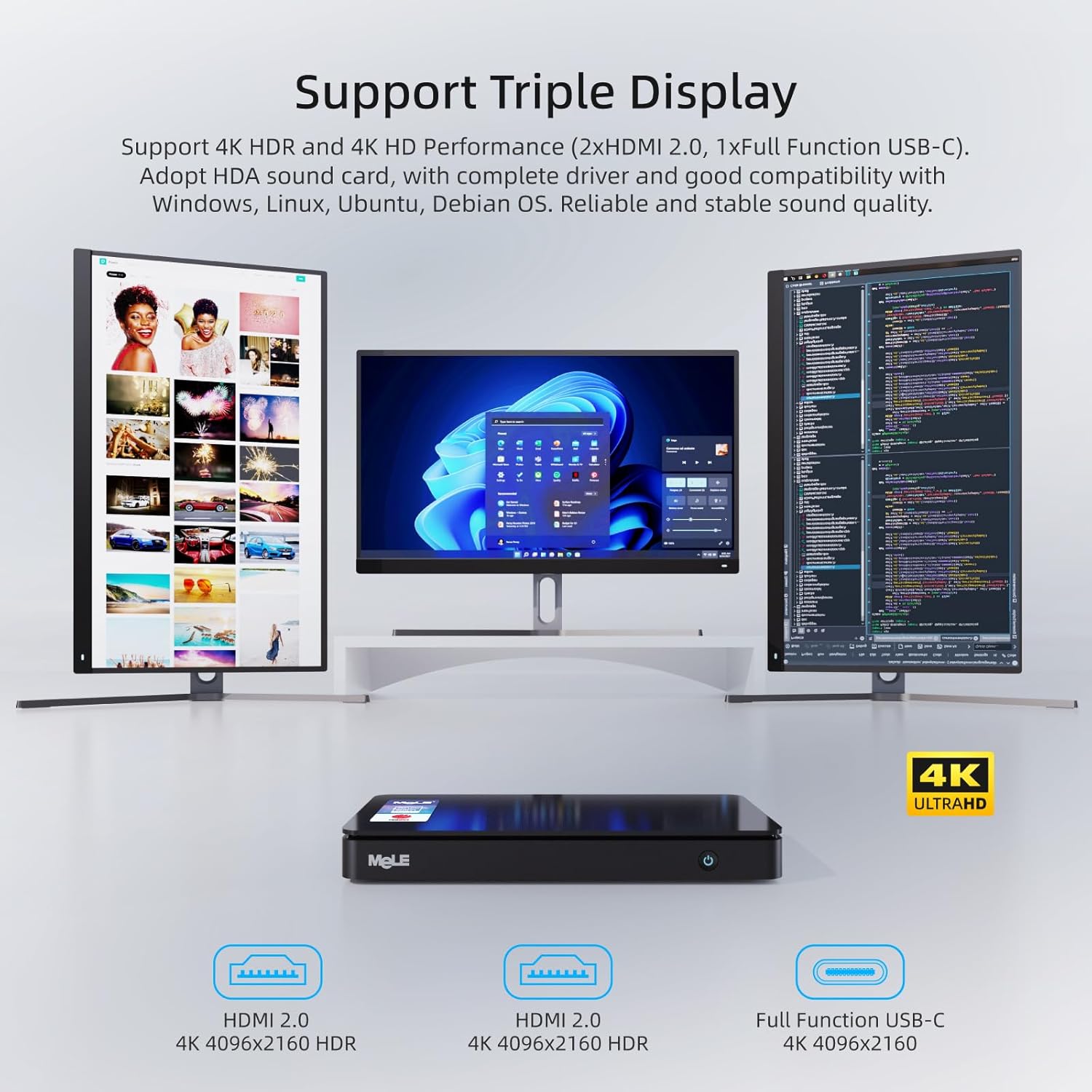
The MeLE Overclock 4C Mini PC N100 connected to three monitors, demonstrating its triple display multitasking capability with 4K resolution.
Видео презентацијаasing the 4K video playback capabilities of the MeLE Overclock 4C Mini PC N100, highlighting smooth and detailed visual performance.
3.3 Мрежна и бежична повезаност
Connect to the internet using the Gigabit Ethernet port or via dual-band Wi-Fi (2.4G and 5.0G) with Wi-Fi 5 MU-MIMO support. Bluetooth 5.1 is available for connecting wireless peripherals.

Illustration of the MeLE Overclock 4C Mini PC N100's stable connectivity options, including Wi-Fi 5, Bluetooth 5.1, and Gigabit Ethernet.
4. Одржавање
4.1 Надоградња складишног простора
The device supports storage expansion via an M.2 22x80 Key M Slot for PCIe3.0 x4 SSDs (up to 4TB) and a Micro SD slot (up to 2TB). Refer to the video below for instructions on how to upgrade the SSD.
A step-by-step guide on how to safely open the MeLE Mini PC and replace or upgrade the SSD storage.

Унутрашње view of the MeLE Overclock 4C Mini PC N100, illustrating the M.2 2280 slot for PCIe3.0 x4 SSDs up to 4TB and Micro SD slot for up to 2TB, along with RAM upgrade options.
4.2 Чишћење
To ensure optimal performance and longevity, regularly clean the exterior of the mini PC with a soft, dry cloth. Avoid using liquid cleaners directly on the device. Ensure ventilation openings are free from dust and obstructions.

Експлодирао view of the MeLE Overclock 4C Mini PC N100, showcasing its intelligent cooling fan design, pure copper pipe, Intel N100 processor, and thermal conductive engineering plastic for efficient heat dissipation.
КСНУМКС. Решавање проблема
5.1 Нема напајања
- Уверите се да је адаптер за напајање безбедно повезан и са мини рачунаром и са исправном утичницом.
- Проверите да ли је утичница функционална тако што ћете укључити други уређај.
- Проверите адаптер за напајање да ли има видљивих оштећења.
5.2 Нема излаза за приказ
- Confirm that the display cables (HDMI, USB-C) are securely connected to both the mini PC and the monitor.
- Уверите се да је монитор укључен и подешен на исправан улазни извор.
- Try using a different display cable or monitor to rule out hardware issues.
5.3 Споре перформансе
- Затворите непотребне апликације које раде у позадини.
- Check for available operating system updates and install them.
- Уверите се да има довољно слободног простора на SSD-у.
- Monitor system temperatures to ensure proper cooling.
6. Спецификације
| Феатуре | Детаљ |
|---|---|
| Бранд | МеЛЕ |
| Назив модела | Overclock 4C |
| Оперативни систем | Windows 11 Pro (supports Linux, Ubuntu, Debian) |
| ЦПУ модел | Intel N100 (12th Gen Alder Lake) |
| Брзина процесора | До 3.4 ГХз |
| Језгра/нити процесора | 4 језгара / 4 нити |
| Смарт Цацхе | 6 МБ |
| ТДП | 15В |
| Инсталирана РАМ меморија | 32 ГБ ДДР4 |
| Брзина меморије | 3200 МХз |
| Капацитет меморије | 512 ГБ ССД |
| Екпандабле Стораге | M.2 2280 SATA SSD & NVMe SSD up to 4TB, Micro SD slot up to 2TB |
| Грапхицс Цопроцессор | Intel UHD Graphics (up to 1.20 GHz) |
| Видео Оутпут | 2x HDMI 2.0 (4K@60Hz), 1x USB-C (DP1.4, 4K@60Hz) |
| УСБ портови | 2x USB 3.2 Gen2, 1x USB 2.0, 1x USB-C (PD3.0, DP1.4, Data) |
| Мрежна повезаност | Gigabit Ethernet (RJ45), Wi-Fi 5 (2.4G/5.0G, MU-MIMO), Bluetooth 5.1 |
| Аудио Интерфаце | 3.5mm Audio Jack (Headphone and MIC) |
| Сигурносне карактеристике | Kensington Lock Slot, Windows 11 Pro security features |
| Додатне карактеристике | Auto power on, PXE/iPXE boot, RTC wake, Wake on LAN, BIOS/CMOS reset |
| Димензије | 7.0 к 3.7 к 0.8 инча (178 к 94 к 21 мм) |
| Тежина | 0.7 фунти (0.32 кг) |
| Метод хлађења | Смарт Фан |
7. Гаранција и подршка
7.1 Информације о гаранцији
MeLE offers a one-year warranty for this product, with a three-month replacement policy and lifetime service. MeLE is committed to complying with all applicable laws on privacy protection and personal data security.
7.2 Корисничка подршка
For any inquiries or technical assistance, please contact MeLE customer service. Replies are typically provided within 24 hours. Service Contact: Service@mele.cn