
EZVIZ H9c
EZVIZ H9c 3K Dual-Lens Camera User Manual
Model: H9c
1. Увод
Thank you for choosing the EZVIZ H9c 3K Dual-Lens Camera. This advanced outdoor security camera features unique dual-lens technology, combining a wide-angle lens with a pan-tilt-zoom lens for comprehensive surveillance. Designed for robust outdoor use, the H9c provides intelligent tracking, 3K resolution, and enhanced night vision capabilities to ensure your property is protected.
This manual provides detailed instructions for the installation, operation, and maintenance of your H9c camera. Please read it carefully before use and retain it for future reference.
2. Садржај пакета
Please check that all components are present and in good condition upon opening the package. If any items are missing or damaged, contact your retailer or EZVIZ customer support.
- EZVIZ H9c 3K Dual-Lens Camera
- Повер Адаптер
- Монтажни образац
- Комплет шрафова (шрафови и зидни типлови)
- Водоотпоран комплет
- Водич за брзи почетак
3. Производ је готовview
Familiarize yourself with the various parts of your EZVIZ H9c camera.
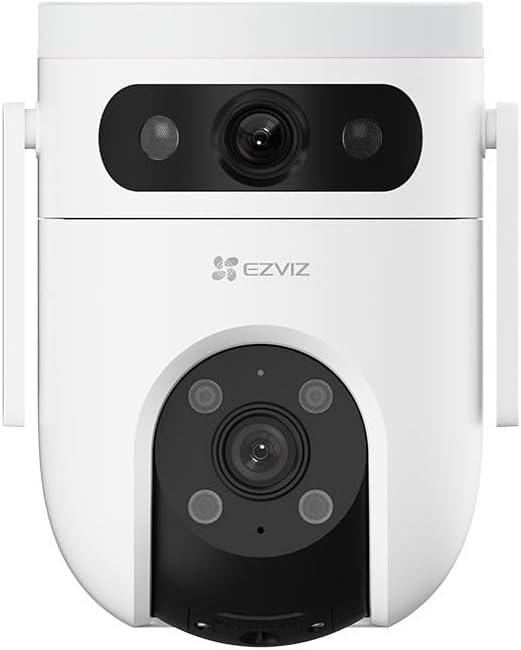
Слика 3.1: Предња страна View - Shows the upper wide-angle lens, lower pan-tilt-zoom lens, and EZVIZ logo. The upper lens includes IR lights for night vision, and the lower lens has additional IR/spotlights.

Слика 3.2: Страна View - Illustrates the mounting bracket and the sleek profile of the camera, highlighting its outdoor-ready design.
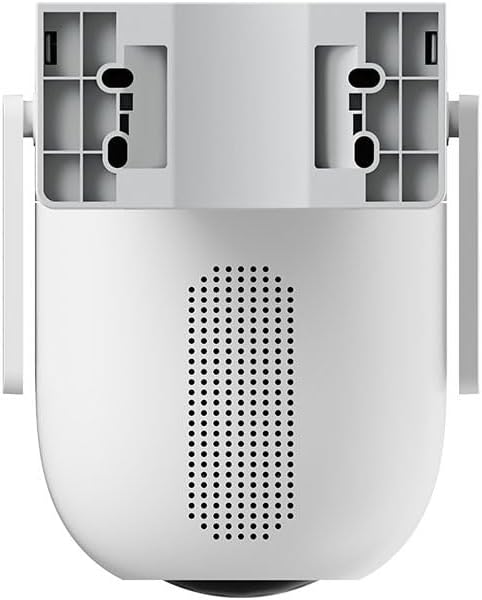
Слика 3.3: Позади View - Displays the speaker grille for two-way audio and ventilation openings.

Слика 3.4: Дно View - Reveals the MicroSD card slot, protected by a cover, for local storage of recordings.
Кључне компоненте:
- Upper Wide-Angle Lens: Provides a broad overview посматраног подручја.
- Lower Pan-Tilt-Zoom (PTZ) Lens: Offers detailed views and can track subjects with 5x optical zoom and 360-degree field of view.
- Infrared (IR) Lights: For clear night vision.
- микрофон: За аудио улаз.
- говорник: For two-way audio communication and siren.
- Утор за мицроСД картицу: За локално складиштење видео записа (картица није укључена).
- Дугме за ресетовање: Used for factory reset (typically located near the SD card slot).
- Напајање: За повезивање адаптера за напајање.
4. Подешавање и инсталација
4.1 Почетно подешавање
- Преузмите EZVIZ апликацију: Тражи "EZVIZ" in the App Store (iOS) or Google Play Store (Android) and download the official app.
- Create an EZVIZ Account: Отворите апликацију и пратите упутства на екрану да бисте регистровали нови налог или се пријавили ако га већ имате.
- Укључите камеру: Connect the power adapter to the camera's power port and plug it into a power outlet. Wait for the indicator light to flash blue, indicating it's ready for setup.
- Додајте камеру у апликацију: In the EZVIZ app, tap the "+" icon on the home screen to add a new device. Scan the QR code located on the camera or its packaging. Follow the in-app prompts to connect the camera to your Wi-Fi network. Ensure your Wi-Fi network is 2.4 GHz.
- Уметните MicroSD картицу (опционо): If you wish to store recordings locally, gently insert a MicroSD card (Class 10 or higher, up to 512GB) into the designated slot on the camera (refer to Figure 3.4). Ensure the camera is powered off before inserting or removing the card.
4.2 Монтирање камере
The H9c camera is designed for outdoor installation. Choose a location that provides the desired viewing angle, has a stable Wi-Fi signal, and is within reach of a power outlet.
- Изаберите локацију: Select a sturdy surface (wall or ceiling) that can support the camera's weight. Ensure there are no obstructions to the camera's field of view.
- Use Mounting Template: Place the mounting template (included in the package) on the desired installation surface and mark the screw holes.
- Избушене рупе: Drill pilot holes at the marked positions. Insert wall plugs if mounting on masonry or concrete.
- Обезбедите камеру: Align the camera's mounting base with the drilled holes and secure it using the provided screws.
- Водоотпорне везе: Use the waterproof kit to protect the power cable connection from moisture, especially for outdoor installations.
- Подесите угао: Once mounted, adjust the camera's angle in the EZVIZ app to ensure optimal coverage.
5. Руковање камером
The EZVIZ H9c camera offers a range of features accessible through the EZVIZ mobile application.
5.1 Функционалност двоструког сочива
The H9c utilizes two lenses for enhanced surveillance:
- Широкоугаони објектив: Provides a static, broad view of the area, ideal for general monitoring.
- Pan-Tilt-Zoom (PTZ) Lens: This lens can be remotely controlled via the app to pan horizontally (360 degrees), tilt vertically, and zoom in (5x optical zoom) for detailed inspection.
- Интелигентно праћење: If the wide-angle lens detects a person, the PTZ lens can automatically rotate to track the person's movement, ensuring continuous coverage of the activity. This allows for simultaneous monitoring of a wide area and detailed tracking of specific events.
5.2 Детекција покрета и упозорења
- Прилагодљиве зоне детекције: Set specific areas within the camera's view where you want motion detection to be active.
- Human Shape Detection: The camera can intelligently distinguish human shapes from other moving objects, reducing false alarms.
- Тренутна обавештења: Receive real-time alerts on your smartphone when motion is detected.
- Активна одбрана: Upon detection, the camera can activate a siren and strobe lights to deter intruders.
5.3 Ноћни вид
The H9c provides clear surveillance even in low-light conditions:
- Инфрацрвени ноћни вид: Automatically switches to black and white infrared mode in the dark.
- Ноћни вид у боји: With built-in spotlights, the camera can provide full-color night vision when sufficient ambient light is available or when spotlights are activated.
5.4 Двосмерни аудио
Communicate with visitors or deter intruders using the built-in microphone and speaker. Access this feature through the live view in the EZVIZ app.
5.5 Снимање и складиштење видеа
- Локално складиште: Supports MicroSD card storage (up to 512GB) for continuous or event-based recording.
- Цлоуд Стораге: Optional EZVIZ CloudPlay subscription service for secure cloud storage.
- Репродукција: View снимљено фооtage directly from the EZVIZ app.
6. Одржавање
Редовно одржавање осигурава оптималне перформансе и дуготрајност вашег фотоапарата.
- Чишћење: Нежно обришите објектив и тело камере меком крпомamp cloth. Do not use harsh chemicals or abrasive cleaners. Ensure the camera is powered off before cleaning.
- Ажурирања фирмвера: Regularly check for and install firmware updates via the EZVIZ app. Updates often include performance improvements, new features, and security enhancements.
- Управљање мицроСД картицом: If using a MicroSD card, periodically check its status in the app. Format the card regularly (e.g., monthly) to maintain optimal recording performance. Back up important footagе пре форматирања.
- Напајање: Ensure the power adapter and cable are free from damage. Replace if any wear or tear is observed.
- Услови животне средине: While designed for outdoor use, avoid exposing the camera to extreme temperatures outside its operating range or direct, prolonged water submersion.
КСНУМКС. Решавање проблема
If you encounter issues with your EZVIZ H9c camera, refer to the following common problems and solutions.
7.1 Camera Offline / Cannot Connect
- Проверите снагу: Ensure the camera is properly connected to a power source and the adapter is working.
- Ви-Фи сигнал: Verify that your Wi-Fi router is working and the camera is within range. Try moving the camera closer to the router or using a Wi-Fi extender.
- Подешавања рутера: Confirm your Wi-Fi network is 2.4 GHz. Ensure there are no MAC address filters or other network restrictions preventing the camera from connecting.
- Поново покрените уређаје: Power cycle both the camera and your Wi-Fi router.
- Ресетуј камеру: If the issue persists, press and hold the reset button on the camera for 5-10 seconds until the indicator light flashes, then re-add the camera through the EZVIZ app.
7.2 Лош квалитет слике
- Чиста сочива: Ensure the camera lens is clean and free from dust, dirt, or smudges.
- Мрежни пропусни опсег: A weak Wi-Fi signal can affect video quality. Check your network speed and camera's signal strength in the app.
- Услови осветљења: Ensure adequate lighting for optimal color vision. In very low light, the camera will switch to black and white night vision.
7.3 Motion Detection Not Working / Too Many False Alarms
- Проверите подешавања: Verify that motion detection is enabled in the EZVIZ app and detection sensitivity is appropriately set.
- Зоне детекције: Adjust detection zones to focus on critical areas and exclude irrelevant ones (e.g., moving trees, busy roads).
- Human Shape Detection: Ensure human shape detection is enabled to filter out non-human movements.
8. Спецификације
| Назив модела | Х9ц |
| Бранд | ЕЗВИЗ |
| Резолуција | 3K (50 MP Photosensor Resolution) |
| Технологија повезивања | бежични (Ви-Фи) |
| Посебне карактеристике | Night Vision, Dual-Lens, Pan-Tilt-Zoom, Intelligent Tracking, Two-Way Audio |
| Усаге Енвиронмент | Оутдоор |
| Оптицал Зоом | 5x |
| Поље оф View | 360 Degrees (PTZ lens) |
| Ниво отпорности на воду | Отпоран на воду |
| Материјал | Пластика |
| Тежина | 200 грама |
| Укључене компоненте | Camera and two 3K-lenses |
| Upper Temperature Range | 100 степени Целзијуса |
| Формат видео записа | АВИ |
9. Гаранција и подршка
For detailed warranty information, please refer to the warranty card included with your product or visit the official EZVIZ website. EZVIZ provides technical support and customer service to assist with any questions or issues you may encounter.
Official EZVIZ Webсајт: ввв.езвиз.цом
You can find FAQs, troubleshooting guides, and contact information for customer support on their webсајту.
Повезани документи - Х9ц
 |
EZVIZ C8C Lite камера: Подешавање, инсталација и кориснички водич Свеобухватни водич за подешавање и инсталирање безбедносне камере EZVIZ C8C Lite. Обухвата садржај пакета, основне функције, укључивање, интернет везу (Wi-Fi/жичну), инсталацију SD картице и опције монтаже. |
 |
EZVIZ HB90 2K+ Wi-Fi камера са два објектива, покретним и нагибним покретом, упутство за употребу Ово корисничко упутство пружа свеобухватна упутства за подешавање, инсталирање и коришћење EZVIZ HB90 2K+ двоструке Wi-Fi покретне и нагибне камере. Покрива основе уређаја, интеграцију апликација, инсталацију камере, пренос уживо... view, подешавања и повезивање паметног дома са Amazon Alexa и Google Assistant. |
 |
EZVIZ H9c Dual 2K Wi-Fi Camera User Manual Comprehensive user manual for the EZVIZ H9c Dual 2K Wi-Fi Camera, covering setup, installation, app operations, connectivity, and troubleshooting. |
 |
Tapo C575D Outdoor Dual Lens Pan/Tilt Security Camera Quick Start Guide Concise guide for the Tapo C575D Outdoor Dual Lens Pan/Tilt Security Camera, detailing its appearance, adjustment, LED indicators, button functions, safety precautions, and regulatory compliance information. |
 |
IRIS130 робусна камера са ноћним видом, панорамским, нагибним и зумом, упутство за употребу Свеобухватни кориснички водич за IRIS130 робусну ноћну камеру са панорамским, нагибним и зумом, који обухвата инсталацију, рад, карактеристике, техничке спецификације и решавање проблема. |
 |
Wyze Cam Pan v2 водич за брзи почетак Овај водич пружа упутства за подешавање и коришћење Wyze Cam Pan v2, укључујући конфигурацију, светлосне индикаторе и информације о усклађености са FCC прописима. |
Ask a question about this manual
Ask about setup, troubleshooting, compatibility, parts, safety, or missing instructions. Manuals+ will review the question and use this page’s manual context to help answer it.