
Amazon Fire TV Soundbar Plus
Amazon Fire TV Soundbar Plus User Manual
Model: Fire TV Soundbar Plus (ASIN: B0D1ZSC62P)
Увод
The Amazon Fire TV Soundbar Plus is a 3.1 channel all-in-one soundbar designed to enhance your home audio experience. It features integrated bass, clear dialogue, and supports advanced audio formats like Dolby Atmos and DTS:X, providing immersive sound for movies, music, and more. This manual provides detailed instructions for setting up, operating, maintaining, and troubleshooting your Fire TV Soundbar Plus.

Слика 1: Предња страна view of the Fire TV Soundbar Plus, highlighting its key audio technologies.
Сетуп
Садржај пакета
Пре него што почнете, уверите се да су све ставке присутне у кутији:
- Фире ТВ Соундбар Плус
- Даљински управљач
- ХДМИ 2.0 кабл
- Кабл за напајање наизменичном струјом
- 2 ААА батерије
- Комплет за монтирање на зид
- Водич за брзи почетак

Figure 2: Contents included in the Fire TV Soundbar Plus package and product dimensions.
Пхисицал Плацемент
The soundbar measures approximately 6.4 cm (height) x 94 cm (width) x 13.2 cm (depth) and weighs 4 kg. For optimal audio performance, place the soundbar centrally in front of your television. Ensure there are no obstructions in front of the soundbar. The included wall mount kit allows for wall installation if preferred.
Повезивање Соундбар-а
Follow these steps to connect your Fire TV Soundbar Plus to your television:
- HDMI (eARC/ARC) Connection: Connect one end of the included HDMI 2.0 cable to the HDMI (eARC/ARC) port on the back of the soundbar. Connect the other end to the HDMI eARC/ARC port on your television. This connection ensures optimal audio quality and allows your TV remote to control the soundbar's volume.
- Прикључак за напајање: Connect the AC power cable to the Power port on the soundbar and then plug it into a wall outlet.
- Optical Connection (Optional): If your TV does not have an HDMI eARC/ARC port, you can use an optical cable (not included) to connect the soundbar to your TV's optical audio output.
- УСБ-А порт: The USB-A port is typically used for service or firmware updates and is not for general user connection.

Слика 3: Задња страна view of the soundbar displaying available connection ports.
Почетно укључивање
Once connected, the soundbar will typically power on automatically with your TV if using the HDMI eARC/ARC connection. If not, press the Power button on the included remote control.
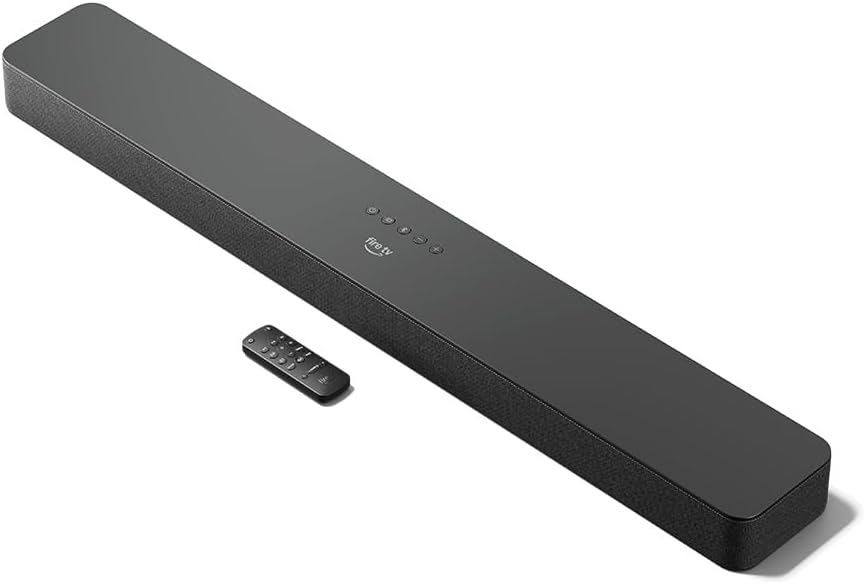
Figure 4: The Fire TV Soundbar Plus and its compact remote control.
Управљање Соундбар-ом
Основне контроле
Use the included remote control to manage your soundbar's functions:
- Дугме за напајање: Укључује или искључује звучну траку.
- Појачавање/утишавање: Подешава главни ниво јачине звука.
- Дугме за утишавање: Искључује или укључује звук.
- Избор улаза: Switches between HDMI, Optical, and Bluetooth inputs.
- Режими звука: Cycles through optimized audio presets.
Режими звука
The Fire TV Soundbar Plus offers several equalizer modes to optimize audio for different content types:
- Режим филма: Enhances cinematic soundscapes with dynamic range and surround effects.
- Музички режим: Provides balanced audio for music playback, emphasizing clarity and bass.
- Спортски режим: Optimizes audio for sports broadcasts, often enhancing commentary and crowd noise.
- Ноћни режим: Смањује динамички опсег како би се спречили изненадни гласни звуци, идеално за касно увече viewинг.
The soundbar features a dedicated central channel for dialogue, ensuring clear conversations in all modes, especially beneficial for movies and TV shows.

Figure 5: Internal components illustrating the integrated speakers, tweeters, and subwoofer for rich sound.

Figure 6: The soundbar delivering immersive audio with Dolby Atmos and DTS:X in a home environment.
Блуетоотх стриминг
You can stream audio from your phone or tablet to the Fire TV Soundbar Plus via Bluetooth. To connect:
- Press the Bluetooth button on the remote control or select Bluetooth input.
- On your mobile device, go to Bluetooth settings and select "Fire TV Soundbar Plus" from the list of available devices.
- Након упаривања, звук са вашег уређаја ће се репродуковати преко саундбара.

Figure 7: Connecting a mobile device via Bluetooth to stream music or podcasts.
Fire TV Integration
For seamless integration with Fire TV devices (sold separately), you can control both your TV and the soundbar with a single remote. Audio settings can be customized directly within the Fire TV interface on selected models.
Одржавање
To ensure the longevity and optimal performance of your Fire TV Soundbar Plus, follow these maintenance guidelines:
- Чишћење: Користите меку, суву крпу за чишћење површине саундбара. Не користите течна средства за чишћење или абразивне материјале, јер могу оштетити завршну обраду.
- вентилација: Уверите се да отвори за вентилацију саундбара нису блокирани како бисте спречили прегревање.
- Ажурирања софтвера: Periodically check for firmware updates to ensure your soundbar has the latest features and performance improvements. Updates are typically delivered automatically when connected to a Fire TV device or can be performed via USB if available.
Решавање проблема
If you encounter issues with your Fire TV Soundbar Plus, refer to the following common problems and solutions:
| Проблем | Могући узрок | Решење |
|---|---|---|
| Нема звука са звучне траке. |
|
|
| Звук је изобличен или нејасан. |
|
|
| Даљински управљач не ради. |
|
|
| Проблеми са упаривањем преко Bluetooth-а. |
|
|
Спецификације
| Феатуре | Детаљ |
|---|---|
| Soundbar Dimensions (LxWxH) | 94 цм к 13.2 цм к 6.4 цм |
| Соундбар Тежина | 4 kg (Actual dimensions and weight may vary based on configuration and manufacturing process) |
| Спеакер Цханнелс | 3.1 (integrated subwoofer) |
| Режими еквилајзера | Movie, Music, Sport, Night |
| Подршка за сурроунд звук | Долби Атмос, ДТС:Кс |
| Портс | HDMI (eARC/ARC), Optical, AC Power, USB-A |
| Блуетоотх подршка | Да |
| Компатибилност | Паметни телевизори и телевизори са стриминг медијским плејерима |
| Укључено у кутију | Fire TV Soundbar Plus, remote control, HDMI 2.0 cable, 1 AC power cable, 2 AAA batteries, wall mount kit, Quick Start Guide |
Гаранција и подршка
The Fire TV Soundbar Plus comes with a one-year limited warranty provided by the manufacturer. This limited warranty is in addition to, and does not compromise, consumer rights. Consumers may have additional rights provided by law even after the limited warranty expires. Use of the Fire TV Soundbar Plus is subject to the terms indicated by Amazon.
For further assistance, please refer to the official Amazon support channels or the Quick Start Guide included with your product.
Ask a question about this manual
Ask about setup, troubleshooting, compatibility, parts, safety, or missing instructions. Manuals+ will review the question and use this page’s manual context to help answer it.