
1. Увод
Thank you for choosing the HOWENS 15.6 Inch Portable Touchscreen Monitor. This device is designed to enhance your productivity and entertainment with its Full HD 1920x1080 IPS display, 10-point multi-touch functionality, and versatile connectivity options. Its compact and lightweight design makes it ideal for various applications, from extending your laptop's display to serving as an industrial control interface.

Слика 1.1: Предња страна view of the HOWENS 15.6 Inch Portable Touchscreen Monitor.
2. Безбедносне информације
Please read all safety instructions carefully before using this product. Failure to follow these instructions may result in electric shock, fire, or damage to the device.
- Не излажите монитор киши, влази или екстремним температурама.
- Избегавајте постављање монитора у близини извора топлоте или на директној сунчевој светлости.
- Користите само адаптер за напајање који сте добили уз уређај.
- Do not attempt to disassemble or repair the monitor yourself. Contact qualified service personnel for assistance.
- Држите монитор даље од јаких магнетних поља.
- Обезбедите одговарајућу вентилацију око монитора да бисте спречили прегревање.
3. Шта је у кутији
Пакет укључује следеће ставке:
- Portable Touchscreen Monitor 15.6 inch
- ХДМИ кабл
- USB cable (for touch functionality)
- Исправљач једносмерне струје
- Даљински управљач
- Оперативни приручник
4. Производ је готовview
4.1 Кључне карактеристике
- FHD 1080P Display: Features a 1920x1080 resolution with a 60Hz refresh rate and IPS panel for 178° wide viewing angles. Brightness of 300 cd/m² and 72% NTSC color gamut ensure vibrant and accurate colors.
- 10-Point Touch Screen: Advanced multi-touch functionality for intuitive interaction. Connect via a Type-A to Type-B USB cable for touch support.
- Широка компатибилност: Supports Laptops, PCs, Mini PCs, Raspberry Pi, PS5/4, Xbox, and various industrial devices via HDMI, DVI, and VGA connections.
- Multi-Function Display Modes: Supports expansion, mirror, second-screen-only, horizontal, and vertical display modes.
- Standard VESA Mount: Equipped with a 75x75mm VESA hole for wall or desktop mounting (stand not included).
- Уграђени двоструки звучници: Enjoy stereo audio directly from the monitor.
4.2 Port Parameters
The monitor features a variety of ports for diverse connectivity:
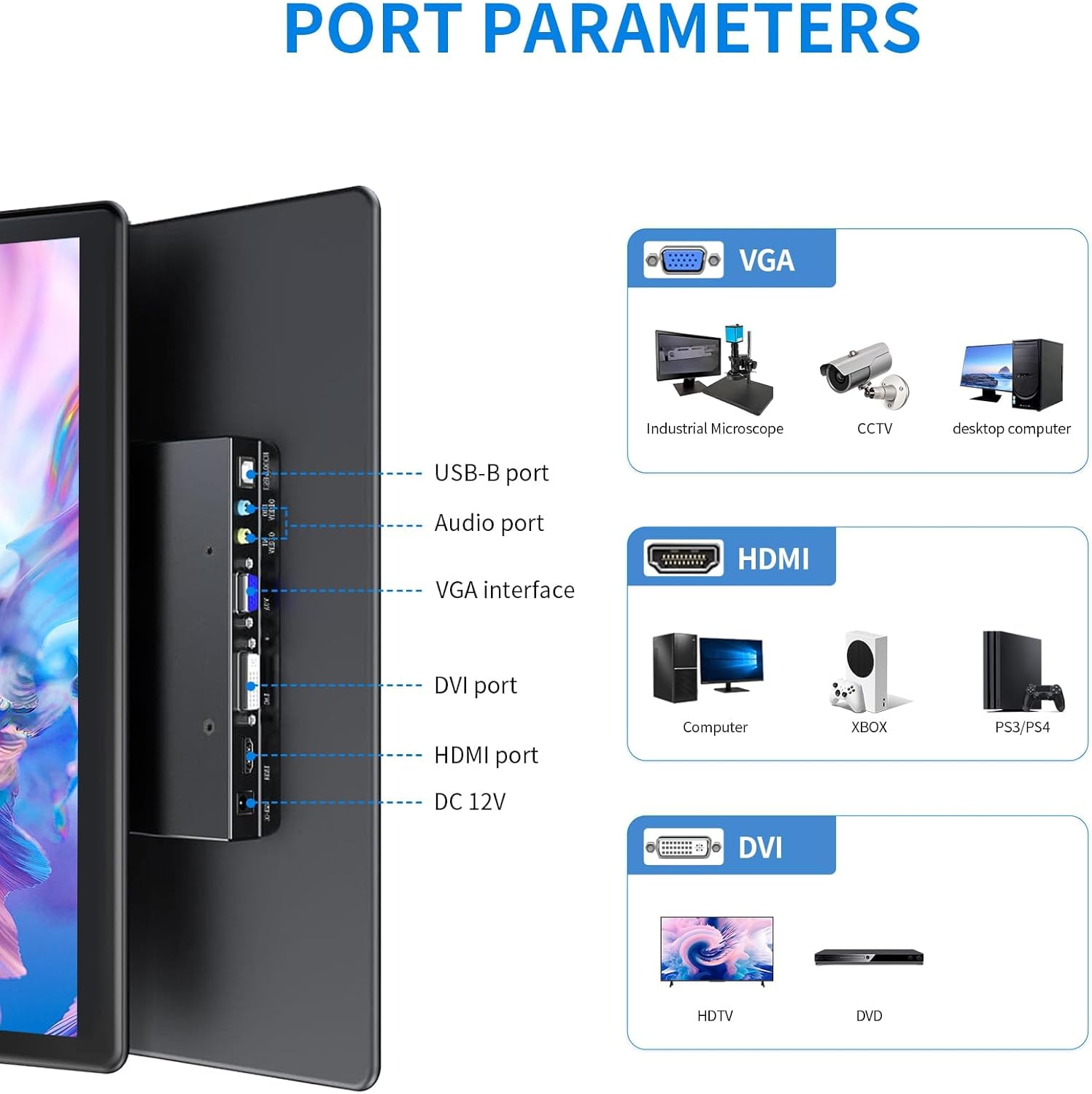
Слика 4.1: Детаљно view of the monitor's input/output ports.
- УСБ-Б порт: For touch functionality connection to a host device.
- Аудио порт: За аудио улаз/излаз.
- VGA интерфејс: For video input from devices like industrial microscopes, CCTV, and desktop computers.
- ДВИ порт: For video input from devices such as HDTVs and DVD players.
- ХДМИ порт: For high-definition video and audio input from computers, Xbox, PS5/4, and other compatible devices.
- ДЦ 12В: Улазни порт за напајање.
4.3 Карактеристике екрана

Image 4.2: Visual representation of key display features.
The monitor's IPS panel provides a 178° wide viewing angle, ensuring consistent image quality from various perspectives. The 1920x1080 resolution delivers sharp and clear visuals, while the 72% NTSC color gamut offers rich and accurate color reproduction.
4.4 Dimensions and VESA Mount

Image 4.3: Product dimensions and VESA mounting details.
The monitor features a standard 75x75mm VESA mounting pattern, allowing for flexible installation on compatible wall mounts or desktop stands (sold separately).
5. Подешавање и повезивање
Follow these steps to connect your HOWENS portable touchscreen monitor to your device:
- Повежите видео сигнал: Use the provided HDMI cable to connect the monitor's HDMI port to your laptop, PC, or gaming console's HDMI output. Alternatively, use a DVI or VGA cable if your device supports those interfaces.
- Connect Touch Functionality (Optional): For touchscreen features, connect the provided USB-A to USB-B cable from your host device's USB-A port to the monitor's USB-B port.
Note: Touch input is not enabled on devices with strict security protocols, such as Nintendo Switch, iPhones, or iPads.
- Прикључите напајање: Plug the DC power adapter into the monitor's DC 12V port and then into a power outlet.
- Укључено: Press the power button on the monitor or use the remote control to turn on the device.
Video 5.1: Demonstration of connecting the monitor to a laptop, including HDMI, USB for touch, and power connections, and showcasing touch functionality and remote control use.
5.1 ВЕСА монтажа
The monitor is compatible with 75x75mm VESA mounts. To mount the monitor, attach a compatible VESA arm or bracket to the four screw holes on the back of the monitor. Ensure the mount can support the weight of the monitor.
6. Руковање монитором
6.1 Функционалност екрана осетљивог на додир
Once the USB-A to USB-B cable is connected to a compatible device, the 10-point multi-touch feature will be active. You can use gestures such as tapping, swiping, pinching, and zooming directly on the monitor screen for intuitive control.
6.2 Даљински управљач
The included remote control allows you to navigate the monitor's On-Screen Display (OSD) menu to adjust settings such as brightness, contrast, color temperature, and input source. Point the remote control towards the infrared receiver on the monitor.
6.3 Режими приказа
The monitor supports various display modes to suit your needs:

Слика 6.1: Визуелни примерamples of multiple display modes.
- Проширени режим: Проширује радну површину на оба екрана, пружајући више радног простора.
- Режим огледала: Duplicates your primary display onto the portable monitor.
- Режим само другог екрана: Displays content only on the portable monitor, turning off the primary display.
- Horizontal/Vertical Mode: Adjust the display orientation to landscape or portrait as required. This can usually be configured in your operating system's display settings.
6.4 Аудио

Image 6.2: Location of built-in dual speakers.
The monitor includes built-in dual speakers for stereo audio output. You can adjust the volume using the remote control or through your connected device's audio settings.
7. Одржавање
- Чишћење екрана: Нежно обришите екран меком крпом која не оставља влакна. За тврдокорне мрље, дampБлаго навлажите крпу водом или средством за чишћење екрана. Избегавајте употребу јаких хемикалија или абразивних материјала.
- Чишћење Цasing: Користите меку, суву крпу за чишћење површине монитораasing.
- Складиштење: When not in use for extended periods, store the monitor in a cool, dry place, preferably in its original packaging or a protective sleeve.
КСНУМКС. Решавање проблема
If you encounter issues with your monitor, please refer to the following common solutions:
- Нема напајања:
- Ensure the DC power adapter is securely connected to the monitor and a working power outlet.
- Проверите да ли је утичница функционална тако што ћете укључити други уређај.
- Нема дисплеја/сигнала:
- Check that the HDMI, DVI, or VGA cable is securely connected to both the monitor and the source device.
- Ensure the correct input source is selected on the monitor using the remote control or OSD menu.
- Try connecting the monitor to a different source device to rule out issues with the original source.
- Екран осетљив на додир не реагује:
- Confirm the USB-A to USB-B cable is properly connected between the monitor and the host device.
- Restart both the monitor and the host device.
- Ensure your operating system supports touchscreen functionality and that drivers are up to date.
- Remember that some devices (e.g., Switch, iPhones, iPads) do not support touch input with this monitor due to security protocols.
- Лош квалитет слике:
- Подесите осветљеност, контраст и боје преко OSD менија.
- Ensure the display resolution on your source device is set to 1920x1080 for optimal clarity.
9. Спецификације
| Феатуре | Спецификација |
|---|---|
| Бранд | HOWENS |
| Број модела | CXTP-BB |
| Величина екрана | 15.6 инча |
| Резолуција | FHD 1920 x 1080p |
| Аспецт Ратио | 16:9 |
| Дисплаи Типе | ЛЦД |
| Дисплаи Тецхнологи | ИПС |
| Рефресх Рате | 60 Хз |
| Осветљеност | 300 Цандела |
| Однос контраста | 1000:1 |
| Viewинг Англе | 178 степени |
| Гамут боја | 72% НТСЦ |
| Технологија повезивања | DVI, HDMI, VGA |
| Додатне карактеристике | Built-In Speakers, Energy Efficient, Eye Care, Portable, Touchscreen |
| Тежина артикла | 2.33 фунти |
| Тип монтаже | Wall Mount (75x75mm VESA) |
10. Гаранција и подршка
This HOWENS monitor comes with a 1-годишња гаранција произвођача against defects. For any product issues or technical support, please contact HOWENS customer service. We are committed to resolving any concerns promptly.
For further assistance, please refer to the contact information provided on the HOWENS official webсајт или вашу документацију о куповини.