
FREEWOLF M96
FREEWOLF M96 Wireless Gaming Keyboard User Manual
Модел: М96
Увод
The FREEWOLF M96 Wireless Gaming Keyboard is designed for versatile use, offering both Bluetooth and 2.4G wireless connectivity. It features a mechanical feel, RGB LED backlighting, a digital display screen, and durable PBT keycaps. This manual provides detailed instructions to help you set up, operate, and maintain your keyboard for optimal performance.
Производ је завршенview
The FREEWOLF M96 keyboard combines advanced features with a user-friendly design. Key components include:
- Двоструко повезивање: Supports Bluetooth (BT1, BT2) and 2.4G wireless modes for seamless switching between multiple devices.
- Дигитални екран: Provides real-time information on battery capacity, connection mode, and charging status.
- Multimedia Control Knob: Allows for easy adjustment of volume and backlight settings.
- ПБТ капице за тастатуре: Durable, spherical keycaps designed for comfortable typing and longevity.
- RGB LED Backlight: Customizable lighting effects to enhance your gaming or typing experience.
- Дуготрајна батерија: Equipped with a 3000 mAh battery for extended use.
- Ергономски дизајн: Features adjustable feet for optimal typing comfort.

Слика: Прекоview of the FREEWOLF M96 Wireless Keyboard, highlighting its 90% US layout, PBT keycaps, Bluetooth/2.4G connectivity, LED backlight, 3000 mAh battery, multimedia knob, LED screen, and compatibility with Win/Mac/Linux/iOS/Android systems.

Слика: Крупни план view of the PBT color blocking keycaps, emphasizing their durability and longer lifespan.
Сетуп
1. Пуњење тастатуре
Before first use, it is recommended to fully charge the keyboard. Connect the provided USB-C cable to the charging port on the keyboard and the other end to a USB power source (e.g., computer USB port, wall adapter).
- The digital display screen will indicate the charging status.
- Потпуно пуњење обично траје неколико сати.

Слика: Са стране view of the keyboard illustrating the power switch, Type-C charging port, and the 2.4G/BT1/BT2 mode switch. The Type-C port is for charging only and cannot be used for wired connection.
2. Повезивање путем 2.4G бежичне мреже
- Locate the 2.4G wireless receiver (USB dongle), usually stored in a compartment on the keyboard's underside.
- Прикључите 2.4G пријемник у слободан USB порт на рачунару.
- Померите прекидач за режим на тастатури у положај „2.4G“.
- The keyboard should automatically connect to your device. The display screen will show the 2.4G connection status.
3. Повезивање преко Блуетоотх-а
The keyboard supports two Bluetooth channels (BT1 and BT2) for connecting to multiple devices.
- Slide the mode switch on the keyboard to either "BT1" or "BT2" position.
- На свом уређају (рачунару, таблету, паметном телефону) омогућите Блутут и потражите нове уређаје.
- Select "FREEWOLF M96" (or similar name) from the list of available devices.
- If prompted, enter the pairing code displayed on your device.
- Once connected, the digital display screen will show the active Bluetooth channel (BT1 or BT2).
To switch between connected Bluetooth devices, simply slide the mode switch to the desired BT1 or BT2 channel.
Video: Demonstrates the dual-mode connectivity of the FREEWOLF M96 Wireless Gaming Keyboard, showing how to switch between 2.4G wireless and Bluetooth connections (BT1, BT2) for seamless multi-device operation.
Упутство за употребу
1. Дигитални екран
The integrated electronic display provides essential information at a glance:
- Капацитет батерије: Приказује тренутни проценат батеријеtage.
- Режим везе: Indicates whether the keyboard is in 2.4G, BT1, or BT2 mode.
- Статус пуњења: Displays an icon when the keyboard is charging.
- Индикатор слабе батерије: Alerts you when the battery is low.

Слика: Детаљна view of the digital display screen on the FREEWOLF M96 keyboard, showing indicators for power display, connection status (2.4G, BT1, BT2), charging, and low battery.
2. Multimedia Control Knob
The knob located on the top right of the keyboard offers dual functionality:
- Default Function (Volume Control):
- Ротирајте у смеру казаљке на сату да бисте повећали јачину звука.
- Окрените супротно од смера казаљке на сату да бисте смањили јачину звука.
- Притисните дугме да бисте искључили/укључили звук.
- Контрола позадинског осветљења:
- Press and hold the knob for five seconds to switch to backlight control mode.
- In backlight control mode:
- Rotate clockwise to increase backlight brightness.
- Rotate counter-clockwise to decrease backlight brightness.
- Press the knob to switch between different backlight effects/modes.

Image: Illustration of the advanced dial control, detailing its default functions for volume (volume up, volume down, mute) and its backlight control functions (backlight brightness up, backlight brightness down, light effect switching) when pressed and held for 5 seconds.
3. Backlight Control (Function Keys)
In addition to the knob, you can control the backlight using function key combinations:
- ФН + Н: Пребаците режим позадинског осветљења
- FN + Up Arrow / Down Arrow: Подесите осветљеност позадинског осветљења
- FN + Left Arrow / Right Arrow: Подесите брзину позадинског осветљења
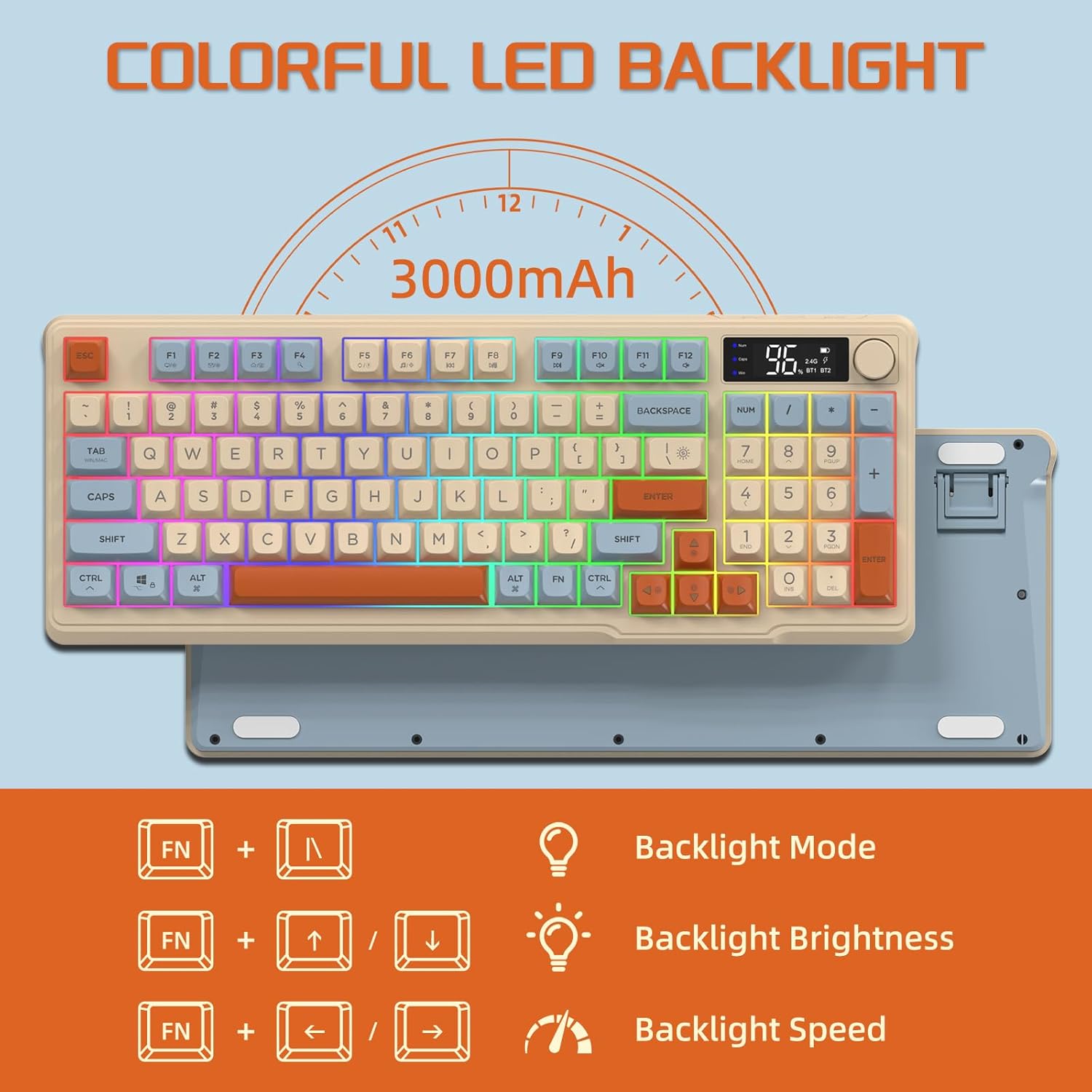
Image: The keyboard displaying the key combinations for controlling the colorful LED backlight, including changing backlight mode, brightness, and speed using the FN key with N, arrow keys.
4. Power Saving Modes
The keyboard is designed with power-saving features to extend battery life:
- Sleep Mode (3 minutes inactivity): After 3 minutes of inactivity, the keyboard enters sleep mode, and the backlight turns off.
- Deep Sleep Mode (10 minutes inactivity): After 10 minutes in sleep mode, the keyboard enters deep sleep. The first key press will be ignored to wake the keyboard, and the second key press will activate it.
5. Компатибилност
The FREEWOLF M96 keyboard is compatible with a wide range of operating systems, including Windows, Mac, and Linux, ensuring broad usability.
Одржавање
1. Чишћење
- Искључите тастатуру пре чишћења.
- Користите меку крпу која не оставља длачицеampводом или благим раствором за чишћење да бисте обрисали површину.
- For cleaning between keycaps, use compressed air or a small brush.
- Избегавајте употребу јаких хемикалија или абразивних материјала.
2. Брига о батерији
- Избегавајте често потпуно пражњење батерије.
- Чувајте тастатуру на хладном и сувом месту када је не користите дуже време.
- Use only the provided charging cable or a compatible USB-C cable.
Решавање проблема
| Проблем | Могући узрок | Решење |
|---|---|---|
| Тастатура не реагује. | Low battery; incorrect connection mode; receiver not plugged in (2.4G); Bluetooth not paired. | Charge the keyboard; switch to correct mode (2.4G/BT1/BT2); ensure 2.4G receiver is connected; re-pair Bluetooth. |
| Позадинско осветљење не ради. | Backlight turned off; low battery; brightness set to minimum. | Check backlight settings using the knob or FN key combinations; charge the keyboard. |
| Тастери се не региструју или се појављују као ghosting. | Software conflict; low battery; interference. | Restart your device; charge the keyboard; move closer to the receiver/device; check for driver updates. |
| Блутут веза је нестабилна. | Сметње; удаљеност од уређаја; празна батерија. | Reduce interference (other wireless devices); move keyboard closer to device; charge keyboard. |
Спецификације
| Феатуре | Детаљ |
|---|---|
| Бранд | Слободни вук |
| Број модела | М96 |
| Технологија повезивања | Блутут, 2.4Г бежична веза |
| Опис тастатуре | Mechanical feel with PBT keycaps |
| Број кључева | 94 keys (US Layout) |
| Позадинско осветљење | РГБ ЛЕД позадинско осветљење |
| Капацитет батерије | 3000 мАх |
| Посебне карактеристике | Electronic display, multimedia control knob, power saving modes |
| Компатибилни уређаји | PC (Windows, Mac, Linux), iOS, Android |
| Боја | Blueberry (Myrtille) |
| Димензије производа | 385mm (15.16 inch) x 145mm (5.71 inch) x 40mm (1.57 inch) |

Image: Diagram illustrating the product dimensions of the FREEWOLF M96 keyboard: 385mm (15.16 inches) length, 145mm (5.71 inches) width, and 40mm (1.57 inches) height.
Гаранција и подршка
This FREEWOLF M96 Wireless Gaming Keyboard comes with a standard manufacturer's warranty. Please refer to the product packaging or the seller's information for specific warranty terms and conditions. For technical support or further assistance, please contact the retailer or manufacturer directly.
For the latest information and support, visit the official FREEWOLF webсајту или контактирајте њихову корисничку службу.
Ask a question about this manual
Ask about setup, troubleshooting, compatibility, parts, safety, or missing instructions. Manuals+ will review the question and use this page’s manual context to help answer it.