
1. Увод
The ELECTROPRIME Hishell M9 Translator is a portable, intelligent device designed for multi-language simultaneous translation, facilitating communication across language barriers. It supports both online and offline translation modes, along with photo and recording translation functionalities. This manual provides essential information for the proper setup, operation, and maintenance of your device.
2. Безбедносне информације
- Не излажите уређај екстремним температурама, директној сунчевој светлости или високој влажности.
- Избегавајте испуштање или излагање уређаја јаким ударима.
- Keep the device away from water and other liquids. If it gets wet, power it off immediately and allow it to dry completely before use.
- Use only the provided or approved charging cable and adapter.
- Do not attempt to disassemble, repair, or modify the device yourself. Contact customer support for assistance.
- Одложите уређај и његову батерију у складу са локалним прописима.
3. Садржај пакета
Молимо вас да проверите пакет за следеће ставке:
- ELECTROPRIME Hishell M9 Translator Device
- УСБ кабл за пуњење
- Кориснички приручник (овај документ)
4. Девице Оверview
Familiarize yourself with the physical components of your Hishell M9 Translator.
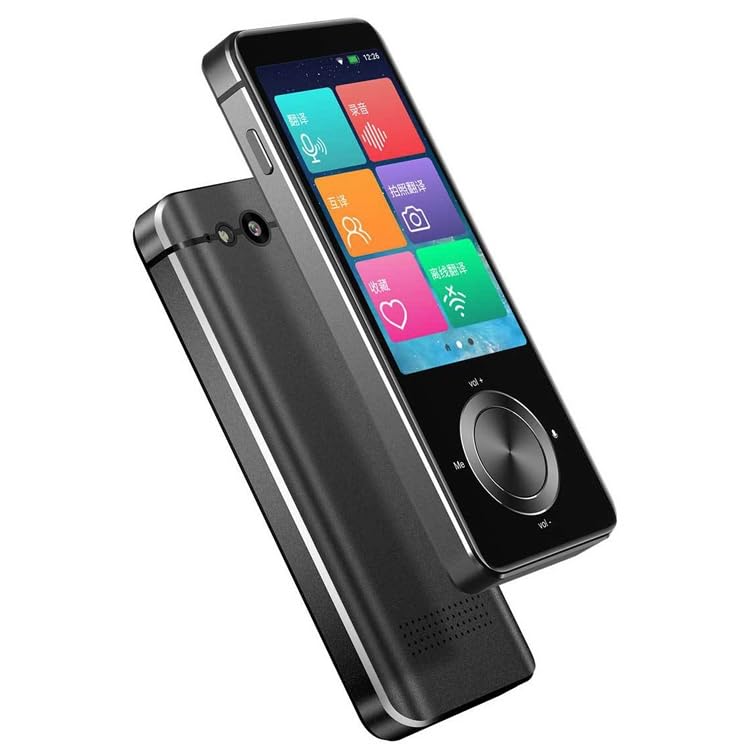
Слика 1: Предња и бочна view of the ELECTROPRIME Hishell M9 Translator. This image shows the device's screen, volume buttons, and power button on the side, along with the speaker grille at the bottom.
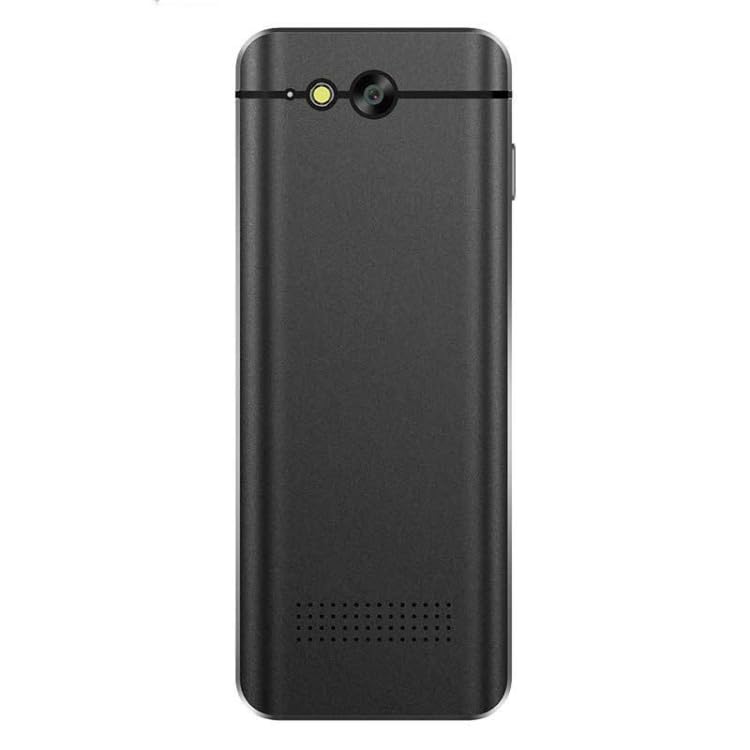
Слика 2: Назад view of the ELECTROPRIME Hishell M9 Translator. This image highlights the rear camera and flash, along with the microphone and speaker perforations.
- Екран осетљив на додир: Главни интерфејс за интеракцију.
- Дугме за напајање: Located on the side, used for powering on/off and screen lock.
- Дугмад за јачину звука: Подесите ниво аудио излаза.
- микрофон: Captures spoken language for translation.
- говорник: Излази преведени аудио.
- камера: Used for photo translation.
- УСБ порт: За пуњење уређаја.
5. Подешавање
5.1. Пуњење уређаја
- Прикључите USB кабл за пуњење на USB порт уређаја.
- Укључите други крај кабла у компатибилни USB адаптер за напајање (није укључен) или USB порт рачунара.
- The device will indicate charging status on the screen. Allow the device to fully charge before first use.
5.2. Укључивање/искључивање
- За укључивање: Притисните и држите дугме за напајање са стране уређаја док се екран не упали.
- За искључивање: Press and hold the Power button until a power-off menu appears on the screen. Select 'Power Off'.
- Да бисте закључали/откључали екран: Кратко притисните дугме за напајање.
5.3. Initial Language Settings
Upon first power-on, you may be prompted to select the device's system language and your preferred translation languages. Follow the on-screen instructions.
5.4. Мрежна веза (Wi-Fi)
For online translation features, a Wi-Fi connection is required.
- From the main screen, navigate to 'Settings'.
- Select 'Wi-Fi' and turn it on.
- Изаберите жељену Wi-Fi мрежу са листе.
- Унесите лозинку ако се то од вас затражи и повежите се.
6. Упутство за употребу
6.1. Real-time Online Translation
This mode requires an active Wi-Fi connection.
- From the main menu, select the 'Real-time Translation' or 'Voice Translation' icon.
- Select the source language (the language you will speak) and the target language (the language you want to translate to).
- Press and hold the designated button (often marked 'Me' or a microphone icon) and speak clearly into the device's microphone.
- Release the button. The device will process your speech and display/speak the translation in the target language.
6.2. Превод ван мреже
The Hishell M9 supports offline translation for certain language pairs. Ensure necessary language packs are downloaded in advance via Wi-Fi in the 'Settings' menu.
- Select 'Offline Translation' from the main menu.
- Choose the downloaded source and target language packs.
- Proceed with voice input as described in section 6.1.
6.3. Превод фотографија
This feature translates text from images using the device's camera.
- Select 'Photo Translation' from the main menu.
- Point the camera at the text you wish to translate. Ensure good lighting and clear focus.
- Tap the screen to capture the image.
- The device will analyze the text and display the translation.
6.4. Recording Translation
This function allows you to record longer conversations and translate them.
- Select 'Recording Translation' from the main menu.
- Tap the 'Record' button to start recording.
- Tap 'Stop' when finished.
- Select the recorded audio file and choose the desired translation language. The device will process and display the translated text.
6.5. Подешавања
Access the 'Settings' menu to adjust various device parameters:
- Ви-Фи: Manage network connections.
- Осветљеност: Подесите осветљеност екрана.
- Волумен: Контролишите јачину звука звучника.
- Подешавања језика: Change system language and download offline language packs.
- Ажурирање система: Check for and install software updates.
- О уређају: View информације о уређају.
7. Одржавање
7.1. Чишћење
- Користите меку, суву крпу која не оставља влакна да бисте очистили екран и кућиште уређаја.
- Не користите абразивна средства за чишћење, алкохол или хемијске раствараче.
7.2. Складиштење
- Уређај чувајте на хладном и сувом месту, даље од директне сунчеве светлости и екстремних температура.
- If storing for an extended period, ensure the battery is charged to approximately 50% to prolong its lifespan.
7.3. Брига о батерији
- Избегавајте често потпуно пражњење батерије.
- Do not leave the device connected to a charger for excessively long periods after it is fully charged.
КСНУМКС. Решавање проблема
| Проблем | Могући узрок | Решење |
|---|---|---|
| Уређај се не укључује. | Слаба батерија; уређај се замрзнуо. | Charge the device for at least 30 minutes. If still unresponsive, perform a hard reset (refer to device-specific instructions if available, usually holding power button for 10-15 seconds). |
| Translation is inaccurate or not working. | Poor internet connection; incorrect language selection; unclear speech. | Ensure stable Wi-Fi connection. Verify source and target languages. Speak clearly and at a moderate pace. For offline mode, ensure language packs are downloaded. |
| Проблеми са Wi-Fi везом. | Нетачна лозинка; ван домета; проблем са рутером. | Re-enter Wi-Fi password. Move closer to the Wi-Fi router. Restart the device and the router. |
| Екран не реагује. | Софтверска грешка; уређај се замрзнуо. | Restart the device. If unresponsive, perform a hard reset. |
9. Спецификације
- Модел: Hishell M9
- Бренд: ЕЛЕЦТРОПРИМ
- Повезивање: Бежични
- Тежина пакета: 0.23 кг / 0.51 лб
- Димензије пакета: 18 cm x 12 cm x 3 cm / 7.09 inches x 4.72 inches x 1.18 inches
- Произвођач: ЕЛЕЦТРОПРИМ
10. Гаранција и подршка
For warranty information and customer support, please refer to the warranty card included with your purchase or contact ELECTROPRIME customer service directly. Keep your proof of purchase for any warranty claims.
For further assistance, visit the official ELECTROPRIME webсајт или контактирајте њихове канале за подршку.