
1. Увод
This manual provides detailed instructions for the installation, operation, and maintenance of the Intellinet 48-Port L3 Managed Gigabit PoE+ Switch, Model 562041. This device is designed for enterprise networks requiring efficient and scalable routing solutions with high-powered Power over Ethernet (PoE) capabilities.
2. Безбедносне информације
Observe the following safety precautions to prevent damage to the device and injury to personnel:
- Осигурајте правилно уземљење уређаја.
- Не излажите прекидач води или прекомерној влажности.
- Користите уређај у наведеним опсезима температуре и влажности.
- Use only the power cable provided or a compatible replacement.
- Do not open the switch casinг; сервисирање препустите квалификованом особљу.
- Обезбедите одговарајућу вентилацију око прекидача како бисте спречили прегревање.
3. Садржај пакета
Проверите да ли су све ставке присутне у пакету:
- Intellinet 48-Port L3 Managed Gigabit PoE+ Switch (Model 562041)
- Кабл за напајање
- 19" rackmount brackets
- Гумене ноге
- Упутства (овај приручник)
4. Производ је готовview
The Intellinet 562041 is a robust Layer 3 managed switch featuring 48 Gigabit PoE+ ports and six 10G SFP+ uplink slots. It supports a total power budget of 850 watts for PoE devices.
4.1 Предња плоча
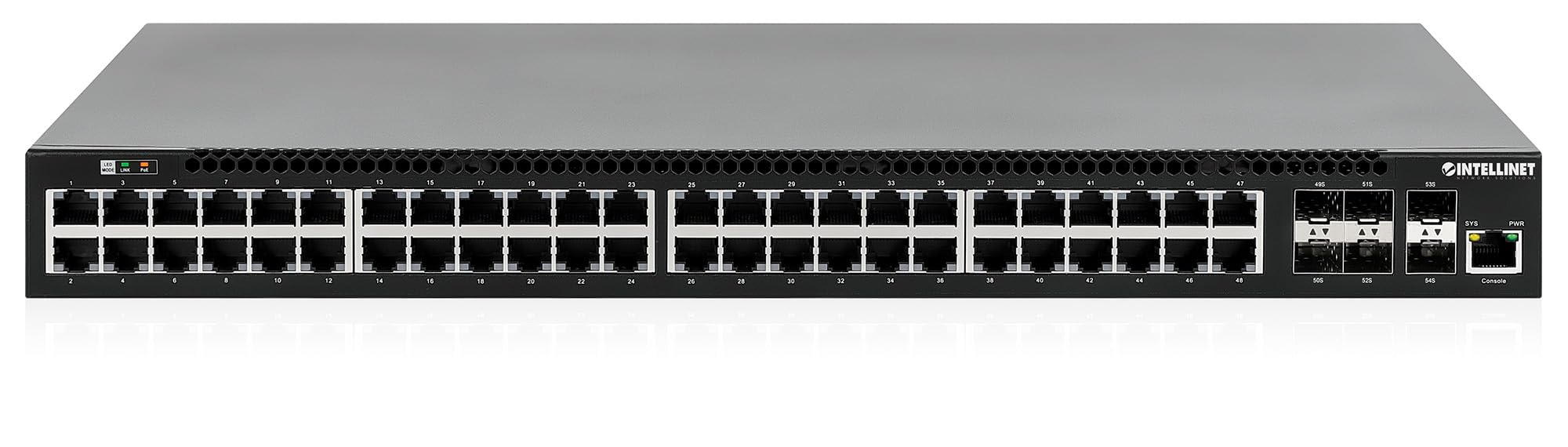
Предњи панел укључује:
- 48 x 10/100/1000 Mbps RJ45 Ports: These ports support Power over Ethernet Plus (PoE+) for connecting compatible devices.
- 6 x 10 Gigabit SFP+ Slots: For high-speed uplink connections to other network devices.
- ЛЕД индикатори: Provide status information for power, system, link activity, and PoE status.
- Порт за конзолу: For local management and configuration.


4.2 Задња плоча

The rear panel typically includes the AC power input and cooling fans for heat dissipation.

5. Подешавање
5.1 Физичка инсталација
The switch can be installed in a standard 19-inch equipment rack or placed on a desktop.
- Инсталација у рацкмоунт: Attach the provided rackmount brackets to the sides of the switch using the included screws. Secure the switch into a standard 19-inch rack.
- Инсталација на радној површини: Attach the provided rubber feet to the bottom of the switch to prevent scratching and ensure stability. Place the switch on a flat, stable surface.
5.2 Прикључак за напајање
Connect the provided power cable to the AC power input on the rear panel of the switch and then to a grounded electrical outlet. Ensure the power switch is in the OFF position before connecting the power cable.
5.3 Мрежне везе
- ПоЕ уређаји: Connect PoE-compatible devices (e.g., IP cameras, VoIP phones, wireless access points) to any of the 48 Gigabit RJ45 ports. The switch will automatically detect and provide power to these devices.
- Уплинк везе: Insert compatible SFP+ transceivers into the 10 Gigabit SFP+ slots and connect them to your core network or other high-speed devices using appropriate fiber optic cables.
- Конзола веза: For initial configuration or direct management, connect a console cable from your computer to the console port on the switch.
5.4 Почетна конфигурација
Refer to the separate software configuration guide for detailed instructions on accessing the switch's management interface (web-based GUI or command-line interface via console port) and performing initial setup, including IP address assignment, user accounts, and basic network settings.
6. Упутство за употребу
6.1 Layer 3 Routing
This switch offers dynamic Layer 3 IP routing capabilities, including OSPF (Open Shortest Path First), RIP (Routing Information Protocol), and VRRP (Virtual Router Redundancy Protocol). These protocols enable efficient and scalable routing within complex network environments.

6.2 Напајање преко етернета (PoE+)
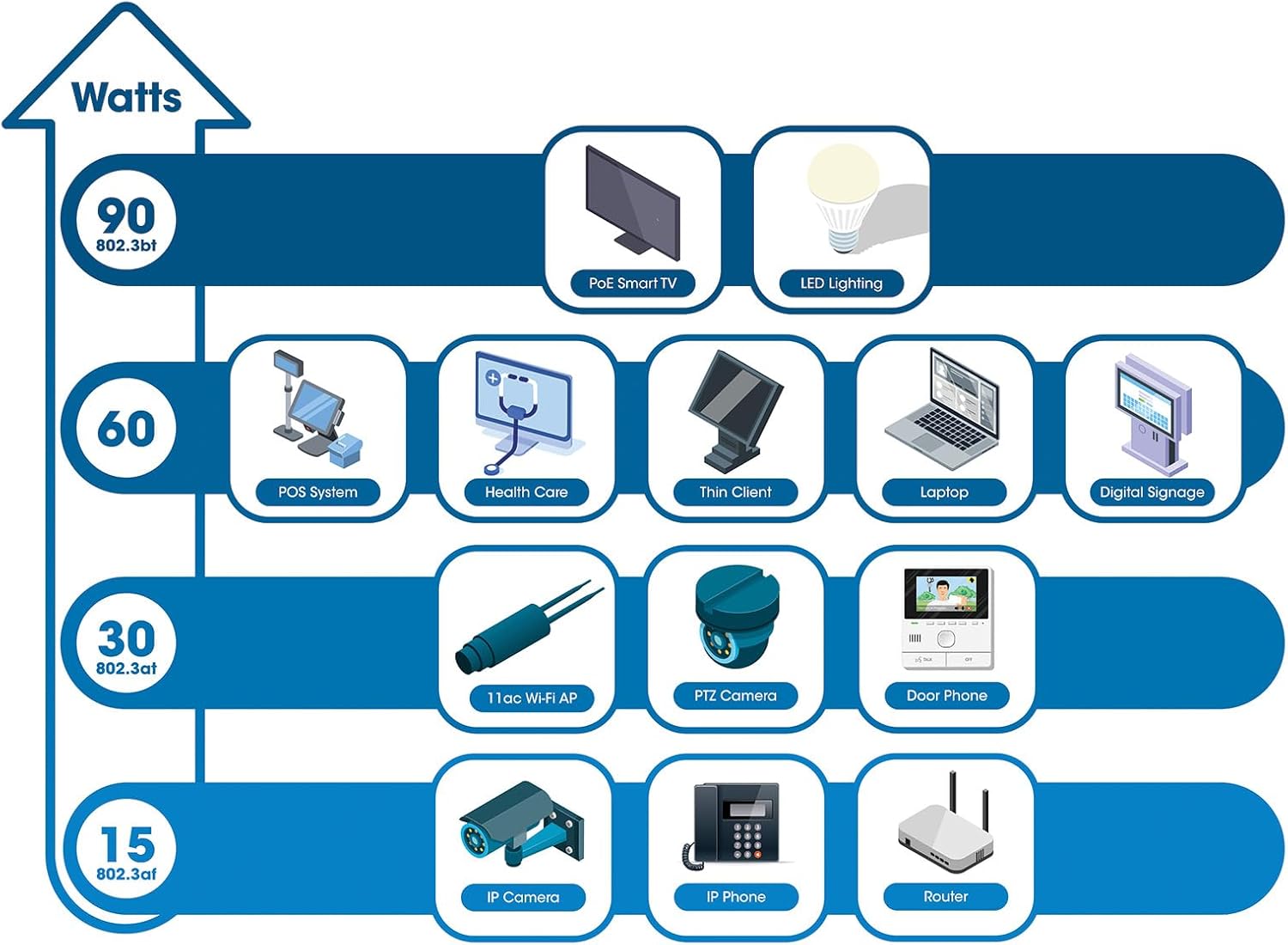
The switch provides up to 30 watts of power per port across its 48 PoE+ ports, with a total power budget of 850 watts. This allows for seamless integration of various PoE devices without the need for separate power adapters.
6.3 PoE Scheduling
The switch supports PoE scheduling, allowing administrators to define specific times for powering on, powering off, or rebooting connected PoE devices. This feature can optimize power consumption and enhance network security.


6.4 Self-Healing Functionality (PDM)
The Powered Device Monitor (PDM) feature enables the switch to proactively monitor the status of connected PoE devices. If a device becomes unresponsive, the PDM can automatically restart the PoE port to restore functionality, minimizing downtime and maintaining network integrity.
6.5 Управљање облаком
The switch supports cloud management capabilities, allowing for remote configuration, monitoring, and troubleshooting of the device from a centralized platform. Refer to the cloud management documentation for setup and usage details.
7. Одржавање
7.1 Ажурирања фирмвера
Regularly check the Intellinet Network Solutions website for the latest firmware updates. Applying firmware updates can improve performance, add new features, and address security vulnerabilities. Follow the instructions provided with the firmware update package carefully.
7.2 Чишћење
To clean the switch, power it off and disconnect all cables. Use a soft, dry cloth to wipe the exterior. Do not use liquid or aerosol cleaners. Ensure ventilation openings are free from dust and debris.
7.3 Разматрања животне средине
Ensure the switch operates within its specified temperature and humidity ranges. Avoid placing the switch in direct sunlight, near heat sources, or in areas with high dust accumulation.
КСНУМКС. Решавање проблема
This section addresses common issues you might encounter with the switch.
8.1 Нема напајања
- Verify the power cable is securely connected to both the switch and a working electrical outlet.
- Уверите се да је прекидач за напајање на задњој плочи у положају УКЉУЧЕНО.
- Проверите утичницу другим уређајем да бисте потврдили да је функционална.
8.2 Нема везе на порту
- Check the Ethernet cable connection at both ends. Ensure it is securely plugged in.
- Verify the cable is not damaged. Try a different cable.
- Уверите се да је повезани уређај укључен и да исправно функционише.
- Check the port status in the switch's management interface.
8.3 PoE уређај не прима напајање
- Confirm the connected device is a PoE-compatible device.
- Проверите ЛЕД диоду за статус PoE за одређени порт.
- Verify the total PoE power budget (850W) is not exceeded by all connected devices.
- Utilize the Powered Device Monitor (PDM) feature to automatically restart the port if the device is unresponsive.
- Check PoE settings in the switch's management interface.
9. Спецификације
| Феатуре | Спецификација |
|---|---|
| Број модела | 562041 |
| Бранд | ИНТЕЛЛИНЕТ МРЕЖНА РЕШЕЊА |
| Број портова | 54 (48 x Gigabit PoE+, 6 x 10G SFP+) |
| Тип интерфејса | PoE, SFP |
| Maximum Power (PoE Budget) | 850 Ваттс |
| Брзина преноса података | 10 Gigabits Per Second (SFP+ uplinks) |
| Тежина артикла | 6.2 килограма (13.64 фунте) |
| Димензије производа (Д к Ш к В) | 13.78 к 17.32 к 1.73 инча |
| Горња оцена температуре | 104 степена Фаренхајта (40°C) |
| Нижа температура | 32 степена Фаренхајта (0°C) |
| Компатибилни уређаји | Desktop, Router, PoE devices (IP cameras, VoIP phones, WAPs) |
| Укључене компоненте | 19" rackmount brackets, Instructions, Rubber feet, power cable |
| УПЦ | 766623562041 |
10. Гаранција и подршка
10.1 Информације о гаранцији
This Intellinet Network Solutions product is covered by a 3-годишња гаранција произвођачаМолимо вас да сачувате доказ о куповини за потребе гаранције. Гаранција покрива недостатке у материјалу и изради при нормалној употреби.
10.2 Техничка подршка
For technical assistance, product documentation, or to register your product, please visit the official Intellinet Network Solutions webсајту или контактирајте њихову корисничку подршку. Контакт информације се обично могу наћи на произвођачевој webсајту или у паковању производа.