
Увод
The JBL Soundgear Frames are innovative Bluetooth audio glasses designed to provide an immersive audio experience while allowing you to remain aware of your surroundings. Equipped with ultra-slim speakers, an integrated microphone, and touch controls, these frames offer seamless connectivity for music, calls, and video conferences. This manual provides essential information for setting up, operating, and maintaining your Soundgear Frames.
Шта је у кутији
Carefully unpack your JBL Soundgear Frames and ensure all items are present:
- JBL Soundgear Frames (Onyx)
- Кабл за пуњење
- Цлотх Цлотх
- Торбица за ношење
Напомена: Додатна опрема се може продавати засебно.
Сетуп
1. Пуњење уређаја
Before first use, fully charge your JBL Soundgear Frames. Connect the provided charging cable to the charging port on the frames and to a USB power source. The LED indicator will show charging status.

Слика: Са стране view of the JBL Soundgear Frames, highlighting the charging port and internal electronics within the temple arms.
- Време пуњења: Приближно 2 сата за потпуно пуњење.
- Трајање батерије: Up to 8 hours of audio playback on a full charge.
2. Блуетоотх упаривање
To connect your Soundgear Frames to a Bluetooth-enabled device:
- Ensure the Soundgear Frames are charged and powered off.
- Press and hold the power button (usually located on one of the temple arms) until the LED indicator flashes blue, indicating pairing mode.
- На свом уређају (паметном телефону, таблету, рачунару) идите на подешавања Bluetooth-а и омогућите Bluetooth.
- Select "JBL Soundgear Frames" from the list of available devices.
- Када се повеже, ЛЕД индикатор ће постати плаво.
The frames support Bluetooth 5.2 for stable and efficient wireless connectivity.
Упутство за употребу
Укључивање/искључивање
- Укључено: Притисните и држите дугме за напајање 2 секунде. ЛЕД диода ће се упалити.
- Искључивање: Притисните и држите дугме за напајање 3 секунде. ЛЕД диода ће се искључити.
Репродукција музике
Use the touch controls located on the temple arms to manage your audio:
- Пусти/паузирај: Single tap on either temple arm.
- Следећа нумера: Double tap on the right temple arm.
- Претходни запис: Double tap on the left temple arm.
- Појачавање звука: Swipe forward on the right temple arm.
- Смањивање јачине звука: Swipe backward on the right temple arm.
Управљање позивима
The integrated microphone allows for clear hands-free calls:
- Одговори/заврши позив: Single tap on either temple arm.
- Одбиј позив: Press and hold either temple arm for 2 seconds.
Гласовни асистент
Activate your device's voice assistant (e.g., Siri, Google Assistant) by triple-tapping on either temple arm.

Image: A person wearing the JBL Soundgear Frames outdoors, demonstrating their use in a real-world setting.
Одржавање
Чишћење
To maintain the clarity of your lenses and the integrity of the frames:
- Use the provided cleaning cloth to gently wipe the lenses and frame.
- For stubborn smudges, use a lens cleaning spray specifically designed for eyewear.
- Avoid using abrasive materials or harsh chemicals, as these can damage the lenses and frame finish.
Складиштење
When not in use, store your Soundgear Frames in the provided carrying case to protect them from scratches and impacts.
Баттери Царе
To prolong battery life, avoid exposing the frames to extreme temperatures. If storing for an extended period, charge the battery to approximately 50% before storage.
Решавање проблема
| Проблем | Решење |
|---|---|
| Frames do not power on. | Уверите се да је батерија напуњена. Прикључите се на извор напајања и покушајте поново. |
| Не могу се повезати преко Bluetooth-а. | Make sure the frames are in pairing mode (flashing blue LED). Check your device's Bluetooth settings and forget previous connections if necessary. Restart both devices. |
| Нема звука или је јачина звука ниска. | Check the volume level on both the frames and your connected device. Ensure the frames are properly paired. |
| Контроле на додир не реагују. | Ensure the touch surface is clean and dry. Restart the frames. |
Спецификације
| Феатуре | Детаљ |
|---|---|
| Број модела | JBLSNDGEARFMSRONX |
| УПЦ | 050036399845 |
| Боја | Оникс |
| Облик предмета | Роунд |
| Боја сочива | Црно |
| Ленс Типе | Неполаризовани |
| Материјал оквира | Тхермопластиц |
| Покривеност оквира | Фулл Фраме |
| Повезивање | Блуетоотх 5.2 |
| Звучници | Ultra-slim 25mm x 9mm |
| Микрофон | Интегрисано |
| Контроле | Додирните |
| Трајање батерије | До 8 сати |
| Време пуњења | Отприлике 2 сата |
| Отпорност на воду | IP54 (Splash and dust resistant) |
| Препоручена употреба | Слушање музике |
| Аге Ранге | Адулт |
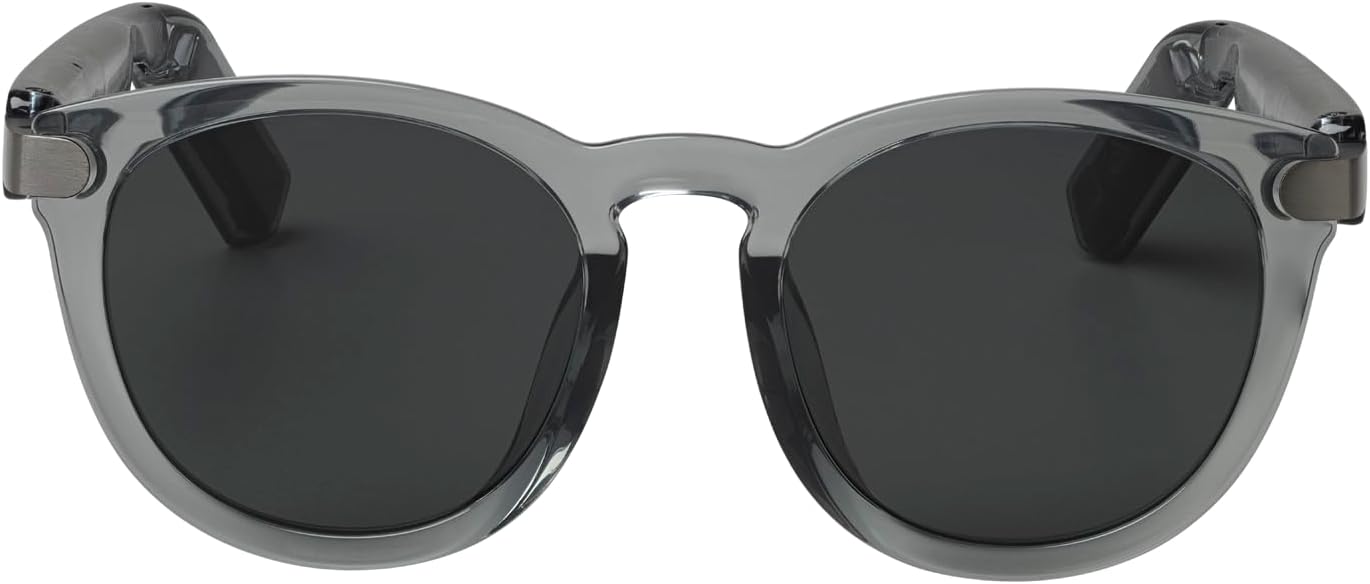
Слика: Фронт view of the JBL Soundgear Frames, showcasing the round, full-frame design and black non-polarized lenses.

Слика: Леђа view of the JBL Soundgear Frames, showing the overall structure from the rear.
Гаранција и подршка
JBL products are designed for reliability and performance. For warranty information and customer support, please refer to the warranty card included with your product or visit the official JBL webсајт. Такође можете пронаћи често постављана питања и додатне ресурсе за подршку на мрежи.
Подршка на мрежи: www.jbl.com/support