
Protectli V1210-2
Protectli Vault V1210-2 Port Micro Appliance/Mini PC User Manual
Model: V1210-2 | Brand: Protectli
1. Увод
This manual provides essential information for the proper installation, operation, and maintenance of your Protectli Vault V1210-2 Port Micro Appliance/Mini PC. Please read this manual thoroughly before using the device to ensure optimal performance and safety. The Protectli Vault V1210-2 is a compact, fanless mini PC designed for network security applications such as firewalls, routers, and other open-source software solutions.
2. Безбедносне информације
- Ensure the device is placed on a stable, flat surface with adequate ventilation.
- Не излажите уређај води, влази или екстремним температурама.
- Користите само адаптер за напајање који сте добили уз уређај.
- Не покушавајте сами да отворите или поправите уређај. Све сервисирање препустите квалификованом особљу.
- Disconnect the power supply before cleaning or moving the device.
3. Садржај пакета
Проверите да ли су све ставке присутне у вашем пакету:
- Protectli Vault V1210-2 Micro Appliance
- Power Adapter with regional plugs
- USB Type-C Console Cable

Image: Contents of the Protectli Vault V1210-2 package, including the device, power adapter with various regional plugs, and a USB Type-C console cable.
4. Хардвер је готовview
4.1 Предња плоча
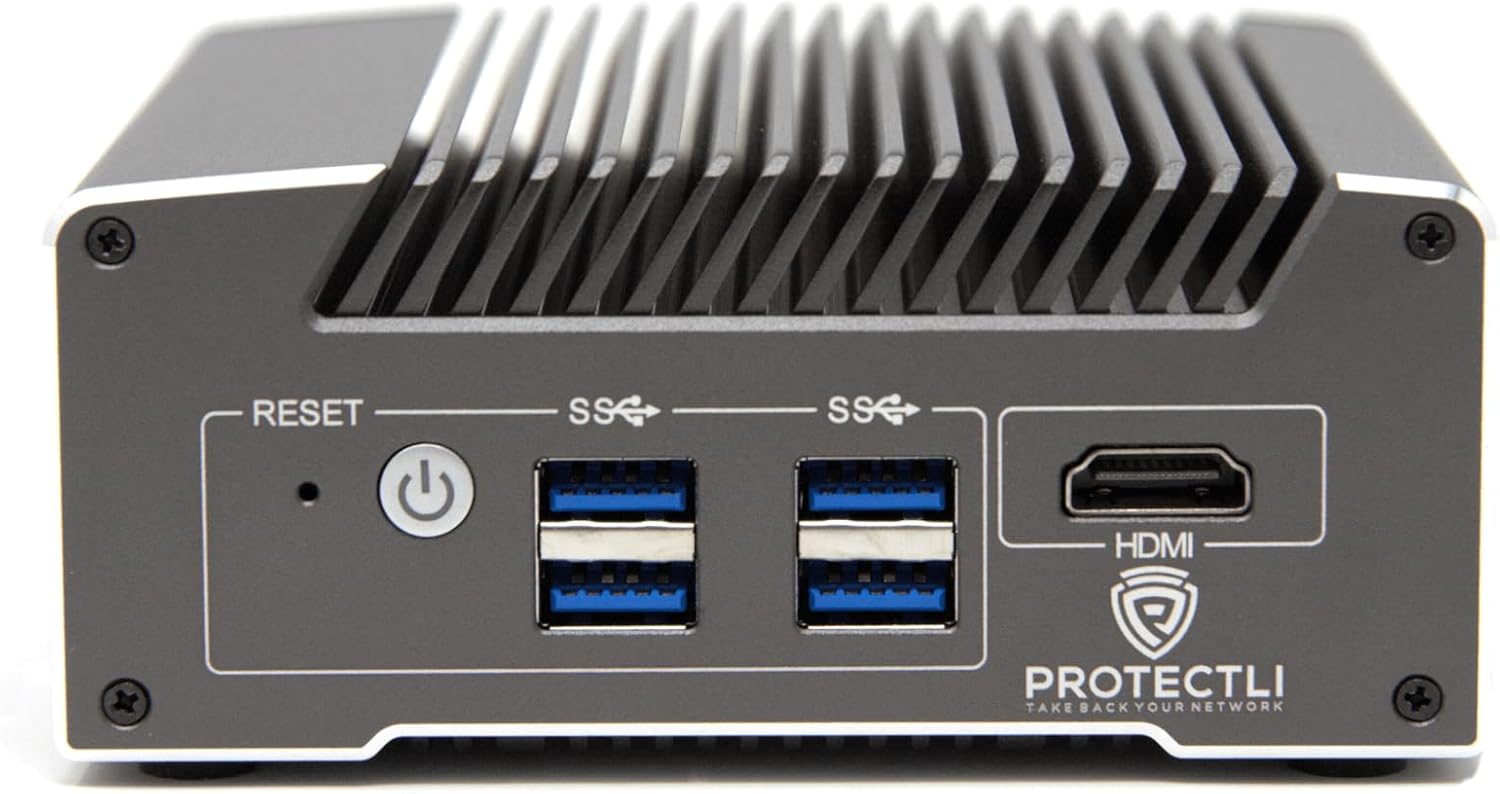
Слика: Фронт view of the Protectli Vault V1210-2, showing the Reset button, Power button, two USB 3.0 ports, and an HDMI port.
- Дугме за ресетовање: Користи се за поновно покретање уређаја.
- Дугме за напајање: Притисните да бисте укључили/искључили уређај.
- УСБ 3.0 портови (к2): За повезивање УСБ уређаја као што су тастатуре, мишеви или екстерне меморије.
- ХДМИ порт: For connecting a display monitor.
4.2 Задња плоча

Слика: Позади view of the Protectli Vault V1210-2, showing the 12V DC power input, two 2.5G Ethernet ports, a USB Type-C console port, and LED indicators.
- 12В ДЦ улаз за напајање: Овде прикључите приложени адаптер за напајање.
- 2.5G Ethernet Ports (x2): For network connections. These are Intel I226-V NICs.
- USB Type-C Console Port: For serial console access, typically used for initial setup or debugging.
- ЛЕД индикатори:
- Power LED (Green): Indicates power status.
- Storage Activity LED (Red): Indicates eMMC or NVMe storage activity.
4.3 Унутрашње компоненте
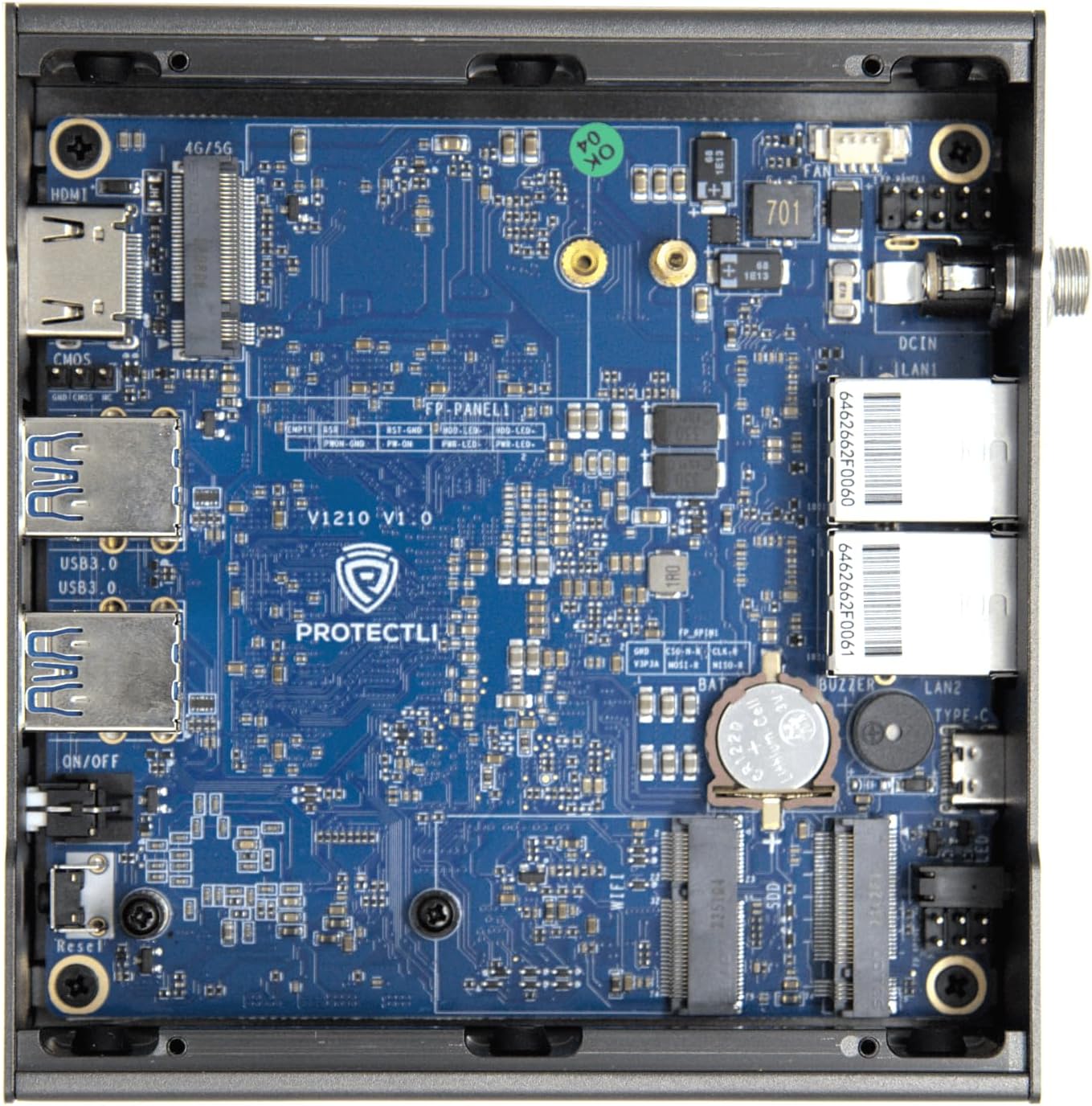
Слика: Интерна view of the Protectli Vault V1210-2, showing the motherboard with integrated RAM, eMMC storage, and M.2 slot for optional NVMe SSD.
- Intel N5105 Quad Core CPU: Processor for the device.
- 4 ГБ LPDDR4 РАМ меморије: On-board system memory.
- 32GB eMMC Storage: On-board flash storage for the operating system.
- М.2 слот: For optional NVMe SSD expansion (not included in this configuration).
5. Упутства за подешавање
Follow these steps for initial setup of your Protectli Vault V1210-2:
- Повежите периферне уређаје: Connect a monitor to the HDMI port, a keyboard and mouse to the USB 3.0 ports.
- Мрежна конекција: Connect your internet source (e.g., modem) to one of the 2.5G Ethernet ports. Connect your local network (e.g., switch or computer) to the other 2.5G Ethernet port.
- Прикључак за напајање: Connect the provided 12V DC power adapter to the power input port on the rear panel, then plug the adapter into a power outlet.
- Укључено: Press the power button on the front panel. The device will power on, and the power LED will illuminate.
- Инсталација оперативног система: The Protectli Vault V1210-2 does not come with a pre-installed operating system. You will need to install your preferred open-source firewall or routing software (e.g., OPNsense, pfSense, VyOS) via a USB installation medium. Refer to the specific software's installation guide for detailed steps.
- Почетна конфигурација: After OS installation, follow the software's instructions for initial network configuration. You may need to use the USB Type-C console port for advanced setup or debugging if direct display output is not sufficient.
6. Упутство за употребу
Once your operating system is installed and configured, the Protectli Vault V1210-2 operates as a dedicated network appliance. Its fanless design ensures silent operation, making it suitable for various environments.
- Нормалан рад: The device is designed for continuous operation. Ensure it has adequate airflow around its heatsink chassis.
- Повер Цицлинг: To safely power off the device, use the shutdown procedure within your installed operating system. If the system is unresponsive, press and hold the power button for 5-10 seconds to force a shutdown.
- BIOS Access: To access the AMI BIOS settings, press the ДЕЛ тастер више пута током покретања.

Image: Diagram illustrating various applications for the Protectli Vault, including VPN Router, Firewall, Hypervisor, Backup WAN, Industrial IoT, Home Automation, Remote Office, and Managed IT Providers.
7. Одржавање
- Чишћење: Use a soft, dry cloth to clean the exterior of the device. Do not use liquid cleaners or aerosols. Ensure the heatsink fins are free from dust buildup to maintain optimal cooling.
- Ажурирања софтвера: Regularly update your installed operating system and software to ensure security and performance. Refer to your software's documentation for update procedures.
- Ажурирања фирмвера: Periodically check the Protectli website for BIOS/firmware updates for your V1210-2 model. Follow the provided instructions carefully when performing firmware updates.
КСНУМКС. Решавање проблема
Уобичајени проблеми и решења:
- Уређај се не укључује:
- Уверите се да је адаптер за напајање безбедно повезан и са уређајем и са исправном утичницом.
- Проверите да ли је утичница функционална.
- Пробајте други адаптер за напајање ако је доступан (уверите се да одговара јачини звука)tagе и amperage specifications).
- Нема излаза на екран:
- Check the HDMI cable connection to both the device and the monitor.
- Уверите се да је монитор укључен и подешен на исправан улазни извор.
- Try connecting to the device via the USB Type-C console port for serial console access to diagnose display issues.
- Проблеми са мрежним повезивањем:
- Verify Ethernet cables are securely connected to the 2.5G NIC ports.
- Check the link/activity LEDs on the Ethernet ports.
- Ensure your operating system's network configuration is correct.
- Restart your modem/router and the Protectli Vault.
- Оперативни систем се не покреће:
- Ensure the boot order in the BIOS is correctly configured for your installed OS or installation medium.
- If installing from USB, ensure the USB drive is bootable and properly formatted.
- Re-attempt OS installation if necessary.
За додатну помоћ, погледајте Protectli Store или контактирајте корисничку подршку.
9. Спецификације
| Феатуре | Спецификација |
|---|---|
| Модел | Protectli Vault V1210-2 |
| Процесор | Intel N5105 Quad Core CPU (2.0 GHz, Turbo 2.9 GHz) |
| РАМ | 4GB LPDDR4 (on-board) |
| Складиштење | 32GB eMMC (on-board) |
| Мрежни интерфејси | 2x Intel I226-V 2.5G NICs |
| УСБ портови | 4к УСБ 3.0 Типе-А |
| Конзолни порт | 1x USB Type-C Console |
| Видео Оутпут | 1x HDMI (Max Resolution: 3840 x 2160) |
| БИОС | АМИ БИОС |
| Димензије (ДкШкВ) | 4.5 к 4.5 к 2 инча (115 к 115 к 50 мм) |
| Тежина | 1.81 фунте (0.82 кг) |
| Оперативни систем | No OS pre-installed (Compatible with Linux-based firewall/router OS) |
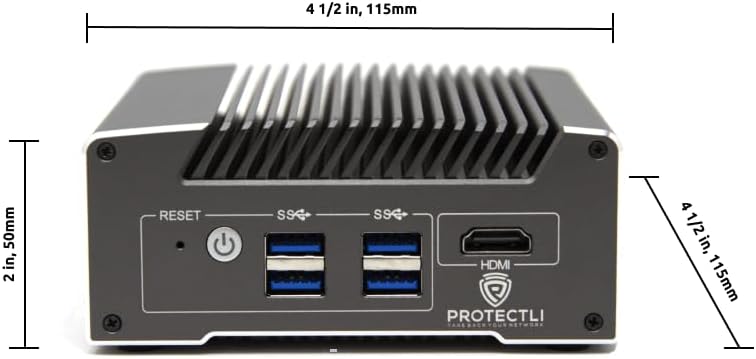
Слика: Фронт view of the Protectli Vault V1210-2 with dimensions indicated: 4 1/2 inches (115mm) width and 2 inches (50mm) height.
10. Информације о гаранцији
Protectli offers a 30-day money-back guarantee for the Vault V1210-2. For detailed warranty terms and conditions, please refer to the official Protectli webсајту или контактирајте њихову корисничку подршку.
Проширени планови заштите могу бити доступни за куповину одвојено:
- Двогодишњи план заштите
- Двогодишњи план заштите
11. Подршка
For technical assistance, troubleshooting, or general inquiries, please contact Protectli's US-based support team. They are available to help resolve any issues you may encounter.
- Посетите званичника Protectli Store on Amazon за информације о производу и ресурсе.
- Explore the Protectli Knowledge Base for extensive documentation and articles.

Image: Features of Protectli products, highlighting open-source readiness, coreboot support, 4G LTE failover, and US-based support.
Ask a question about this manual
Ask about setup, troubleshooting, compatibility, parts, safety, or missing instructions. Manuals+ will review the question and use this page’s manual context to help answer it.