
1. Производ је готовview
The NEWSKILL Chiron Pro is an ambidextrous wireless gaming mouse designed for precision and comfort. It features a high-performance optical sensor, programmable buttons, and customizable RGB lighting.

Слика: Под углом view of the NEWSKILL Chiron Pro Wireless Gaming Mouse, showcasing its ergonomic shape and design.
2. Садржај пакета
- NEWSKILL Chiron Pro Wireless Gaming Mouse
- USB 2.4GHz бежични пријемник
- УСБ-Ц на УСБ-А кабл за пуњење/дата
- Кориснички приручник (овај документ)
3. Упутства за подешавање
3.1 Почетно пуњење
Before first use, it is recommended to fully charge the mouse. Connect the provided USB-C cable to the mouse's front port and the USB-A end to a powered USB port on your computer or a USB wall adapter. A full charge takes approximately 2 hours and provides up to 80 hours of usage.

Слика: Фронт view of the mouse, highlighting the USB-C charging port.
3.2 Wireless Connection (2.4GHz)
- Locate the USB 2.4GHz wireless receiver. It is typically stored in a compartment on the underside of the mouse.
- Укључите УСБ пријемник у слободан УСБ порт на рачунару.
- Укључите миш помоћу прекидача УКЉУЧЕНО/ИСКЉУЧЕНО који се налази на дну миша.
- Your computer should automatically detect and install the necessary drivers. The mouse is ready for use once the RGB lighting activates.
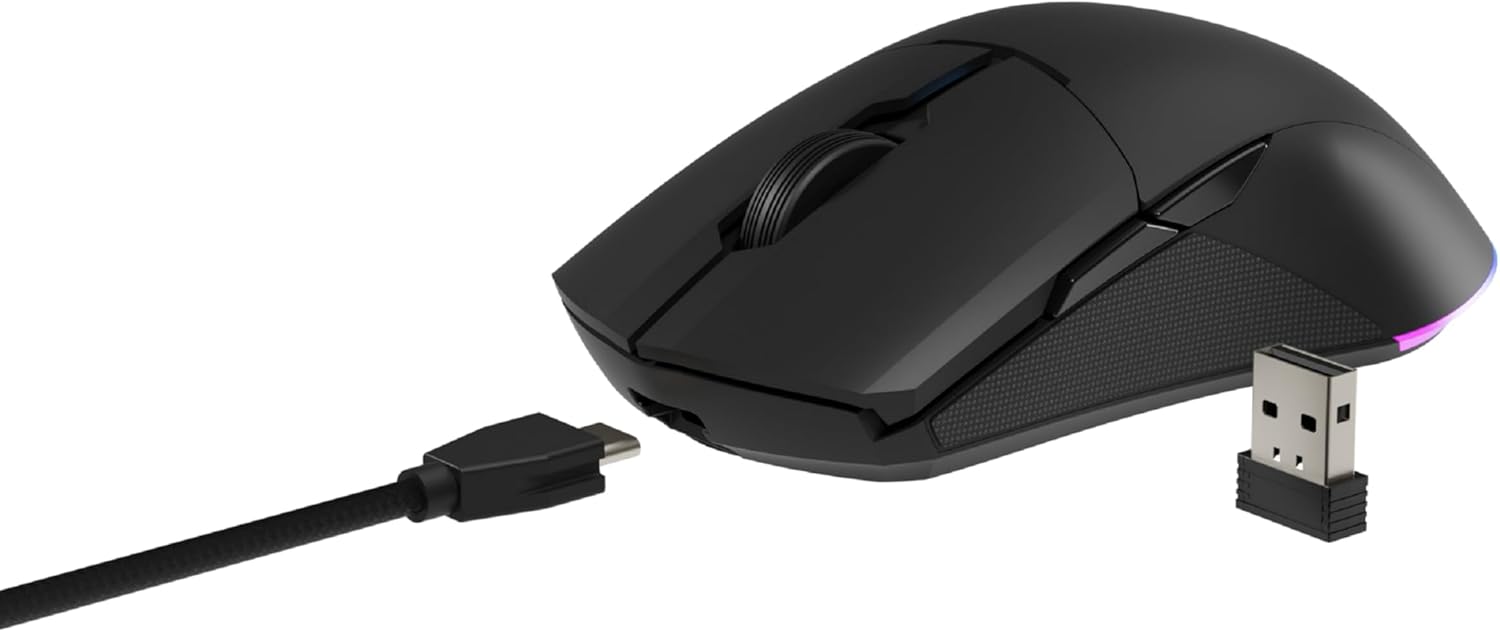
Image: The NEWSKILL Chiron Pro mouse shown with its USB-C cable and the 2.4GHz wireless receiver.
3.3 Жична веза
The mouse can also be used in wired mode. Simply connect the USB-C cable to the mouse and the USB-A end to your computer. The mouse will function as a wired device and charge simultaneously.
4. Упутство за употребу
4.1 Основне функције
- Леви клик: Примарна акција.
- Десни клик: Секундарни радни/контекстни мени.
- Точак за померање: Померање горе/доле, клик средњим тастером миша.
- Side Buttons (8 programmable): Default functions may vary, but are customizable via software.

Слика: Са стране view of the mouse, showing the textured grip and two side buttons.
4.2 ДПИ подешавање
The mouse features a Pixart PMW3335 optical sensor with up to 16000 configurable DPI. The DPI button on the underside of the mouse allows you to cycle through preset DPI levels. For fine-tuning and custom DPI settings, use the advanced software.

Image: Underside of the mouse, showing the DPI button, optical sensor, and ON/OFF switch.
4.3 Прилагођавање RGB осветљења
The Chiron Pro features customizable RGB lighting. To personalize lighting effects, colors, and brightness, download and install the dedicated NEWSKILL software from the official website. The software also allows for button remapping and macro creation.

Image: The NEWSKILL Chiron Pro mouse displaying its customizable RGB lighting.
5. Одржавање
5.1 Чишћење
Да бисте одржали оптималне перформансе, редовно чистите миш. Користите меку, суву крпу за брисање површине. За тврдокорну прљавштину, благо дamp Може се користити крпа са благим сапуном, водећи рачуна да течност не уђе у миш. Избегавајте абразивна средства за чишћење или раствараче.
5.2 Одржавање батерије
To prolong battery life, avoid fully discharging the mouse frequently. Charge the mouse when the battery indicator suggests low power. Store the mouse in a cool, dry place when not in use for extended periods.
КСНУМКС. Решавање проблема
- Миш не реагује:
Ensure the mouse is turned ON. Check if the USB receiver is securely plugged into a working USB port. If using wired mode, ensure the USB-C cable is properly connected. Try a different USB port. - Проблеми са бежичном везом:
Ensure the mouse is within range of the USB receiver (typically up to 10 meters). Avoid placing the receiver near other wireless devices that might cause interference. Re-pair the mouse if necessary (refer to software instructions). - DPI or button issues:
Ensure the NEWSKILL software is installed and up-to-date. Check your settings within the software. Reset to default settings if custom configurations are causing issues. - Проблеми са пуњењем:
Verify the USB-C cable is not damaged and is properly connected. Try a different USB port or charging adapter. Ensure the mouse is not in an extremely hot or cold environment during charging. - Missing USB Receiver:
The USB receiver is typically stored in a compartment on the underside of the mouse for safekeeping. Please check this compartment thoroughly. If it is genuinely missing, contact customer support.
7. Спецификације
| Феатуре | Спецификација |
|---|---|
| Бранд | НЕВСКИЛЛ |
| Назив модела | ЦХИРОН ПРО |
| Број модела | 10831240 |
| Боја | Црно |
| Технологија повезивања | Wireless (2.4GHz), USB (Wired) |
| Тип сензора | Optical (Pixart PMW3335) |
| ДПИ | До 16000 ДПИ |
| Број дугмади | 8 (Програмабилно) |
| Пребаците животни век | Huano switches (up to 20 million clicks) |
| Оријентација руке | Амбидектроус |
| Трајање батерије | До 80 сати |
| Време пуњења | Прибл. 2 сата |
| Димензије производа | 12.4 к 6.75 к 0.1 цм |
| Тежина производа | 500 г |
| Компатибилни оперативни системи | Windows 10, Windows 7, Windows Vista, Windows XP, Linux |
8. Гаранција и подршка
8.1 Информације о гаранцији
NEWSKILL products are covered by a manufacturer's warranty. For specific warranty terms and conditions, please refer to the warranty card included with your product or visit the official NEWSKILL webсајт. Сачувајте доказ о куповини за потребе гаранције.
8.2 Корисничка подршка
If you encounter any issues or have questions regarding your NEWSKILL Chiron Pro Wireless Gaming Mouse, please visit the official NEWSKILL support website or contact their customer service team. You can find contact information on the NEWSKILL webсајт: ввв.невскиллгаминг.цом