
LEKATO RM
LEKATO 61-Key Digital Piano RM User Manual
Model: RM | Brand: LEKATO
Увод
Thank you for choosing the LEKATO 61-Key Digital Piano. This electronic keyboard is designed for both beginners and experienced musicians, featuring lighted keys, various learning modes, and versatile connectivity. This manual provides detailed instructions for setup, operation, and maintenance to ensure optimal performance and enjoyment of your instrument.
Шта је у кутији
Пажљиво распакујте све компоненте и уверите се да су укључене следеће ставке:
- LEKATO 61-Key Digital Piano
- X-Stand
- Повер Адаптер
- Мусиц Станд
- Кориснички приручник (овај документ)
- Одвијач (за монтажу постоља)

Image: Contents of the LEKATO 61-Key Digital Piano package, showing the keyboard, X-stand, power adapter, music stand, user manual, and a screwdriver.
Упутства за подешавање
1. Assembling the X-Stand
The included X-stand provides stable support for your digital piano. Follow the instructions provided with the stand for proper assembly. Ensure all screws are tightened securely using the provided screwdriver.
2. Attaching the Music Stand
Insert the music stand into the designated slots on the top panel of the keyboard. Ensure it is firmly seated to hold your sheet music or tablet securely.
3. Прикључак за напајање
Your LEKATO digital piano can be powered by either the AC adapter or 6 AA batteries (not included).
- АЦ адаптер: Connect the provided AC adapter to the DC 9V port on the rear of the keyboard and then plug it into a standard wall outlet.
- батерије: Отворите одељак за батерије на доњој страни тастатуре и уметните 6 АА батерија, водећи рачуна о исправном поларитету.
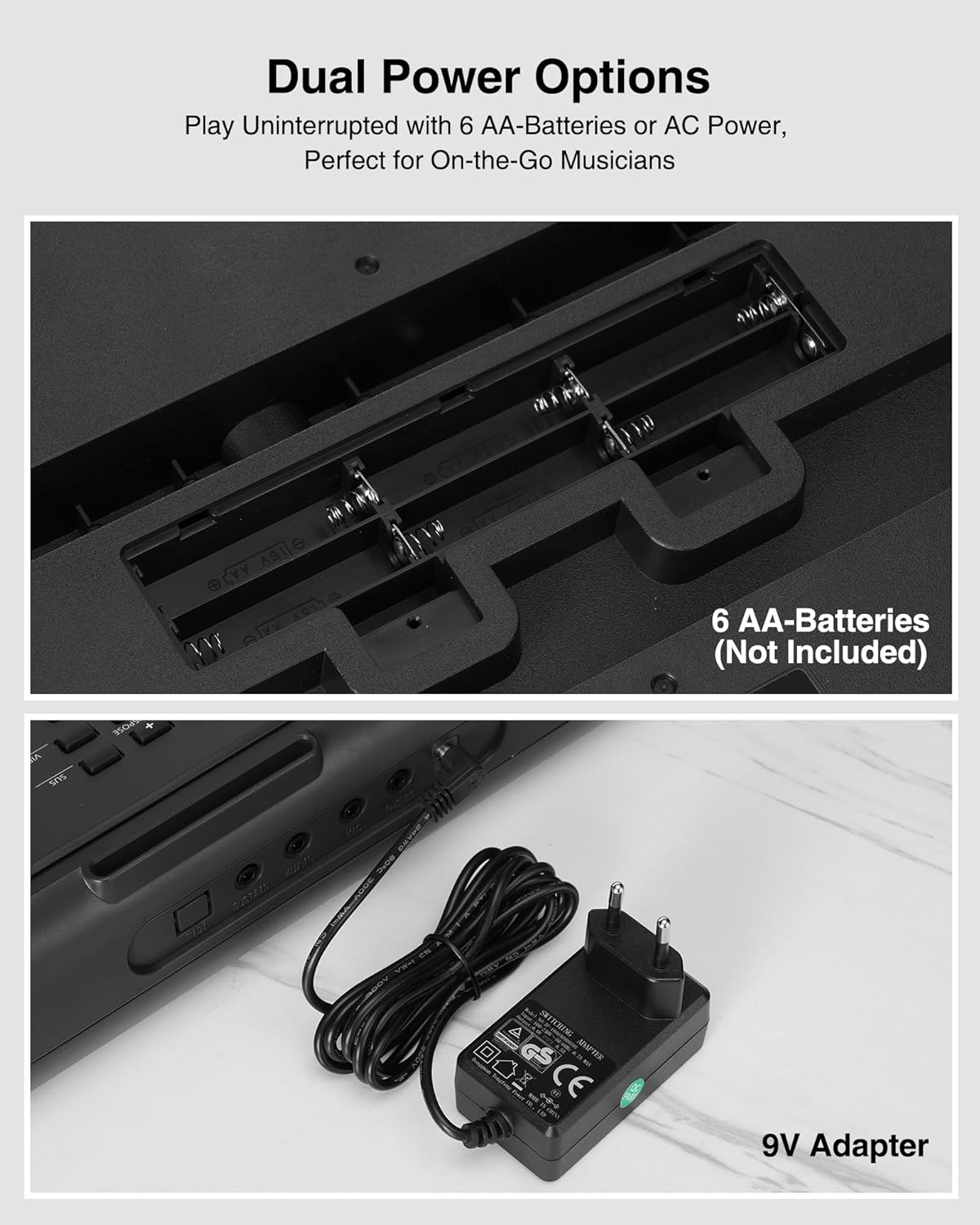
Image: The keyboard's dual power options, showing the battery compartment for 6 AA batteries and the connection for the 9V AC adapter.
Упутство за употребу
1. Укључивање/искључивање
Притисните тастер ПОВЕР button located on the left side of the control panel to turn the keyboard on or off. The LED display will illuminate upon power-on.
2. Контрола јачине звука
Користите ВОЛУМЕ + и ЗАПРЕМИНА - buttons to adjust the overall sound level.
3. Tones and Rhythms
The keyboard features 300 timbres (tones) and 300 rhythms. Use the ТИМБРЕ и РХИТАМ buttons, along with the numeric keypad, to select your desired sound or rhythm. The LED display will show the current selection.
4. Демо песме
The keyboard includes 50 demonstration songs. Press the ДЕМО button and use the numeric keypad to select and play a demo song.
5. Learning Modes (Lighted Keys)
The LEKATO digital piano offers two teaching modes to assist beginners, utilizing the lighted keys feature:
- Teaching Mode 1: Single Keyboard - This mode guides you by lighting up the correct keys for a selected song.
- Teaching Mode 2: Follow - In this mode, the keyboard waits for you to play the correct lighted key before proceeding to the next note.
Притисните тастер УЧИТЕ button to cycle through these modes. The LIGHTED KEYS button can toggle the key lights on or off.

Image: Two individuals playing the LEKATO keyboard, demonstrating its ease of use for beginners with lighted keys and teaching modes.
6. Split Function
Тхе РАЗДЕЛИТИ function divides the keyboard into two parts, allowing two different instrument sounds to be played simultaneously or for two players to use the keyboard at once. This is ideal for piano duets or teaching scenarios.
7. Остале функције
- Снимање/Репродукција: Користите REC/PROG и ПЛАИ buttons to record and playback your performances.
- Темпо: Подесите брзину ритмова и демо песама помоћу ТЕМПО + и ТЕМПО - дугмад.
- транспоновање: Change the pitch of the keyboard using the ТРАНСПОСЕ + и TRANSPOSE - дугмад.
- Одржи: Притисните тастер СУС button to add a sustain effect to notes.
- Вибрато: Притисните тастер ВИБ button to add a vibrato effect.
- Метрономе: Активирајте метроном притиском на МЕТРО button to help with timing.
- Перцуссион: Access 61 drum sounds using the ПЕРКУСИЈА дугме.
- Chord Modes: Features include single-finger chords, multi-finger chords, and bass chords.
Повезивање
The LEKATO digital piano offers various ports for enhanced musical experiences:
- МИДИ: Connect to external MIDI devices for advanced music production or learning software.
- СУСТАИН: Connect an external sustain pedal (not included) for more expressive playing.
- АУКС ИН: Connect an external audio source (e.g., smartphone, MP3 player) to play along with your favorite tracks.
- МИЦ: Connect a microphone (not included) for singing along while playing.
- ТЕЛЕФОНИ: Plug in headphones (not included) for silent practice without disturbing others.
- ДЦ 9В: Улаз за напајање за АЦ адаптер.

Слика: Детаљна view of the keyboard's rear panel, illustrating the various input and output ports for versatile connectivity.
Опције напајања
The keyboard supports two power methods:
- АЦ напајање: Use the provided 9V AC adapter for continuous power.
- Снага батерије: For portable use, insert 6 AA batteries (not included) into the battery compartment. This allows for playing on the go.
Одржавање
- Чишћење: Wipe the keyboard surface with a soft, dry cloth. Do not use abrasive cleaners or solvents.
- Складиштење: Чувајте тастатуру на хладном и сувом месту, даље од директне сунчеве светлости и екстремних температура.
- Одржавање батерије: Ако користите батерије, уклоните их ако се тастатура неће користити дужи период да бисте спречили цурење.
- Руковање: Handle the keyboard with care to avoid dropping or impacting it, which could damage internal components.
Решавање проблема
- Нема напајања:
- Ensure the AC adapter is securely connected to both the keyboard and a working power outlet. If using batteries, check that they are inserted correctly and are not depleted.
- Нема звука:
- Check the volume level. Ensure headphones are not plugged in if you intend to use the built-in speakers. Verify that the correct tone is selected.
- Keys Not Lighting Up:
- Ensure the 'Lighted Keys' function is enabled and that a teaching mode or demo song is selected that utilizes this feature.
- Изобличен звук:
- Reduce the volume. Check for any loose connections if external speakers are used. Ensure the power supply is stable.
If you encounter issues not covered here, please refer to the support section or contact LEKATO customer service.
Спецификације
| Феатуре | Детаљ |
|---|---|
| Бранд | ЛЕКАТО |
| Назив модела | RM |
| Број кључева | 61 |
| Ниво вештине | Intermediate (suitable for beginners) |
| Посебне карактеристике | Lighted Keys, Learning Modes, LED Screen, Music Stand |
| Технологија повезивања | Auxiliary (Jack 3.5 mm) |
| Извор напајања | Battery Powered or Corded Electric (6 AA batteries or 9V AC adapter) |
| Прикључак за слушалице | Јацк 3.5 мм |
| Укључене компоненте | X-Stand |
| Димензије (приближно) | 92 цм (д) к 25 цм (ш) к 7 цм (в) |
| Тежина (приближно) | 3 КГ |

Image: Diagram illustrating the approximate dimensions (length, width, height) and weight of the LEKATO 61-Key Digital Piano.
Информације о гаранцији
This product comes with a 1-year warranty from the date of purchase. Please retain your proof of purchase for warranty claims. The warranty covers manufacturing defects but does not cover damage caused by misuse, accidents, or unauthorized modifications.
Подршка
For further assistance, technical support, or warranty inquiries, please contact LEKATO customer service through the retailer where you purchased the product or visit the official LEKATO webсајт за контакт информације.
Производ је завршенview Видео
Видео: Кратак прегледview of the LEKATO 61-Key Digital Piano, showcasing its features such as lighted keys, teaching modes, split function, connectivity ports, and dual power options. This video provides a visual guide to the product's main functionalities.
Ask a question about this manual
Ask about setup, troubleshooting, compatibility, parts, safety, or missing instructions. Manuals+ will review the question and use this page’s manual context to help answer it.