
1. Увод
Thank you for choosing the RAINPOINT 2-Zone Irrigation Computer. This device is designed to simplify your garden watering, offering precise control and efficiency. With its durable brass inlet, large LCD display, and versatile programming options, you can ensure your plants receive optimal hydration while conserving water.

Image: The RAINPOINT 2-Zone Irrigation Computer, showing the main unit with its large display, control buttons, and dual outlets. A roll of sealing tape is also visible.
2. Кључне карактеристике
- 100% Brass Inlet: Features a new, improved pure brass inlet and metal thread, ensuring strength, durability, and resistance up to 116 psi. An integrated metal filter gasket prevents sediment from entering the irrigation system.

Слика: Детаљна view highlighting the robust brass inlet and the internal metal filter, emphasizing durability and leak prevention.
- 2 Independent Programmable Zones: Equipped with two large outlets (flow rate 5-35 L/min), allowing customized watering schedules (start time, frequency, and duration) for each zone. This provides complete control over different areas of your garden or lawn.

Image: The irrigation computer connected to two hoses, illustrating how two separate zones can be programmed with different start times and durations.
- Велики ЛЦД екран: Features a 2.95-inch easy-to-read LED display that conveniently shows watering time, frequency, power, and other details.
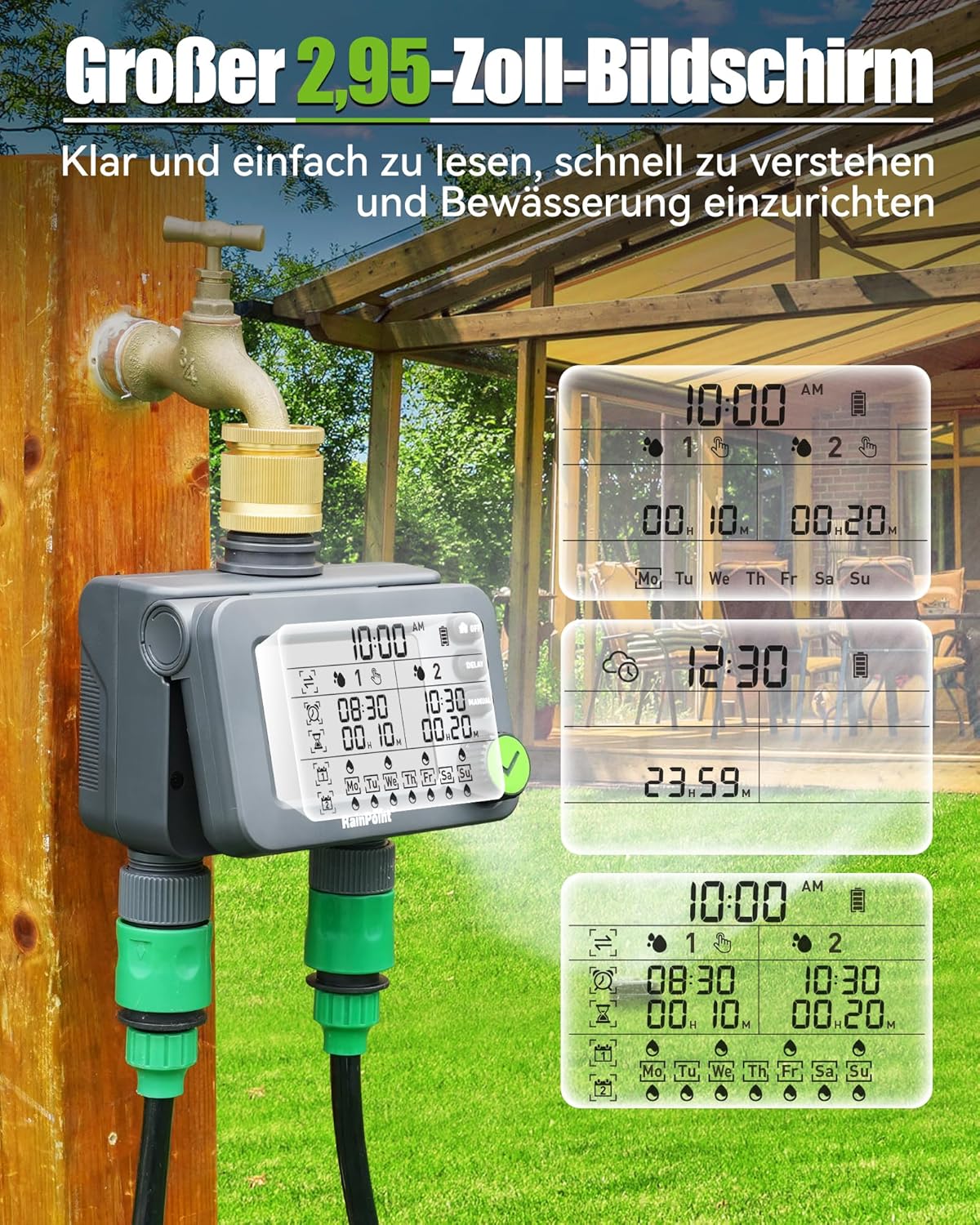
Image: The large LCD screen of the timer, displaying current time, battery level, and programmed watering schedules for both zones, ensuring clear visibility of settings.
- Rain Delay & Manual Mode: The rain delay mode pauses your programmed schedule for 24, 48, or 72 hours and automatically resumes afterward. The manual mode allows for on-demand watering of any lawn or garden area for an adjustable period from 1 minute to 8 hours, without interrupting your set schedule.

Image: Top panel shows icons for 24, 48, and 72-hour rain delay. Bottom panel shows a child watering with a hose, illustrating the manual watering function.
- Лако програмирање: Simple one-button setup for the sprinkler timer program. You can set the start time, watering duration from 1 minute to 3 hours 59 minutes, and watering frequency for any day of the week or every day. Flexible schedules can be customized, such as cyclic watering daily or fixed times multiple times per week.

Image: The display showing options for setting watering duration (1 min to 3h59min) and frequency (daily or specific days of the week), demonstrating the ease of programming.
- 2024 New Hose Timer: Features a 360° rotatable interface for easy installation. Built-in metal filter withstands 35kg water pressure. Second-generation valve diaphragm with self-cleaning technology for up to 600,000 cycles. IP54 high-impact plastic and robust construction ensure longevity. Sealing ring on the battery cover prevents water leakage.

Image: A composite image illustrating key design elements: the updated brass head, internal filter, 360° rotatable knob, and the waterproof sealed battery cover.
- Упозорење о ниској батерији: The timer features an easy-to-read 2.5-inch LED display that shows watering time, next watering schedule, and battery level. A low battery notification informs the user when batteries need replacement, and the valve automatically shuts off when batteries are low to prevent overwatering.
3. Подешавање и инсталација
- Инсталација батерије:
Open the battery compartment on the back of the device. Insert two AA alkaline batteries (not included), ensuring correct polarity. Close the battery cover securely to maintain the IP54 waterproof rating. The sealing ring on the battery cover helps prevent water ingress.
- Повезивање са славином:
Screw the brass inlet of the irrigation computer onto your outdoor faucet. Ensure the connection is tight to prevent leaks. The 360° rotatable interface allows for easy positioning.

Image: The irrigation timer securely attached to an outdoor faucet, with close-ups of the brass inlet, anti-filter, and waterproof battery cover, demonstrating robust construction.
- Прикључна црева:
Attach your garden hoses to the two independent outlets at the bottom of the irrigation computer. Ensure these connections are also secure.
- Почетно укључивање:
Once batteries are installed, the display should light up. The device will typically default to a time setting mode or display the current time.
4. Упутство за употребу
4.1 Подешавање тренутног времена
- Rotate the large green knob to the "TIME" position (or similar icon for time setting).
- Use the "+" and "-" buttons (if available, or rotate the knob) to adjust the hour and minute.
- Press the "OK" or checkmark button to confirm each setting.
4.2 Programming Automatic Watering (2 Zones)
The device allows independent programming for two zones.
- Изаберите зону: Use the "ZONE" button or rotate the knob to select Zone 1 or Zone 2.
- Подесите време почетка: Rotate the knob to the "START TIME" position. Adjust the desired start time using the knob or +/- buttons and confirm.
- Подесите трајање заливања: Rotate the knob to the "HOW LONG" position. Set the watering duration (1 minute to 3 hours 59 minutes) and confirm.
- Подесите учесталост заливања: Rotate the knob to the "HOW OFTEN" position. Choose the frequency:
- Every day (daily cycle)
- Specific days of the week (weekly cycle)
- Every X hours/days (e.g., every 12 hours, every 2 days)
- Repeat steps for the other zone if desired.

Image: A visual representation of the automatic watering mode, showing options for setting watering duration and frequency, with a child playing in sprinklers in the background.
4.3 Ручни режим заливања
To water immediately without affecting your programmed schedule:
- Press the "MANUAL" button.
- Use the knob or +/- buttons to set the desired watering duration (1 minute to 8 hours).
- Press the "OK" or checkmark button to start manual watering.
- To stop manual watering, press the "OFF" button or press "MANUAL" again and set duration to 0.

Image: The irrigation timer in a garden setting, with text indicating "Manual Watering Mode" and a duration range of 1 minute to 8 hours, demonstrating flexible on-demand watering.
4.4 Функција одлагања кише
To temporarily pause your watering schedule due to rain:
- Притисните дугме „ОДЛАГАЊЕ“.
- Each press will cycle through delay options: 24 hours, 48 hours, 72 hours.
- Select the desired delay period. The timer will automatically resume the programmed schedule after the delay.
- To cancel rain delay, press the "DELAY" button until the delay icon disappears or press "OFF" and then turn it back on.

Image: The irrigation timer displaying the rain delay function, with icons for 24, 48, and 72-hour delays, set against a backdrop of a garden.
4.5 Искључивање тајмера
To completely stop all watering programs:
- Press the "OFF" button. The display will indicate that the timer is off.
- To reactivate, press the "OFF" button again.
5. Одржавање
- Замена батерије: Replace batteries when the low battery warning appears on the display. Always use fresh AA alkaline batteries.
- Чишћење филтера: Periodically check and clean the metal filter gasket located in the brass inlet. This prevents debris from clogging the system.
- Зимско складиштење: Before the first frost, disconnect the irrigation computer from the faucet and hoses. Drain any remaining water and store the unit indoors in a dry, frost-free location. This prevents damage from freezing water.
- Генерално чишћење: Обришите спољашњост јединице огласомamp cloth. Do not use abrasive cleaners or submerge the unit in water.
КСНУМКС. Решавање проблема
| Проблем | Могући узрок | Решење |
|---|---|---|
| Нема протока воде. |
|
|
| Цурење воде из прикључака. |
|
|
| Екран је празан или замагљен. |
|
|
| Тајмер не залива у заказано време. |
|
|
7. Спецификације
- Модел: B0D41PW41J (2 Zone)
- Бренд: РАИНПОИНТ
- Материјал: Brass (inlet), High-impact Plastic (body)
- Боја: Црно
- Димензије производа: Approximately 1 x 1 x 1 cm (0.39 x 0.39 x 0.39 inches) - Note: This dimension seems incorrect from source, likely a placeholder. Actual dimensions are larger.
- Тежина артикла: 540 грама (приближно 1.19 фунти)
- Water Pressure Resistance: До 116 пси (8 бара)
- Брзина протока: 5-35 Л/мин
- Трајање заливања: 1 минута до 3 сати 59 минута
- Manual Watering Duration: 1 минут до 8 сата
- Rain Delay Options: 24 сата, 48 сата, 72 сати
- Приказ: 2.95-инчни ЛЦД
- Извор напајања: 2 x AA алкалне батерије (нису укључене)
- Водоотпорна оцена: ИП54
8. Гаранција и подршка
RAINPOINT products are designed for durability and performance. For specific warranty information, please refer to the warranty card included with your product or visit the official RAINPOINT website. If you encounter any issues or have questions regarding your irrigation computer, please contact RAINPOINT customer support:
- Подршка на мрежи: Посетите RAINPOINT Store on Amazon за често постављана питања и информације о производу.
- Подршка путем е-поште: Refer to your product packaging or the official RAINPOINT webсајт за најновију адресу е-поште корисничке службе.
Image: A customer service representative wearing a headset, symbolizing available support for RAINPOINT products.