
1. Увод и крајview
The Targa TID-AUT700 is a motorized in-dash Android media entertainment system designed for vehicle integration. This unit features a 7-inch touchscreen display that retracts and extends, offering a versatile interface for various media and connectivity options. It is equipped with Bluetooth for hands-free communication, multiple media inputs, and a powerful audio output.
Кључне карактеристике:
- Detachable Face for security
- Motorized 7-inch Touchscreen display
- 65W x 4 audio output
- AM/FM radio with RDS (Radio Data System)
- Bluetooth hands-free calling and audio streaming
- Auxiliary (Aux), USB, and SD Card Input for media playback
- Укључује даљински управљач за практичан рад
- Supports CarPlay and Android Auto functionality
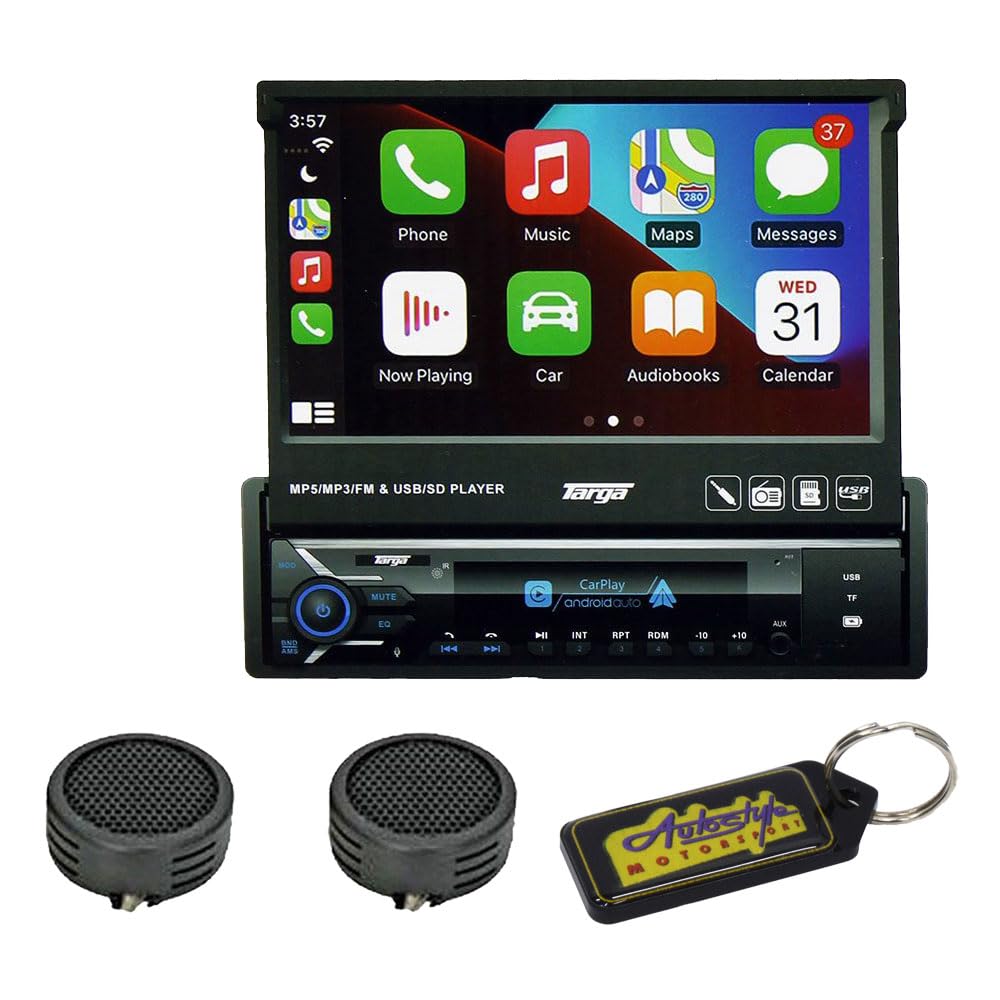
Слика 1: Targa TID-AUT700 unit with its 7-inch motorized touchscreen extended. The screen displays a user interface with icons for Phone, Music, Maps, Messages, Now Playing, Car, Audiobooks, and Calendar. Below the screen, the main unit features control buttons, a volume knob, and ports for USB and SD cards.
2. Подешавање и инсталација
Proper installation is crucial for optimal performance and safety. It is highly recommended that a qualified professional install this unit. Incorrect wiring can cause damage to the unit or your vehicle.
2.1 Ожичење
- Снага: Connect the yellow wire to a constant 12V power source, the red wire to an accessory 12V power source (switched with ignition), and the black wire to a chassis ground.
- говорници: Connect speaker wires to the corresponding vehicle speaker wires. Ensure correct polarity (+/-) for each speaker. The unit supports 4-channel output.
- Антена: Connect the vehicle's radio antenna to the unit's antenna input.
- Remote Control Wire: If applicable, connect the blue/white wire to the ampвод за даљинско укључивање лифиера.
- Жица за паркирну кочницу: For safety, connect the parking brake wire to the vehicle's parking brake circuit. Video playback may be restricted unless the parking brake is engaged.
2.2 Монтажа јединице
Install the unit into a standard single-DIN opening using the provided mounting sleeve and hardware. Secure the unit firmly to prevent movement during vehicle operation.
2.3 Detachable Face Installation
To attach the detachable face panel, align the panel with the main unit and gently push until it clicks into place. To remove, press the release button (if present) and pull the panel away from the unit. Store the detachable face in a protective case when not in use.
3. Упутство за употребу
3.1 Укључивање/искључивање
- Укључено: Притисните тастер PWR/MODE button or turn the ignition key to the ACC or ON position.
- Искључивање: Притисните и држите PWR/MODE button for a few seconds, or turn the ignition key to the OFF position.
3.2 Motorized Screen Operation
The 7-inch screen is motorized. Use the dedicated screen open/close buttons (often labeled with arrows or a screen icon) on the unit or remote control to extend or retract the display. Ensure no obstructions are in the screen's path.
3.3 Интерфејс екрана осетљивог на додир
Navigate the unit's functions by touching the icons and menus on the 7-inch display. Swipe gestures may be used for scrolling through lists or pages. The interface is designed to be intuitive, similar to a smartphone or tablet.
3.4 Radio (AM/FM with RDS)
- Изаберите радио режим: Притисните тастер МОДЕ button until 'Radio' or 'FM/AM' is displayed.
- Аутоматско скенирање: Притисните тастер СЦАН button to automatically search and store strong stations.
- Ручно подешавање: Користите ТУНЕ +/- дугмад за ручно подешавање фреквенције.
- Пресетс: Touch and hold a preset number on the screen to save the current station.
3.5 Bluetooth Hands-Free
- Упаривање: On your mobile device, search for Bluetooth devices and select 'TID-AUT700' (or similar name). Enter the default PIN (usually '0000') if prompted.
- Упућивање позива: Use the touchscreen dial pad or access your phone's contacts via the unit.
- Примање позива: Притисните тастер ОДГОВОР button on the screen to accept an incoming call.
- Аудио стреаминг: Once paired, you can stream audio from your device to the unit.
3.6 Media Playback (USB/SD/Aux)
- УСБ/СД: Insert a USB drive into the USB port or an SD card into the SD card slot. The unit should automatically switch to the corresponding mode or allow selection from the source menu.
- Аук улаз: Connect an external audio device (e.g., MP3 player) to the 3.5mm Aux-in jack using an audio cable. Select 'AUX' from the source menu.
- File Подршка: The unit supports MP3, MP5, and other common audio/video formats.
3.7 Подешавања звука
Access the audio settings menu on the touchscreen to adjust equalizer (EQ) presets, bass, treble, balance, and fader settings to customize your listening experience.
3.8 КарПлеј / Андроид Ауто
Connect your compatible iPhone or Android smartphone via USB to enable CarPlay or Android Auto. This allows you to access navigation, music, messages, and other apps directly from the unit's touchscreen, providing a safer and more integrated driving experience.
4. Одржавање
4.1 Чишћење јединице
- Користите меку, суву крпу да обришете површину уређаја.
- For the touchscreen, use a soft, lint-free cloth slightly dampened with a screen cleaner solution. Avoid harsh chemicals or abrasive materials.
- Уверите се да је уређај искључен из струје пре чишћења.
4.2 Detachable Face Care
When the face panel is detached, store it in its protective case to prevent scratches or damage. Avoid exposing it to direct sunlight or extreme temperatures.
КСНУМКС. Решавање проблема
If you encounter issues with your Targa TID-AUT700, refer to the following common problems and solutions:
| Проблем | Могући узрок | Решење |
|---|---|---|
| Нема напајања за јединицу. | Incorrect wiring; blown fuse; ignition off. | Check power connections (yellow, red, black wires). Inspect vehicle's fuse box and unit's fuse. Ensure ignition is on. |
| Нема звука из звучника. | Speaker wires disconnected; volume too low; mute function active. | Verify speaker wire connections. Increase volume. Check if the unit is muted. |
| Грешка упаривања са Bluetooth-ом. | Device not in pairing mode; incorrect PIN; interference. | Ensure both devices are in pairing mode. Re-enter PIN '0000'. Move closer to the unit. Restart both devices. |
| Screen not extending/retracting. | Obstruction; motor malfunction; power issue. | Проверите да ли постоје физичке препреке. Уверите се да уређај има стабилно напајање. Ако проблем и даље постоји, контактирајте подршку. |
| Екран на додир не реагује. | Software glitch; screen damage. | Perform a soft reset (refer to unit's reset button, usually a small pinhole). If damage is visible, contact support. |
Ако ова решења не реше проблем, обратите се корисничкој подршци.
6. Спецификације
- Модел: TID-AUT700
- Приказ: 7-inch Motorized Touchscreen
- Face Panel: Одвојиви
- Аудио излаз: КСНУМКСВ к КСНУМКС
- Радио тјунер: AM/FM with RDS
- Повезивање: Bluetooth Hands-free, Aux Input, USB Input, SD Card Input
- Компатибилност: CarPlay, Android Auto
- УПЦ: 745853662875
7. Информације о гаранцији
This Targa TID-AUT700 unit comes with a 6-месечна гаранција from the date of purchase. This warranty covers manufacturing defects under normal use. It does not cover damage caused by improper installation, accident, misuse, abuse, neglect, unauthorized modification, or normal wear and tear. Please retain your proof of purchase for warranty claims.
8. Подршка
For further assistance, technical support, or warranty inquiries, please contact your retailer or the manufacturer's customer service department. Have your model number (TID-AUT700) and proof of purchase ready when contacting support.