
1. Увод
The LEAUDIO XDUOO MH-02 is a versatile USB Digital-to-Analog Converter (DAC) and Tube Headphone Amplifier. It combines the warmth of tube pre-amplification with the power of a Class A transistor buffer, designed to enhance your audio experience. This manual provides detailed instructions for setup, operation, and maintenance of your MH-02 unit.
2. Безбедносна упутства
- Уверите се да је напајање волtage matches the requirements specified for the device (DC 12V/2A).
- Не излажите уређај води, влази или екстремним температурама.
- Избегавајте постављање уређаја на директно сунчево светло или близу извора топлоте.
- Обезбедите одговарајућу вентилацију око уређаја како бисте спречили прегревање.
- Не покушавајте сами да отворите или поправите уређај. Све сервисне радове препустите квалификованом особљу.
- Чувати ван домашаја деце.
3. Садржај пакета
Молимо вас да проверите пакет за следеће ставке:
- XDUOO MH-02 Unit
- Power Adapter (DC 12V) (Typically included, please verify packaging)
- USB Cable (Typically included, please verify packaging)
4. Производ је готовview
4.1 Предња плоча
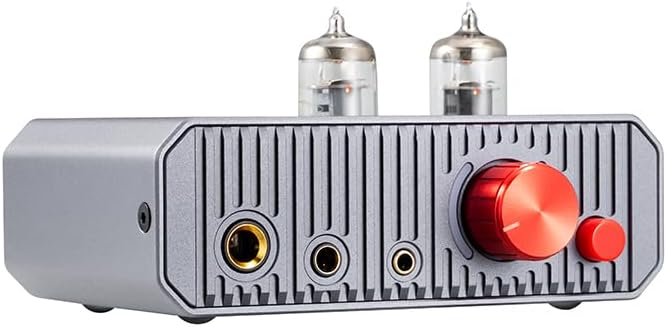
This image displays the front panel of the MH-02, highlighting the dual vacuum tubes, the prominent red volume control knob, the smaller red gain selection button, and the three distinct headphone output jacks.
- 6.35 мм излаз за слушалице: Стандардни прикључак за слушалице.
- 4.4 мм балансирани излаз за слушалице: Balanced headphone jack for compatible headphones.
- 3.5 мм излаз за слушалице: Стандардни прикључак за слушалице.
- Дугме за јачину звука: Controls the output volume for headphones and line out.
- Gain Button: Toggles between low and high gain settings.
- Вакумске цеви: Dual 6J1 tubes for pre-ampосвешћење.
4.2 Задња плоча

This image illustrates the rear panel of the MH-02, featuring the RCA input and output connections, the USB-C port for digital audio, the DC 12V power input, and the main power switch.
- RCA L/R IN: Аналогни аудио улаз.
- RCA L/R OUT: Analog audio line output.
- USB IN (Type-C): Digital audio input for USB DAC function.
- ДЦ 12В: Улазни прикључак за напајање.
- Прекидач: Toggles the unit on or off.
5. Подешавање
5.1 Connecting to a USB Audio Device

This diagram illustrates two primary connection methods: USB for digital sources like laptops, and RCA for analog sources such as CD players, both leading to headphone output.
- Use a USB OTG cable (not included) to connect the MH-02's USB IN port to your computer (Windows, Linux, Mac OS X), iOS device, Android device, or HiFi player.
- Connect your headphones to one of the headphone output jacks on the front panel.
- Ensure the MH-02 is powered on.
- Select the MH-02 as the audio output device in your source device's sound settings.
5.2 Connecting to an Analog Audio Device
- Use an RCA audio cable to connect the AUX/Line output of your player (e.g., CD player) to the RCA L/R IN ports on the rear panel of the MH-02.
- Connect your headphones to one of the headphone output jacks on the front panel.
- Ensure the MH-02 is powered on.
5.3 Прикључак за напајање
- Connect the provided DC 12V power adapter to the DC 12V input jack on the rear panel of the MH-02.
- Укључите адаптер за напајање у одговарајућу зидну утичницу.
6. Упутство за употребу
6.1 Укључивање/искључивање
Flip the power switch on the rear panel to the 'ON' position to power on the unit. Flip it to 'OFF' to power off. A built-in relay mutes the circuit during power-on to prevent 'POP' noise and ensure optimal tube operation.

This image shows an internal relay, which is part of the built-in protection circuit designed to prevent 'POP' noise during power cycles.
6.2 Контрола јачине звука
Rotate the large red knob on the front panel clockwise to increase volume and counter-clockwise to decrease volume. Start with a low volume setting before playing audio to avoid sudden loud sounds.
6.3 Gain Switch Operation

This diagram explains the function of the gain switch: pressing the button activates 'LOW' gain, while leaving it unpressed selects 'HIGH' gain.
The small red button on the front panel is the gain switch. Press it gently to toggle between two gain settings: Low Gain (button pressed) and High Gain (button unpressed). Select the appropriate gain setting based on your headphones' impedance and sensitivity to achieve optimal sound and prevent over-driving or under-driving.
6.4 Using as a Pre-ampлифиер
The MH-02 features a volume-controlled line output (RCA L/R OUT) that routes audio through its tube stage. This allows the unit to function as a pre-amplifier for other audio amplifiers or active speakers, potentially enhancing their sound quality.
7. Спецификације
| Параметар | Валуе |
|---|---|
| Повер Суппли | ДЦ 12В/2А |
| Усклађен ОС | Windows, Linux, Mac OS X, iOS, Android |
| Sampling Rate Support (PCM) | 16-32Бит/44.1к-384кХз |
| Sampling Rate Support (DSD) | DSD64-256 |
| Излазна снага | 1300мВ (32Ω оптерећење) |
| Фреквенцијски одзив | 10Хз-60КХз (±0.5дБ) |
| Добитак | +12dB / +18dB |
| ТХД+Н | 0.8% (1KHz, 32Ω load) |
| С/Н однос | 113дБ |
| Преслушавање | 70дБ |
| Димензије јединице (Д к Ш к В) | 12 x 10 x 6.4 цм (приближно 4.7 x 3.9 x 2.5 инча) |
| Јединична тежина | 0.42 Kg (approx. 14.8 ounces) |
| Item Weight (as listed) | 14.4 унци |
| Произвођач | LEAUDIO |
| Датум првог доступног | 20. маја 2024. године |
КСНУМКС. Решавање проблема
- Нема звука:
- Ensure the unit is powered on and the power adapter is securely connected.
- Check all audio cables (USB, RCA, headphones) are correctly and securely connected.
- Verify the volume knob is turned up.
- If using USB, ensure the MH-02 is selected as the default audio output device on your computer or source device.
- Test with different headphones or source devices to isolate the issue.
- Изобличен звук:
- Reduce the volume on both the MH-02 and your source device.
- Check the gain setting. If using sensitive headphones, try the 'Low Gain' setting.
- Уверите се да аудио каблови нису оштећени или лабави.
- Тестирајте са различитим аудио записима files or sources.
- Интермитентна веза:
- Проверите све кабловске спојеве да ли су лабави.
- Try a different USB or RCA cable.
- Уверите се да је напајање стабилно.
9. Одржавање
- Чишћење: Користите меку, суву крпу за чишћење спољашњости уређаја. Не користите течна средства за чишћење или раствараче.
- Замена цеви: The 6J1 vacuum tubes have a finite lifespan. If you notice a significant degradation in sound quality or tube failure, contact the manufacturer or a qualified technician for replacement instructions. Ensure the unit is powered off and unplugged before attempting any tube replacement.
- Складиштење: When not in use for extended periods, store the unit in a cool, dry place away from direct sunlight and dust.
10. Гаранција и подршка
For warranty information, technical support, or service inquiries, please refer to the documentation provided with your purchase or contact the seller/manufacturer directly. Keep your proof of purchase for warranty claims.


