
Т300
Generic T300 LED Mini Projector User Manual
Модел: Т300
1. Увод
Хвала вам на куповиниasing the Generic T300 LED Mini Projector. This compact and portable projector is designed for home theater use, offering a clear viewing experience with its short-focus optical lens and diffuse reflection imaging technology, which helps reduce eye strain. This manual provides essential information for setting up, operating, maintaining, and troubleshooting your projector.

Слика 1.1: The T300 Mini Projector's compact size allows for easy portability, fitting conveniently into a bag.
2. Садржај пакета
Молимо вас да проверите садржај пакета након распакивања како бисте били сигурни да су сви елементи присутни:
- 1x T300 Projector
- 1x Power Adapter (EU Plug)
- 1к даљински управљач
- 1к АВ кабл
- 1x Упутство за употребу (овај документ)
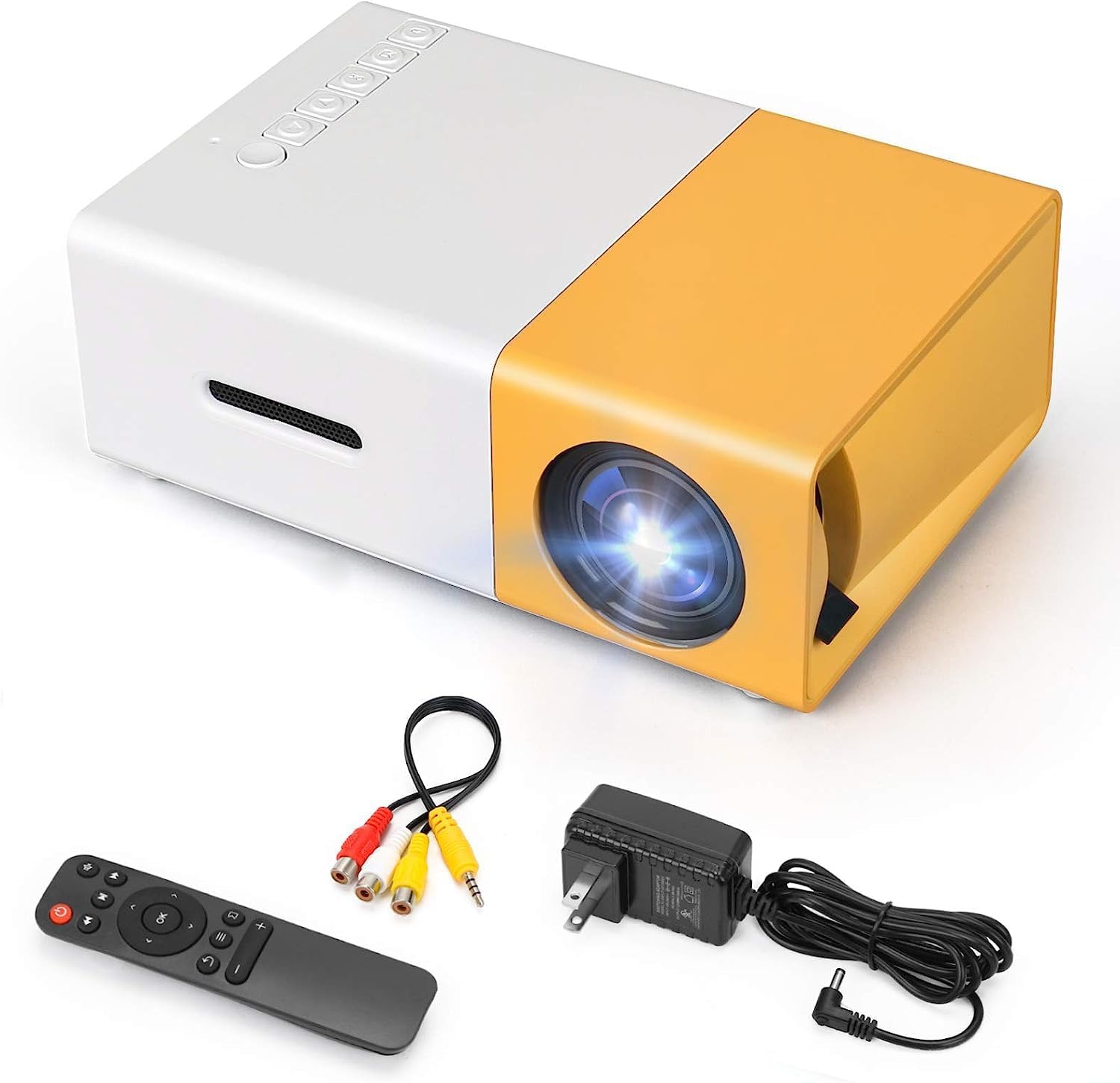
Слика 2.1: The T300 Mini Projector and its included accessories.
3. Производ је готовview
Familiarize yourself with the various ports and controls on your T300 Mini Projector:

Слика 3.1: Предње и задње views of the T300 Mini Projector, detailing its input/output ports and control buttons.
3.1. Портови и интерфејси
- ХДМИ улаз: Connect to laptops, TV boxes, gaming consoles, and other HDMI-enabled devices.
- УСБ улаз: For playing media directly from USB drives.
- Утор за микро СД картицу: For playing media directly from Micro SD cards.
- АВ улаз: Connect to older devices using the included AV cable.
- Micro USB (5V/2A): Power input option, compatible with power banks or car chargers.
- Earphone Slot: За повезивање екстерних слушалица или звучника.
- Улаз за једносмерну струју: Main power input using the provided power adapter.
3.2. Контроле
- Прекидач: To turn the projector on or off.
- Navigation Buttons (Left, Right, OK): За навигацију и избор у менију.
- Дугме за унос: Да бисте изабрали улазни извор.
- Дугме за повратак: To go back in menus.
4. Подешавање
4.1. Прикључак за напајање
- Connect the provided power adapter to the DC Power Input port on the projector.
- Укључите адаптер за напајање у зидну утичницу.
- Alternatively, for portable use, connect a 5V/2A power bank or car charger to the Micro USB (5V/2A) port.
4.2. Повезивање уређаја
The T300 projector supports various input sources:
- ДВИ: Connect your laptop, TV box, gaming console (PS4/PS3), or other HDMI devices using an HDMI cable (not included).
- УСБ: Уметните УСБ флеш диск у УСБ порт да бисте репродуковали медије fileс директно.
- Мицро СД картица: Insert a Micro SD card into the Micro SD card slot to play media files.
- АВ: Use the included AV cable to connect to devices with AV output (e.g., DVD players).

Слика 4.1: Multimedia connectivity options for the T300 Mini Projector.
4.3. Placement and Focus
- Поставите пројектор на стабилну, равну површину.
- Position the projector at a distance between 2 to 5 meters from the projection surface to achieve an optimal image size of 60 to 150 inches.
- Adjust the focus ring on the projector lens until the image appears clear and sharp. The short-focus optical lens allows focusing at a distance of 50cm.
5. Упутство за употребу
5.1. Укључивање/искључивање
Press the Power Switch on the projector or the power button on the remote control to turn the projector on or off.
5.2. Избор улазног извора
After powering on, use the 'Input' button on the projector or the remote control to cycle through available input sources (HDMI, USB, TF Card, AV) until your desired source is displayed.
5.3. Репродукција мултимедијалног садржаја
The projector supports multi-format video, audio, picture, and e-book playback. Navigate through your media files using the navigation buttons on the projector or remote control and press 'OK' to select.
5.4. Аудио излаз
The projector has a built-in miniature speaker. For enhanced audio, connect external speakers or headphones to the Earphone Slot.

Слика 5.1: Versatile applications of the T300 Mini Projector for entertainment.
6. Одржавање
6.1. Чишћење сочива
Use a soft, lint-free cloth or lens cleaning paper to gently wipe the projector lens. Avoid using abrasive materials or harsh chemicals that could scratch the lens.
6.2. Вентилација
Ensure the projector's ventilation openings are not blocked during operation to prevent overheating. Keep the projector in a well-ventilated area.
6.3. Складиштење
When not in use, store the projector in a cool, dry place, away from direct sunlight and excessive dust. It is recommended to use the original packaging or a protective case.
6.4. Лamp Живот
ЛЕД лamp in your T300 projector has an estimated life of 20,000 hours, providing long-term use without frequent lamp замена.
КСНУМКС. Решавање проблема
Ако наиђете на проблеме са пројектором, погледајте следеће уобичајене проблеме и решења:
- Нема приказане слике:
- Ensure the projector is powered on and the power adapter is securely connected.
- Verify the input source is correctly selected (HDMI, USB, AV, etc.).
- Проверите кабл за повезивање између пројектора и изворног уређаја.
- Слика је мутна:
- Подесите прстен за фокусирање на објективу пројектора док слика не буде јасна.
- Ensure the projection distance is within the recommended range (2-5 meters).
- Нема звука:
- Проверите подешавања јачине звука и на пројектору и на изворном уређају.
- If using external speakers/headphones, ensure they are properly connected to the Earphone Slot.
- Verify the audio output settings on your source device.
- Даљински управљач не ради:
- Уверите се да нема препрека између даљинског управљача и ИР пријемника пројектора.
- Replace the batteries in the remote control if necessary.
8. Спецификације
| Феатуре | Спецификација |
|---|---|
| Модел | Т300 |
| Резолуција подршке | 1920 к 1080 (Фулл ХД) |
| Нативе Ресолутион | 1920 к 1080 |
| Дисплаи Типе | LCD, DLP |
| Интерфејси | HDMI, USB, TF Card Slot, AV, Micro USB (5V-2A) |
| Уграђени звучник | Да |
| Lamp Живот | 20,000 сата |
| Величина производа | 114 к 87 к 50 мм |
| Препоручена употреба | Кућни биоскоп |
| Посебна карактеристика | Портабле |
| Максимална величина слике | 150 инча |
| Минимална величина слике | 60 инча |
| Максимална удаљеност бацања | 5 метара |
| Минимална удаљеност бацања | 2 метара |
| Повер Инпут | 5В/2А |
9. Гаранција и подршка
9.1. Информације о гаранцији
Овај производ обично долази са а Политика замене у року од 10 дана from the date of purchase. Please refer to your retailer's specific warranty terms and conditions for detailed information. The LED lamp is designed for a long life of 20,000 hours, which is not typically covered by short-term replacement policies.
9.2. Корисничка подршка
For technical assistance, troubleshooting beyond this manual, or warranty claims, please contact your original retailer or the manufacturer, SHUBH LABH ENTERPRISES. Keep your purchase receipt or proof of purchase handy when contacting support.
Ask a question about this manual
Ask about setup, troubleshooting, compatibility, parts, safety, or missing instructions. Manuals+ will review the question and use this page’s manual context to help answer it.