
Увод
Thank you for choosing the Trueque Wireless Keyboard and Mouse Combo. This manual provides detailed instructions for setting up, operating, maintaining, and troubleshooting your new wireless peripheral set. Please read this manual carefully before use to ensure optimal performance and longevity of your product.
Садржај пакета
Проверите да ли су све ставке присутне у вашем пакету:
- 1 к бежична тастатура
- 1 к бежични миш
- 1 x USB пријемник (смештен унутар миша)
- 1 к Упутство за употребу

Производ је завршенview
The Trueque Wireless Keyboard and Mouse Combo is designed for comfort and efficiency, featuring an ergonomic design, a built-in phone holder, and quiet operation.
Карактеристике тастатуре:
- Ергономски дизајн: Full-sized keyboard with a generous palm rest and adjustable tilt legs to reduce wrist strain.
- Integrated Phone/Tablet Holder: A built-in cradle allows you to prop up your smartphone or tablet for easy viewинг.
- Тихо куцање: Soft membrane keys provide a smooth and quiet typing experience.
- Мултимедијални интервентни тастери: Includes 6 dedicated hotkeys for quick access to common functions like web browsing and calculator.

Карактеристике миша:
- Ергономски облик: Contoured grips and a comfortable handshake angle for prolonged use.
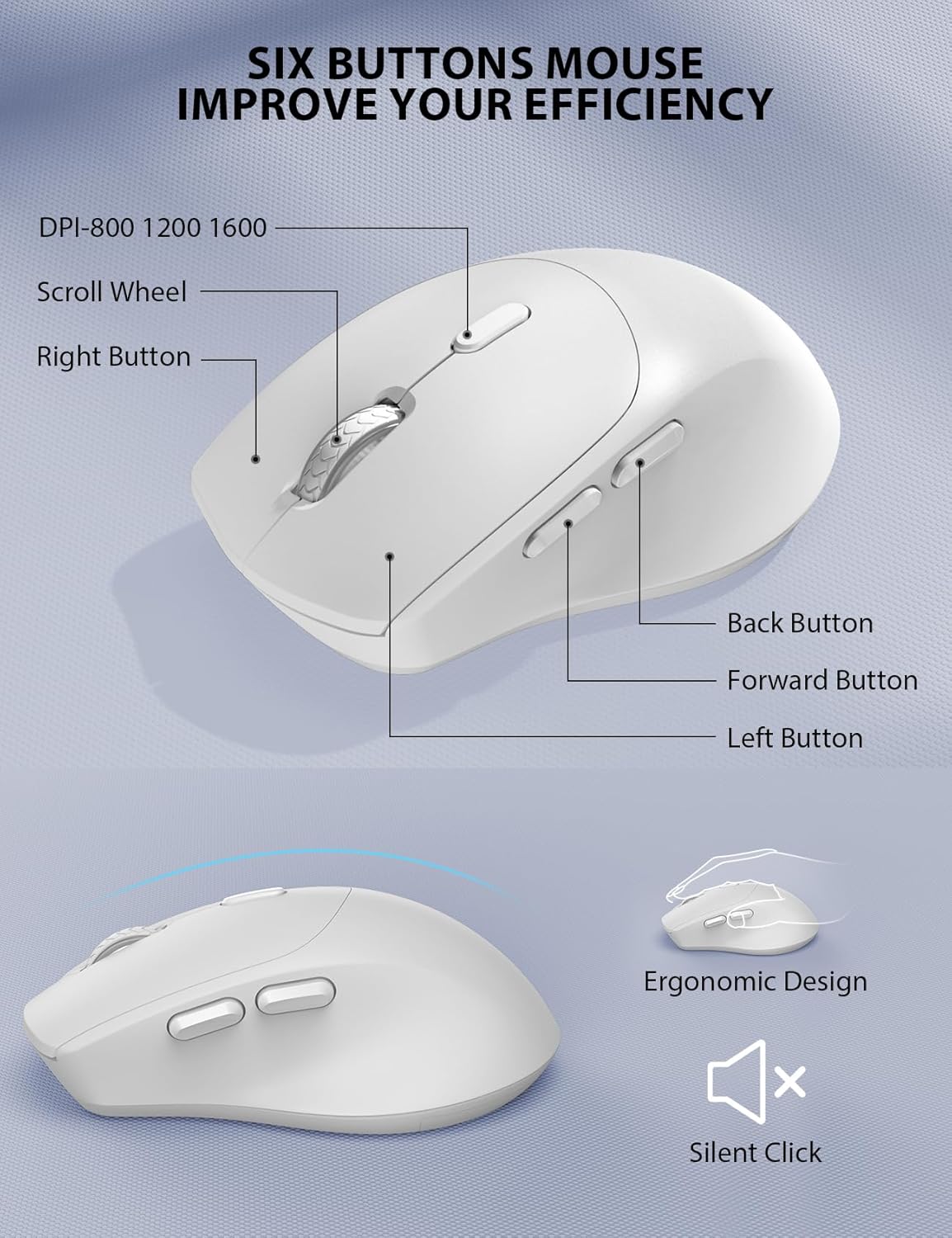
- Подесиви ДПИ: Three DPI settings (800/1200/1600) for customizable cursor sensitivity.
- Дизајн са 6 дугмади: Includes left, right, scroll wheel, DPI button, and forward/backward buttons for enhanced navigation.
- Тихи кликови: Designed to produce 95% less noise than standard mice.
Бежична повезаност:
- 2.4ГХз бежична технологија: Обезбеђује стабилну и поуздану везу до 10 метара (33 стопа).
- Један УСБ пријемник: One compact USB receiver connects both the keyboard and mouse to your device.

Подешавање и инсталација
Follow these steps to set up your Trueque Wireless Keyboard and Mouse Combo:
- Инсталирајте батерије:
- тастатура: Open the battery compartment on the underside of the keyboard and insert two (2) AAA batteries (not included), ensuring correct polarity.
- миш: Open the battery compartment on the underside of the mouse and insert one (1) AA battery (not included), ensuring correct polarity. The USB receiver is typically stored in this compartment.

Image: The back of the keyboard and mouse, illustrating the battery compartments for 2xAAA (keyboard) and 1xAA (mouse), and the storage slot for the USB receiver. - Повежите УСБ пријемник:
- Извадите УСБ пријемник из одељка за батерију миша.
- Укључите УСБ пријемник у слободан УСБ порт на рачунару или лаптопу.
- Укључено:
- миш: Turn on the power switch located on the underside of the mouse.
- тастатура: The keyboard will activate automatically when you press any key.
Video: This video demonstrates how to install batteries and pair the mouse, which is helpful for initial setup and troubleshooting connection issues.
Операција
Употреба тастатуре:
- куцање: The full-sized layout with a numeric keypad provides a familiar typing experience.
- Пречице: Utilize the dedicated hotkeys (e.g., for web browser, calculator) located above the function keys for quick access to applications.
- Индикаторска светла: Observe the Num Lock, Caps Lock, and Power indicator lights to monitor keyboard status. The power light will blink when batteries are low.
Употреба миша:
- ДПИ подешавање: Press the DPI button (usually located behind the scroll wheel) to cycle through 800, 1200, and 1600 DPI settings to adjust cursor speed.
- Дугмад за навигацију: Use the forward and backward buttons on the side of the mouse for quick web навигација по страници.
Паметно управљање напајањем
The keyboard and mouse are equipped with a smart sleep mode to conserve battery life:
- Стање тастатуре: Тастатура ће ући у режим мировања након 15 минута неактивности.
- Mouse Sleep: Миш ће ући у режим спавања након 10 минута неактивности.
- Пробудити: To wake up either device, simply press any button or key.
With smart power management, you can expect extended battery life, reducing the frequency of battery changes.
Компатибилност
This wireless keyboard and mouse combo is widely compatible with various operating systems and devices:
- Оперативни системи: Windows, Chrome OS, Mac OS.
- Компатибилни уређаји: PCs, Laptops, Desktops, Tablets (with appropriate USB-A port or adapter).

Решавање проблема
If you encounter issues with your wireless keyboard and mouse, please refer to the following common solutions:
- Нема везе / Кашњење:
- Уверите се да су батерије правилно инсталиране и да су довољно напуњене. Замените их ако је потребно.
- Проверите да ли је USB пријемник безбедно прикључен у исправан USB порт. Покушајте са другим USB портом.
- Приближите тастатуру и миш УСБ пријемнику да бисте искључили проблеме са дометом.
- Re-pair the devices: For the mouse, press the scroll wheel and right button simultaneously for 5-8 seconds. For the keyboard, ensure it's powered on and try pressing a key.
- Тастери не реагују / Миш се не помера:
- Проверите нивое напуњености батерије и замените их ако су ниске.
- Ensure the mouse power switch is in the 'ON' position.
- Clean any debris around the mouse's optical sensor or under the keyboard keys.
- сметње:
- Other 2.4GHz wireless devices (e.g., Wi-Fi routers, cordless phones) may cause interference. Try to minimize their proximity.
Video: This video provides tips for troubleshooting common issues if your keyboard and mouse are not working properly, including battery installation and pairing.
Спецификације
| Феатуре | Детаљ |
|---|---|
| Бранд | Бартер |
| Модел | B0D4PJYJB8 |
| Боја | Бела |
| Технологија повезивања | КСНУМКСГХз Вирелесс |
| Посебне карактеристике | Ergonomic, Wrist Rest, Phone Holder |
| Компатибилни уређаји | PC, Laptop, Desktop, Tablet |
| Откривање покрета | Оптицал |
| Батерија за тастатуру | 2 к ААА батерије (нису укључене) |
| Батерија за миш | 1 x AA battery (Not Included) |
| Извор напајања | Баттери Поверед |
| Распоред тастатуре | КВЕРТИ |
| Број кључева | 104 |
| Опис тастатуре | Мембране |
| ДПИ подешавања миша | 800/1200/1600 |
| Компатибилни оперативни системи | Windows, Chrome OS, Mac OS |

Гаранција и подршка
Your Trueque Wireless Keyboard and Mouse Combo comes with a one-year replacement warranty from the date of purchase. If you experience any issues with your product, please contact our customer service team for assistance.
Е-пошта корисничке службе: труекуесервице@оутлоок.цом
Our professional customer service team is available to help resolve your problems promptly.
