
1. Увод
This manual provides detailed instructions for the installation, operation, and maintenance of your darkFlash DPW90 ATX Mid-Tower PC Case. Please read this manual thoroughly before beginning assembly to ensure proper setup and optimal performance. This PC case is designed for enthusiasts seeking a blend of aesthetics, performance, and ease of use, featuring a unique back plug-in BTF motherboard compatibility and a full-view curved glass design.
2. Кључне карактеристике
- Advanced Back-Mounted Motherboard Design: Supports BTF motherboards for a streamlined interior and simplified cable management. Also compatible with standard ATX, M-ATX, and ITX motherboards.
- Innovative Curved Glass Views: Features a 270° panoramic tempered glass panel with a natural R-angle transition for a modern aesthetic.
- Enhanced Cooling Efficiency: Optimized airflow with support for up to 10 fans and dual 360mm radiators, ensuring effective heat dissipation.
- Spacious Interior & Easy Installation: Accommodates high-end components, including large GPUs (up to 445mm length) and multiple storage options. The design facilitates hassle-free upgrades and maintenance.
- Type-C Port & Durable Materials: Equipped with a high-speed I/O panel featuring a Type-C interface for fast data transfer. Constructed from premium metal and tempered glass for durability.
3. Садржај пакета
Verify that all components are present before proceeding with installation. If any items are missing or damaged, please contact customer support.
- darkFlash DPW90 ATX Mid-Tower PC Case
- 4 x 120mm ARGB Fans (Pre-installed)
- Кутија са додатном опремом (шрафови, одстојници, кабловске везице итд.)
- Кориснички приручник (овај документ)
4. Подешавање и инсталација
Follow these steps for assembling your PC components within the darkFlash DPW90 case.
4.1. Припрема
- Unpack the PC case and place it on a stable, flat surface.
- Remove the side panels by gently pulling them off. The curved glass panel is designed for quick removal.

Figure 1: Upgraded Design with Removable Panels
4.2. Инсталација матичне плоче
The DPW90 supports both standard and back plug-in BTF motherboards.
- For Standard Motherboards (ATX, M-ATX, ITX): Secure your motherboard to the pre-installed standoffs using the provided screws.
- For Back Plug-in BTF Motherboards (ATX, M-ATX, ITX): Align the motherboard with the rear-mounted connectors and secure it. This design routes cables to the back of the case for a cleaner look.

Figure 2: Motherboard Compatibility
4.3. Уградња вентилатора и радијатора
The case supports extensive cooling configurations.
- The case comes with 4 pre-installed 120mm ARGB fans.
- It supports up to 10 fans in total.
- Dual 360mm liquid radiators can be installed for advanced cooling. Refer to the diagram for optimal placement.
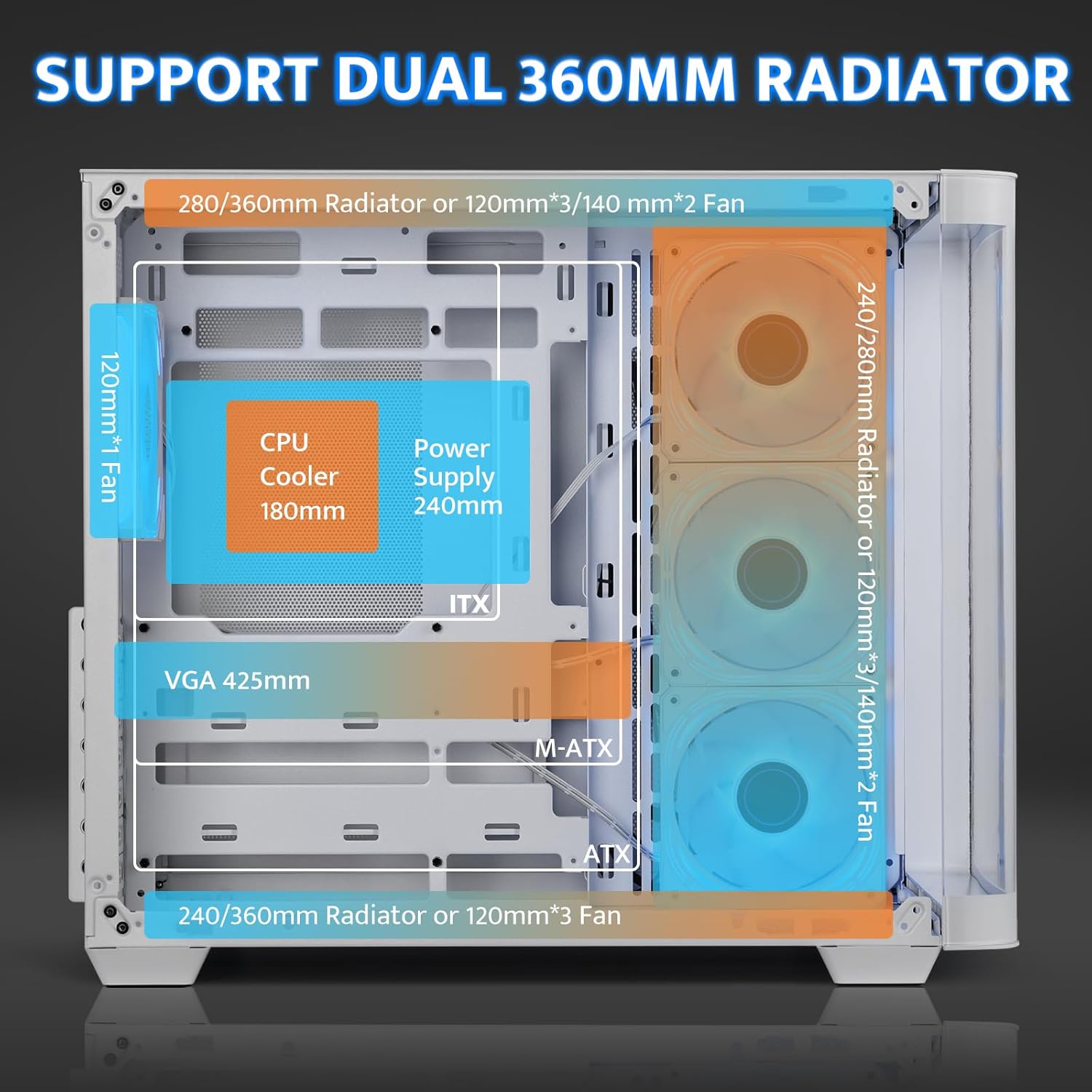
Figure 3: Cooling System Support
4.4. GPU and PSU Installation
- ГПУ: The case accommodates GPUs up to 445mm in length. Utilize the 7 PCI slots for installation.
- ПСУ: Install the power supply unit (PSU) in the rear-mounted compartment. The maximum supported PSU length is 240mm.
4.5. Инсталација складишта
The multi-function bracket supports multiple storage drives.
- Install up to 3 x 2.5" SSDs and 2 x 3.5" HDDs.
- Ensure proper orientation for SATA and power connections, especially for 2.5" drives, to avoid re-installation.

Figure 4: Multi-Function Storage Bracket
4.6. Front I/O Panel Connections
Connect the front panel cables to your motherboard according to your motherboard's manual.
- УСБ 3.0: 1 порт
- УСБ 2.0: 1 порт
- Тип-Ц: 1 port (1280MB/s)
- ХД аудио: Headphone and Microphone jacks
- Дугме за ресетовање
- ЛЕД контролно дугме

Figure 5: High-Speed I/O Panel
5. Упутство за употребу
5.1. Укључивање/искључивање
Press the power button on the front I/O panel to turn your system on or off.
5.2. ARGB контрола вентилатора
The pre-installed ARGB fans feature a 5V 3Pin ARGB interface. Connect these to a compatible motherboard header or an external ARGB controller (not included) to customize lighting effects. The case includes an LED control button on the I/O panel for basic lighting adjustments if connected to a compatible hub.

Figure 6: Infinity Mirror ARGB Fans
6. Одржавање
6.1. Чишћење филтера за прашину
The darkFlash DPW90 includes magnetic dust filters to prevent dust buildup. Regularly remove and clean these filters to maintain optimal airflow and cooling performance.
- Gently pull off the magnetic dust filters located on the top and side panels.
- Clean the filters using compressed air or a soft brush.
- Reattach the filters.
6.2. Генерално чишћење
Користите меку, дamp cloth to clean the exterior surfaces of the case. Avoid abrasive cleaners or solvents that may damage the finish or tempered glass.
КСНУМКС. Решавање проблема
Овај одељак се бави уобичајеним проблемима на које можете наићи.
7.1. Fans Not Spinning or RGB Not Working
- Проверите везе: Ensure all fan power cables and ARGB cables are securely connected to the motherboard or an ARGB controller.
- Извор напајања: Some included fans may run directly off a SATA power connector. Verify this connection is secure.
- Software/BIOS Settings: If using a motherboard header, check your motherboard's BIOS/UEFI settings or companion software for fan speed and RGB control.
- RGB Hub: Note that an RGB Hub Controller is not included. If advanced control is desired, a separate controller may be needed.
7.2. Limited Space for Cable Management
- Utilize Rear Compartment: The back-mounted motherboard design provides space behind the motherboard tray for cable routing.
- Везице за каблове: Use the included cable ties to bundle and secure cables, optimizing space.
- Modular PSU: If upgrading, consider a modular power supply to reduce unnecessary cable clutter.
7.3. Difficulty Installing Storage Drives
- 2.5" Drive Orientation: For 2.5" SSDs, ensure the SATA data and power ports are facing upwards before securing them to the multi-function bracket.
- Редослед инсталације: Install 2.5" drives before 3.5" drives if space is constrained.
8. Спецификације
| Феатуре | Спецификација |
|---|---|
| Назив модела | DPW90 |
| Бранд | darkFlash |
| Тип случаја | Мид Товер |
| Компатибилност матичне плоче | ATX, Micro ATX, ITX (including Back Plug-in BTF) |
| Материјал | Метал, каљено стакло |
| Боја | Бела |
| Димензије производа (ДкШкВ) | 11.22 к 18.11 к 15.6 инча (285 к 460 к 398 мм) |
| Тежина артикла | 18.9 фунти |
| CPU Cooler Height (Max) | 180мм |
| GPU Length (Max) | 445мм |
| PSU Length (Max) | 240мм |
| Метод хлађења | Ваздух, вода |
| Подршка обожаватеља | Up to 10 fans (4 x 120mm ARGB pre-installed) |
| Подршка радијатора | Дуални 360мм |
| Стораге Баис | 3 x 2.5" SSD, 2 x 3.5" HDD |
| Предњи И / О портови | 1 x USB 3.0, 1 x USB 2.0, 1 x Type-C, HD Audio, Reset, LED |
9. Гаранција и подршка
9.1. Информације о гаранцији
darkFlash products are manufactured to high-quality standards. For specific warranty details regarding your DPW90 PC case, please refer to the warranty card included in your package or visit the official darkFlash webсајт. Гаранција обично покрива производне недостатке под нормалним условима употребе.
9.2. Корисничка подршка
If you encounter any issues or have questions not covered in this manual, please contact darkFlash customer support through their official website or the retailer from whom you purchased the product. Have your product model (DPW90) and purchase information ready when contacting support.
For more information, visit the official darkFlash store: darkFlash Store on Amazon