
Увод
This manual provides detailed instructions for the safe and effective use of your BÉABA Zen Nomad Video Baby Monitor. Please read this manual thoroughly before operating the device and retain it for future reference.
Производ је завршенview
The BÉABA Zen Nomad is a portable video baby monitor designed for flexible use at home or while traveling. It connects to your smartphone via a dedicated application, offering a range of features to help you monitor your baby.
Кључне карактеристике:
- Бежична повезаност: Connects directly to your smartphone via a dedicated app.
- Преносиви дизајн: Lightweight with a versatile clip for easy positioning.
- Дуг век трајања батерије: Up to 6 hours of autonomy on battery power.
- Ноћни вид: Infrared night vision for clear monitoring in low light.
- Two-Way Talk (Walkie-Talkie): Communicate with your baby remotely.
- Успаванке: Integrated lullabies to soothe your baby.
- Вишебојно ноћно светло: Remote-controlled night light for a calming atmosphere.
- Сензори животне средине: Built-in thermometer and humidity detector.
- ВОКС функција: Sound and motion detection for continuous monitoring.
- Подршка за више камера: Connect and monitor multiple cameras simultaneously via the app.
Компоненте
The BÉABA Zen Nomad Video Baby Monitor includes the following components:
- Zen Nomad Camera Unit
- УСБ кабл за пуњење
- Кориснички приручник (овај документ)

Слика 1: The BÉABA Zen Nomad Video Baby Monitor, showing the camera unit, its versatile clip stand, and the product packaging. A smartphone displaying the live feed is also visible.
Упутства за подешавање
- Напуните уређај: Before first use, fully charge the Zen Nomad camera using the provided USB cable. The charging port is typically located on the back or side of the unit.
- Преузмите мобилну апликацију: Тражи the dedicated BÉABA Zen Nomad application on your smartphone's app store (iOS or Android) and install it.
- Креирајте налог: Open the application and follow the on-screen instructions to create a user account or log in if you already have one.
- Додајте камеру:
- Power on the Zen Nomad camera.
- In the application, select the option to "Add Device" or "Add Camera."
- Follow the app's instructions to pair the camera with your smartphone. This usually involves scanning a QR code on the camera or connecting to a temporary Wi-Fi network broadcast by the camera.
- Ensure your smartphone is connected to a 2.4GHz Wi-Fi network during the pairing process.
- Поставите камеру: Use the versatile clip to securely attach the camera to a crib rail, shelf, or other stable surface. Ensure the camera has a clear view ваше бебе.

Слика 2: The BÉABA Zen Nomad camera unit demonstrating its clip attachment feature on a crib rail. The camera is positioned to monitor the baby.

Слика 3: The BÉABA Zen Nomad camera unit securely clipped to the side of a crib, providing a clear view into the crib.
Упутство за употребу
Once your BÉABA Zen Nomad is set up, you can access its features through the dedicated mobile application.
Mobile Application Interface:
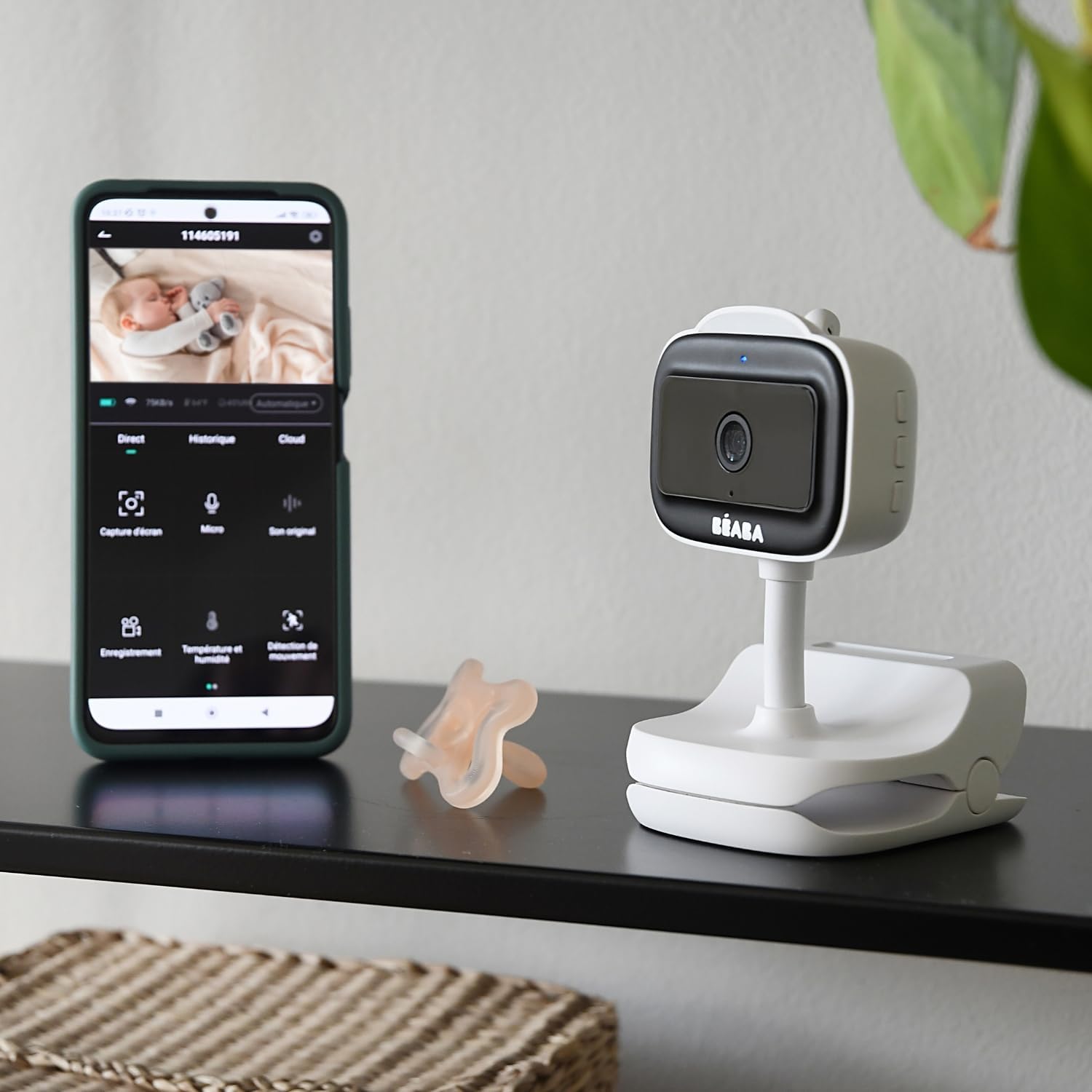
Слика 4: A smartphone displaying the BÉABA Zen Nomad mobile application interface, showing live video feed and various control options like recording, microphone, temperature, and motion detection.
- Уживо View: Access real-time video and audio from the camera.
- Двосмерни разговор: Use the microphone icon in the app to speak through the camera to your baby.
- Ноћни вид: The camera automatically activates infrared night vision in low-light conditions.
- Ноћно светло: Control the multi-color night light feature directly from the app to create a soothing environment.
- Успаванке: Select and play integrated lullabies through the camera's speaker.
- Праћење температуре и влажности: View real-time temperature and humidity readings of the baby's room within the app.
- VOX Function (Sound and Motion Detection): Activate VOX mode to receive alerts on your smartphone when sound or motion is detected in the baby's room. Adjust sensitivity settings as needed.
- Multi-Camera Monitoring: If you have multiple Zen Nomad cameras, you can view feeds from all connected cameras within the same application.

Слика 5: A smartphone displaying the BÉABA Zen Nomad mobile application, illustrating the capability to monitor multiple camera feeds simultaneously.
- Manual Camera Rotation: The camera unit can be manually rotated to adjust the viewугао уласка.
Одржавање
- Чишћење: Wipe the camera unit with a soft, dry cloth. Do not use abrasive cleaners or solvents.
- Складиштење: Чувајте уређај на хладном и сувом месту када се не користи.
- Одржавање батерије: Да бисте продужили век трајања батерије, избегавајте често потпуно пражњење батерије. Редовно је пуните.
Решавање проблема
| Проблем | Могући узрок | Решење |
|---|---|---|
| Камера се не укључује. | Слаба или никаква батерија. | Connect the camera to a power source using the USB cable and allow it to charge for at least 30 minutes before attempting to power on again. |
| Unable to pair camera with the app. | Incorrect Wi-Fi network (5GHz instead of 2.4GHz), incorrect password, or camera not in pairing mode. |
|
| No video feed or poor image quality. | Weak Wi-Fi signal, camera too far from router, or network congestion. |
|
| Audio issues (no sound, distorted sound). | Microphone or speaker blocked, app volume settings, or network delay. |
|
Спецификације
- Број модела: 930373
- Технологија повезивања: бежични (Ви-Фи)
- Извор напајања: Напаја се батеријама (пуњиво)
- Аутономија батерије: До 6 сати
- Резолуција видео снимка: 720п
- Посебне карактеристике: Motion Detector, Night Vision, Temperature and Humidity Sensor, Two-Way Talk, Lullabies, Multi-Color Night Light, VOX Function
- Компатибилни уређаји: Смартпхоне
- Материјал: Пластика
- Боја: Бела
- Волtage: 5 Волтс
- Снага: 5 Ваттс
- Димензије: Приближно 20.5 к 12.7 к 9.2 цм
- Тежина: Отприлике 453 грама
Гаранција и подршка
The BÉABA Zen Nomad Video Baby Monitor comes with a 2 година гаранције on spare parts, ensuring support for potential component replacements. For technical assistance, troubleshooting beyond this manual, or warranty claims, please contact BÉABA customer support through their official webсајт или контакт информације које сте добили уз куповину.
For more information, visit the official BÉABA store: BÉABA Official Store