
T-Wolf GG-G530
T-Wolf RoboCop такмичарски гејмерски миш GG-G530 Упутство за употребу
Model: GG-G530
Увод
This manual provides essential information for the setup, operation, and maintenance of your T-Wolf RoboCop Competitive Gaming Mouse GG-G530. Please read this manual thoroughly before using the product to ensure optimal performance and longevity.
Садржај пакета
- 1 x T-Wolf RoboCop Competitive Gaming Mouse GG-G530
- 1 x Упутство за употребу (овај документ)
Карактеристике производа
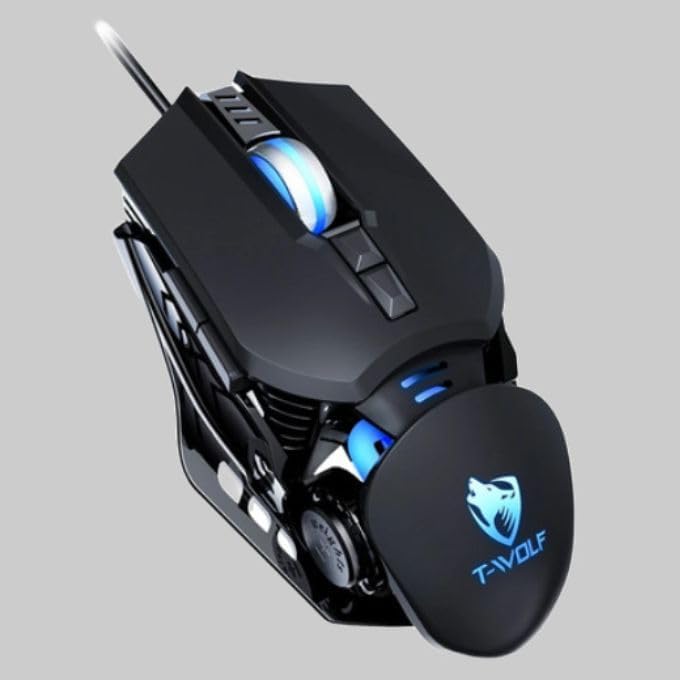
The T-Wolf RoboCop Competitive Gaming Mouse GG-G530 is designed for precision and comfort, suitable for both gaming and office use. Key features include:
- Optical Engine Design: Ensures stable operation and high sensitivity.
- Mechanical Armored Modeling: Distinctive and robust design.
- Симетрична „уради сам“ противтежа: Allows for adaptable weight adjustment.
- 7 Дугмад: Includes left click, right click, scroll wheel, DPI switcher, and additional programmable buttons.
- Интелигентно повезивање: Plug-and-play functionality with automatic driver installation.
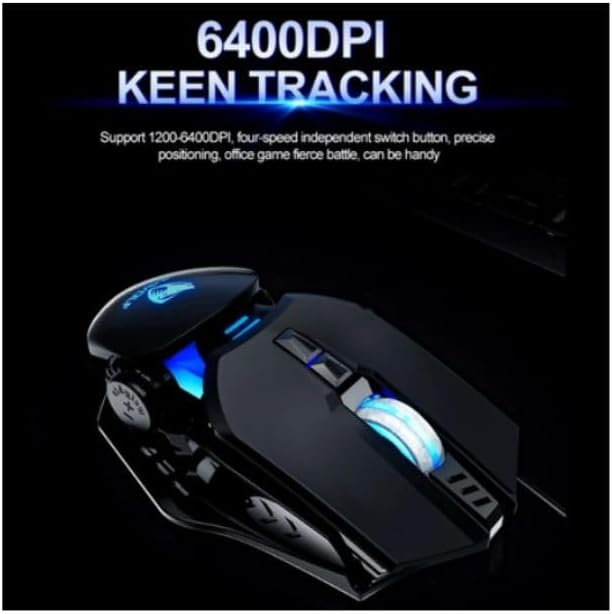
- Подесиви ДПИ: Four levels of sensitivity (1200/2400/3200/6400 DPI) for precise control.
- Ергономски дизајн: Provides comfortable use for extended periods without fatigue.
- Four-Color Light Effect: Dynamic lighting for visual appeal.
- Жична веза: Reliable USB interface with a 150cm cable.
- Компатибилност система: Supports Windows and Mac operating systems.
Сетуп
- Повежите миш: Insert the USB connector of the T-Wolf RoboCop Gaming Mouse into an available USB port on your computer.
- Аутоматска инсталација драјвера: The operating system will automatically detect the mouse and install the necessary drivers. This process typically takes a few moments. No manual driver installation is required.
- Спреман за употребу: Када се драјвери инсталирају, миш је спреман за тренутну употребу.
Упутство за употребу
The T-Wolf RoboCop Gaming Mouse features 7 buttons for various functions. Familiarize yourself with their basic operations:
- Леви клик: Примарна селекција и интеракција.
- Десни клик: Accesses contextual menus and secondary functions.
- Точак за померање: Скролује кроз документе и web странице. Може да функционише и као средњи клик.
- DPI Switcher Button: Подешава осетљивост миша (DPI).
- Додатна дугмад: The remaining buttons can be assigned specific functions through your operating system's mouse settings or compatible third-party software (note: no macro programming is natively supported by the mouse hardware).

ДПИ Адјустмент
The mouse features an adjustable DPI (Dots Per Inch) setting, allowing you to change the cursor sensitivity on the fly. This is particularly useful for different tasks, such as precise aiming in games or fast navigation in general use.
- Лоцирајте DPI Switcher Button, typically positioned behind the scroll wheel.
- Press the DPI Switcher Button to cycle through the available DPI settings: 1200 DPI, 2400 DPI, 3200 DPI, and 6400 DPI.
- Each press will change the sensitivity, allowing you to find the setting that best suits your current activity.
Одржавање
To ensure the longevity and optimal performance of your T-Wolf RoboCop Gaming Mouse, follow these simple maintenance guidelines:
- Чишћење: Користите меку, суву крпу да обришете површину миша. За тврдокорну прљавштину, благо обришитеampОбришите крпу водом или благим раствором за чишћење. Избегавајте јаке хемикалије или абразивне материјале.
- Оптички сензор: Periodically clean the optical sensor on the underside of the mouse with a cotton swab to prevent dust buildup, which can affect tracking performance.
- Нега каблова: Avoid sharply bending or pulling the USB cable to prevent internal damage.
- Складиштење: Када се не користи, чувајте миш на чистом и сувом месту, даље од екстремних температура.
Решавање проблема
If you encounter issues with your T-Wolf RoboCop Gaming Mouse, refer to the following common solutions:
- Миш не реагује:
- Уверите се да је USB кабл безбедно прикључен у исправан USB порт на рачунару.
- Покушајте да прикључите миш на други УСБ порт.
- Поново покрените рачунар.
- Кретање курсора је неправилно или скачкасто:
- Очистите оптички сензор на доњој страни миша.
- Уверите се да користите миш на чистој, нерефлектујућој и равномерној површини. Препоручују се подлоге за миш.
- DPI Adjustment Not Working:
- Ensure you are pressing the correct DPI switcher button.
- The mouse cycles through fixed DPI settings; there is no visual indicator on the mouse itself for the current DPI level, only the change in cursor speed.
- Дугмад не функционишу:
- Check your operating system's mouse settings to ensure buttons are enabled and configured correctly.
- Test the mouse on another computer to rule out a software or system issue.
Спецификације
| Модел | GG-G530 |
| Материјал | ABS + Electroplating |
| Систем за праћење | Оптицал |
| Веза | Виред |
| Цабле Ленгтх | 150 цм |
| Тип интерфејса | УСБ |
| ДПИ подешавања | 1200 / 2400 / 3200 / 6400 (подесиво) |
| Број дугмади | 7 |
| Век трајања | Approximately three years |
| Метод рада | Пхотоелецтриц |
| Лигхт Еффецт | Four-color cycling |
| Величина артикла | 130 к 80 к 35 мм |
| Тежина артикла | 160 г |
| Подржани системи | Виндовс, Мац |
Гаранција и подршка
Your T-Wolf RoboCop Competitive Gaming Mouse GG-G530 comes with a 6-месечна гаранција произвођача од дана куповине.
This warranty covers defects in materials and workmanship under normal use. It does not cover damage caused by accident, misuse, abuse, unauthorized modification, or external causes such as liquid damage.
For warranty claims or technical support, please contact your retailer or the point of purchase. Please retain your proof of purchase for warranty validation.

Ask a question about this manual
Ask about setup, troubleshooting, compatibility, parts, safety, or missing instructions. Manuals+ will review the question and use this page’s manual context to help answer it.