
Увод
Хвала вам на куповиниasing the KOKKO KMF-1 Multi-Effects Guitar Pedal. This versatile pedal combines 18 speaker models, a drum machine, and a looper, offering a comprehensive solution for guitarists. Please read this manual carefully to ensure proper operation and to fully utilize all features.
Кључне карактеристике
- 18 Speaker Models: Features 18 high-fidelity speaker models, developed with advanced DSP algorithms and IR technology for world-renowned speaker simulations.
- IR Cabinet Simulation: Ensures superior sound quality with high-fidelity cabinet modeling.
- Drum Machine & Looper: Includes a drum machine with 6 styles and over 40 rhythms, and a looper with 30 seconds of non-overdub recording capability, enabling one-man band performances.
- Флексибилне опције напајања: Can be powered by AA batteries or an adapter.
- Више интерфејса: Equipped with external signal input, USB output, and headphone output for easy plug-and-play use.
Садржај пакета
Приликом распакивања, молимо вас да се уверите да су све доле наведене ставке присутне и у добром стању:
- 1 x KOKKO KMF-1 Multi-Effects Pedal
- (Note: Power adapter and AA batteries are typically sold separately and not included in the standard package.)
Производ је завршенview
Familiarize yourself with the various parts and controls of your KMF-1 pedal.

Слика 1: Одозго надоле view of the KOKKO KMF-1 Multi-Effects Pedal, showing the expression pedal on the left and the control panel with display, knobs, and footswitches on the right.
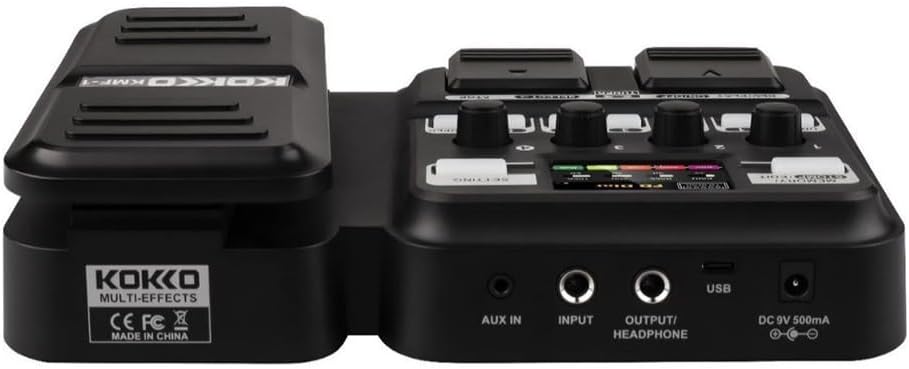
Слика 2: Позади view of the KOKKO KMF-1 Multi-Effects Pedal, highlighting the AUX IN, INPUT, OUTPUT/HEADPHONE, USB, and DC 9V power input ports.
Контроле и везе:
- Педала експресије: Used for volume control or wah effects.
- Екран: Shows current settings, effects, and modes.
- Knobs (1-4): Control various parameters depending on the selected effect or mode.
- Footswitches (DRUM, REC/PLAY ON/OFF, TUNER, SELECT, STOP, LOOPER): For activating/deactivating functions and navigating presets.
- MEMORY/STOMP EDIT Button: Toggles between memory and stompbox modes, or enters edit mode.
- SETTING Button: Приступа системским подешавањима.
- АУКС ИН: 3.5mm input for connecting external audio sources (e.g., MP3 player).
- УЛАЗНИ: 1/4" input for connecting your guitar.
- OUTPUT/HEADPHONE: 1/4" output for connecting to an ampлифиер или слушалице.
- УСБ порт: For connecting to a computer for recording or software updates.
- ДЦ 9В Улаз за напајање: For connecting a 9V DC power adapter (center negative).
Сетуп
Укључивање:
- Снага батерије: Open the battery compartment on the underside of the pedal and insert 4 x AA batteries (not included), ensuring correct polarity.
- Напајање АЦ адаптера: Connect a 9V DC (center negative) power adapter (not included) to the DC 9V input jack.
Connecting Your Gear:
- Повежите своју гитару са ИНПУТ jack using a 1/4" instrument cable.
- Повежите OUTPUT/HEADPHONE прикључак за твоју гитару amplifier's input or to headphones using a 1/4" cable.
- (Optional) Connect an external audio source (e.g., smartphone, MP3 player) to the АУКС ИН jack using a 3.5mm stereo cable.
- (Опционално) Повежите УСБ port to your computer for direct recording or firmware updates.
Упутство за употребу
Основна операција:
- Укључивање/искључивање: The unit powers on automatically when connected to power. Disconnect power to turn off.
- Контрола јачине звука: Use the expression pedal to control the overall output volume.
- Navigating Presets: Use the SELECT footswitch to cycle through different presets or effects.
Using Speaker Models:
The KMF-1 features 18 high-quality speaker models. These models simulate the sound characteristics of various guitar cabinets.
- Enter the speaker model selection mode (refer to display).
- Use the SELECT footswitch or corresponding knobs to browse and choose your desired speaker model.
- Adjust parameters like gain, tone, and volume using the numbered knobs (1-4) as indicated on the display.
Друм машина:
The built-in drum machine offers 6 styles and over 40 rhythms to practice or jam along with.
- Притисните тастер ДРУМ footswitch to activate the drum machine.
- Use the SELECT footswitch or knobs to choose a drum style and rhythm.
- Adjust the drum volume using the appropriate knob.
- Притисните ДРУМ again to stop the drum machine.
Looper Function:
The looper allows you to record up to 30 seconds of audio without overdubbing, perfect for creating backing tracks.
- Притисните тастер REC/PLAY ON/OFF footswitch once to start recording. The display will indicate recording status.
- Play your guitar part.
- Притисните REC/PLAY ON/OFF again to stop recording and immediately start playback of the recorded loop.
- Да бисте зауставили репродукцију, притисните СТОП ножни прекидач.
- To clear the loop, press and hold the СТОП ножни прекидач.
Функција тјунера:
The integrated tuner allows for accurate guitar tuning.
- Притисните тастер ТЈУНЕР footswitch to activate the tuner. The output signal will be muted.
- Play a single note on your guitar. The display will show the note and indicate if it is sharp, flat, or in tune.
- Подешавајте штимовање гитаре док дисплеј не покаже да је нота наштимована.
- Притисните тастер ТЈУНЕР footswitch again to exit the tuner and unmute the output.
Memory/Stomp Edit Mode:
This mode allows you to switch between saved presets (Memory mode) and individual stompbox effects (Stomp mode), as well as edit parameters.
- Притисните тастер MEMORY/STOMP EDIT button to toggle between Memory and Stomp modes.
- In Stomp mode, individual effects can be turned on/off using their dedicated footswitches or by selecting them.
- To edit parameters, press and hold the MEMORY/STOMP EDIT button to enter edit mode. Use the knobs and footswitches to adjust settings as displayed.
- Save your changes by following the on-screen prompts (usually by pressing a specific footswitch or button).
Системска подешавања:
Access system settings to configure global parameters.
- Притисните тастер СЕТТИНГ button to enter the system settings menu.
- Use the footswitches or knobs to navigate through the menu options.
- Adjust settings such as display brightness, factory reset, etc.
- Притисните тастер СЕТТИНГ поново притисните дугме да бисте изашли из менија.
Одржавање
- Чишћење: Use a soft, dry cloth to clean the pedal. Do not use abrasive cleaners or solvents.
- Складиштење: Чувајте педалу на хладном и сувом месту, даље од директне сунчеве светлости и екстремних температура.
- Замена батерије: If using batteries, replace them when the low battery indicator appears or when the pedal's performance degrades. Remove batteries if the pedal will not be used for an extended period.
- Избегавајте влагу: Keep the pedal away from water and other liquids.
- Пажљиво рукујте: Избегавајте испуштање или излагање педале јаким ударцима.
Решавање проблема
| Проблем | Могући узрок | Решење |
|---|---|---|
| Нема излаза звука. | Incorrect cable connections; Low battery; Tuner is active; AmpЛифиер је искључен. | Check all cables are securely connected. Replace batteries or use AC adapter. Deactivate tuner. Ensure ampУтикач је укључен и јачина звука је појачана. |
| Изобличен или лош квалитет звука. | Input level too high; Incorrect effect settings; Damaged cable. | Adjust guitar volume or pedal input level. Check and adjust effect parameters. Try a different cable. |
| Педала се не укључује. | No power source; Dead batteries; Faulty adapter. | Ensure power adapter is connected or batteries are inserted correctly. Replace batteries. Try a different compatible power adapter. |
| Looper not recording. | Incorrect looper mode; Memory full. | Ensure you are in the correct looper recording mode. Clear previous loops if memory is full. |
Спецификације
| Феатуре | Детаљ |
|---|---|
| Назив модела | KMF-1 |
| Димензије производа (Д к Ш к В) | КСНУМКС к КСНУМКС к КСНУМКС цм (КСНУМКС к КСНУМКС к КСНУМКС инча) |
| Тежина артикла | 900 г (1.98 лбс) |
| Повер Суппли | 9V DC (center negative) adapter or 4 x AA batteries |
| Хардверски интерфејс | УСБ |
| Модели звучника | 18 (IR technology) |
| Looper Recording Time | 30 seconds (non-overdub) |
| Друм Рхитхмс | Over 40 rhythms across 6 styles |
| Број модела произвођача | 43ST9NRST131F1P8K5GRJ7 |
Гаранција и подршка
KOKKO products are designed and manufactured to the highest quality standards. For information regarding warranty coverage, technical support, or service, please refer to the warranty card included with your product or visit the official KOKKO webсајт. Молимо вас да сачувате доказ о куповини за евентуалне рекламације по гаранцији.
За додатну помоћ, обратите се нашем тиму за корисничку подршку.


