
1. Увод
Welcome to the HOTWAV Hyper 7 Pro rugged smartphone user manual. This guide will assist you in understanding and utilizing all the features of your new device. The Hyper 7 Pro is designed for durability and high performance, featuring Android 14, 5G connectivity, a 200MP camera, and a large 10800mAh battery.
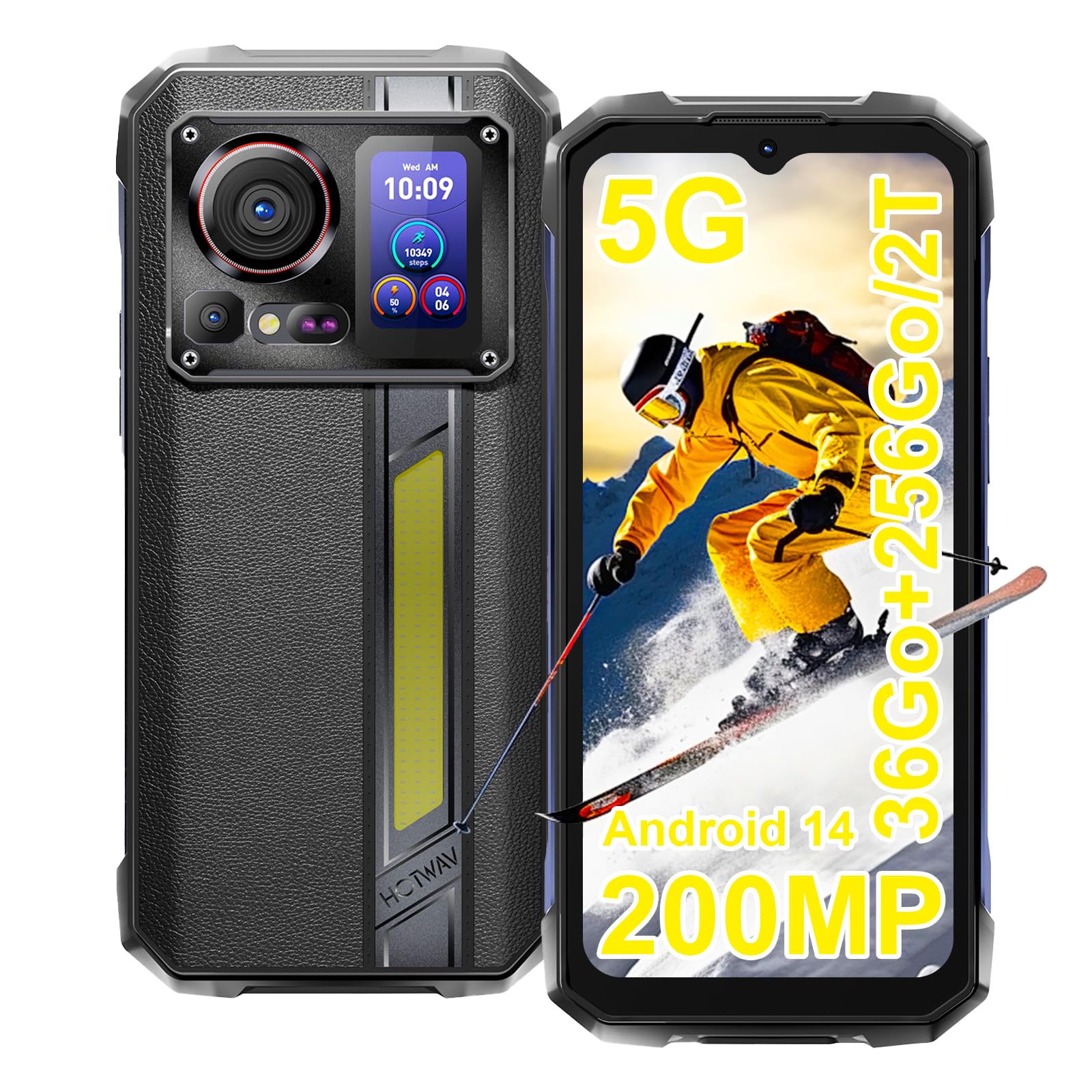
Image: The HOTWAV Hyper 7 Pro rugged smartphone, showcasing its robust design and rear display.
2. Шта је у кутији
Upon unboxing your HOTWAV Hyper 7 Pro, please ensure all the following items are present:
- HOTWAV Hyper 7 Pro Smartphone
- УСБ Типе-Ц кабл
- Адаптер за напајање (33В)
- Алат за избацивање СИМ картице
- Pre-applied Screen Protector (Gorilla Glass)
- Additional Screen Protector
- Упутство за употребу

Image: All items included in the HOTWAV Hyper 7 Pro package, including the phone, charger, cables, and documentation.
3. Водич за подешавање
3.1. Installing SIM Cards and MicroSD Card
- Пронађите лежиште за СИМ картицу на левој страни уређаја.
- Уметните алат за избацивање СИМ картице у мали отвор поред лежишта и лагано притисните док лежиште не искочи.
- Place your Nano-SIM card(s) and/or a microSD card (up to 2TB) into the designated slots on the tray. Ensure the gold contacts face downwards.
- Пажљиво вратите лежиште у телефон док не кликне на своје место.
3.2. Почетно укључивање и основна конфигурација
- Press and hold the Power button (located on the right side) until the HOTWAV logo appears.
- Пратите упутства на екрану да бисте изабрали језик, повезали се са Wi-Fi мрежом и подесили свој Google налог.
- Configure your preferred security methods, such as Face ID and Fingerprint Unlock.
3.3. Пуњење уређаја
Пре прве употребе, препоручује се да потпуно напуните уређај.
- Повежите USB Type-C кабл са портом за пуњење на дну телефона.
- Connect the other end of the cable to the provided 33W power adapter.
- Укључите адаптер за напајање у зидну утичницу. Индикатор пуњења ће се појавити на екрану.

Image: The HOTWAV Hyper 7 Pro charging with its 33W fast charger, highlighting the OTG function.
4. Упутство за употребу
4.1. Главни екран и навигација
The Hyper 7 Pro features a 6.6-inch FHD+ display with a 120Hz refresh rate for smooth interactions. Navigate through the Android 14 interface using standard touch gestures: tap, swipe, pinch-to-zoom.

Image: The vibrant 6.6-inch FHD+ display of the Hyper 7 Pro, showcasing its visual quality.
4.2. Secondary Rear Screen
The innovative secondary screen on the back provides quick access to essential information and controls without activating the main display.
- Приказ времена: View тренутно време и датум.
- Контрола камере: Користите као а viewпроналазач за селфије са задње камере или брзе снимке.
- Music Applications: Control playback for music apps.
- Обавештења: See incoming call and message alerts.
- Battery Status & Step Count: Monitor battery level and daily steps.

Image: The versatile secondary display on the back of the Hyper 7 Pro, showing different information widgets.
4.3. Функције камере
The Hyper 7 Pro is equipped with a powerful camera system:
- Задња камера: 200MP main sensor for high-resolution photos and a 24MP night vision camera with infrared LEDs for clear images in low light.
- Предња камера: 32MP for sharp selfies and video calls.
- AI Algorithms: Enhance saturation for night scenes, portraits, and landscapes.
- Видео снимак: Supports 4K video capture.

Image: A visual comparison demonstrating the superior detail captured by the Hyper 7 Pro's 200MP camera.
4.4. Customizable Side Button
The red side button can be configured for three different actions:
- Појединачна штампа: Assign to open a specific app or function.
- Доубле Пресс: Assign to open a different app or function.
- Дуго притисните: Assign to open a third app or function.
Configure these settings in the phone's 'Side Key Function' menu.

Image: The customizable side button on the Hyper 7 Pro, showing how different press actions can launch various applications.
4.5. Повезивање и посебне функције
- 5G мрежа: Уживајте у брзој интернет конекцији.
- Wi-Fi 6 и Bluetooth 5.2: Advanced wireless connectivity for faster speeds and stable connections.
- НФЦ: For contactless payments and quick pairing with other devices.
- ГПС: Integrated GPS, Beidou, Galileo, and GLONASS for precise navigation.
- Campинг Лигхт: A powerful 280-lumen LED light on the back, with timer and SOS/Flash functions.
- OTG функција: Connect USB devices or use your phone as a power bank to charge other devices.
- Режим рукавице: Побољшана осетљивост на додир за употребу са рукавицама.
- ФМ радио: Слушајте своје омиљене радио станице.

Image: The powerful LED camping light of the Hyper 7 Pro, demonstrating its illumination capabilities.
5. Одржавање
5.1. Чишћење уређаја
The HOTWAV Hyper 7 Pro is IP68/IP69K rated for water and dust resistance. To clean, gently wipe the device with a soft, damp cloth. For stubborn dirt, you may rinse it under low-pressure fresh water, ensuring all ports are securely closed. Avoid using harsh chemicals or abrasive materials.

Image: The Hyper 7 Pro enduring water splashes, highlighting its waterproof design.
5.2. Брига о батерији
Да бисте продужили век трајања батерије од 10800 mAh:
- Избегавајте екстремне температуре.
- Use only the provided 33W charger and USB-C cable.
- Не дозволите да се батерија често потпуно испразни.
5.3. Ажурирања софтвера
Regularly check for and install system updates to ensure optimal performance, security, and access to new features. You can usually find this option in your phone's Settings menu under 'System' or 'About phone'.
5.4. Управљање складиштем
With 256GB of internal storage and support for up to 2TB microSD cards, you have ampпростор. Периодично поновоview твој files and applications to free up space and maintain performance. Consider backing up important data to cloud storage or an external device.
КСНУМКС. Решавање проблема
If you encounter issues with your HOTWAV Hyper 7 Pro, refer to the following common solutions:
- Уређај се не укључује: Ensure the battery is charged. Connect the phone to the charger for at least 30 minutes, then try powering on again.
- Проблеми са наплатом: Verify that the charger and USB-C cable are securely connected and undamaged. Try a different power outlet. Ensure the charging port is clean and free of debris.
- Network Connectivity Problems (5G/Wi-Fi): Check if Airplane Mode is off. Restart your phone. For mobile data, ensure your SIM card is correctly inserted and your plan is active. For Wi-Fi, forget the network and reconnect.
- Камера не ради: Restart the camera app or the phone. Check app permissions for the camera in Settings.
- Споре перформансе: Close unnecessary background apps. Clear cache for frequently used apps. Ensure you have sufficient storage space. Restart the device.
- Екран не реагује: Restart the phone by holding the power button for an extended period (usually 10-15 seconds). If a hard reset is needed, consult the online support resources.
- Грешке у софтверу: Ensure your Android 14 system is up to date. If issues persist, a factory reset might be necessary (back up your data first).
If these steps do not resolve your issue, please contact HOTWAV customer support for further assistance.
7. Спецификације
| Феатуре | Спецификација |
|---|---|
| Бранд | ХОТВАВ |
| Назив модела | Hyper 7 Pro |
| Оперативни систем | Андроид 14 |
| Процесор | MediaTek Dimensity 7050 осам језгара (2.6 GHz) |
| РАМ | 16 GB (expandable to 36 GB with virtual memory) |
| Интерна меморија | 256 ГБ |
| Екпандабле Стораге | Up to 2 TB (microSD) |
| Величина екрана | 6.6 inches FHD+ |
| Резолуција екрана | 1080*2408 пиксела |
| Рефресх Рате | 120 Хз |
| Заштита екрана | Цорнинг Горилла Гласс 3 |
| Капацитет батерије | 10800 мАх |
| Пуњење | Брзо пуњење од 33W, обрнуто OTG пуњење |
| Задња камера | 200 MP Main, 24 MP Night Vision |
| Предња камера | 32 МП |
| Видео Ресолутион | 4K |
| Оцене издржљивости | IP68, IP69K, MIL-STD-810H |
| Повезивање | 5G, Wi-Fi 6, Bluetooth 5.2, NFC |
| Навигација | ГПС, Беидоу, Галилео, ГЛОНАСС |
| Тип СИМ картице | Дуал Нано-СИМ |
| Димензије | 17.5 к 8.2 к 1.8 цм |
| Тежина | 406 грама |
8. Гаранција и подршка
8.1. Информације о гаранцији
Your HOTWAV Hyper 7 Pro comes with a 2 година гаранције од датума куповине. Ова гаранција покрива производне недостатке и кварове при нормалној употреби. Молимо вас да сачувате доказ о куповини за потребе подношења захтева за гаранцију.
8.2. Корисничка подршка
For any technical assistance, warranty claims, or product-related inquiries, please contact HOTWAV customer support through their official website or the contact information provided with your purchase. Ensure you have your device model and purchase details ready when contacting support.

Image: HOTWAV's commitment to customer satisfaction, including a 2-year warranty and dedicated customer service.