
Кеицхрон К10 Мак
Кеицхрон К10 Мак бежична прилагођена механичка тастатура Упутство за употребу
Model: K10 Max
1. Увод
This manual provides detailed instructions for the Keychron K10 Max Wireless Custom Mechanical Keyboard. The K10 Max is a full-sized (108-key) mechanical keyboard designed for versatility, offering 2.4 GHz, Bluetooth, and wired connectivity options. It features QMK open-source firmware for extensive customization and is compatible with Mac, Windows, and Linux operating systems.

Image 1.1: Keychron K10 Max Wireless Mechanical Keyboard with a close-up of a Keychron Super Brown switch.
2. Садржај пакета
Verify that all items are present in your Keychron K10 Max package:
- Кеицхрон К10 Мак бежична прилагођена механичка тастатура
- Type-A to Type-C Cable (x1)
- Type-A 2.4GHz Receiver (x1)
- Extension Adapter for Receiver (x1)
- Keycap-Switch Puller (x1)
- Hex Key & Screwdriver (x1)
- Additional Keycaps for Windows OS

Image 2.1: Included accessories with the Keychron K10 Max keyboard.
3. Подешавање
3.1. Почетно пуњење
Before first use, connect the keyboard to a USB power source using the provided Type-A to Type-C cable to ensure it is fully charged.
3.2. Промена оперативног система
Locate the OS switch on the side of the keyboard. Toggle it to either 'Mac' or 'Windows' depending on your operating system. This ensures correct key mapping for multimedia and function keys.

Image 3.1: Operating system switch on the Keychron K10 Max.
3.3. Режими повезивања
The K10 Max supports three connectivity modes: 2.4 GHz wireless, Bluetooth 5.1, and wired USB-C.
- Бежична веза од 2.4 GHz: For high-performance gaming and low-latency connection. Insert the Type-A 2.4GHz receiver into an available USB port on your device. The keyboard will automatically connect.
- Блуетоотх КСНУМКС: Allows connection to up to three devices simultaneously. To pair, switch the keyboard to Bluetooth mode, then press and hold Фн + КСНУМКС (or 2, 3) until the key flashes, indicating pairing mode. Select 'Keychron K10 Max' on your device's Bluetooth settings.
- Жични USB-C: Connect the keyboard directly to your device using the provided USB-C cable. This mode also charges the keyboard.
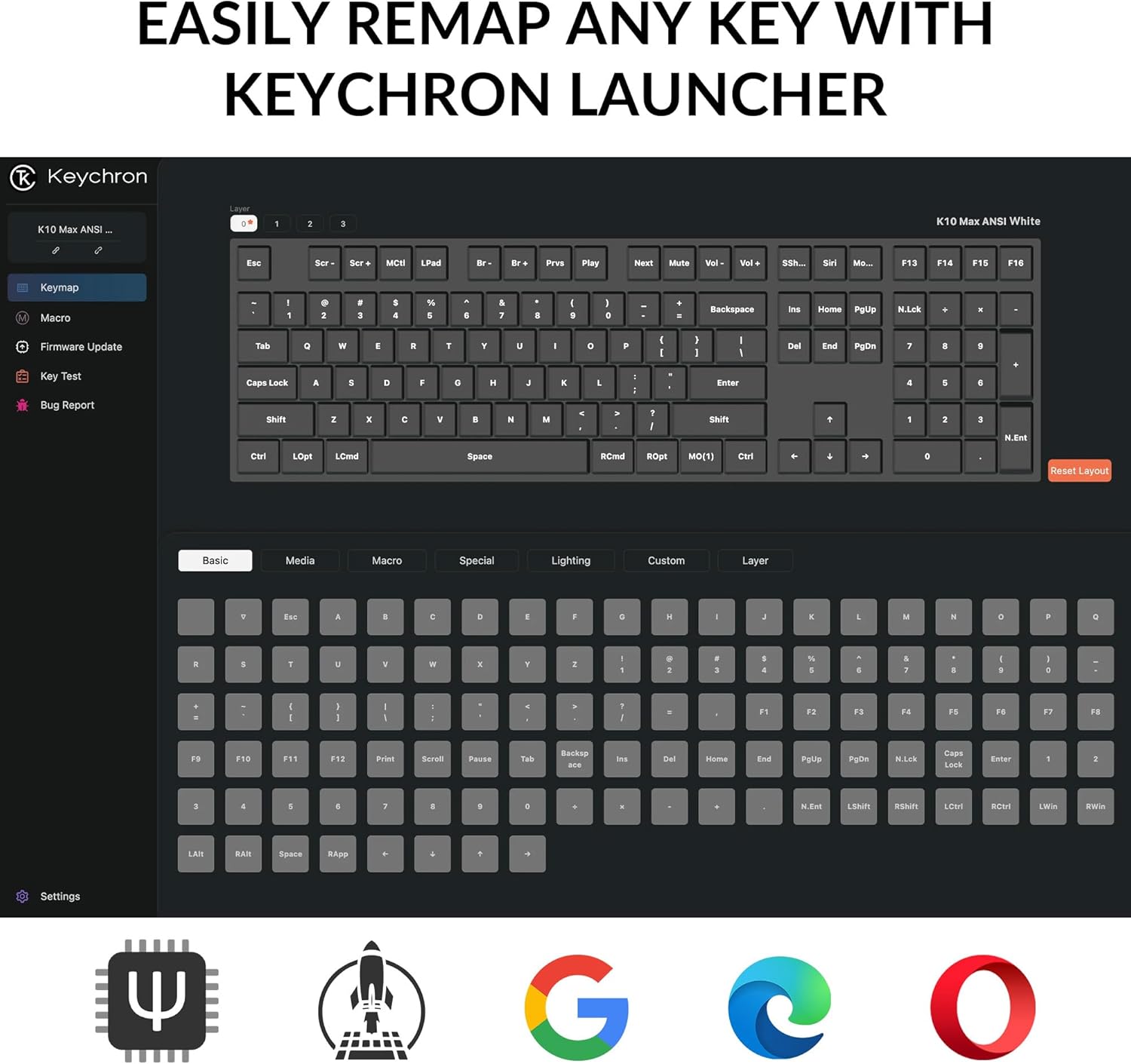
Image 3.2: Connectivity options for the Keychron K10 Max.
4. Упутство за употребу
4.1. Key Remapping and Customization (QMK Firmware)
The Keychron K10 Max runs on QMK open-source firmware, allowing for extensive key remapping and macro creation. Use the Keychron Launcher web application to customize key functions, lighting effects, and create custom layers.
- Access the Keychron Launcher via a web претраживач.
- Connect your keyboard in wired mode to ensure proper communication with the Launcher.
- Follow the on-screen instructions within the Launcher to remap keys, set macros, and update firmware.

Image 4.1: Keychron Launcher interface for key remapping.
4.2. Контрола позадинског осветљења
The keyboard features a white backlight with south-facing LEDs for enhanced visibility and compatibility with most keycaps. Use the dedicated backlight keys (usually Fn + light bulb icon or similar) to cycle through various lighting effects and adjust brightness.

Image 4.2: South-facing white backlight illumination.
5. Одржавање
5.1. Чишћење
Да бисте очистили тастатуру, искључите је из свих извора напајања. Користите меку крпу која не оставља влакна, благо натопљенуampводом или благим раствором за чишћење. Избегавајте прскање течности директно на тастатуру. За чишћење између тастера користите компримовани ваздух или малу четку.
5.2. Прекидачи са могућношћу брзе замене
The K10 Max features hot-swappable sockets, allowing you to change mechanical switches without soldering. Use the included keycap-switch puller tool for this process.
- Gently remove the keycap using the keycap puller.
- Insert the switch puller around the switch, ensuring it grips the top and bottom clips.
- Pull the switch straight up to remove it.
- Поравнајте пинове новог прекидача са отворима на штампаној плочи и чврсто притисните док не кликне на своје место. Уверите се да пинови нису савијени.
- Замените поклопац тастера.

Image 5.1: Hot-swappable Keychron Super switches.
КСНУМКС. Решавање проблема
- Тастатура не реагује: Ensure the keyboard is charged. Check the connectivity mode switch (2.4 GHz, Bluetooth, or wired) and ensure it matches your connection method. For wired mode, try a different USB-C cable or port.
- Проблеми са Bluetooth везом: Ensure the keyboard is in Bluetooth pairing mode (Fn + 1/2/3 flashing). Remove the keyboard from your device's Bluetooth list and attempt to re-pair. Ensure no other devices are interfering.
- 2.4 GHz wireless issues: Ensure the 2.4 GHz receiver is securely plugged into a working USB port. Try moving the receiver closer to the keyboard or using the included extension adapter.
- Keys not working or incorrect output: Verify the OS switch is set correctly (Mac/Windows). If you have remapped keys using Keychron Launcher, ensure the correct layer is active or reset to default settings within the software. Check for bent switch pins if you recently swapped switches.
- Позадинско осветљење не ради: Ensure the keyboard is charged. Cycle through backlight modes and brightness levels using the designated function keys.
If issues persist, refer to the official Keychron support resources or contact customer service.
7. Спецификације
| Модел | Кеицхрон К10 Мак |
| Димензије | 17.61 к 5.5 инча (447.37 мм к 139.82 мм) |
| Тежина артикла | 4.64 pounds (1530 g ± 10 g) |
| Материјал оквира | АБС пластика |
| Кеицапс | OSA Double-shot PBT Keycaps |
| Прекидачи | Keychron Super Mechanical Switch (Hot-swappable with 3-pin & 5-pin MX Mechanical Switches) |
| Стабилизатор | Screw-in PCB Stabilizer |
| Позадинско осветљење | South-facing White Backlight |
| МЦУ | ARM Cortex-M4 32-bit STM32F402 (256KB Flash) |
| Поллинг Рате | 1000 Hz (2.4 GHz and Wired) / 90 Hz (Bluetooth Mode) |
| Н-Кеи Ролловер (НКРО) | Да |
| Повезивање | 2.4 GHz / Bluetooth 5.1 / Type-C Wired |
| Компатибилни уређаји | Лаптоп, рачунар, паметни телефон, таблет |
| Компатибилност оперативног система | macOS / Windows / Linux |
| Батерије | 1 литијум-јонска батерија (укључена) |

Слика 7.1: Детаљне спецификације производа.
8. Гаранција и подршка
For warranty information, please refer to the documentation included with your purchase or visit the official Keychron website. For technical support, frequently asked questions, or additional assistance, please visit the Keychron Store on Amazon or the official Keychron support page.
Ask a question about this manual
Ask about setup, troubleshooting, compatibility, parts, safety, or missing instructions. Manuals+ will review the question and use this page’s manual context to help answer it.