
Увод
Thank you for choosing the Edifier STAX Spirit S5 Wireless Planar Magnetic Headphones. These headphones are engineered to deliver an exceptional audio experience, featuring advanced planar magnetic drivers with EqualMass diaphragms for precise sound reproduction and minimal distortion. With Qualcomm Snapdragon Sound technology, LDAC, and LHDC codec support, the S5 provides high-resolution wireless audio. This manual provides detailed instructions for setup, operation, maintenance, and troubleshooting to ensure you get the most out of your new headphones.
Садржај пакета
Молимо вас да проверите да ли су све ставке наведене у наставку укључене у ваш пакет:
- 1 x Edifier STAX Spirit S5 Headset
- 2 x Cooling Mesh Earpads (pre-installed or spare)
- КСНУМКС к УСБ кабел за пуњење типа Типе-Ц
- 1 x Earpad Pick Tool
- 1 x 3.5 mm AUX audio kabl
- 1 x адаптер са 3.5 мм на 6.35 мм
- 1 x Headphone Carrying Case
- 2 x Earpad Pouches
- 1 к Упутство за употребу
Производ је завршенview
Familiarize yourself with the components and controls of your Edifier STAX Spirit S5 headphones.

Фронт view of the Edifier STAX Spirit S5 headphones, showcasing their sleek black design and over-ear cups.

A user wearing the Edifier STAX Spirit S5 headphones, demonstrating their comfortable fit and profile током употребе.
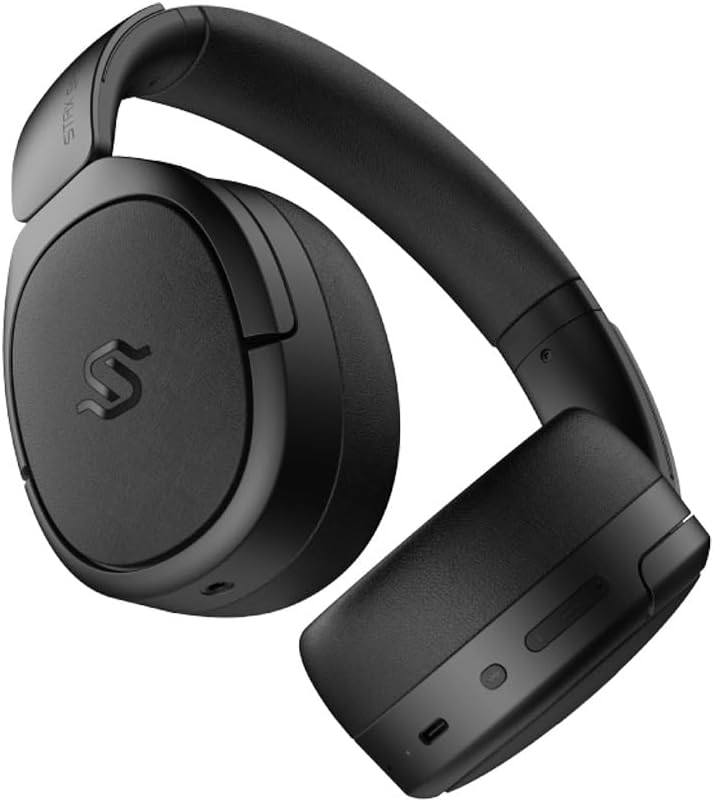
Сиде view of the headphones, highlighting the control buttons and ports located on the right earcup, including the USB-C port.

A detailed close-up of the control buttons on the earcup, showing the power button, volume controls, and the USB-C charging port.

The Edifier STAX Spirit S5 headphones folded compactly, illustrating their portability and ease of storage in the included carrying case.
Сетуп
Пуњење слушалица
Before first use, fully charge your Edifier STAX Spirit S5 headphones.
- Connect the supplied USB Type-C cable to the charging port on the headphones and the other end to a USB power adapter (not included) or a computer's USB port.
- The LED indicator will show charging status. It typically takes approximately 10 minutes for a quick charge, providing extended playback. A full charge can provide up to 80 hours of battery life.
- Once fully charged, the LED indicator will change (refer to the specific indicator behavior in your quick start guide, if available).
Укључивање/искључивање
- Укључено: Притисните и држите дугме за напајање око 3 секунде док се индикаторска лампица не упали.
- Искључивање: Притисните и држите дугме за напајање око 5 секунде док се индикаторска лампица не угаси.
Блуетоотх упаривање
The STAX Spirit S5 uses Bluetooth V5.4 for stable and fast transmission.
- Уверите се да су слушалице искључене.
- Press and hold the Power button for approximately 5-7 seconds until the indicator light flashes rapidly, indicating pairing mode.
- On your device (smartphone, tablet, computer), enable Bluetooth and search for "Edifier STAX Spirit S5" in the list of available devices.
- Select the headphones to connect. Once successfully paired, the indicator light will stop flashing and remain solid or turn off, depending on the model's specific behavior.
- Гоогле Фаст Паир: For Android devices, the headphones support Google Fast Pair for quick and seamless connection. Simply power on the headphones near your Android device, and a pairing prompt will appear.
- Multi-device Connection: The S5 can connect to two audio devices simultaneously. After pairing with the first device, put the headphones back into pairing mode and connect to the second device. The headphones will intelligently switch between the two.
Жичана веза
The headphones support both USB-C and 3.5mm AUX wired connections.
- USB-C аудио: Connect the USB Type-C cable from the headphones to a compatible USB-C port on your device for digital audio playback and charging.
- 3.5mm AUX Audio: Connect the 3.5mm AUX cable to the audio input port on the headphones and the other end to your audio source's 3.5mm output. Use the included 3.5mm to 6.35mm adapter for devices with a 6.35mm jack. Note that the headphones must be powered on for passive wired mode.
Упутство за употребу
Основне контроле
The main controls are located on the earcup:
- Дугме за напајање:
- Press and hold for 3 seconds to Power On.
- Press and hold for 5 seconds to Power Off.
- Press and hold for 5-7 seconds (from off) to enter Bluetooth pairing mode.
- Јачина звука (+): Кратак притисак да повећате јачину звука.
- Утишавање (-): Кратко притисните да бисте смањили јачину звука.
- Multi-function Button (often between volume buttons):
- Short press: Play/Pause music.
- Short press: Answer/End call.
- Дуги притисак: Одбијање позива.
- Двоструки притисак: Следећа нумера.
- Троструки притисак: Претходна нумера.
Аудио технологије
The STAX Spirit S5 supports various high-fidelity audio codecs for an optimal listening experience:
- Qualcomm Snapdragon Sound: Ensures stable RF connection and efficient power consumption for extended listening.
- LDAC & LHDC: Compatible with Hi-Res Audio and Wireless Hi-Res Audio, delivering exceptional detail and clarity.
- aptX HD, aptX Adaptive, aptX Lossless: Part of the Snapdragon Audio technology, providing high-resolution audio with ultra-low latency (as low as 89ms with aptX Adaptive).
Функционалност позива
The headphones are equipped with dual microphones and Qualcomm cVc technology for clear calls.
- Уклањање буке: Integrated Qualcomm cVc actively suppresses ambient noise, enhancing voice clarity during calls.
- приватност: The closed-back design helps ensure conversation privacy.
Одржавање
Правилно одржавање осигурава дуготрајност и перформансе ваших слушалица.
- Чишћење:
- Обришите слушалице меком, сувом крпом.
- For earpads, use a slightly damp крпом ако је потребно, али избегавајте прекомерну влагу.
- Немојте користити јаке хемикалије, раствараче за чишћење или јаке детерџенте.
- Замена јастучића за уши:
- The STAX Spirit S5 comes with two sets of earpads (mesh and leather).
- To replace, gently pull off the existing earpad. Use the included earpad pick tool if needed to carefully detach it from the earcup.
- Align the new earpad with the earcup and press firmly around the edges until it clicks securely into place.
- Складиштење:
- When not in use, store the headphones in the provided carrying case to protect them from dust, scratches, and impacts.
- Избегавајте складиштење на екстремним температурама или високој влажности.
- Одржавање батерије:
- Да бисте сачували век трајања батерије, избегавајте често потпуно пражњење слушалица.
- Ако складиштите батерију дуже време, напуните је на око 50% пре складиштења.
Решавање проблема
Ако имате проблема са слушалицама, погледајте следеће уобичајене проблеме и решења:
| Проблем | Могући узрок | Решење |
|---|---|---|
| Слушалице се не укључују. | Ниска батерија. | Пуните слушалице помоћу USB-C кабла. |
| Није могуће упаривање преко Bluetooth-а. | Слушалице нису у режиму упаривања; Bluetooth уређаја је искључен; сметње. | Ensure headphones are in pairing mode (flashing light). Turn Bluetooth off/on on your device. Move closer to the device. Clear previous pairings on your device. |
| Нема звука или је јачина звука ниска. | Volume too low; incorrect audio source; loose cable (wired mode). | Increase volume on headphones and source device. Ensure correct audio output is selected on your device. Check wired connections. |
| Poor audio quality (wireless). | Distance from device; interference; low-quality audio source. | Reduce distance to your device. Avoid strong electromagnetic interference. Use high-quality audio files/streaming services. |
| Микрофон не ради током позива. | Incorrect input device selected; microphone muted. | Ensure the headphones are selected as the input device in your call application settings. Check if the microphone is muted. |
If the problem persists, please contact Edifier customer support.
Спецификације
Key technical specifications for the Edifier STAX Spirit S5 headphones:
| Бранд | Едифиер |
| Назив модела | S5 |
| Број модела | S5spaceblack |
| Боја | Црно |
| Технологија повезивања | Жично, бежично (Блутут) |
| Бежична комуникациона технологија | Блуетоотх |
| Блуетоотх верзија | V5.4 (implied from feature bullets) |
| Прикључак за слушалице | 3.5mm Jack, USB-C |
| Импеданса | 120 ома |
| Постављање уха | Преко уха |
| Форм Фацтор | Циркум-аурални |
| Тежина артикла | 420 грама |
| Састав батерије | Литијум-јонски |
| Пуњива батерија | Да |
| Време пуњења | Approx. 10 minutes (for quick charge) |
| Посебне карактеристике | Брзо пуњење |
| Компатибилни уређаји | Computer, Laptop, Mobile Phone |
| Специфичне употребе за производ | Music, Professional, Studio Listening |
Гаранција и подршка
The Edifier STAX Spirit S5 headphones come with a two-year warranty, ensuring reliable performance and support.
For technical assistance, warranty claims, or further inquiries, please contact Edifier customer support through their official webсајт или продавац од кога сте купили производ. Молимо вас да сачувате доказ о куповини ради потврде гаранције.