
1. Увод
Thank you for choosing the Zelotes Wireless Trackball Mouse. This ergonomic device is designed to provide comfort and efficiency for various computing tasks, reducing wrist and arm strain. It offers versatile connectivity options, including 2.4 GHz wireless and Bluetooth, allowing seamless switching between up to three devices. This manual provides detailed instructions for setup, operation, maintenance, and troubleshooting to ensure you get the most out of your new trackball mouse.

Image: The Zelotes F33 Wireless Trackball Mouse, showcasing its ergonomic design and trackball.
2. Карактеристике производа
- Ергономски дизајн: Utilizes a trackball for cursor movement, minimizing wrist and arm motion. Features an innovative adjustable angle (0° to 18°) with a removable aluminum alloy base for natural palm positioning and reduced fatigue during prolonged use.
- Вишемодална повезаност: Supports both 2.4 GHz USB wireless and Bluetooth connections. Connects simultaneously to three devices (one via USB, two via Bluetooth) and allows seamless switching between them.
- Уграђена пуњива батерија: Equipped with a 730mAh rechargeable Lithium-ion battery and includes a USB charging cable. The mouse can be used while charging.
- Подесиви ДПИ: Offers 5 adjustable DPI settings: 800, 1200, 1600, 2400, and 4800 DPI, allowing you to customize cursor sensitivity to your preference.
- 8 програмабилних дугмади: Includes standard left/right click, scroll wheel, and dedicated forward/back side buttons for enhanced navigation and file менаџмент.
- ЛЕД осветљење: Features vibrant LED lighting with 16.8 million color options, which can be turned off if desired.
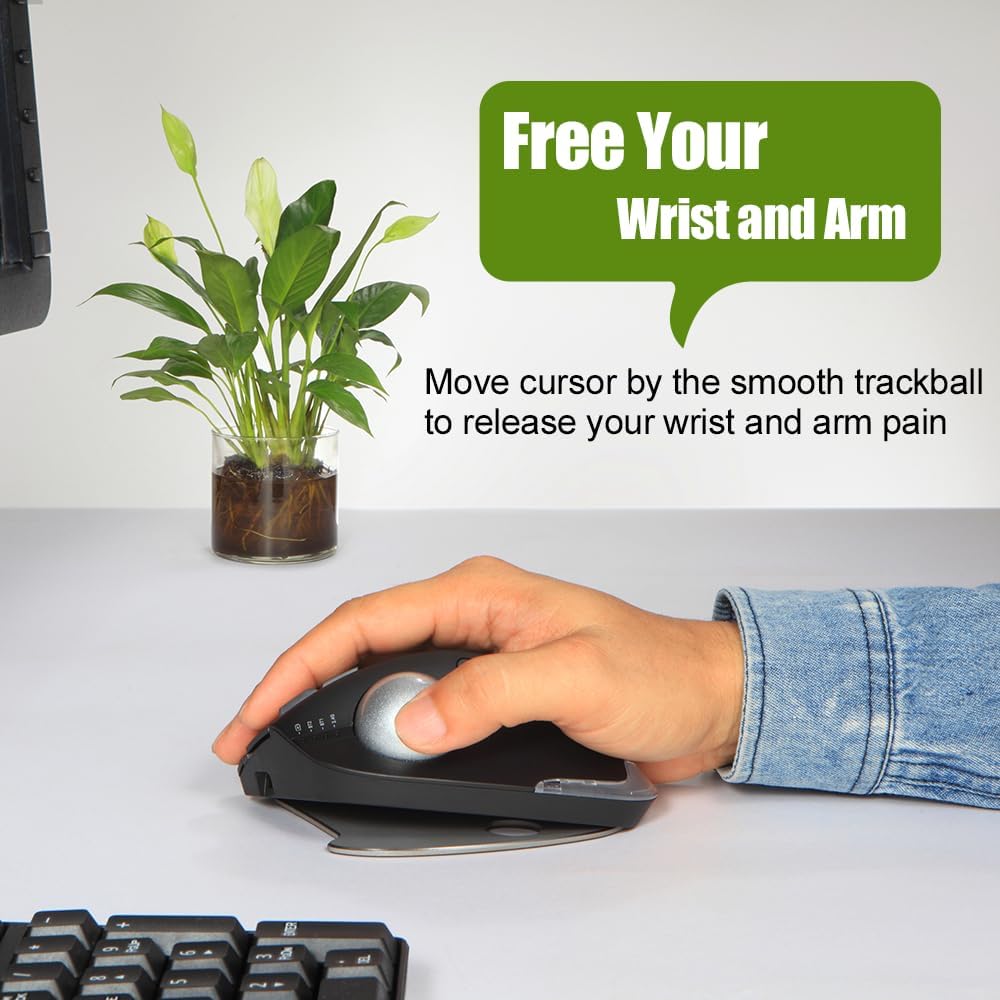
Image: A hand resting comfortably on the trackball mouse, illustrating how it helps free the wrist and arm from strain.

Image: The trackball mouse demonstrating its adjustable angles (0° and 18°) for personalized comfort.
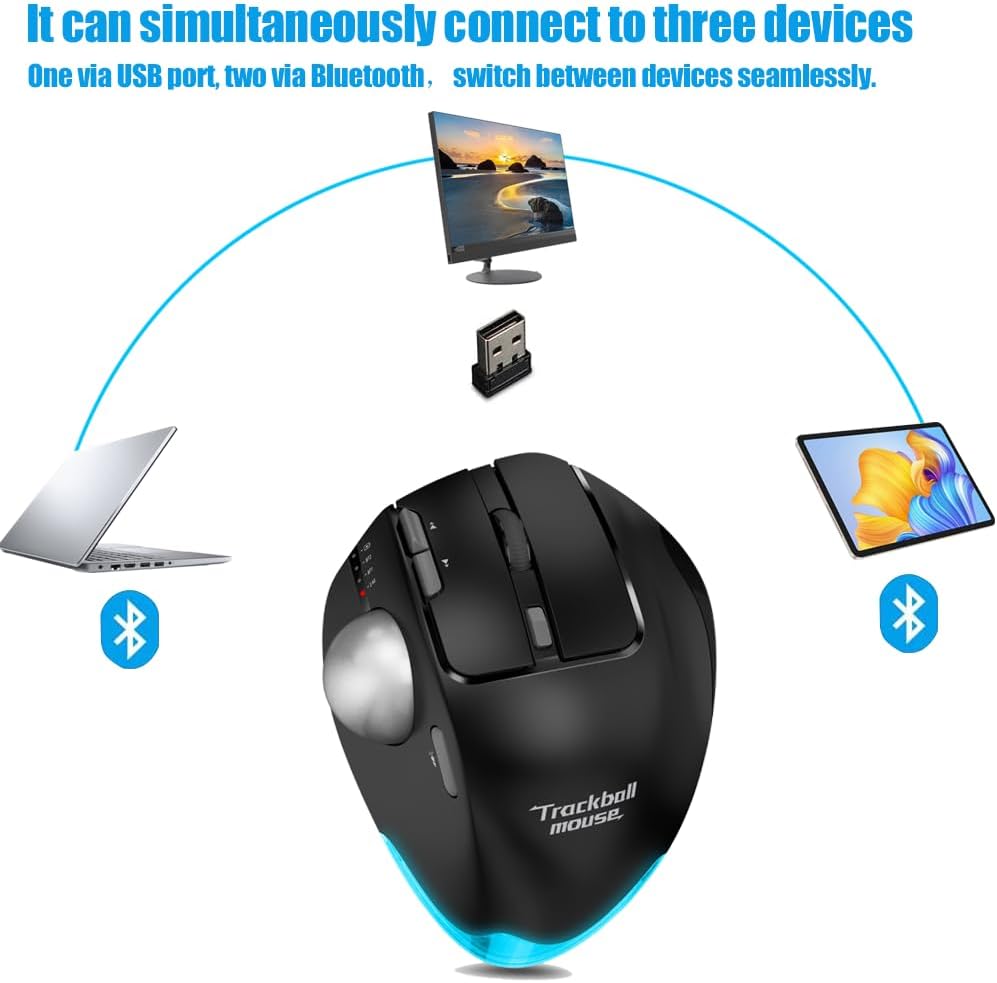
Image: Diagram showing the trackball mouse simultaneously connected to a laptop (Bluetooth), desktop (USB), and tablet (Bluetooth).

Image: The trackball mouse being charged via a USB cable, with an indicator showing its 730mAh battery capacity.

Image: The trackball mouse displaying its customizable LED lighting in various colors.
3. Садржај пакета
Молимо вас да проверите пакет за следеће ставке:
- Zelotes Wireless Trackball Mouse (F33)
- USB Receiver (stored in the mouse's battery compartment)
- УСБ кабл за пуњење
- Кориснички приручник (овај документ)
4. Подешавање
4.1 Почетно пуњење
For optimal performance, fully charge the mouse before first use.
- Connect the provided USB charging cable to the charging port on the front of the mouse.
- Повежите други крај USB кабла са USB извором напајања (нпр. USB портом рачунара, USB адаптером за зид).
- The charging indicator light will illuminate. Once fully charged, the light may change color or turn off (refer to mouse indicators for specific behavior).
4.2 Бежична веза од 2.4 GHz
This mode uses the included USB receiver for a stable wireless connection.
- Locate the USB receiver, usually stored in a slot on the bottom of the mouse.
- Укључите УСБ пријемник у слободан УСБ порт на рачунару.
- Укључите миш помоћу прекидача за напајање на дну.
- Switch the mouse to 2.4G mode (indicated by a specific light or switch position, refer to mouse markings). The mouse should automatically connect to your computer.
4.3 Блутут веза (БТ1 / БТ2)
The mouse supports two independent Bluetooth connections.
- Укључите миша.
- Switch the mouse to either BT1 or BT2 mode using the mode switch on the mouse. The corresponding indicator light will blink, indicating pairing mode.
- On your device (PC, tablet, smartphone), go to Bluetooth settings and search for new devices.
- Select "Zelotes F33" (or similar name) from the list of available devices to pair.
- Once paired, the indicator light will become solid. Repeat for a second Bluetooth device using the other BT mode (BT2 if you used BT1 first).
4.4 Пребацивање између уређаја
To switch between connected devices (2.4G, BT1, BT2), simply use the mode switch button on the mouse. The mouse will seamlessly transition control to the selected device.
5. Упутство за употребу
5.1 ДПИ подешавање
The mouse features a dedicated DPI button to cycle through sensitivity settings.
- Press the DPI button (usually located near the scroll wheel or trackball) to change the cursor speed.
- The available DPI settings are 800, 1200, 1600, 2400, and 4800.
- Observe the indicator lights or on-screen feedback (if supported by your OS) to confirm the current DPI setting.
5.2 Функције дугмета
The Zelotes F33 mouse has 8 buttons with default functions:
- Леви клик: Standard selection.
- Десни клик: Контекстни мени.
- Точак за померање: Vertical scrolling; press for middle click.
- Дугмад за напред/назад: Навигација web странице или фасцикле.
- Дугме ДПИ: Adjust cursor sensitivity.
- Дугме за пребацивање режима: Switch between 2.4G, BT1, and BT2 modes.
- лоптица: Move the cursor by rotating the trackball with your thumb.
Note: Some buttons may be programmable via software (not included) for custom functions depending on your operating system.
5.3 Ergonomic Angle Adjustment
The mouse comes with a removable aluminum alloy base that allows you to adjust its angle for improved comfort.
- Gently detach the base from the bottom of the mouse.
- Reattach the base in the desired orientation to achieve either a 0° (flat) or 18° (tilted) angle.
- Ensure the base is securely attached before use.
6. Одржавање
6.1 Trackball Cleaning Guide
Regular cleaning of the trackball ensures smooth and precise cursor movement.
- 1. корак: The trackball can be pushed out from the trackball socket at the bottom of the mouse.
- 2. корак: Remove the trackball and gently clean the trackball socket with a cotton cloth.
- 3. корак: Place the trackball back into the mouse to complete the cleaning process.

Image: A visual guide demonstrating the three steps to disassemble and clean the trackball for smoother operation.

Image: The trackball separated from the mouse, showing the socket for cleaning.
* If the surface of the trackball needs cleaning, gently wipe it with water and allow it to air dry. Avoid using chemical agents.
6.2 Генерално чишћење
Wipe the exterior of the mouse with a soft, dry, or slightly damp тканина. Немојте користити јаке хемикалије или абразивна средства за чишћење.
6.3 Одржавање батерије
Да бисте продужили век трајања батерије, избегавајте често потпуно пражњење миша. Пуните га када се појави индикатор да је батерија празна.
КСНУМКС. Решавање проблема
| Проблем | Могући узрок | Решење |
|---|---|---|
| Mouse not responding / Cursor erratic | Low battery; Trackball dirty; Connection issue; USB receiver not plugged in (2.4G mode) | Charge the mouse; Clean the trackball and socket (refer to Section 6.1); Re-pair Bluetooth or re-insert USB receiver; Ensure correct mode is selected. |
| Повезивање преко Блуетоотх-а није могуће | Mouse not in pairing mode; Device Bluetooth off; Already connected to max devices | Ensure mouse is in BT1/BT2 pairing mode (blinking light); Turn on Bluetooth on your device; Disconnect from another device if necessary. |
| Миш се не пуни | Cable faulty; Power source issue; Charging port damaged | Try a different USB cable; Use a different USB port or power adapter; Contact customer support if port is damaged. |
| Дугмад не раде | Software conflict; Physical damage | Restart your computer; Test on another device; Contact customer support. |
8. Спецификације
| Феатуре | Спецификација |
|---|---|
| Бранд | zelotes |
| Назив модела | F-33 (F33) |
| Боја | Црно |
| Технологија повезивања | Bluetooth, 2.4 GHz USB Wireless |
| Технологија детекције покрета | Трацкбалл |
| Број дугмади | 8 |
| ДПИ подешавања | 800 / 1200 / 1600 / 2400 / 4800 |
| Оријентација руке | Тачно |
| Тип батерије | Литијум-јонски |
| Капацитет батерије | 730 mAh (приближно) |
| Пуњива | Да |
| Компатибилни оперативни системи | Win11, Win10, Win8, Win7, Mac OS, Chrome OS, Android 5.0 or later |
| Компатибилни уређаји | Personal computer, Tablet, Smartphone, Game console |
| Посебне карактеристике | Programmable button, Ergonomic design, LED light, Rechargeable, Adjustable angle (0°/18°) |
9. Гаранција и подршка
Zelotes products are manufactured to high-quality standards. For information regarding warranty coverage, technical support, or service inquiries, please refer to the warranty card included with your product or visit the official Zelotes webсајт. Молимо вас да сачувате доказ о куповини за потребе гаранције.