
Увод
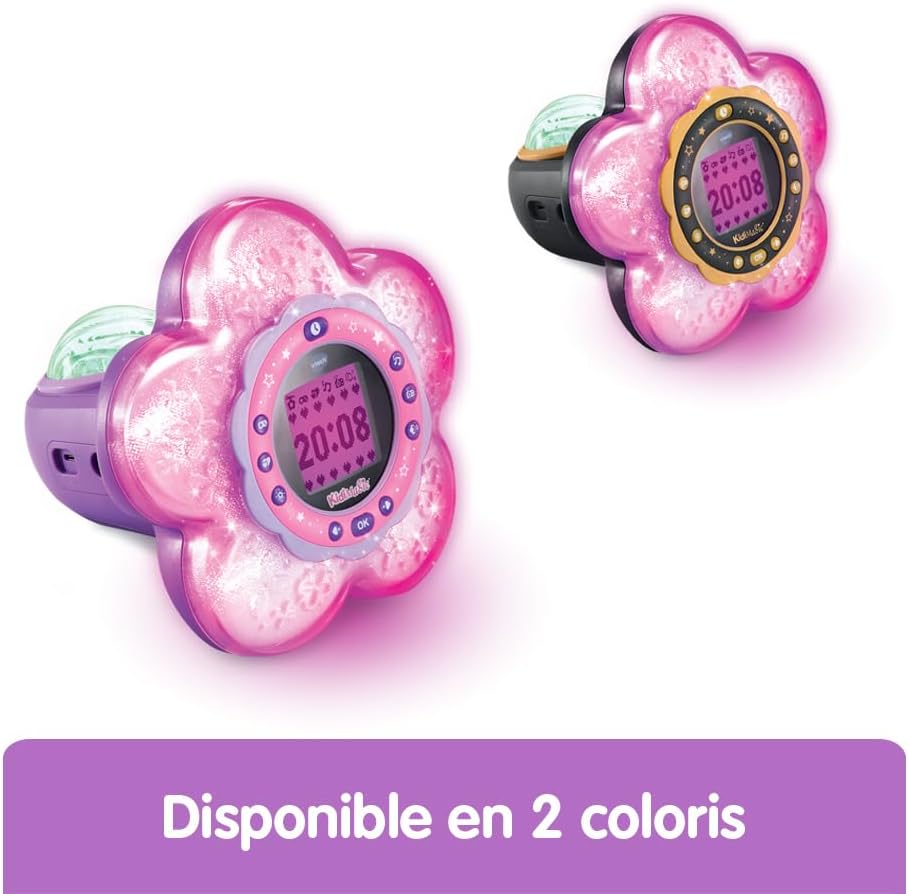
The VTech KidiMagic Galaxy Light is a versatile 9-in-1 device designed for children aged 6 to 12 years. It functions as an alarm clock, FM radio, speaker, and features an aurora borealis projector, interactive light effects, and various games and activities. This manual provides instructions for proper setup, operation, and maintenance of your device.
Безбедносне информације
- УПОЗОРЕЊЕ: Није погодно за децу млађу од 36 месеци због ситних делова.
- Увек надгледајте децу током употребе.
- Do not immerse the device in water. Clean with a dry cloth only.
- Use only the recommended batteries or VTech power adapter (sold separately).
- Држати даље од извора топлоте и директне сунчеве светлости.
Садржај пакета
- 1 KidiMagic Galaxy Light unit
- 4 LR6-AA batteries (for demonstration purposes)
- 1 Audio cable (for external music player connection)
Производ је завршенview
Familiarize yourself with the main components and controls of your KidiMagic Galaxy Light.

слика: Фронт view of the KidiMagic Galaxy Light, illustrating the time display and the aurora borealis projection feature.

слика: Назад view of the KidiMagic Galaxy Light, highlighting the battery compartment and various connection ports.
Контроле и екран:
- ЛЦД екран: Displays time, game information, and settings.
- Сензор: Located on top, detects hand movements for light effects.
- Дугмад: Various buttons for navigation, settings, and game control.
- говорник: Интегрисани звучник за аудио излаз.
- Audio ulazni priključak: For connecting external music players.
- Одељак за батерије: Located at the back.
Сетуп
1. Инсталација батерије
- Пронађите одељак за батерију на задњој страни уређаја.
- Помоћу шрафцигера отворите поклопац одељка за батерије.
- Уметните 4 нове LR6-AA батерије, водећи рачуна о исправном поларитету (+/-).
- Вратите поклопац и затегните завртањ.
Alternatively, the device can be powered by a VTech duo AC adapter (002181), sold separately.
2. Прво укључивање
Press the Power button to turn on the device. The screen will light up, and you may be prompted to set the time.
Основна операција
Подешавање времена
- Access the 'Settings' menu using the navigation buttons.
- Select 'Time' and adjust the hour and minute using the arrow buttons.
- Confirm your selection with the 'OK' button.
Постављање аларма
- Navigate to the 'Alarm' menu.
- Choose an alarm slot and set the desired wake-up time.
- Select an alarm melody from the available options.
- Confirm to activate the alarm.
Подешавање јачине звука
Use the dedicated volume buttons (usually marked with '+' and '-') to increase or decrease the sound level.
Аутоматско искључивање
The device features an automatic shut-off timer to conserve battery life. You can set it to 60 minutes, 120 minutes, 240 minutes, or disable the sleep mode entirely through the settings menu.
Карактеристике
Aurora Borealis Projection
The KidiMagic Galaxy Light projects beautiful aurora borealis effects onto the ceiling, creating a celestial atmosphere in the room. This feature can be activated and customized through the light settings.

слика: A child interacting with the KidiMagic Galaxy Light, demonstrating the dynamic light effects and color changes.
Interactive Light Effects and Color Changes
Wave your hand over the magic sensor on the device to change its color and activate 12 different light effects and 7 color variations. This allows for personalized ambiance.
ФМ Радио
Tune into your favorite FM radio stations. The device can store preferred stations for quick access.
External Music Player (MP3) Connection
Connect an external music player, such as an MP3 player, using the included audio cable. This transforms the KidiMagic Galaxy Light into a speaker, allowing you to play your own music.

слика: Сиде view of the KidiMagic Galaxy Light, emphasizing its capability to function as a musical speaker when connected to an external device.
Integrated Games
The device includes 4 enchanting games for entertainment:
- Buzzy Adventure
- скривача
- Magic Mushroom
- Magic Garden
слика: A child engaged in playing one of the integrated games on the KidiMagic Galaxy Light's screen.
Magic Activities
Explore 6 magical activities designed for fun and relaxation:
- Цристал Балл
- Magic Card
- Your Elf of the Day
- Emotion Management
- Positive Emotions
- Релаксација
Одржавање
- Чишћење: Обришите уређај благим дamp тканина. Немојте користити јаке хемикалије или абразивна средства за чишћење.
- Замена батерије: Replace batteries when the device's performance diminishes or if the screen becomes dim. Follow the battery installation steps.
- Складиштење: Store the device in a cool, dry place away from direct sunlight when not in use for extended periods. Remove batteries if storing for several months.
Решавање проблема
Уређај се не укључује:
- Проверите да ли су батерије правилно уметнуте са одговарајућим поларитетом.
- Замените новим батеријама.
- Ако користите АЦ адаптер, уверите се да је правилно повезан и функционалан.
Screen is dim or flickering:
- Батерије су можда празне. Замените их.
- Ensure the device is not exposed to extreme temperatures.
Проблеми са звуком:
- Проверите подешавања јачине звука.
- If using an external music player, ensure the audio cable is fully inserted and the external device's volume is up.
Спецификације
| Број модела | 572705 |
| Димензије (Д к Ш к В) | 18.5 к 18 к 17.3 цм |
| Тежина | 635 грама |
| Препоручена старост | 6 - 10 years (Manufacturer's minimum: 72 months, maximum: 120 months) |
| Извор напајања | 4 x LR6-AA batteries (included for demo) or VTech AC adapter (sold separately) |
| Материјал | Пластика |
| Језик | French (Product content) |
| Карактеристике | Alarm Clock, FM Radio, Speaker, Aurora Projection, 12 Light Effects, 7 Colors, 6 Magic Activities, 4 Games |
Гаранција и подршка
За информације о гаранцији и корисничкој подршци, погледајте документацију која је приложена уз куповину или посетите званичну веб страницу VTech-а. webсајт. Сачувајте доказ о куповини за евентуалне рекламације по гаранцији.