Увод
This manual provides essential information for the setup, operation, and maintenance of your new Tucus replacement remote control. This remote is designed to be compatible with various JVC Micro COMPACT COMPONENT Stereo Systems, including models RM-SUXQ30UW, RM-SUXQ30US, UX-Q30S, UX-Q30B, UX-Q30P, and UX-Q30W. While it is a replacement remote and not the original device's remote, common functions are expected to operate normally. Please review this guide thoroughly to ensure proper use and longevity of your remote control.
Сетуп
1. Инсталација батерије
The remote control requires two (2) AA batteries (not included) for operation. Follow these steps to install them:
- Пронађите одељак за батерије на полеђини даљинског управљача.
- Померите поклопац одељка за батерије надоле или ка споља да бисте га отворили.
- Уметните две АА батерије, водећи рачуна да позитивни (+) и негативни (-) терминали буду правилно поравнати са ознакама унутар одељка.
- Вратите поклопац одељка за батерију на место док не кликне чврсто.

Figure 1: Back of the remote control showing the battery compartment cover.
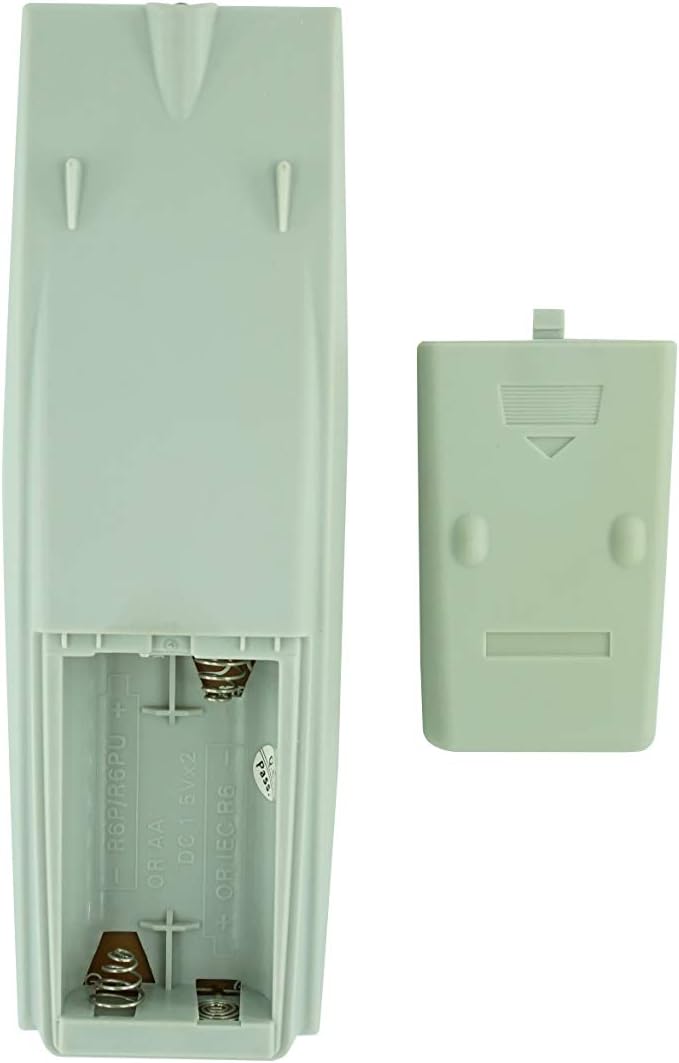
Figure 2: Battery compartment with cover removed, ready for battery insertion.
2. Прва употреба
Once batteries are installed, the remote control is ready for use. Point the remote directly at your JVC Micro COMPACT COMPONENT Stereo System. No additional programming is typically required for this replacement remote for the listed compatible models.
Упутство за употребу
This remote control provides access to the primary functions of your JVC stereo system. Below is a general overview of common button functions. Please note that while the functionality is guaranteed, the exact button layout may differ slightly from your original remote.

Слика 3: Предња страна view даљинског управљача са распоредом дугмади.
Кључне функције:
- СТАНДБИ/ОН: Powers the stereo system on or off.
- ПРИКАЗ: Changes or shows display information.
- САТ/ТАЈМЕР: Accesses clock and timer settings.
- СПАВАЊЕ: Sets a sleep timer for automatic power off.
- Number Buttons (0-9, +10): Direct input for track numbers, radio frequencies, etc.
- БАС / ВИСОКИ ТОНОВИ: Подешава нивое баса и високих тонова.
- Navigation (UP, DOWN, LEFT, RIGHT, SET): Користи се за навигацију и избор у менију.
- Playback Controls (PLAY/PAUSE, STOP, FAST FORWARD, REWIND, SKIP): Контролише репродукцију медија.
- Source Selection (CD, TAPE, FM/AM, AUX/MD): Бира извор аудио улаза.
- FM MODE / REV.MODE: Toggles FM stereo/mono or tape reverse mode.
- AUTO PRESET: Аутоматски скенира и чува радио станице.
- PRGM / RANDOM / REPEAT: Controls program, random, and repeat playback modes.
- PTY SEARCH / PTY SELECT: For Program Type search and selection on radio.
- DISPLAY / TA/News / Info: Provides additional display information or traffic/news announcements.
- AHB PRO: Activates or deactivates Active Hyper-Bass PRO.
- ЈАЧИНА ЗВУКА (+/-): Подешава главни ниво јачине звука.
For specific advanced functions, please refer to the original instruction manual of your JVC Micro COMPACT COMPONENT Stereo System.
Одржавање
Чишћење даљинског управљача
Да бисте одржали изглед и функционалност даљинског управљача, редовно га чистите:
- Обришите површину меком, сувом крпом.
- За тврдокорну прљавштину, благо дampОчистите крпу водом или благим, неабразивним средством за чишћење. Не прскајте средство за чишћење директно на даљински управљач.
- Avoid using harsh chemicals, solvents, or abrasive cleaning pads, as these can damage the remote's finish or internal components.
Замена батерије
Replace batteries when the remote's response becomes sluggish or it stops functioning. Always replace both batteries at the same time with new ones of the same type (AA). Do not mix old and new batteries, or different types of batteries.
Складиштење
Ако даљински управљач неће бити коришћен дуже време, извадите батерије како бисте спречили цурење и потенцијално оштећење даљинског управљача.
Решавање проблема
- Даљински не реагује:
- Проверите да ли су батерије правилно уметнуте са исправним поларитетом (+/-).
- Замените старе батерије новим.
- Ensure there are no obstructions between the remote control and the stereo system's infrared receiver.
- Уверите се да сте унутар ефективног домета даљинског управљача.
- Some buttons not working or unexpected behavior:
- This remote is a replacement and while common functions are supported, the button layout or specific advanced functions might not perfectly match your original remote. Refer to the button layout image in the Operating Instructions section.
- Ensure the stereo system is powered on and set to the correct input source.
- Даљински управљач изгледа оштећен:
- If the remote has been dropped or exposed to liquids, internal damage may have occurred. In such cases, replacement may be necessary.
Спецификације
| Бранд | Генериц |
| Произвођач | TUCUS |
| Број модела | DVT-C9F24992D65E215A7DD6011D34514A46 |
| Компатибилни модели | JVC RM-SUXQ30UW, RM-SUXQ30US, UX-Q30S, UX-Q30B, UX-Q30P, UX-Q30W Micro COMPACT COMPONENT Stereo SYSTEM |
| Врста материјала | Остало |
| Извор напајања | 2 к АА батерије (нису укључене) |
| ASIN | B0D79958PW |
| Датум првог доступног | јун 17. 2024 |
Информације о гаранцији
This product comes with a 3-month warranty from the date of purchase. This warranty covers manufacturing defects and ensures the remote control functions as intended for compatible models. Please retain your proof of purchase for any warranty claims.
Корисничка подршка
If you have any questions regarding the compatibility or functionality of this remote control, or if your specific device model is not listed, please contact the seller directly for assistance. The seller stocks a wide range of remote controls and parts and can confirm suitability for your needs.
For general inquiries or to provide feedback, please refer to the contact information provided by your retailer or the seller.


