
1. Увод
The LAUNCH X431 PRO Star is an advanced automotive intelligent diagnostic tool designed for comprehensive vehicle analysis. This device features an 8-inch touch screen, runs on Android 10.0, and is powered by a 2.0GHz 4-Core processor with 4GB RAM and 64GB ROM. It includes a 6000mAh battery for extended operation. The PRO Star supports fault diagnosis for a wide range of vehicle models and systems, offering functions such as code reading, code clearing, data stream analysis, reset functions, action testing, coding, and matching.

Figure 1.1: LAUNCH X431 PRO Star Diagnostic Scanner with key features highlighted.
2. Подешавање и прва употреба
2.1 Распакивање и садржај пакета
Carefully unpack all items from the carrying box. Verify that all components listed below are present.

Figure 2.1: Contents of the LAUNCH X431 PRO Star package.
- LAUNCH X-431 PRO STAR Tablet
- Царриинг Бок
- Diagnostic Cable (OBDII)
- Тип-Ц УСБ кабл
- АЦ адаптер
- US Plug, UK Plug, EU Plug
- Упутство за употребу
- Брзи водич
- Листа паковања
- PIN Envelope
2.2 Initial Device Configuration
- Напуните уређај: Fully charge the LAUNCH X431 PRO Star tablet using the provided AC adapter and Type-C USB cable before first use.
- Укључено: Притисните и држите дугме за напајање да бисте укључили уређај.
- Language and Time Zone: Пратите упутства на екрану да бисте изабрали жељени језик и временску зону.
- Повежите се на Ви-Фи: Connect the device to a stable Wi-Fi network (supports 2.4GHz and 5.0GHz). Internet access is required for registration and software updates.
- Региструјте налог: Register an account on the manufacturer's website using the serial number provided with your device.
- Ажурирање софтвера: After registration, you will be prompted to update the software. Perform all available updates to ensure optimal functionality and access to the latest vehicle data. This process may take some time.
3. Упутство за употребу
3.1 Повезивање са возилом
- Пронађите OBDII порт возила, обично испод контролне табле са стране возача.
- Connect the diagnostic cable to the LAUNCH X431 PRO Star tablet.
- Connect the other end of the diagnostic cable to the vehicle's OBDII port.
- Turn the vehicle's ignition to the 'ON' position (do not start the engine).
3.2 Basic Diagnostic Functions
Once connected, the device will attempt to auto-detect the vehicle's VIN. If auto-detection fails, you can manually enter the vehicle information.
- Health Report: After identifying the vehicle, the system can generate a comprehensive health report.
- Full System Scan: Perform a complete scan of all available vehicle systems.
- Читање/брисање кодова: View diagnostic trouble codes (DTCs) and clear them after repairs.
- Подаци уживо: Monitor real-time data streams from various sensors and components.
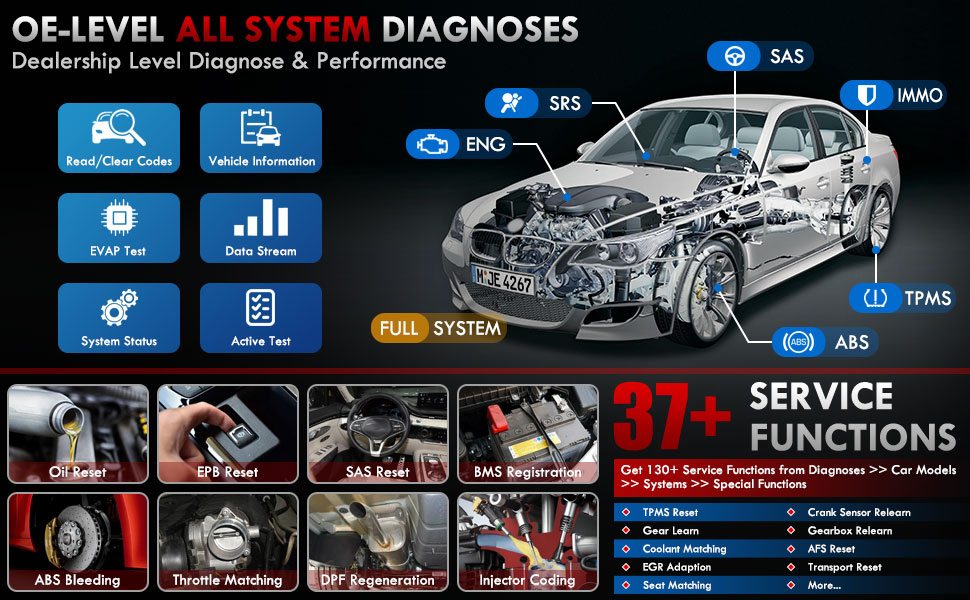
Слика 3.1: Завршеноview of OE-level all system diagnostic capabilities.
3.3 Advanced Maintenance Services (37+)
The LAUNCH X431 PRO Star offers over 37 advanced maintenance and reset functions, with the potential to expand to over 130 types depending on the vehicle's make, model, and year. These services include:
- Ресетовање уља
- АБС Блеединг
- Регистрација батерије
- EPB Reset (Electronic Parking Brake)
- DPF Regeneration (Diesel Particulate Filter)
- Кодирање ињектора
- SAS Reset (Steering Angle Sensor)
- Throttle Matching
- TPMS Reset (Tire Pressure Monitoring System)
- Ресетовање мењача
- Ресетовање суспензије
- AFS Headlamp Ресетуј

Слика 3.2: Прamples of the 37+ maintenance service functions.
3.4 Bi-Directional Control (Active Test)
This feature allows the technician to send commands to vehicle systems and components to test their functionality. This helps in quickly identifying faulty components without manual disassembly. Exampлес укључује:
- Turning the radiator fan on/off
- Testing door lock actuators
- Energizing injectors
- Управљање ретровизорима
- Отварање/затварање прозора

Figure 3.3: Illustration of bi-directional control capabilities.
3.5 Кодирање ЕЦУ-а
ECU Coding enables the matching, relearning, and coding of newly installed ECU modules after repairs or replacements. It also allows for the activation of higher-level vehicle functions. This includes:
- Flash/Match/Calibration
- Recode and Relearn
- Alter Configuration
- Reprogram Adaptive Data
- Recognize New CPU
- Match Current Settings
- Customize Car Features (e.g., automatic lock, reverse rearview mirror down, windows close when rain)

Слика 3.4: Прamples of ECU coding applications.
3.6 FCA SGW Vehicle Access & Quick Guided Functions
- FCA SGW: The X431 PRO Star is AutoAuth certified, allowing secure diagnosis of SGW (Security Gateway) vehicles without limitations.
- Quick Guided: Provides step-by-step guidance for Volkswagen group vehicles, simplifying complex diagnostic procedures.
3.7 Extension Modules
The device supports various optional add-on tools to expand its capabilities, including:
- Battery Tester (e.g., BST360)
- Videoscope (e.g., VSP-600)
- Oscilloscope (e.g., O2-2)
- TPMS Detector (e.g., TSGUN, i-TPMS)
- WiFi Thermal Printer (e.g., X-431)
- АДАС алат за калибрацију
- XPROG 3 (Immobilizer Programmer)

Figure 3.5: Various optional extension modules for the X431 PRO Star.
4. Одржавање
4.1 Ажурирања софтвера
The LAUNCH X431 PRO Star includes 2 years of free software updates. After this period, the device will continue to function, but new software releases and vehicle data updates will require a subscription. Regular updates ensure compatibility with new vehicle models and access to the latest diagnostic features.
4.2 Општа нега
- Држите уређај чистим и без прашине и влаге.
- Store the device in its protective carrying case when not in use.
- Избегавајте излагање уређаја екстремним температурама или директној сунчевој светлости током дужег периода.
- Use only the provided charging accessories to prevent damage.
КСНУМКС. Решавање проблема
If you encounter issues with your LAUNCH X431 PRO Star, consider the following:
- Проблеми са везом: Ensure the diagnostic cable is securely connected to both the scanner and the vehicle's OBDII port. Verify the vehicle's ignition is in the 'ON' position.
- Софтверски кварови: Ensure the device's software is up to date. A factory reset may resolve persistent software issues (note: this will erase user data).
- Компатибилност возила: While the device covers over 99% of vehicles, specific advanced functions may vary by make, model, and year. Consult the vehicle coverage list or contact support for details.
- Перформансе уређаја: If the device is slow or unresponsive, try restarting it. Ensure sufficient battery charge.
6. Спецификације
| Феатуре | Спецификација |
|---|---|
| Модел | LAUNCH X-431 PRO STAR |
| Оперативни систем | Андроид 10.0 |
| Процесор | 2.0GHz 4-Core |
| РАМ | 4ГБ |
| ROM (меморија) | 64ГБ |
| Дисплаи | 8-inch Touch Screen (1280x800 resolution) |
| Батерија | 6000мАх |
| Повезивање | Wi-Fi (2.4/5.0 GHz), CANFD, DoIP |
| Камера | 8.0 MP Rear-facing |
| Тежина артикла | 8.4 фунти |
| Димензије пакета | 13.6 к 13.2 к 6.1 инча |
| Аутомотиве Фит Типе | Универсал Фит |
7. Гаранција и подршка
7.1 Информације о гаранцији
The LAUNCH X431 PRO Star comes with a 2 година гаранције covering manufacturing defects and hardware malfunctions.
7.2 Техничка подршка
LAUNCH provides 7*24 technical support for any post-sales issues or technical assistance. For support, please refer to the contact information provided in your product packaging or visit the official LAUNCH webсајту.