
1. Увод
The darkFlash PMT750 is a high-performance, fully modular power supply designed to meet the demands of modern personal computers. It adheres to the latest ATX 3.1 and PCIe 5.1 standards, ensuring compatibility and stable power delivery for cutting-edge components, including high-power graphics cards. Featuring 80 PLUS Gold efficiency, 100% Japanese 105°C capacitors, and a native 12VHPWR cable, this power supply offers reliability, energy efficiency, and simplified cable management for an optimized system build.

Слика: Прекоview of the darkFlash PMT750 Power Supply highlighting ATX 3.1 benefits.
2. Безбедносне информације
Please read and understand all safety instructions before installing or operating the darkFlash PMT750 Power Supply. Failure to follow these guidelines may result in electric shock, fire, or damage to the product and other components.
- Искључите напајање: Always ensure your computer is completely powered off and unplugged from the wall outlet before performing any installation, maintenance, or troubleshooting.
- Хигх Волtage: The power supply unit contains high voltagе компоненте. Не отварајте напајање цasing under any circumstances. There are no user-serviceable parts inside.
- Правилно уземљење: Ensure your computer system and the power supply are properly grounded to prevent electrical hazards.
- вентилација: Install the PSU in a well-ventilated area. Do not block the fan intake or exhaust. Adequate airflow is crucial for optimal performance and longevity.
- Влага и течности: Avoid exposing the power supply to moisture, liquids, or extreme humidity.
- Радно окружење: Use the PSU within its specified operating temperature and humidity ranges.
- Интегритет кабла: Inspect all cables for damage before connection. Do not use damaged cables.

Image: The darkFlash PMT750 Power Supply showing its full voltage compatibility and safety protections.
3. Садржај пакета
Verify that all items listed below are included in your darkFlash PMT750 Power Supply package:
- darkFlash PMT750 Power Supply Unit
- Модуларни сет каблова:
- 1x 24-pin ATX (20+4-pin) Mainboard Cable
- 2x ATX 12V (4+4-pin) CPU Cables
- 1x 12VHPWR (12+4-pin) PCIe 5.1 Cable
- 2x PCIe (6+2-pin) GPU Cables
- 2x SATA+SATA+SATA+PATA Cables
- Кабл за напајање наизменичном струјом
- Монтажни завртњи
- Кориснички приручник (овај документ)
- Anti-static glove (may be included depending on region/batch)

Image: The darkFlash PMT750 Power Supply shown with its packaging and an anti-static glove.
4. Подешавање и инсталација
Follow these steps to properly install your darkFlash PMT750 Power Supply:
- Припремите свој систем: Ensure your computer is completely powered off and unplugged from the wall outlet. It is recommended to work on a clean, static-free surface.
- Уклоните стари напајач (ако је применљиво): If you are replacing an existing power supply, disconnect all cables from it and carefully remove it from your PC case.
- Инсталирајте нови PSU: Gently slide the darkFlash PMT750 into the designated power supply mounting bay within your PC case. Align the screw holes and secure the PSU with the provided mounting screws.
- Повежите модуларне каблове: The fully modular design allows you to connect only the cables your system requires. This improves airflow and simplifies cable management.
- Напајање матичне плоче: Connect the 24-pin ATX cable to the corresponding port on your motherboard.
- Снага процесора: Connect the ATX 12V (4+4-pin) cable(s) to your motherboard's CPU power connector(s). Modern motherboards may require one or two such connections.
- Graphics Card Power (PCIe 5.1): For graphics cards requiring the new 12VHPWR connector, use the native 12VHPWR (12+4-pin) cable. Ensure it is firmly seated into both the PSU and the graphics card.
- Graphics Card Power (Standard PCIe): For other graphics cards or components, use the PCIe (6+2-pin) cables as needed.
- Периферни уређаји: Connect SATA and PATA cables to your storage drives (SSDs, HDDs) and other peripherals.
- Организујте каблове: Route all connected cables neatly within your PC case. Utilize cable ties or management features of your case to ensure optimal airflow and a clean aesthetic.
- Завршне провере: Before powering on, double-check all cable connections to ensure they are secure and correctly installed.

Image: Diagram illustrating the fully modular cabling options and lengths for the darkFlash PMT750.
5. Упутство за употребу
Once the darkFlash PMT750 Power Supply is correctly installed and all connections are verified:
- Ensure the power switch located on the back of the PSU is in the "OFF" (0) position.
- Connect the AC power cord to the PSU's power inlet and then plug the other end into a grounded wall outlet.
- Пребаците прекидач за напајање на задњој страни напајања у положај "УКЉУЧЕНО" (I).
- You can now power on your computer using the power button on your PC case.
- The PSU's 120mm fan will operate automatically, adjusting its speed based on the internal temperature to provide efficient and quiet cooling.
6. Одржавање
Regular maintenance helps ensure the longevity and optimal performance of your darkFlash PMT750 Power Supply:
- Чишћење: Periodically, and with the system powered off and unplugged, gently clean the exterior of the PSU and the fan grille. Use a soft cloth to wipe away dust. For internal dust, use compressed air to carefully blow dust out of the fan blades and heatsinks through the vents. Не отварајте напајање цasing.
- Рад вентилатора: The 120mm FDB (Fluid Dynamic Bearing) fan is designed for quiet and efficient cooling. Ensure that the fan's intake and exhaust areas are free from obstructions to allow for proper airflow.
- Услови животне средине: Operate the PSU within a stable environment, avoiding excessive heat, cold, or humidity.

Image: Illustration of the intelligent heat dissipation control and 120mm fan of the darkFlash PMT750.
КСНУМКС. Решавање проблема
If you encounter issues with your darkFlash PMT750 Power Supply, refer to the following common problems and solutions:
- Нема напајања система:
- Ensure the AC power cord is securely connected to both the PSU and a functional wall outlet.
- Проверите да ли је прекидач за напајање на задњој страни напајања у положају „УКЉУЧЕНО“ (I).
- Check all modular cables (24-pin ATX, CPU, GPU, SATA) to ensure they are firmly seated in both the PSU and the respective components.
- Test the wall outlet with another electrical device to confirm it is supplying power.
- System Instability or Random Crashes:
- Confirm that your system's total power consumption does not exceed the PSU's 750W capacity. Use a power calculator if unsure.
- Re-check all cable connections, especially the 12VHPWR or PCIe power cables to your graphics card, ensuring they are fully inserted.
- Ensure proper ventilation within your PC case to prevent overheating of components, including the PSU.
- If issues persist, consider testing components individually or consulting a qualified technician.
- Excessive Noise from PSU:
- Уверите се да вентилатор напајања није блокиран кабловима или прашином.
- If the noise is unusual (e.g., grinding, clicking) and persistent, power down your system and contact darkFlash customer support.
If the problem cannot be resolved using these troubleshooting steps, please contact darkFlash customer support for further assistance.
8. Спецификације
The darkFlash PMT750 Power Supply offers the following technical specifications:
| Феатуре | Спецификација |
|---|---|
| Модел | ПМТ750 |
| Ватtage | 750 Ваттс |
| Ефикасност | 80 PLUS Gold Certified (up to 90% energy efficiency) |
| Форм Фацтор | АТКС |
| Компатибилност | Спремни за АТКС 3.1 и ПЦИе 5.1 |
| кондензатори | 100% Japanese 105°C Rated Capacitors |
| Хлађење | 120mm FDB Temperature-Controlled Fan |
| Модуларни дизајн | Фулли Модулар |
| Заштите | Оверволtage Protection (OVP), Overpower Protection (OPP), Short Circuit Protection (SCP) |
| Улазни волtage | Фулл Волtagе (100-240В) |
| Димензије (Д к Ш к В) | 5.52 к 5.9 к 3.39 инча (140 мм к 150 мм к 86 мм) |
| Тежина артикла | 4.88 фунти |
Конфигурација кабла:
- 1x 24-pin ATX (20+4-pin) Mainboard (550mm)
- 2x ATX 12V (4+4-pin) CPU (700mm)
- 1x 12VHPWR (12+4-pin) PCIe 5.1 (600mm)
- 2x PCIe (6+2-pin) GPU (500+150mm)
- 2x SATA+SATA+SATA+PATA (450+150+150+150mm)

Image: The darkFlash PMT750 Power Supply unit, highlighting its 750W high-efficiency rating.

Слика: Крупни план унутрашњости view of the darkFlash PMT750, showcasing the 100% Japanese 105°C capacitors.
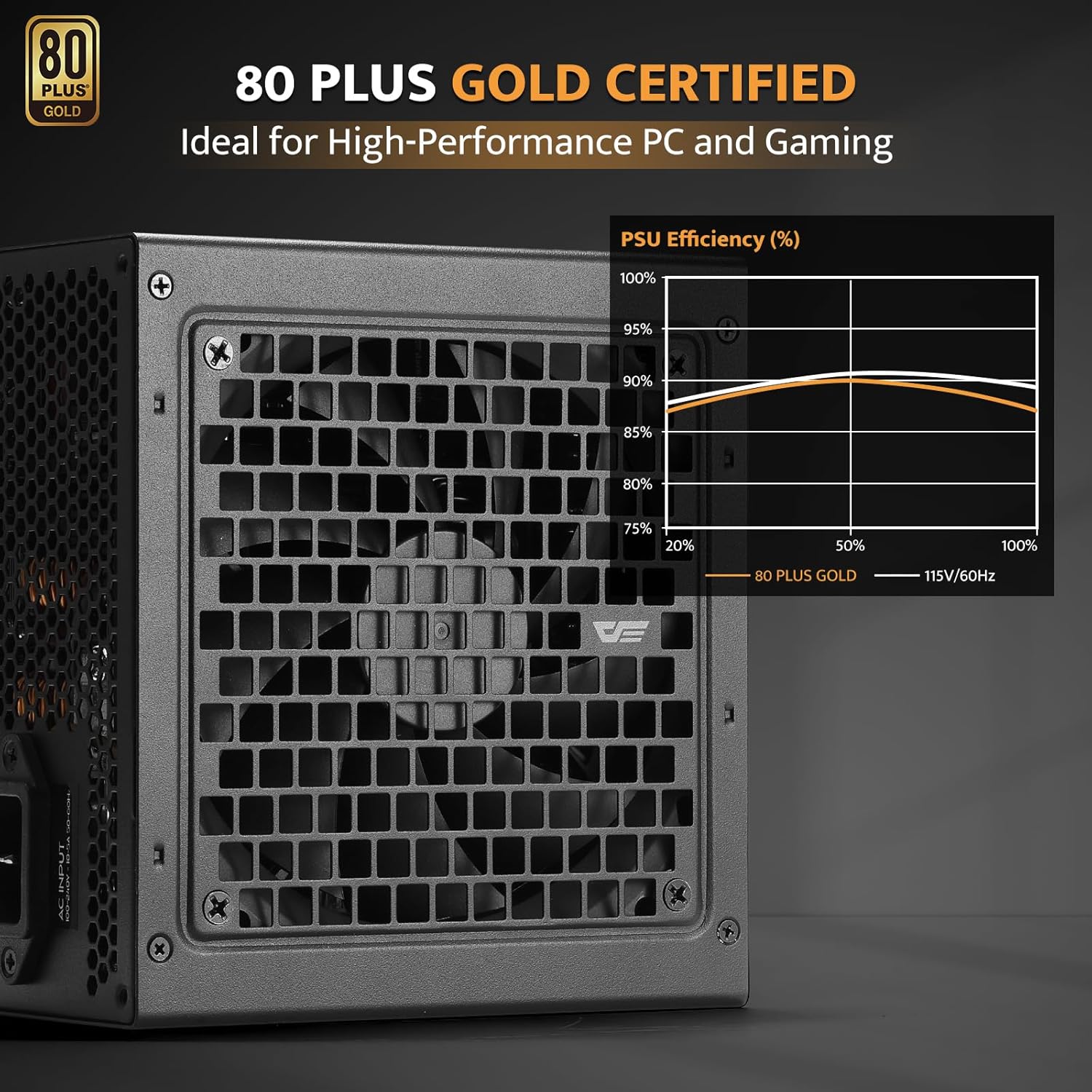
Image: The darkFlash PMT750 Power Supply displaying its 80 PLUS Gold certification.

Image: Diagram showing the compact dimensions of the darkFlash PMT750, indicating its suitability for various PC cases.
9. Гаранција и подршка
darkFlash provides a limited warranty for the PMT750 Power Supply. For detailed warranty terms, conditions, and registration information, please visit the official darkFlash webсајт. Сачувајте рачун као доказ о куповини за евентуалне рекламације по гаранцији.
For technical support, troubleshooting assistance beyond this manual, or to inquire about replacement parts, please contact darkFlash customer service through their official webсајт или контакт информације које сте добили уз паковање производа.
Напомена: У достављеним подацима за уграђивање у овај приручник нису пронађени званични видео снимци производа од продавца.