
1. Увод
The ARROWMAX SGS PRO Smart Mini Electric Engraving and Polishing Pen is a versatile tool designed for precision work on various materials. It is suitable for refreshing, customizing, and creating intricate designs on plastic, wood, stone, steel, aluminum, gold, glass, ceramics, jade, and other crystals/minerals. This tool is ideal for craftwork, including miniatures, jewelry, prototypes, sculptures, and detailed art or design projects.
Key features include a diamond-tipped engraving head for precise designs, a magnetic USB charging system for convenience, and a smart motion system that adjusts speed based on the tool's angle. The device also offers optional app customization for precise speed and direction control.
2. Садржај пакета
Проверите да ли су све ставке наведене у наставку укључене у ваш пакет:
- 1 x SGS PRO Electric Engraving and Polishing Pen
- 30 x Engraving Bits
- 12 x Polishing Bits
- 1 к торба за складиштење
- 1 к УСБ кабл за пуњење
- 1 x Упутство за употребу (овај документ)

Figure 2.1: Complete set of ARROWMAX SGS PRO included items.
3. Производ је готовview
Familiarize yourself with the components of the SGS PRO engraving pen:
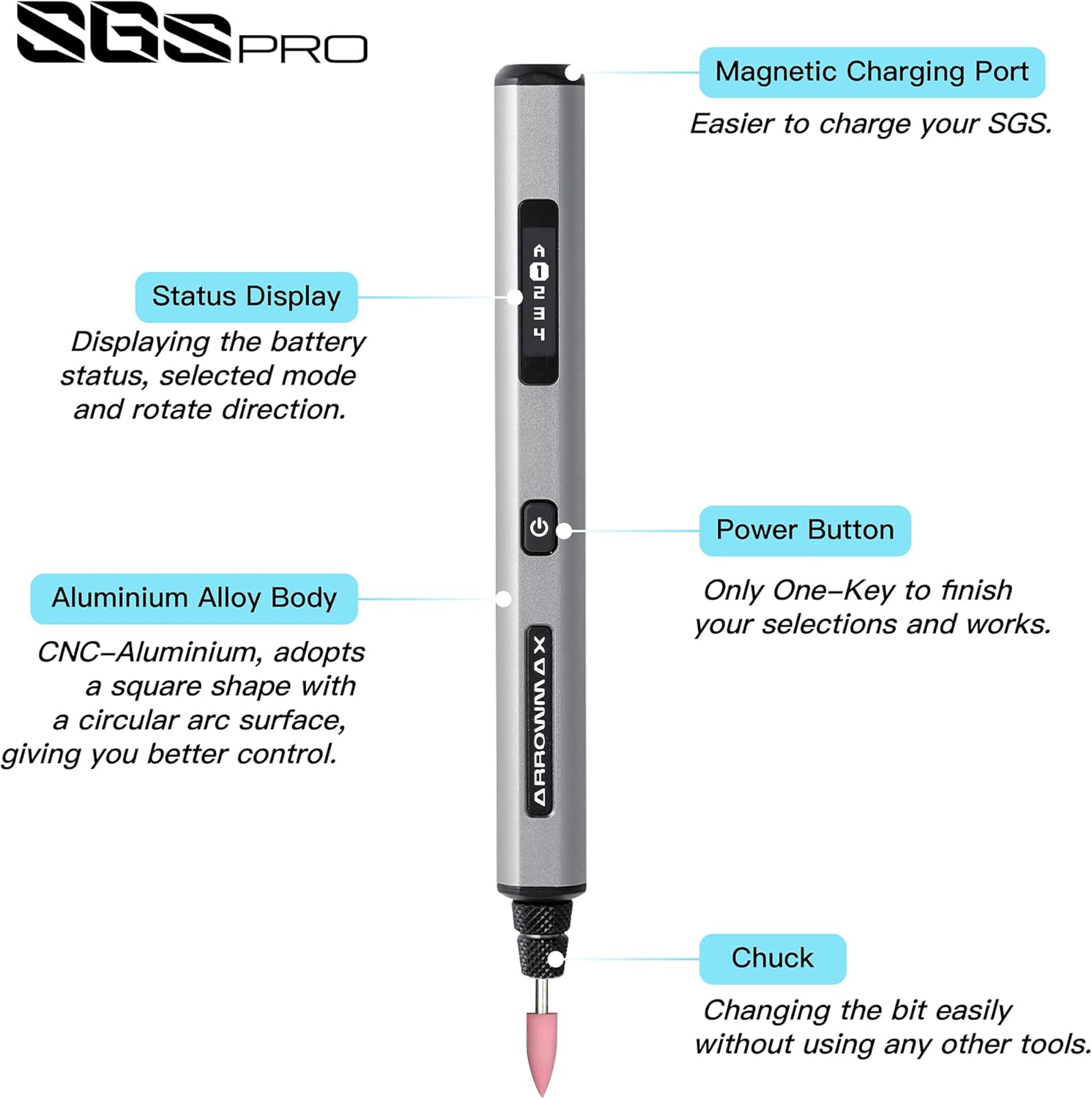
Figure 3.1: SGS PRO Component Diagram.
- Магнетни прикључак за пуњење: Located at the top, this port allows for convenient magnetic USB charging.
- Приказ статуса: An OLED screen that shows battery status, selected mode, and rotation direction.
- Тело од алуминијумске легуре: The main body of the pen, designed for durability and comfortable grip.
- Дугме за напајање: Used to power the device on/off and to cycle through modes or confirm selections.
- Цхуцк: The mechanism at the tip where engraving and polishing bits are inserted and secured.
4. Подешавање
4.1 Пуњење уређаја
Before first use, fully charge the SGS PRO pen. The device features a 4V rechargeable battery that provides approximately 90 minutes of operation on a full charge.
- Connect the provided USB charging cable to the magnetic charging port on the top of the pen.
- Повежите други крај USB кабла са компатибилним USB извором напајања (нпр. USB портом рачунара, USB адаптером за зид).
- The Status Display will indicate the charging progress. Once fully charged, the display will show a full battery icon.

Figure 4.1: Charging the SGS PRO pen.
4.2 Installing Engraving/Polishing Bits
The SGS PRO comes with 30 engraving bits and 12 polishing bits. Select the appropriate bit for your task.
- Уверите се да је уређај искључен.
- Gently insert the shaft of the desired engraving or polishing bit into the chuck at the tip of the pen.
- Push the bit firmly until it is securely seated. The chuck is designed for easy bit changes without additional tools.
- To remove a bit, gently pull it straight out from the chuck.

Figure 4.2: Assortment of engraving and polishing bits.
5. Упутство за употребу
5.1 Powering On/Off and Basic Operation
- To power on the device, press and hold the Power Button until the Status Display illuminates.
- The display will show the current speed mode and rotation direction.
- Press the Power Button briefly to cycle through the preset speed modes.
- To power off, press and hold the Power Button until the display turns off.
5.2 Smart Motion System
The SGS PRO features a smart motion system that automatically adjusts the tool's speed based on the angle of the twist. This allows for precise and consistent engraving and polishing results, adapting to your hand movements during operation.
5.3 App Customization (Optional)
For advanced control, the ARROWMAX smartphone app (available for Android and iOS) allows precise customization of speed and direction. The app allows for speeds up to 30,000 RPM, with adjustments in 500 RPM increments.
- Download the "Arrowmax" app from your device's app store.
- Ensure Bluetooth is enabled on your smartphone and the SGS PRO pen is powered on.
- Open the app and follow the on-screen instructions to pair with your SGS PRO device.
- Within the app, you can precisely adjust the speed and switch between forward and reverse rotation directions for each mode.

Figure 5.1: ARROWMAX App Interface for customization.
5.4 Material Compatibility and Applications
The SGS PRO is designed for use on a wide range of materials, including but not limited to:
- Пластика
- Дрво
- Стоне
- Челик
- Алуминијум
- Gold and other metals
- стакло
- Керамика
- Crystals and minerals (e.g., jade)
Уобичајене апликације укључују:
- Engraving and carving intricate designs
- Polishing surfaces
- Grinding and shaping
- Model making and prototyping
- Customizing personal items

Слика 5.2: Прamples of material customization.

Figure 5.3: SGS PRO features in use.
6. Одржавање
Proper maintenance ensures the longevity and optimal performance of your SGS PRO pen.
- Чишћење: After each use, gently wipe the pen body with a soft, dry cloth to remove dust and debris. Use a small brush to clean around the chuck area, ensuring no material residue accumulates. Do not use harsh chemicals or abrasive cleaners.
- Нега битова: Inspect engraving and polishing bits regularly for wear and tear. Replace dull or damaged bits to maintain precision and prevent damage to the workpiece or the tool. Store bits in their designated slots within the aluminum case to prevent loss and damage.
- Складиштење: When not in use, store the SGS PRO pen and its accessories in the provided aluminum case in a cool, dry place, away from direct sunlight and extreme temperatures.
- Пуњење: Avoid overcharging the battery. Disconnect the charger once the battery is full. If storing for extended periods, charge the battery to approximately 50% to prolong its lifespan.
КСНУМКС. Решавање проблема
If you encounter issues with your SGS PRO pen, refer to the following common problems and solutions:
| Проблем | Могући узрок | Решење |
|---|---|---|
| Уређај се не укључује. | Батерија је празна. | У потпуности напуните уређај помоћу приложеног УСБ кабла. |
| Уређај се не пуни. | Проблем са каблом за пуњење или извором напајања. | Ensure the USB cable is securely connected. Try a different USB port or power adapter. Verify the magnetic connection is clean and secure. |
| Bit is loose or falls out. | Bit not inserted correctly or chuck is worn. | Ensure the bit is pushed firmly into the chuck until it is secure. If the problem persists, contact customer support. |
| Inconsistent speed or performance. | Low battery, incorrect mode, or app connection issue. | Charge the battery. Check the Status Display for the current mode. If using the app, ensure a stable Bluetooth connection. |
| Апликација не може да се повеже са уређајем. | Bluetooth is off, device is off, or app issue. | Ensure Bluetooth is enabled on your phone and the SGS PRO is powered on. Restart the app and/or the device. |
| Device does not rotate in reverse. | Direction setting not activated. | Use the ARROWMAX app to select the reverse rotation direction. |
8. Спецификације
| Феатуре | Детаљ |
|---|---|
| Број модела | АМ-199213 |
| Бранд | АРРОВМАКС |
| Волtage | 4 Волтс |
| Извор напајања | Баттери Поверед |
| Тип батерије | 1 литијум-полимерска батерија (укључена) |
| Оперативно време | Approx. 90 minutes (after full charge) |
| Препоручена употреба | Engraving, Polishing |
| Посебне карактеристике | Rechargeable, Smart Motion System, App Customization (Optional) |
| Тежина артикла | 13.4 унци |
| Димензије пакета | 8.82 к 3.11 к 1.26 инча |
| Произвођач | Freemax Technology Company Limited (IMPORT) |
| Датум првог доступног | 4. јул 2024 |
9. Безбедносне информације
Please read and understand all safety warnings and instructions before operating the SGS PRO pen to prevent electric shock, fire, and serious injury.
- Always wear appropriate personal protective equipment (PPE), such as safety glasses, to protect your eyes from flying debris.
- Ensure your work area is well-lit and clean. Cluttered or dark areas invite accidents.
- Држите подаље децу и особе у близини док користите алат. Ометања могу узроковати да изгубите контролу.
- Не користите електричне алате у експлозивној атмосфери, као што је присуство запаљивих течности, гасова или прашине.
- Избегавајте случајно покретање. Уверите се да је прекидач у положају „искључено“ пре него што повежете батерију, подигнете или носите алат.
- Не форсирајте алат. Користите одговарајући алат за своју апликацију. Одговарајући алат ће обавити посао боље и сигурније по стопи за коју је дизајниран.
- Искључите батерију из алата пре него што извршите било каква подешавања, промените додатну опрему или складиштите електрични алат.
- Чувајте електричне алате у стању мировања ван домашаја деце и не дозволите особама које нису упознате са електричним алатом или овим упутствима да рукују електричним алатом.
- Одржавајте електричне алате и прибор. Проверите да ли су покретни делови неусклађени или везани, поломљени делови и било које друго стање које може утицати на рад електричног алата. Ако је оштећен, дајте електрични алат на поправку пре употребе.
- Електрични алат, прибор и наставке за алате итд. користите у складу са овим упутствима, узимајући у обзир услове рада и посао који треба обавити. Употреба електричног алата за радње другачије од предвиђених може довести до опасне ситуације.
- Не излажите алат киши или влажним условима. Улазак воде у електрични алат повећава ризик од струјног удара.
- Користите само пуњач који је навео произвођач. Пуњач који је погодан за једну врсту батерије може створити ризик од пожара када се користи са другом батеријом.
- Користите електричне алате само са посебно одређеним батеријама. Употреба других батерија може створити опасност од повреда и пожара.
10. Гаранција и подршка
The ARROWMAX SGS PRO Electric Engraving and Polishing Pen is manufactured by Freemax Technology Company Limited (IMPORT).
For product support, warranty inquiries, or technical assistance, please contact the manufacturer directly using the information below:
- Произвођач: Freemax Technology Company Limited (IMPORT)
- Адреса: Room 1203, 12F, Wah Shing Centre, 11-13 Shing Yip Street, Kwun Tong, Hong Kong
- Webсајт: arrowmax-rc.com
- Емаил: info@arrowmax-rc.com
- Телефон: +852 3590 9790
Молимо вас да сачувате доказ о куповини за евентуалне рекламације у вези са гаранцијом.
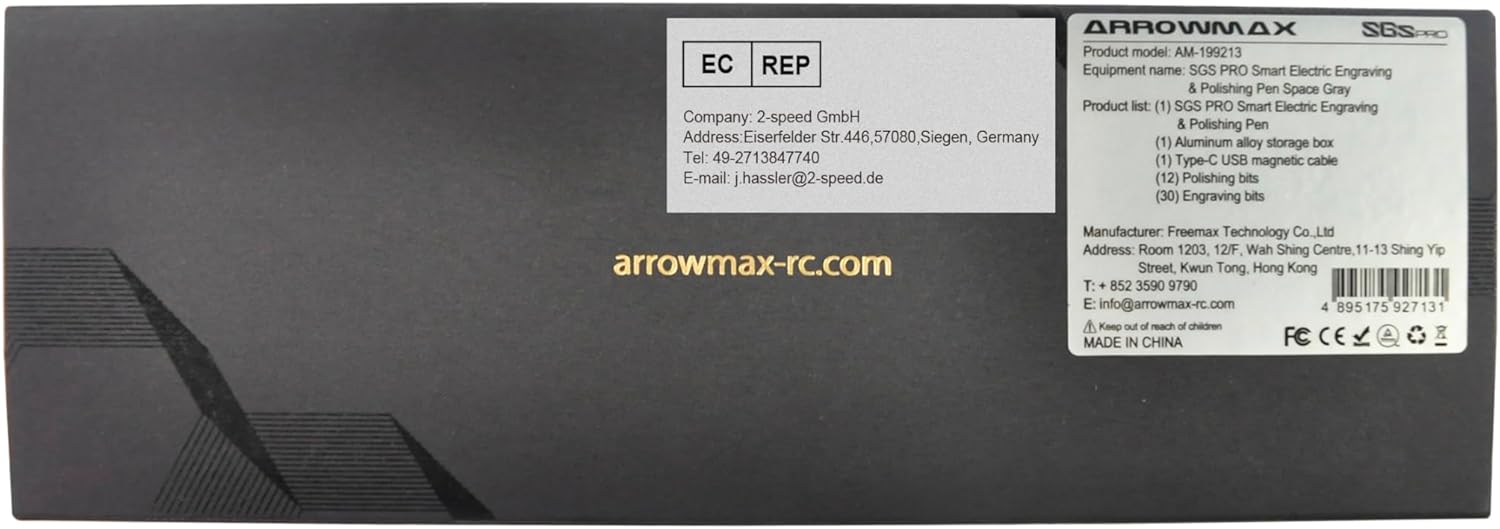
Figure 10.1: Manufacturer and contact information from product packaging.