
1. Увод
This manual provides instructions for the Attoe Wireless Bluetooth Mouse, Model MXY0614. This device features dual-mode connectivity (Bluetooth and 2.4G wireless), a transparent design with RGB backlighting, and a rechargeable battery. Please read this manual carefully before use to ensure proper operation and maintenance.
2. Садржај пакета
Проверите да ли су све ставке присутне у пакету:
- 1 x Attoe Wireless Bluetooth Gaming Mouse
- 1 x Кабл за пуњење (Тип-C)
- 1 к Упутство за употребу

Слика 2.1: Садржај пакета
3. Карактеристике производа
- Магнетни горњи поклопац: The top cover is secured by strong magnetic adsorption, allowing for easy access to the USB receiver and precise alignment.
- RGB позадинско осветљење: Features an RGB water-cooled light band for customizable lighting effects.
- Екран батерије: Four indicator lights show the remaining battery level.
- Пуњива: Built-in 400mAh lithium polymer battery, charged via Type-C port. Full charge takes approximately 2-3 hours.
- Двострука веза: Supports both Bluetooth (BT) and 2.4G wireless modes.
- Аутоматско спавање: Automatically enters deep sleep mode after 10 minutes of inactivity to conserve power.
- Широка компатибилност: Compatible with Windows 2000/XP/win7/win8/win10, Vista 32-bit, IOS, Linux, and Mac OS.
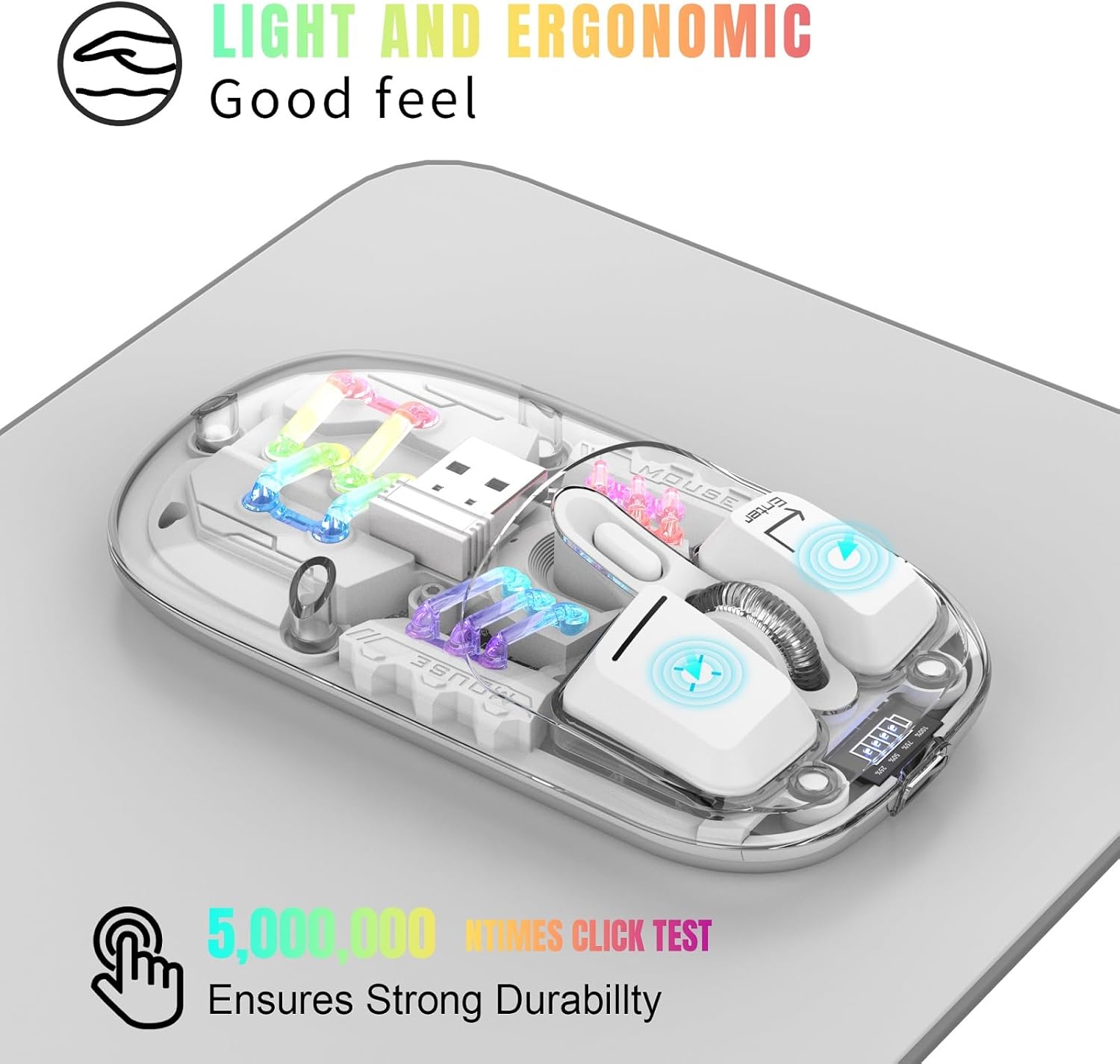
Figure 3.1: Ergonomic Design and RGB Lighting

Figure 3.2: Magnetic Top Cover
4. Производ је готовview

Figure 4.1: Mouse Components and Controls
The diagram above identifies the key components and controls of the mouse, including the left and right buttons, scroll wheel, DPI adjustment, battery indicator, Type-C charging port, and the location of the 2.4G USB receiver.
5. Упутства за подешавање
5.1. 2.4Г бежична веза
- Remove the magnetic top cover of the mouse.
- Take out the USB 2.4G receiver from its storage slot.
- Уметните УСБ пријемник у слободан УСБ порт на рачунару или уређају.
- Flip the mouse over and locate the mode switch on the bottom. Slide the switch to the "2.4G" position.
- The mouse will automatically connect to your device. No additional software is required.
5.2. Блуетоотх веза
- Flip the mouse over and locate the mode switch on the bottom. Slide the switch to the "BT" position.
- Press and hold the left, middle (scroll wheel), and right buttons simultaneously for 3 seconds to enter Bluetooth pairing mode. The RGB lights will flash to indicate pairing mode.
- On your device (computer, laptop, tablet), open Bluetooth settings.
- Тражи new Bluetooth devices and select "BT5.0 Mouse" or a similar name from the list.
- Confirm the pairing on your device. The mouse's RGB lights will stop flashing once successfully paired.

Figure 5.1: Dual Mode Connectivity
Video 5.1: Demonstrating the connection process and features of the Transparent Gaming Mouse.
6. Упутство за употребу
6.1. RGB контрола осветљења
- Пребаците светлосни режим: Click the dedicated light mode switch button (refer to Figure 4.1) to cycle through 11 different RGB lighting effects.
- Укључи/искључи светла: Long press the light mode switch button for 3 seconds to turn the RGB lights on or off.
6.2. Подешавање DPI-ја
The mouse features adjustable DPI settings. Click the DPI button (refer to Figure 4.1) to cycle through available DPI levels (e.g., 800, 1200, 1600 DPI). Each click will change the cursor sensitivity.
6.3. Пуњење миша
- Повежите приложени кабл за пуњење типа C са портом за пуњење на предњој страни миша.
- Повежите други крај кабла са УСБ извором напајања (нпр. УСБ портом рачунара, УСБ адаптером за зид).
- The battery display lights will indicate charging status. A full charge typically takes 2-3 hours.
- The 4 small lights on the battery display indicate the remaining battery level.
6.4. Функција аутоматског спавања
To conserve battery life, the mouse will automatically enter a deep sleep mode if left unused for more than 10 minutes. To wake the mouse, simply move it or press any button.
7. Одржавање
- Одржавајте миш чистим брисањем меком, сувом крпом. Избегавајте употребу јаких хемикалија или абразивних материјала.
- Ensure the Type-C charging port is free from dust and debris.
- Store the USB receiver inside the mouse when not in use to prevent loss.
- Избегавајте излагање миша екстремним температурама или директној сунчевој светлости.
КСНУМКС. Решавање проблема
- Миш не реагује: Ensure the mouse is charged. Check the mode switch (2.4G or BT) is correctly set. For 2.4G, ensure the USB receiver is properly inserted. For Bluetooth, re-enter pairing mode and re-pair with your device.
- Повремена веза: Ensure the mouse is within the 10-meter wireless range. Avoid obstructions between the mouse and the receiver/device.
- RGB светла не раде: Check if the lights are turned off by long-pressing the light mode switch. Ensure the mouse has sufficient battery.
- Кретање курсора је неправилно: Clean the optical sensor on the bottom of the mouse. Ensure you are using the mouse on a suitable surface.
9. Спецификације
| Феатуре | Спецификација |
|---|---|
| Број модела | MXY0614 |
| Повезивање | Bluetooth (BT) + 2.4G Wireless |
| Дугмад | 4 buttons (Left, Right, Scroll Wheel/Middle, DPI) |
| ДПИ | 1600 DPI (Adjustable) |
| Ратед Волtagе/Струја | ДЦ 5В/400мА |
| Удаљеност бежичне везе | 10 метара |
| Свитцх Лифе | 20 милиона циклуса |
| Батерија | Built-in 400mAh Lithium Polymer (Rechargeable) |
| Порт за пуњење | Типе-Ц |
| Тежина производа | 40 г (1.41 унци) |
| Димензије производа | КСНУМКС к КСНУМКС к КСНУМКСмм (КСНУМКС к КСНУМКС к КСНУМКС инча) |
| Компатибилност | Windows 2000/XP/win7/win8/win10, Vista 32-bit, IOS, Linux, Mac OS |

Слика 9.1: Димензије производа
10. Гаранција и подршка
For any questions or issues regarding your Attoe Wireless Bluetooth Mouse, please contact our after-sales service. We are committed to providing a satisfactory resolution.
Contact information for support can typically be found on the product packaging or the official Attoe webсајту.