
1. Увод
This manual provides essential instructions for the installation, setup, and operation of your TONGOU Wi-Fi Smart Switch 1P+N DIN Rail DIY with Power Monitoring. This device allows you to transform traditional household appliances into smart, connected devices, offering remote control, voice control, and energy consumption monitoring through the Smart Life or Tuya application.

Image 1.1: TONGOU Wi-Fi Smart Switch integrated into a smart home system, showing app control and Wi-Fi connectivity.
2. Безбедносне информације
WARNING: Electrical installation should only be performed by qualified personnel. Incorrect installation can lead to electric shock, fire, or property damage.
- Увек искључите напајање на главном прекидачу пре инсталације или одржавања.
- Уверите се да је уређај инсталиран на сувом месту, даље од влаге и екстремних температура.
- Проверите да ли је волtage and current ratings of the switch match your electrical system requirements.
- Do not exceed the maximum current rating of 6A for this model.
- Уверите се да су све везе ожичења безбедне и правилно изоловане.
3. Садржај пакета
Проверите да ли су све ставке присутне у пакету:
- 1 x TONGOU Wi-Fi Smart Switch (Model: With Power Monitoring 6A)
- 1 к Упутство за употребу
4. Спецификације
| Феатуре | Спецификација |
|---|---|
| Бранд | TONGOU |
| Број модела | With Power Monitoring 6A |
| Оператинг Волtage | Наизменична струја 90 - 240 V, 50/60 Hz |
| Вирелесс Типе | Wi-Fi 2.4 GHz (5/4 GHz not supported) |
| Цуррент Ратинг | 6 А |
| Maximum Wiring Capacity | 10 mm² (Power side and Load side) |
| Тип монтаже | Монтажа на ДИН шину |
| Димензије (Д к Ш к В) | 9 к 2 к 8 цм |
| Тежина | 120 грама |
| Контакт материјал | Silver-plated relay contacts |
| Оперативни режим | Он/Офф |
| Цертификати | CE |
| Радна температура | До 80 степени Целзијуса |
5. Инсталација
The TONGOU Wi-Fi Smart Switch is designed for DIN rail mounting. Follow these steps for proper installation:
- Искључивање струје: Before starting any electrical work, ensure the main power supply to the circuit is turned off at the circuit breaker.
- Монтажа: Mount the smart switch onto a standard 35mm DIN rail. The device occupies one position (18mm width).
- Ожичење: Connect the power input (N for Neutral, L for Live) to the top terminals labeled 'Power'. Connect the load output (N for Neutral, L for Live) to the bottom terminals labeled 'Load'. The maximum wiring capacity is 10 mm² for both power and load sides. Ensure correct polarity.
- Заштита струјног круга: It is recommended to install an upstream residual current circuit breaker (RCBO/A type, 30mA/10kA) to protect the circuit.
- Сигурне везе: Use a screwdriver to securely tighten all wire connections.

Image 5.1: Wiring diagram illustrating the connection of the TONGOU Wi-Fi Smart Switch to a circuit with an upstream circuit breaker and a light bulb as a load.
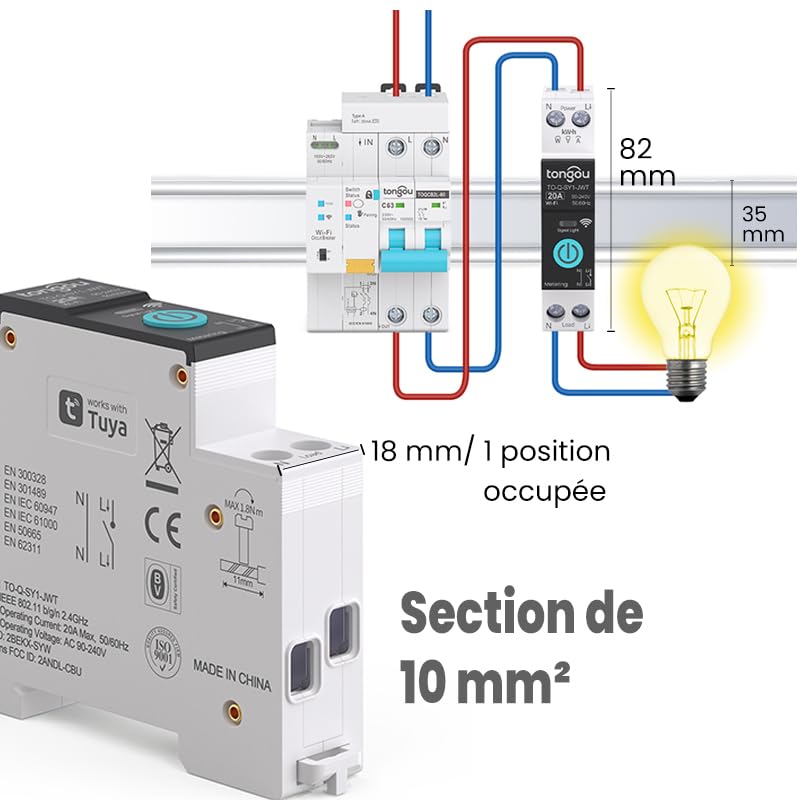
Image 5.2: Close-up of the smart switch showing its dimensions (82mm height, 35mm depth, 18mm width) and indicating a 10 mm² wiring section capacity.
6. Подешавање
To enable smart functionalities, connect your TONGOU Wi-Fi Smart Switch to the Smart Life or Tuya application.
- Преузмите апликацију: Download the "Smart Life" or "Tuya Smart" application from the App Store (iOS) or Google Play Store (Android).
- Региструј се/Пријави се: Отворите апликацију и региструјте се за нови налог или се пријавите са постојећим.
- Уђите у режим упаривања: After restoring power to the switch, press and hold the main button on the device for 5 to 10 seconds until the signal light blinks rapidly in blue. This indicates the device is in pairing mode.
- Додај уређај у апликацији: In the Smart Life/Tuya app, tap the "+" icon (usually in the top right corner) to add a new device. The app should automatically discover the switch. If not, manually select "Electrical" > "Circuit Breaker (Wi-Fi)" or similar.
- Повежите се на Ви-Фи: Follow the in-app instructions to connect the device to your 2.4 GHz Wi-Fi network. Напомена: The device only supports 2.4 GHz Wi-Fi; 5 GHz networks are not compatible.
- Преименуј уређај: Once connected, you can rename the device for easier identification (e.g., "Living Room Light").

Image 6.1: Visual guide showing how to press and hold the button for 5-10 seconds until the blue indicator light blinks rapidly, signifying pairing mode.

Image 6.2: Screenshot of the Smart Life/Tuya app showing the login/register screen, a Wi-Fi router, and the process of adding a discovered "WiFi Din Rail Switch" device.
7. Оперативни
Once the smart switch is successfully paired, you can control it and monitor energy usage through the app or voice commands.
7.1. Даљинско управљање путем апликације
Open the Smart Life or Tuya app. Select your TONGOU Smart Switch from the device list. You can:
- Turn the connected appliance On or Off remotely from anywhere.
- Set up various timer modes:
- Тиминг Моде: Schedule specific on/off times for daily or weekly routines.
- Режим одбројавања: Set a countdown timer for the device to turn off after a specified duration.
- Cyclic Timing Mode: Configure repetitive on/off cycles.
- Astronomical Timing Mode: Automate based on sunrise and sunset times.
7.2. Управљање гласом
The TONGOU Smart Switch is compatible with Amazon Alexa and Google Assistant. To enable voice control:
- Link your Smart Life/Tuya account to Amazon Alexa or Google Home app.
- Откријте нове уређаје.
- Користите гласовне команде као што су:
- „Алекса, укључи [Назив уређаја]“
- „Хеј Google, искључи [Назив уређаја]“

Image 7.1: An Amazon Echo device displaying a voice waveform, indicating it is processing a command to turn off a lamp.
7.3. Праћење снаге
The smart switch provides real-time and historical energy consumption data:
- View real-time current, voltage, and power consumption of the connected load.
- Access historical data (hourly, daily, monthly, yearly) to track energy usage patterns.
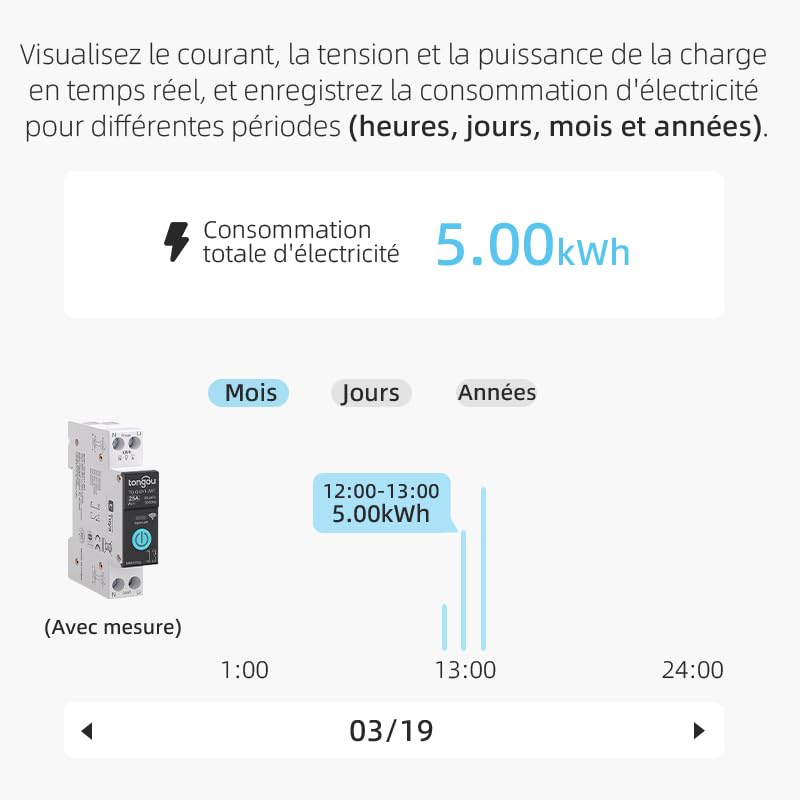
Image 7.2: A graphical representation within the app showing total electricity consumption (5.00 kWh) and a bar chart illustrating hourly consumption data for a specific date.
8. Одржавање
To ensure optimal performance and longevity of your TONGOU Wi-Fi Smart Switch:
- Одржавајте уређај чистим и без прашине. Користите суву, меку крпу за чишћење.
- Не користите течна средства за чишћење или раствараче.
- Обезбедите одговарајућу вентилацију око уређаја како бисте спречили прегревање.
- Regularly check wiring connections for tightness, especially after initial installation.
КСНУМКС. Решавање проблема
If you encounter issues with your TONGOU Wi-Fi Smart Switch, refer to the following common problems and solutions:
| Проблем | Могући узрок | Решење |
|---|---|---|
| Уређај се не повезује на Wi-Fi | Incorrect Wi-Fi band (5GHz), weak signal, incorrect password, device not in pairing mode. | Ensure your Wi-Fi is 2.4 GHz. Move the device closer to the router. Re-enter Wi-Fi password carefully. Put the device back into pairing mode (rapid blue blinking). |
| Уређај је офлајн у апликацији | Wi-Fi disconnected, power outage, router issues. | Check your Wi-Fi router and internet connection. Verify the device has power. Re-pair if necessary. |
| Гласовна контрола не ради | Account not linked, device not discovered, incorrect commands. | Ensure Smart Life/Tuya account is linked to Alexa/Google Home. Discover devices in the voice assistant app. Use the exact device name. |
| Power monitoring data is inaccurate or missing | Неправилно ожичење, квар уређаја. | Double-check wiring according to the installation diagram. Contact support if the issue persists. |
| Device not responding to manual button press | Нема струје, унутрашња грешка. | Check power supply to the device. If power is present and the device is unresponsive, contact support. |
10. Гаранција и подршка
For warranty information and technical support, please refer to the documentation provided with your purchase or contact TONGOU customer service through their official channels. Keep your purchase receipt as proof of purchase.