
Tecmojo 6U/23.6in Depth/Mesh Door
Tecmojo 6U Wall Mount Server Network Rack Instruction Manual
Model: 6U/23.6in Depth/Mesh Door
Brand: Tecmojo
Увод
This manual provides detailed instructions for the safe and efficient installation, operation, and maintenance of your Tecmojo 6U Wall Mount Server Network Rack. Please read this manual thoroughly before beginning assembly or use to ensure proper functionality and safety.
Безбедносне информације
- Увек носите одговарајућу личну заштитну опрему (ЛЗО) током инсталације.
- Ensure the mounting surface can support the combined weight of the rack and all installed equipment. This rack supports up to 176 lbs when wall-mounted.
- Use appropriate tools and follow all local building codes and safety regulations.
- Do not overload the rack. Distribute equipment weight evenly.
- Држите децу и кућне љубимце даље од радног простора током монтаже.
Садржај пакета
Проверите да ли су све доле наведене компоненте присутне и да ли су неоштећене пре него што наставите са склапањем.
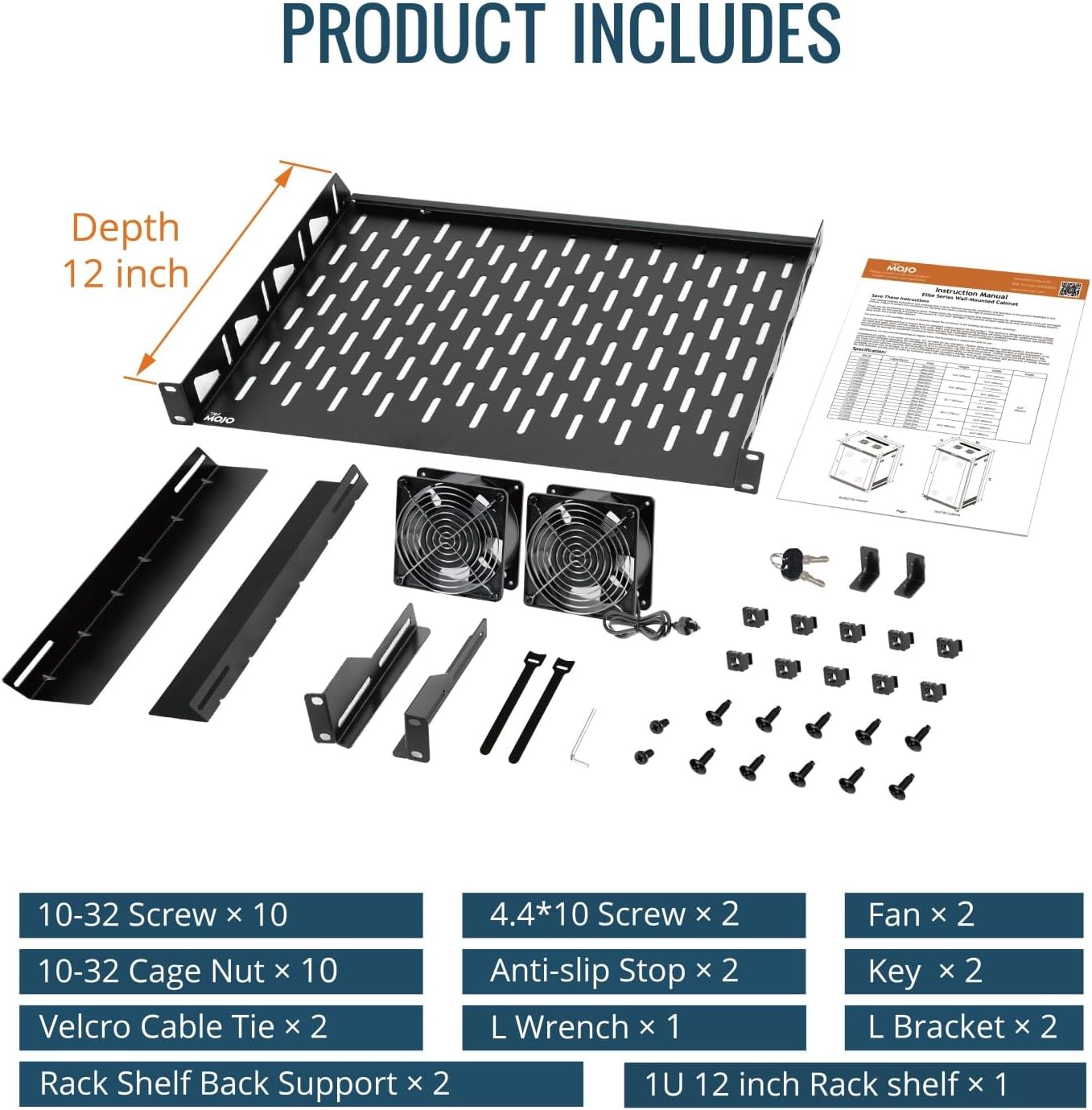
Image: All components included in the Tecmojo 6U Wall Mount Rack package. This includes various screws, cage nuts, Velcro cable ties, two cooling fans, L brackets, and a 1U 12-inch rack shelf.
- Доња табла
- Top Cover (with pre-installed fans)
- Front Mesh Door
- Front Frames (2)
- Rack Rails (4)
- Бочне плоче (2)
- Бацк Цовер
- 1U Cantilever Shelf
- Mounting Hardware (10-32 Screws, 10-32 Cage Nuts, 4.4*10 Screws, Anti-slip Stops, L Wrench, Keys)
- Velcro Cable Ties (2)
Подешавање и инсталација
Follow these steps for assembling and mounting your Tecmojo 6U Wall Mount Server Network Rack.
Video Guide: Standard Wall Mount Cabinet Installation
Video: A detailed installation guide for the Tecmojo Standard Wall Mount Cabinet, demonstrating step-by-step assembly and mounting procedures.
Монтажа корак по корак
- Саставите главни оквир:
Attach the two front frames to the vented side of the bottom panel using the provided screws. Ensure they are securely fastened and aligned.

Image: The bottom panel and two vertical frame pieces are shown, illustrating the initial assembly of the rack's main structure.
- Причврстите задњи поклопац:
Secure the back cover to the bottom panel and the two front frames. This forms the rear structure of the cabinet.
- Инсталирајте горњи поклопац:
Place the top cover onto the assembled frame and fasten it with the provided screws. Verify all parts are correctly aligned and secured.
- Инсталирајте Рацк Раилс:
Install the four rack rails inside the cabinet. These rails can be adjusted to your desired depth and are compatible with both square and tapped holes for versatile equipment mounting.
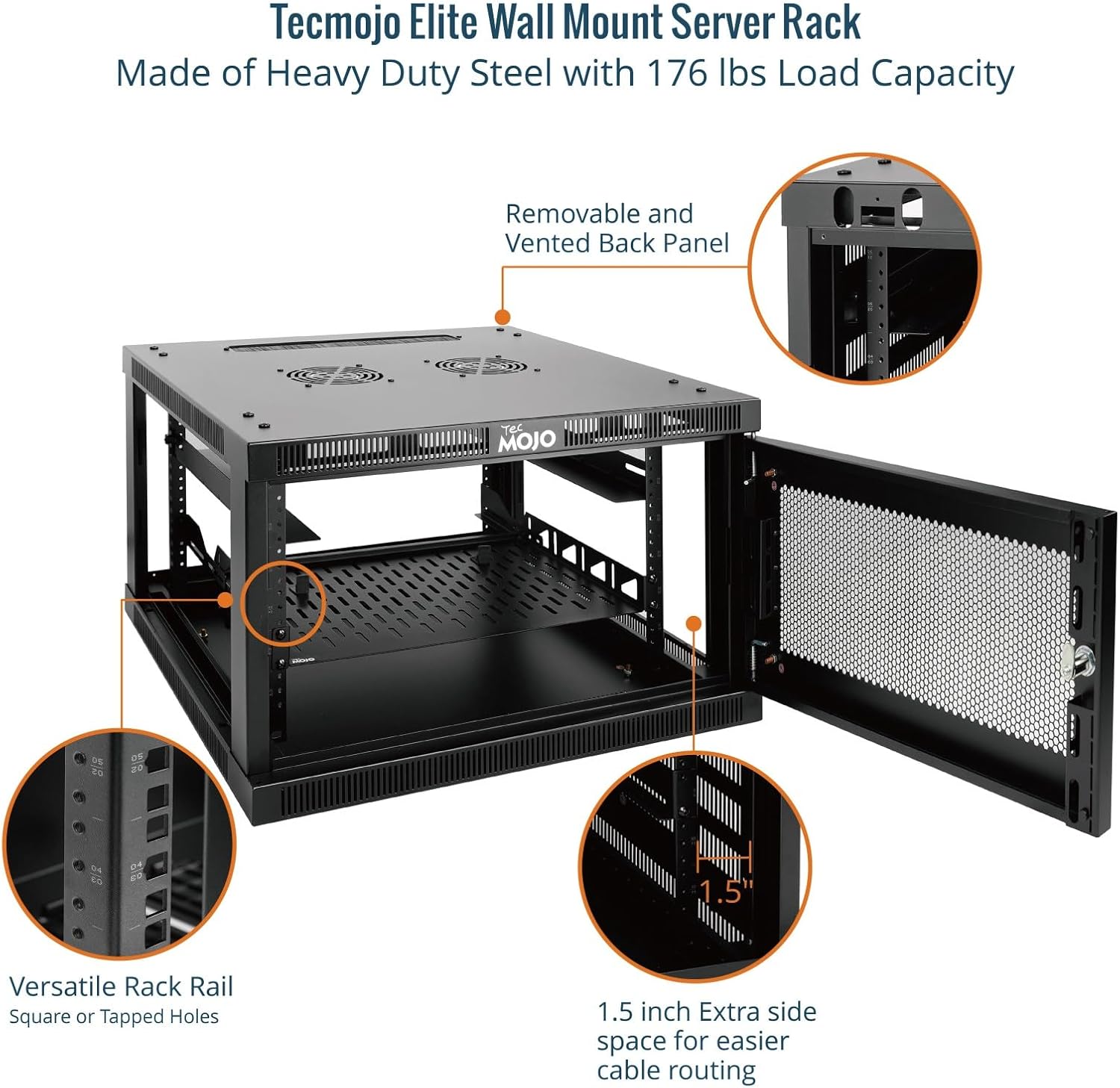
Слика: Интерна view highlighting the versatile rack rails, which can accommodate square or tapped holes, and the 1.5-inch extra side space for cable routing.
- Саставите бочне панеле:
Attach the two side panels to the main frame. These panels are lockable for enhanced security.
- Install Front Door:
Install the front mesh door. This door is reversible and lockable, providing security and airflow.

Image: The fully assembled Tecmojo 6U Wall Mount Rack with its mesh door, ready for installation.
- Install Cantilever Shelf:
Mount the 1U cantilever shelf inside the rack at your desired height to support non-rack equipment.
Валл Моунтинг
Use the provided mounting hole drilling template to mark the positions on your wall. Ensure the wall is structurally sound to support the rack's weight. Secure the wall hanging panel to the wall using appropriate fasteners (not included, as wall types vary). Then, hang the assembled cabinet onto the wall hanging panel and secure it with screws.

Image: The Tecmojo Elite Wall Mount Server Cabinet highlighting key features such as top and bottom brush panels for cable management, two cooling fans, and lockable door and side panels for security.
Упутство за употребу
Your Tecmojo 6U Wall Mount Server Network Rack is designed for optimal performance and security.
- Систем за хлађење: The cabinet features dual top-mounted cooling fans for active ventilation. These fans help maintain an optimal temperature for your equipment.
- безбедност: The front mesh door and side panels are lockable to protect your valuable IT equipment from unauthorized access. Use the provided keys to secure the cabinet.
- Управљање кабловима: Utilize the 1.5-inch extra side space and top/bottom brush panels for efficient cable routing and management, ensuring a tidy and organized setup.
- Контрола термостата: This Elite Series cabinet includes a thermostat for precise temperature management. Adjust the thermostat to your preferred temperature to ensure optimal operating conditions for your equipment.
Video Guide: Tecmojo Elite Series Wall Mount Cabinet Features
Видео: Оверview of the features of the Tecmojo Elite Series wall mount cabinet, including its thermostat control and robust design.
Одржавање
- Чишћење: Редовно бришите спољашње површине меком крпомamp тканина. Избегавајте абразивна средства за чишћење.
- Инспекција вентилатора: Periodically check the cooling fans for dust buildup and ensure they are operating correctly to maintain proper airflow. Clean fan blades gently if necessary.
- Провера хардвера: Периодично проверавајте све завртње и причвршћиваче како бисте били сигурни да су чврсто затегнути. Поново затегните ако се открије било каква лабавост.
- Door and Lock: Ensure the door hinges and locking mechanism operate smoothly. Lubricate if needed.
Решавање проблема
| Проблем | Могући узрок | Решење |
|---|---|---|
| Difficulty with screw installation during assembly. | Misalignment of parts or tight threading. | Ensure proper alignment before tightening. Apply gentle pressure and turn slowly. For very tight threads, a small amount of lubricant can help. |
| Door does not close smoothly or requires force. | Неправилно поравнате шарке или механизам за затварање. | Check hinge alignment and adjust if necessary. Ensure the latch mechanism is free of obstructions and lubricate if stiff. |
| Cabinet feels unstable after wall mounting. | Improper wall fasteners or insufficient wall support. | Verify that the wall is suitable for mounting heavy loads. Use appropriate anchors and ensure all mounting screws are securely fastened into wall studs or robust anchors. Consult a professional if unsure. |
| Cooling fans are not operating. | Power issue or fan malfunction. | Check power connection to the fans. Ensure the thermostat is set to an appropriate temperature that would trigger fan operation. If issues persist, contact customer support. |
Спецификације

Image: Visual representation of the Tecmojo 6U Wall Mount Rack's dimensions and key specifications.
- Димензије производа: 23.6"Д к 23.6"Ш к 14.6"В
- Тежина артикла: 56.9 фунти
- Материјал: Alloy Steel (Heavy Duty Cold Rolled Steel)
- Величина: 6U
- дубина: 23.6 инча
- Тип врата: Mesh Door (Reversible, Lockable)
- Капацитет оптерећења: 176 lbs (wall-mounted), 350 lbs (floor-mounted)
- Компатибилност: Standard 19-inch rackmount devices
- Хлађење: Dual top-mounted cooling fans
- безбедност: Lockable front door and side panels
- Сертификати: EIA/ECA-310-E, CE, PCI, HIPAA, NEMA Type-1 standards
Гаранција и подршка
For warranty information, technical support, or to purchase replacement parts, please visit the official Tecmojo website or contact our customer service team. Keep your purchase receipt for warranty claims.
Tecmojo Customer Service: Visit the Tecmojo Store
Повезани документи - 6U/23.6in Depth/Mesh Door
 |
Упутство за употребу зидног ормарића Tecmojo Elite серије Упутство за употребу за Tecmojo Elite серију зидних кућишта са стакленим вратима. Садржи спецификације, безбедносна упозорења и упутства за монтажу мрежних кућишта за рекове. |
 |
ALLNET ALL-SMA6xxx серија 19" зидни мрежни ормар - равно паковање Detailed specifications and assembly instructions for the ALLNET ALL-SMA6xxx Series 19-inch wall-mounted network cabinets. Available in various sizes, colors (RAL7035, RAL9005), and depths (450mm, 600mm). Features include lockable glass door, adjustable rails, and passive cooling. Flat pack design for easy shipping. |
 |
Tecmojo отворени сталак за сервере и AV опрему - упутство за употребу Свеобухватно упутство за употребу Tecmojo-ових отворених регала за сервере и AV опрему. Садржи спецификације, безбедносне смернице и упутства за монтажу за моделе 11120121, 11120122 и 11120123. |
 |
LinkPower LINK-6U-450 зидни ормар од 19 инча: Техничке спецификације и водич за инсталацију Детаљне техничке спецификације и упутства за инсталацију зидног ормара LinkPower LINK-6U-450 од 19 инча. Карактеристике укључују висину од 6U, ширину од 600 мм, дубину од 450 мм, статичко оптерећење од 60 кг, заштиту IP21 и врата од каљеног стакла. |
 |
TecMOJO Wall-Mounting Bracket 350 Instruction Manual Instruction manual for the TecMOJO Wall-Mounting Bracket 350, detailing safety warnings, specifications, installation guidance, accessories, and product liability limitations. |
 |
SPT-605-12 Rolling Server Rack Cabinet - Specifications and Installation Guide This document provides detailed specifications, product diagrams, and step-by-step installation instructions for the SPT-605-12 Rolling Server Rack Cabinet, designed for organizing server equipment. |
Ask a question about this manual
Ask about setup, troubleshooting, compatibility, parts, safety, or missing instructions. Manuals+ will review the question and use this page’s manual context to help answer it.