
1. Увод
Thank you for choosing the Hama DR2002BT Digital Radio. This device offers a comprehensive audio experience with FM, DAB/DAB+ digital radio reception, and Bluetooth connectivity. Its user-friendly design, featuring large buttons and a clear 4.3-inch TFT color display, makes it suitable for all users. This manual will guide you through the setup, operation, and maintenance of your new digital radio.
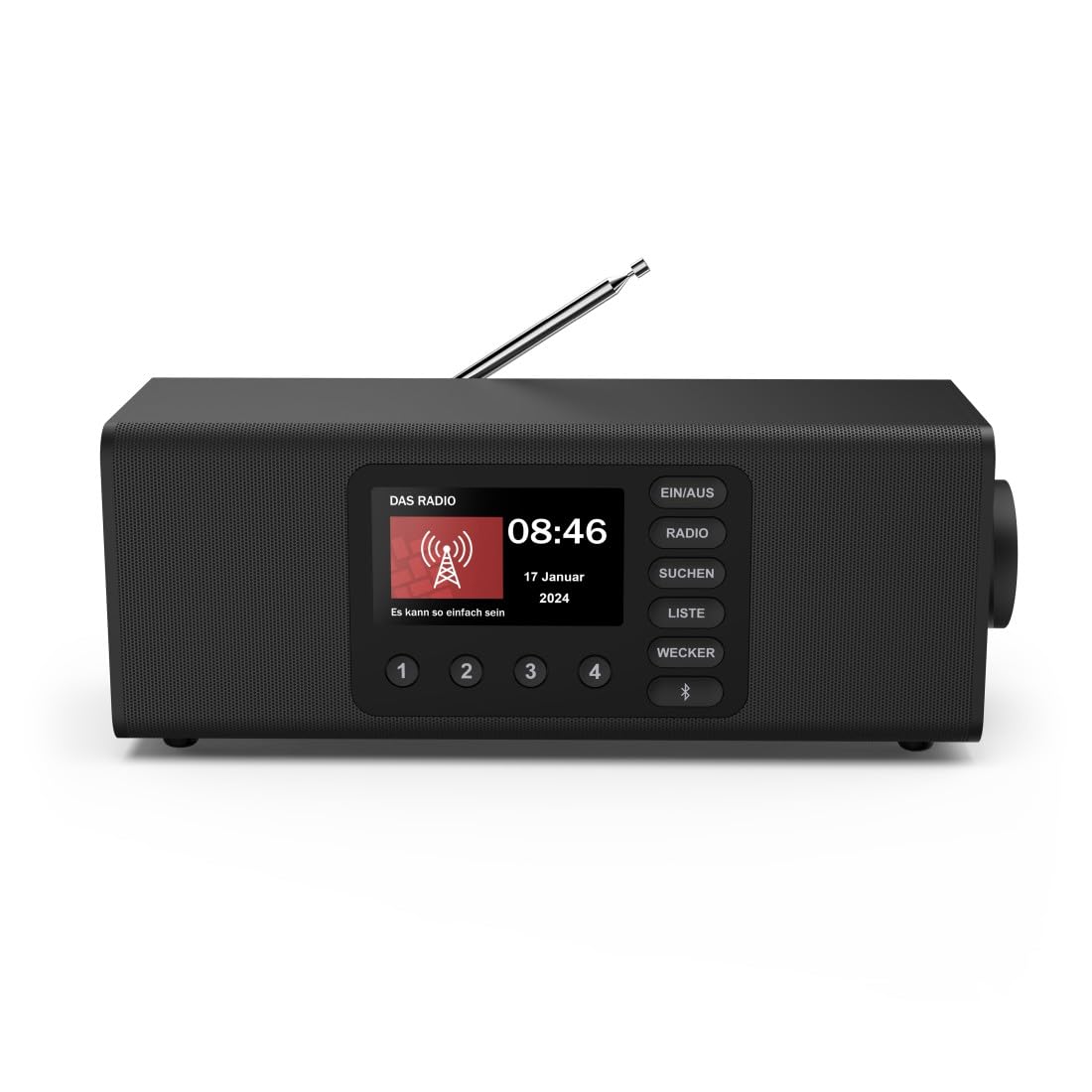
Слика: Фронт view of the Hama DR2002BT Digital Radio, showcasinњегов дисплеј и контролна дугмад.
2. Безбедносне информације
Пажљиво прочитајте ова безбедносна упутства пре употребе уређаја. Сачувајте ово упутство за будуће потребе.
- Не излажите уређај влази, киши или екстремним температурама.
- Избегавајте постављање уређаја у близини извора топлоте или на директном сунцу.
- Не отварајте уређај цasinг. Поправке треба да обавља само квалификовано особље.
- Користите само испоручени адаптер за напајање.
- Осигурајте одговарајућу вентилацију око уређаја.
3. Садржај пакета
Проверите да ли су сви предмети присутни приликом распакивања:
- Hama DR2002BT Digital Radio
- Повер Адаптер
- Упутство за употребу
4. Производ је готовview
4.1 Контроле и екран на предњој плочи

Image: Front panel of the radio highlighting the display and control buttons, with icons for Bluetooth, DAB+, and Alarm functions.
The front panel features a 4.3-inch TFT color display, large control buttons, and a rotary knob for easy navigation and selection. Key buttons include:
- EIN/AUS (ON/OFF): Укључује или искључује уређај.
- РАДИО: Switches between FM and DAB/DAB+ modes.
- SUCHEN (SEARCH): Initiates station scanning.
- LISTE (LIST): Accesses the list of available stations.
- WECKER (ALARM): Конфигурише подешавања аларма.
- Блуетоотх дугме: Активира режим упаривања путем Bluetooth-а.
- Унапред подешена дугмад (1-4): Quick access to stored favorite stations.
- Rotary Knob (LAUTSTÄRKE/NAVIGIEREN): Controls volume and navigates menus.
4.2 Прикључци задње плоче
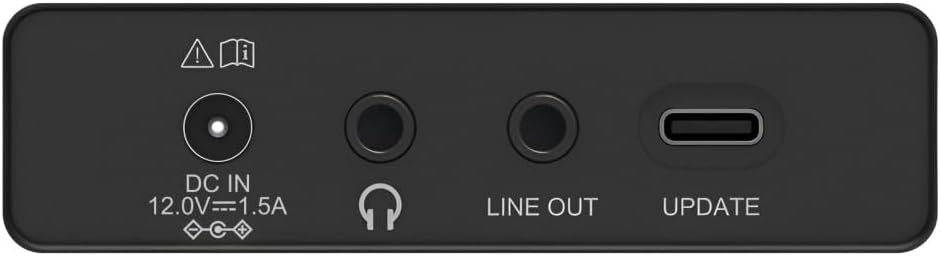
Image: Close-up of the rear panel showing the DC IN, Headphone, Line Out, and UPDATE (USB-C) ports.
The rear panel provides essential connectivity options:
- DC IN 12.0V --- 1.5A: Power input for the external adapter.
- Утичница за слушалице (3.5 мм): За приватно слушање.
- ЛИНЕ ОУТ: Audio output for connecting to external ampлифиерс или звучници.
- UPDATE (USB-C): За ажурирања фирмвера.
- Телескопска антена: For FM and DAB/DAB+ reception.

Слика: Позади view of the Hama DR2002BT Digital Radio with its telescopic antenna extended for optimal signal reception.
5. Подешавање
5.1 Прикључак за напајање
- Прикључите приложени адаптер за напајање на ДЦ ИН порт на задњој страни радија.
- Uključite adapter za struju u odgovarajuću utičnicu.
- The radio will power on automatically or enter standby mode.
5.2 Antenna Positioning
For optimal FM and DAB/DAB+ reception, fully extend the telescopic antenna. Position the radio near a window if reception is poor.
5.3 Почетно подешавање (Прва употреба)
Upon first power-on, the radio may guide you through an initial setup process, including language selection and an automatic DAB station scan. Follow the on-screen prompts.
6. Упутство за употребу
6.1 Укључивање/искључивање
Притисните тастер ЕИН/АУС дугме за укључивање или искључивање радија.
6.2 DAB/DAB+ Radio Mode
- Притисните тастер РАДИО дугме за одабир ДАБ режима.
- If this is the first time in DAB mode or if you want to rescan, press SUCHEN to perform a full scan for available stations.
- Use the rotary knob to navigate through the station list. Press the knob to select a station.
- То view the station list, press the ЛИСТЕ дугме.
6.3 Режим ФМ радија
- Притисните тастер РАДИО дугме за одабир ФМ режима.
- Притисните SUCHEN to automatically scan for the next available FM station.
- Alternatively, use the rotary knob to manually tune to a frequency.
6.4 Чување и позивање пресета
The radio allows you to store up to 4 favorite stations using the dedicated preset buttons (1-4).
- Tune to the desired station (DAB or FM).
- Press and hold one of the preset buttons (1-4) until the display confirms the station has been saved.
- To recall a preset station, simply press the corresponding preset button (1-4).
6.5 Блуетоотх рад

Слика: Фронт view of the radio with Bluetooth and stereo speaker icons, indicating its wireless audio streaming capability.
The Hama DR2002BT can stream audio from your smartphone, tablet, or laptop via Bluetooth 5.0.
- Press the Bluetooth button on the front panel to enter Bluetooth pairing mode. The display will show a pairing indicator.
- On your external device (smartphone, tablet), enable Bluetooth and search for available devices.
- Select "Hama DR2002BT" from the list of devices to pair.
- Once paired, you can play audio from your device, and it will be output through the radio's speakers.
6.6 Функција будилника

Image: A person waking up with the Hama DR2002BT Digital Radio placed on a bedside table, illustrating its alarm clock functionality.
The radio features two independent alarm settings.
- Притисните тастер ВЕЦКЕР дугме за приступ подешавањима аларма.
- Use the rotary knob to select Alarm 1 or Alarm 2.
- Configure the alarm time, source (buzzer or radio station), and repetition (once, daily, weekdays, weekends, or specific days).
- Press the rotary knob to confirm each setting.
- To quickly activate/deactivate an alarm, press the ВЕЦКЕР button and use the rotary knob to toggle the alarm status.

Image: A person interacting with the Hama DR2002BT Digital Radio, demonstrating its ease of use for setting functions like alarms or tuning stations.
7. Одржавање
To ensure the longevity and optimal performance of your Hama DR2002BT Digital Radio, follow these maintenance guidelines:
- Чишћење: Use a soft, dry, lint-free cloth to clean the exterior of the radio. Do not use abrasive cleaners, waxes, or solvents.
- прашина: Regularly dust the device to prevent accumulation in vents and ports.
- Складиштење: If storing the radio for an extended period, disconnect it from the power supply and store it in a cool, dry place.
- Антена: Пажљиво рукујте телескопском антеном како бисте избегли савијање или ломљење.
КСНУМКС. Решавање проблема
Ако наиђете на проблеме са радиом, погледајте следеће уобичајене проблеме и решења:
| Проблем | Могући узрок | Решење |
|---|---|---|
| Нема струје | Power adapter not connected; Power outlet faulty | Проверите везу адаптера за напајање; покушајте са другом утичницом. |
| Слаб радио пријем (DAB/FM) | Антена није извучена; Подручје слабог сигнала; Сметње | Fully extend the telescopic antenna; Reposition the radio (e.g., near a window); Perform a new station scan. |
| Блуетоотх упаривање није успело | Bluetooth not enabled on external device; Radio not in pairing mode; Device too far | Ensure Bluetooth is on and visible on your device; Press the Bluetooth button on the radio; Move devices closer (within 10m). |
| Нема звука | Јачина звука је прениска; активирано је искључивање звука; изабран је погрешан извор | Increase volume using the rotary knob; Check if mute is active; Ensure the correct mode (DAB, FM, Bluetooth) is selected. |
| Аларм се не оглашава | Alarm not activated; Incorrect alarm time/day set | Verify alarm is enabled in settings; Check alarm time and repetition settings. |
9. Спецификације

Image: Diagram showing the dimensions of the Hama DR2002BT Digital Radio: 35 cm (width), 12.5 cm (depth), and 13 cm (height).
| Феатуре | Детаљ |
|---|---|
| Број модела | DR2002BT (00054298) |
| Пријем | DAB, DAB+, FM |
| Блуетоотх верзија | 5.0 |
| Излазна снага (РМС) | 10 W (Stereo) |
| Дисплаи | 4.3" TFT екран у боји |
| Везе | 3.5mm Jack (Headphone), USB-C (Update), Line Out, DC IN |
| Повер Суппли | Спољни адаптер за напајање |
| Димензије (Ш к Д к В) | 35 к 12.5 к 13 цм |
| Тежина | 1788 грама |
| Материјал | Пластика |
| Боја | Црно |
| Додатне карактеристике | Alarm Function (2 alarms), Direct Selection Keys |
10. Гаранција и подршка
Hama GmbH & Co KG provides a warranty for this product. Please refer to the warranty card included in your package or visit the official Hama webсајт за детаљне услове гаранције.
For technical support, troubleshooting assistance, or spare parts, please contact Hama customer service or visit their website. The availability of spare parts in the EU is guaranteed for 7 years.
- Произвођач: Хама ГмбХ & Цо КГ
- Земља порекла: Немачка
- EU Spare Parts Availability: 7 године