
Увод
Thank you for choosing the Oakcastle HIFI150 Stereo System. This manual provides essential information for setting up, operating, and maintaining your device. Please read it thoroughly before use and retain it for future reference.
Безбедносне информације
Да бисте осигурали безбедан рад и спречили оштећења, молимо вас да се придржавате следећих мера безбедности:
- Не излажите уређај киши, влази или екстремним температурама.
- Не отварајте цasinг. Сва сервисирања препустите квалификованом особљу.
- Обезбедите одговарајућу вентилацију око уређаја. Не блокирајте вентилационе отворе.
- Користите само струјни адаптер који је испоручен са јединицом.
- Keep the unit away from heat sources such as radiators, stoves, or other heat-producing appliances.
- Чистите јединицу само сувом крпом.
Садржај пакета
Молимо вас да проверите да ли су све ставке присутне у вашем пакету:
- Oakcastle HIFI150 Stereo System
- Ремоте Цонтрол
- Батерије за даљински управљач
- Повер Цабле
- Упутство за употребу
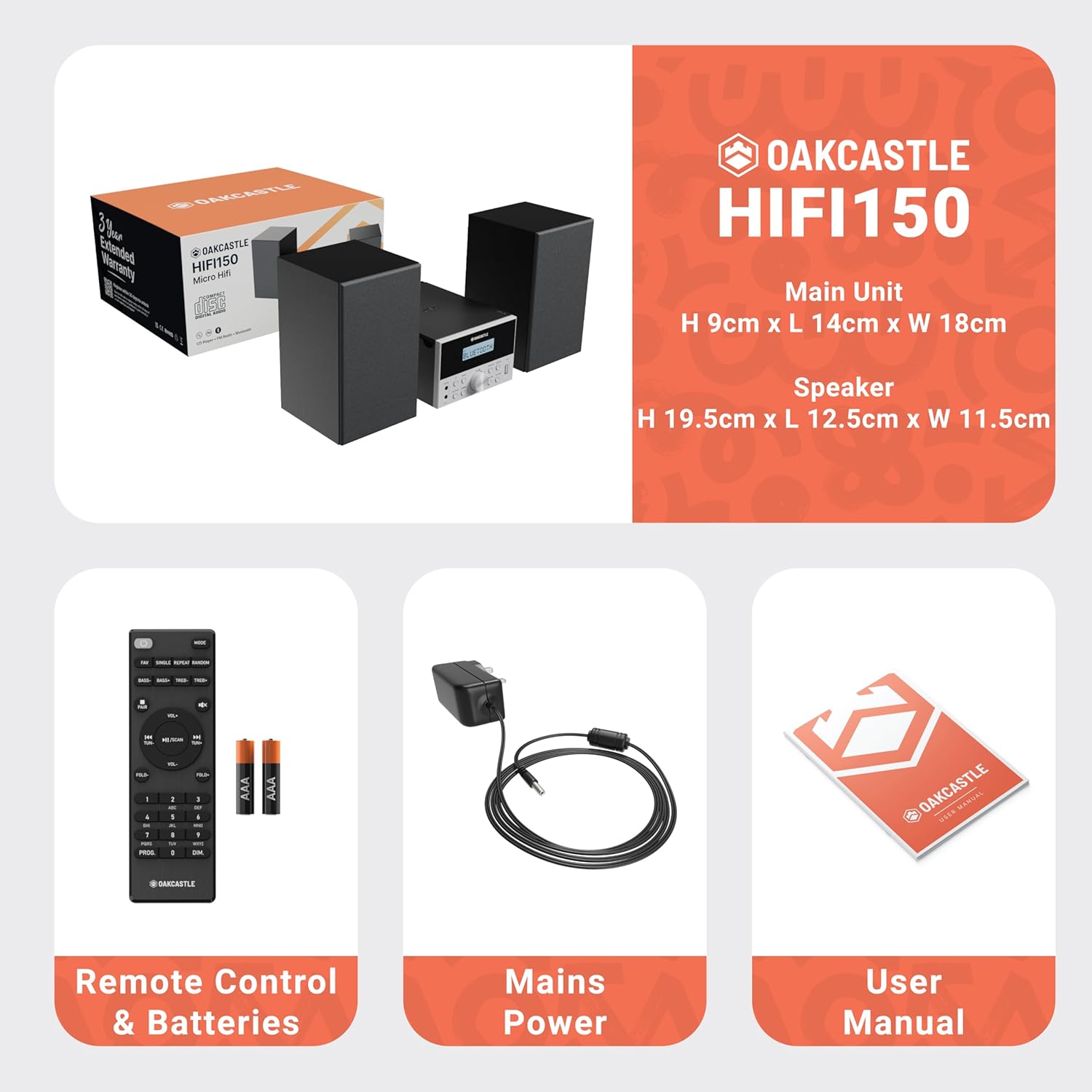
Image: The Oakcastle HIFI150 package contents, showing the main unit, two speakers, remote control with batteries, power adapter, and user manual.
Производ је завршенview
The Oakcastle HIFI150 features a compact design with intuitive controls and multiple connectivity options.
Контроле и екран на предњој плочи

Image: A close-up of the Oakcastle HIFI150 main unit's front panel, highlighting the digital display, central volume knob, mode selection buttons, and front-facing AUX In and USB ports. The display shows 'BLUETOOTH'.
- Приказ: Shows current mode, track information, and radio frequency.
- Дугме за напајање: Укључује или искључује јединицу.
- Дугме за режим: Cycles through input sources (CD, FM, Bluetooth, AUX, USB).
- Дугме за јачину звука: Подешава главну јачину звука.
- Дугме за репродукцију/паузу: Controls playback for CD, USB, and Bluetooth.
- Skip/Tune Buttons: Navigates tracks or tunes radio frequencies.
- АУКС улазни порт: За повезивање екстерних аудио уређаја преко 3.5 мм кабла.
- УСБ порт: За репродукцију звука fileс са УСБ диска.
Прикључци задњег панела
The rear panel includes connections for speakers and power.
Сетуп
1. Повезивање звучника
Connect the included speakers to the speaker terminals on the rear of the main unit. Ensure correct polarity (red to red, black to black) for optimal sound quality.
2. Прикључак за напајање
Plug the power cable into the AC inlet on the rear of the main unit, then plug the other end into a standard wall outlet.
Упутство за употребу
Укључивање/искључивање
Притисните тастер Повер дугме на предњој плочи или даљинском управљачу да бисте укључили или искључили уређај.
Избор режима
Притисните тастер Режим button on the front panel or remote control repeatedly to cycle through the available input sources: CD, ФМ Радио, Блуетоотх, АУКС, и УСБ.
Блуетоотх Оператион
- Изаберите Блуетоотх mode using the Mode button. The display will show 'BLUETOOTH' and the unit will enter pairing mode.
- На паметном телефону или другом Bluetooth уређају омогућите Bluetooth и потражите доступне уређаје.
- Select 'OAKCASTLE HIFI150' from the list. Once connected, the unit will confirm the connection.
- You can now stream audio wirelessly from your device to the HIFI150.
ЦД репродукција

Image: The Oakcastle HIFI150 with its top-loading CD player mechanism open, revealing a compact disc placed inside. The display shows 'CD'.
- Отворите поклопац одељка за ЦД.
- Place a CD (MP3, CD, WMA, or CD-R format) onto the spindle with the label side facing up.
- Затворите поклопац одељка за ЦД.
- Изаберите CD mode. The unit will read the disc and begin playback automatically.
- Користите дугмад Репродукуј/Паузирај и Прескочи да бисте контролисали репродукцију.
Операција ФМ радија

Image: The Oakcastle HIFI150 main unit with its telescopic antenna extended, displaying an FM radio frequency on its screen. The unit is placed between two speakers.
- Изаберите ФМ Радио режим.
- Извуците телескопску антену за бољи пријем.
- Аутоматско скенирање: Press and hold the Play/Pause button to automatically scan and save available FM stations (up to 30 presets).
- Ручно подешавање: Use the Skip/Tune buttons to manually adjust the frequency.
- Подсетите унапред подешене вредности: Use the 'FAV/PROG' button on the remote to cycle through saved stations.
УСБ репродукција
- Уметните УСБ диск у УСБ порт на предњој плочи.
- Изаберите УСБ mode. The unit will automatically detect and begin playing compatible audio fileс (МП3, ВМА).
- Користите дугмад Репродукуј/Паузирај и Прескочи да бисте контролисали репродукцију.
АУКС улаз
- Повежите екстерни аудио уређај (нпр. MP3 плејер, паметни телефон) са АУКС Ин port on the front panel using a 3.5mm audio cable (not included).
- Изаберите АУКС режим.
- Контролишите репродукцију са повезаног екстерног уређаја.
Контрола јачине звука
Ротирајте Волуме Квачица on the front panel or use the ВОЛ +/- дугмад на даљинском управљачу да бисте подесили ниво звука.
Употреба даљинског управљача
The included remote control provides full functionality for the HIFI150. Ensure batteries are correctly inserted. Point the remote control towards the front panel of the main unit for optimal response.
Одржавање
Чишћење
- Обришите уређај меком, сувом крпом.
- Не користите абразивна средства за чишћење, воскове или раствараче јер могу оштетити завршну обраду.
Складиштење
If the unit is not used for an extended period, unplug it from the power outlet and store it in a cool, dry place.
Решавање проблема
If you encounter issues with your HIFI150, please refer to the following common problems and solutions:
| Проблем | Могући узрок | Решење |
|---|---|---|
| Нема струје | Кабл за напајање није повезан; утичница је неисправна | Уверите се да је кабл за напајање безбедно повезан; покушајте са другом утичницом. |
| Нема звука | Volume too low; Incorrect input mode; Speakers not connected | Increase volume; Select correct input mode; Check speaker connections. |
| CD се не репродукује | CD inserted incorrectly; Disc scratched/dirty; Incorrect format | Reinsert CD correctly; Clean or replace disc; Ensure disc is compatible (MP3, CD, WMA, CD-R). |
| Блуетоотх се не повезује | Bluetooth mode not selected; Device too far; Device already connected to another unit | Select Bluetooth mode; Move device closer; Disconnect from other devices and try again. |
| Лош ФМ пријем | Антена није извучена; Слаб сигнал | Fully extend the telescopic antenna; Try repositioning the unit. |
Спецификације
| Број модела | 1000002971 |
| Бранд | Оакцастле |
| Повезивање | Блутут 5.2, УСБ, АУКС |
| Аудио излаз | 20В |
| Подржани медији | CD, MP3, WMA, CD-R, USB |
| Радио | FM Radio with 30 Presets |
| Компатибилни уређаји | МП3 плејер, паметни телефон, таблет |
| Материјал кабинета | Дрво |
| Боја | Црно |
| Димензије артикла (Д к Ш к В) | 13.7 к 17.8 к 9 цм |
| Тежина артикла | 2 килограма |
Гаранција и подршка
The Oakcastle HIFI150 comes with an extended 3-year warranty. Registration is required to activate the full warranty period. Please refer to the warranty card included in your package or visit the official Oakcastle website for registration details and support information.
For technical assistance or further inquiries, please contact Oakcastle customer support through their official channels.